 PluginStats
eslint-plugin-prettier weekly downloads statistics
By prettier (4 listings) · npm · ESLint plugins
Runs prettier as an eslint rule
eslint-plugin-prettier has 17,204,641 recorded weekly downloads on npm, a decrease of 52.8% over the past 30 days, ranking #88 of 2,256 tracked listings.
About eslint-plugin-prettier
eslint-plugin-prettier
Runs Prettier as an ESLint rule and reports differences as individual ESLint issues.
If your desired formatting does not match Prettier’s output, you should use a different tool such as prettier-eslint instead.
Please read Integrating with linters before installing.
TOC
• Sample • Installation • Configuration (legacy: .eslintrc*) • Configuration (new: eslint.config.js) • Svelte support • arrow-body-style and prefer-arrow-callback issue • Options • Line endings • Sponsors • Backers • Contributing • Changelog • License
Sample
./node_modules/.bin/eslint --format codeframe pkg/commons-atom/ActiveEditorRegistry.js (code from nuclide).
Installation
eslint-plugin-prettier does not install Prettier or ESLint for you. You must install these yourself.
This plugin works best if you disable all other ESLint rules relating to code formatting, and only enable rules that detect potential bugs. If another active ESLint rule disagrees with prettier about how code should be formatted, it will be impossible to avoid lint errors. Our recommended configuration automatically enables eslint-config-prettier to disable all formatting-related ESLint rules.
Configuration (legacy: .eslintrc*)
For legacy configuration, this plugin ships with a plugin:prettier/recommended config that sets up both eslint-plugin-prettier and eslint-config-prettier in one go.
Add plugin:prettier/recommended as the last item in the extends array in your .eslintrc* config file, so that eslint-config-prettier has the opportunity to override other configs:
This will:
• Enable the prettier/prettier rule. • Disable the arrow-body-style and prefer-arrow-callback rules which are problematic with this plugin - see the below for why. • Enable the eslint-config-prettier config which will turn off ESLint rules that conflict with Prettier.
Configuration (new: eslint.config.js)
For flat configuration, this plugin ships with an eslint-plugin-prettier/recommended config that sets up both eslint-plugin-prettier and eslint-config-prettier in one go.
Import eslint-plugin-prettier/recommended and add it as the last item in the configuration array in your eslint.config.js file so that eslint-config-prettier has the opportunity to override other configs:
This will:
• Enable the prettier/prettier rule. • Disable the arrow-body-style and prefer-arrow-callback rules which are problematic with this plugin - see the below for why. • Enable the eslint-config-prettier config which will turn off ESLint rules that conflict with Prettier.
Svelte support
We recommend to use eslint-plugin-svelte instead of eslint-plugin-svelte3 because eslint-plugin-svelte has a correct eslint-svelte-parser instead of hacking.
When use with eslint-plugin-svelte3, eslint-plugin-prettier will just ignore the text passed by eslint-plugin-svelte3, because the text has been modified.
If you still decide to use eslint-plugin-svelte3, you'll need to run prettier --write *.svelte manually.
arrow-body-style and prefer-arrow-callback issue
If you use arrow-body-style or prefer-arrow-callback together with the prettier/prettier rule from this plugin, you can in some cases end up with invalid code due to a bug in ESLint’s autofix – see issue #65.
For this reason, it’s recommended to turn off these rules. The plugin:prettier/recommended config does that for you.
You can still use these rules together with this plugin if you want, because the bug does not occur all the time. But if you do, you need to keep in mind that you might end up with invalid code, where you manually have to insert a missing closing parenthesis to get going again.
If you’re fixing large of amounts of previously unformatted code, consider temporarily disabling the prettier/prettier rule and running eslint --fix and prettier --write separately.
Options
Note: While it is possible to pass options to Prettier via your ESLint configuration file, it is not recommended because editor extensions such as prettier-atom and prettier-vscode will read .prettierrc, but won't read settings from ESLint, which can lead to an inconsistent experience.
• The first option: • An object representing options that will be passed into prettier. Example:
NB: This option will merge and override any config set with .prettierrc files
• The second option: • An object with the following options • usePrettierrc: Enables loading of the Prettier configuration file, (default: true). May be useful if you are using multiple tools that conflict with each other, or do not wish to mix your ESLint settings with your Prettier configuration. And also, it is possible to run prettier without loading the prettierrc config file via the CLI's --no-config option or through the API by calling prettier.format() without passing through the options generated by calling resolveConfig. • fileInfoOptions: Options that are passed to prettier.getFileInfo to decide whether a file needs to be formatted. Can be used for example to opt-out from ignoring files located in node_modules directories. • The rule is auto fixable -- if you run eslint with the --fix flag, your code will be formatted according to prettier style.
Line endings
Prettier's default endOfLine is lf. On Windows, files are often checked out or saved with crlf, so eslint reports Delete ␍ (or Insert ␍) for every line even when the file is otherwise formatted. This plugin reports exactly what Prettier would change, so eslint --fix and prettier --write keep producing the same output — it is not specific to this plugin.
Configure line endings where Prettier can see them so the plugin and your editor agree:
• .prettierrc: "endOfLine": "auto" keeps each file's existing line endings (use "crlf"/"lf" to enforce one explicitly). • .editorconfig: end_of_line = lf (or crlf). • .gitattributes: for example * text=auto eol=lf, so checkouts are consistent across platforms.…
Description from the npm listing.
- eslint
- eslintplugin
- eslint-plugin
- prettier
README badge
Show your rank in a README or on your website. The badge updates automatically.
Charts
Images: 30d · 1y · all time · 1600×900 dark
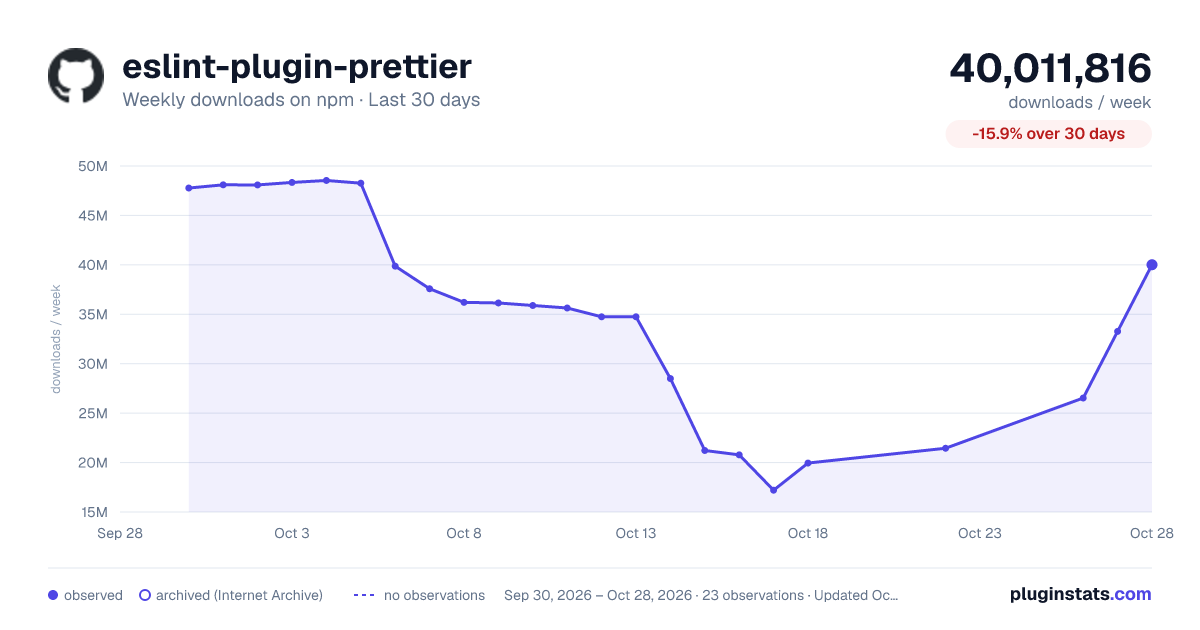
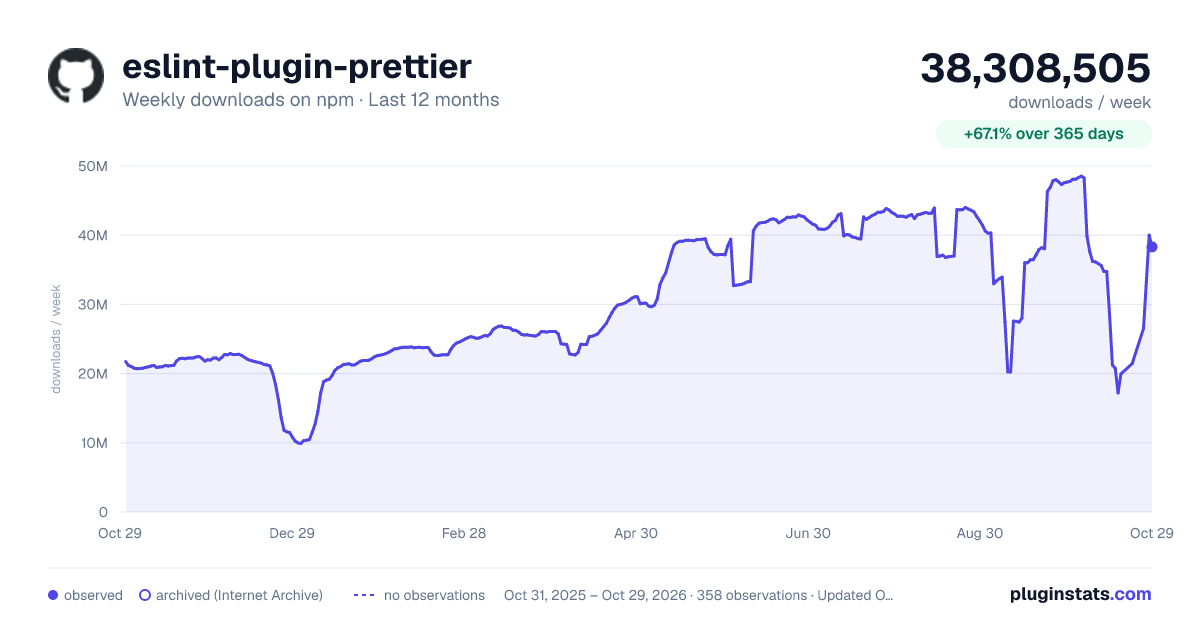
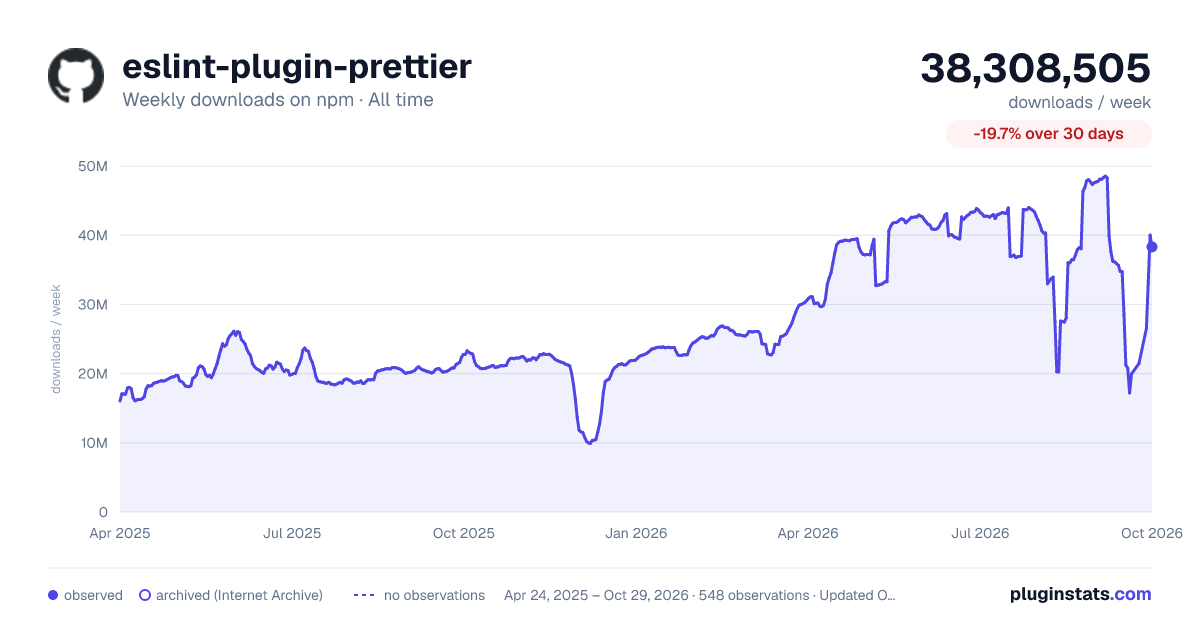

Adoption over time
7/30/90-day growth
Ranking history
Listing placement
Listing placement
Filled points are observed values; hollow points come from Internet Archive snapshots of the listing page. Dashed segments span periods with no observations — values between points are not interpolated.
Each band is one page of 20. Weekly downloads on a linear scale. Placement is projected from weekly downloads, so it can differ from the marketplace's own sort order. Hover a dot to see the listing.
Recent observations
Full history (542)Similar npm ESLint plugins plugins
All 20 eslint-plugin-prettier alternativesData source
Weekly downloads (trailing 7 complete days) come from the official npm downloads API. Downloads include CI and mirrors and are not equivalent to installs or users. npm publishes no ratings.
Listing: https://www.npmjs.com/package/eslint-plugin-prettier. First seen Oct 16, 2026; last successful collection Oct 19, 2026. See the methodology.