 PluginStats
@oya-ai/browser weekly downloads statistics
By oya-ai (2 listings) · npm · Claude Code
Rotate thousands of browsers behind one API, personas, proxies, stealth, CAPTCHA and MFA.
@oya-ai/browser has 2,282 recorded weekly downloads on npm, a decrease of 53.7% over the past 30 days.
It ranks #1255 of 2,251 tracked npm listings by weekly downloads.
PluginStats has 121 daily observations since Jun 19, 2026; the latest is from Oct 17, 2026.
About @oya-ai/browser
@oya-ai/browser
A real browser your agents drive from the inside. Record a run once, replay it with no model in the loop.
From nothing to an answer
Two things to have first: an API key from oyabrowser.com (or your own deployment) in OYA_API_KEY, and a browser to drive.
The fastest browser to have is one you already have. Open the Oya desktop browser and sign in with the same key: start() hands over the browser that is already connected when no provider is configured, so the five lines above work with nothing else set up. stop() leaves a browser you borrowed alone, because you did not start it.
When you would rather it start one for you, run npx @oya-ai/cli init and pick where browsers run: Oya Cloud, your own Docker, Browserbase, Steel, Anchor, Browser Use, or a Chrome of your own over CDP. Your code does not change.
Where the key comes from, in order: new Oya({ apiKey }), then OYA_API_KEY, then the file oya login wrote (~/.oya/config.json, or OYA_CONFIG_HOME), which is read on Node 22.3 and newer. baseUrl resolves the same way. A CI job that sets neither fails loudly rather than borrowing whatever is on the machine.
Node.js 20 or newer; the examples are ES modules. OYA_BASE_URL points at a self-hosted control plane. On Node.js 24+, await using browser = await oya.browser.start() stops it when the scope exits, errors included.
For AI agents
No key yet? Get your own, and use your person's own browser with their logins:
Written for agents: oyabrowser.com/llms.txt.
Portal automation: record once, replay with new inputs
This example adapts the portal-automation project's workflow: reuse a persona, attach to an existing browser or start one, run a prompt the first time, then replay its saved playbook. The portal, workflow names, and request values below are fictional. Supply your own test portal and credentials through environment variables; adapt the task to its actual pages.
Save as portal.mjs and run node portal.mjs after setting OYA_API_KEY, PORTAL_URL, PORTAL_USERNAME, and PORTAL_PASSWORD. Set OYA_BROWSER_ID only to reuse an already running browser.
submit() starts a background run and returns a Run handle. The SDK polls every two seconds by default (pollMs overrides this). run.done resolves with the result or rejects with an error; run.status() reads the run record. Attention reasons are captcha, mfa, agent, and heal_failed. A run waits up to 30 minutes for request.respond() or run.respond(). Run records are held in server memory for one hour after completion; they do not survive a server restart.
Data, secrets, and reusable placeholders
Use {{name}} references in prompts instead of interpolating values into the prompt text. data is available to the agent for reasoning; secrets supplies values for typing without including them as readable task inputs. Filters include first, last, digits, and date:MM/DD/YYYY.
For prompt runs, pass credentials in secrets. For replay, pass all variables in data: the saved playbook tracks which variables are secret, including during healing. Placeholder-based inputs remain variables in the saved flow. This is not a blanket redaction guarantee for page content, screenshots, agent replies, or application logs; inspect exported code before sharing it.
Files
file() puts a file in data. The agent attaches it with its upload tool: hand it the element id of whatever you can see (the "Choose file" button, the drop zone, the field itself) and the real is found from there, including the hidden ones most upload widgets use.
A string argument is a path on disk (Node only); a Blob, a File, or a Uint8Array works anywhere. name sets the filename the site sees and type overrides the MIME guessed from the extension. The ceiling is 10MB per file, and the bytes travel inline with the run. Nothing is stored server-side after it ends.
Data instead of a sentence
extract() runs the same agent and answers in the shape you ask for, so you do not parse prose:
It throws when the agent reports it could not do the task.
Files work in data for ask(), submit(), and play(); secrets rejects them, because a file is never typed through a placeholder. A run recorded with toPlaybook() keeps the upload as a variable, so the replay takes a different file:
The generated Playwright module calls setInputFiles, where the same variable is a plain path rather than a file() value.
When a replay heals
Replay normally runs recorded steps without an LLM. With autoHeal: true (the default), a broken step hands over to the agent, which finishes the task; its steps replace the broken ones in the playbook, so the next replay runs without the model again. The result says so with healed: true.
A replay that meets a sign-in page signs in with the profile's stored login and second factor (oya.personas.setCredentials, setMfa), returns to where the flow was, and carries on.
Use autoHeal: false with play() or submit({ playbook: name }, options) to fail at a broken step without agent repair. oya.playbooks.remove(name) removes a playbook.
Free-text answers
A field the agent wrote itself (a comment, the reason for a request, a question's answer), rather than copying it from your prompt, is not replayed word for word. Each replay asks your model for fresh text, from the prompt and that run's data. The playbook lists these fields in answers; pass a field's key in data to type fixed text instead. The Playwright export calls oya.llm.answer(question, vars) for them, so run it as run(page, vars, oya) with an Oya client.
Move a playbook to another environment
The CLI does the same with oya playbooks export --out file.json and oya playbooks import file.json.
Use your own model key
As in the portal-automation project's model setup script, configure the model on your Oya API key once for subsequent agent runs:
config.set takes ConfigUpdate and config.get() returns Config, so an editor offers the valid providers and a typo fails to compile rather than silently falling back:…
Description from the npm listing.
- browser
- ai-agents
- cdp
- playwright
- puppeteer
- headless-chrome
- browserbase
- steel
- browser-use
- captcha
- fingerprint
- mcp
- ai-agent
- agent-browser
- browser-agent
- agent-skills
- claude-code
- codex
- openclaw
- hermes-agent
Where @oya-ai/browser sits in the listing
Each band is one page of 20. Weekly downloads on a log scale. Placement is projected from weekly downloads, so it can differ from the marketplace's own sort order. Hover a dot to see the listing.


Charts
Images: 30d · 1y · all time · 1600×900 dark
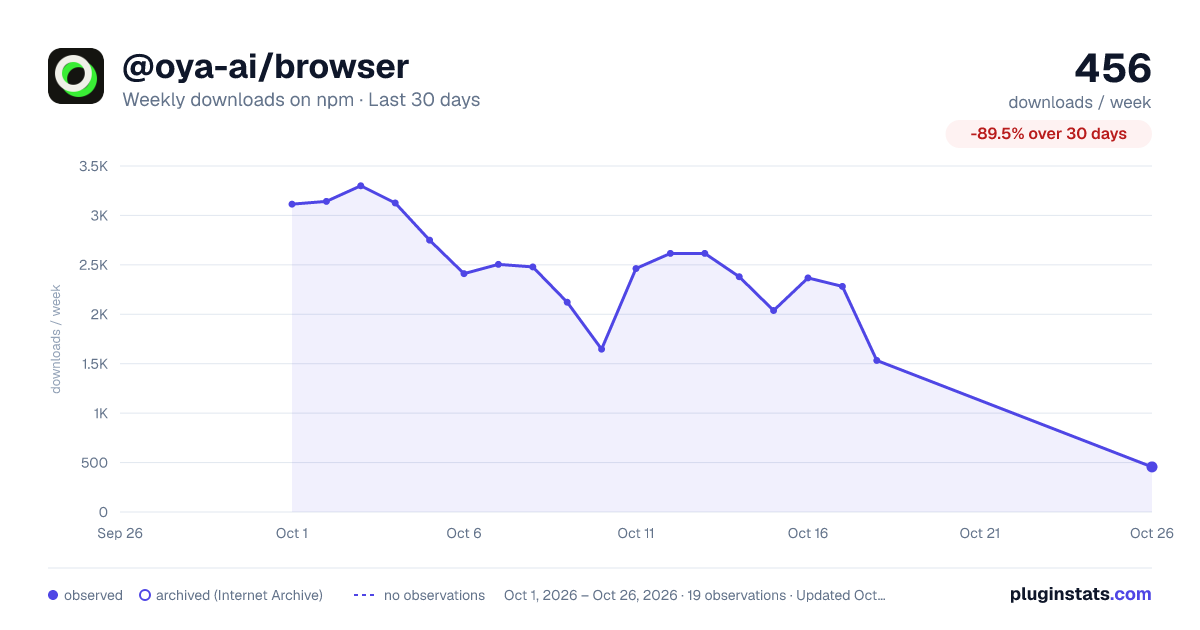
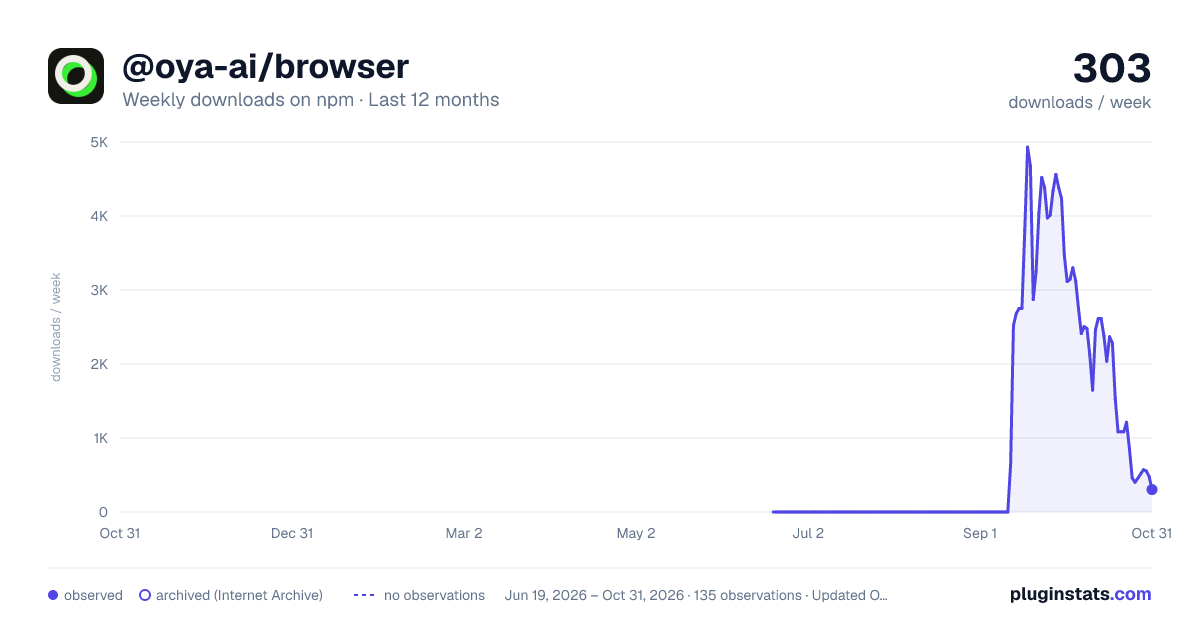
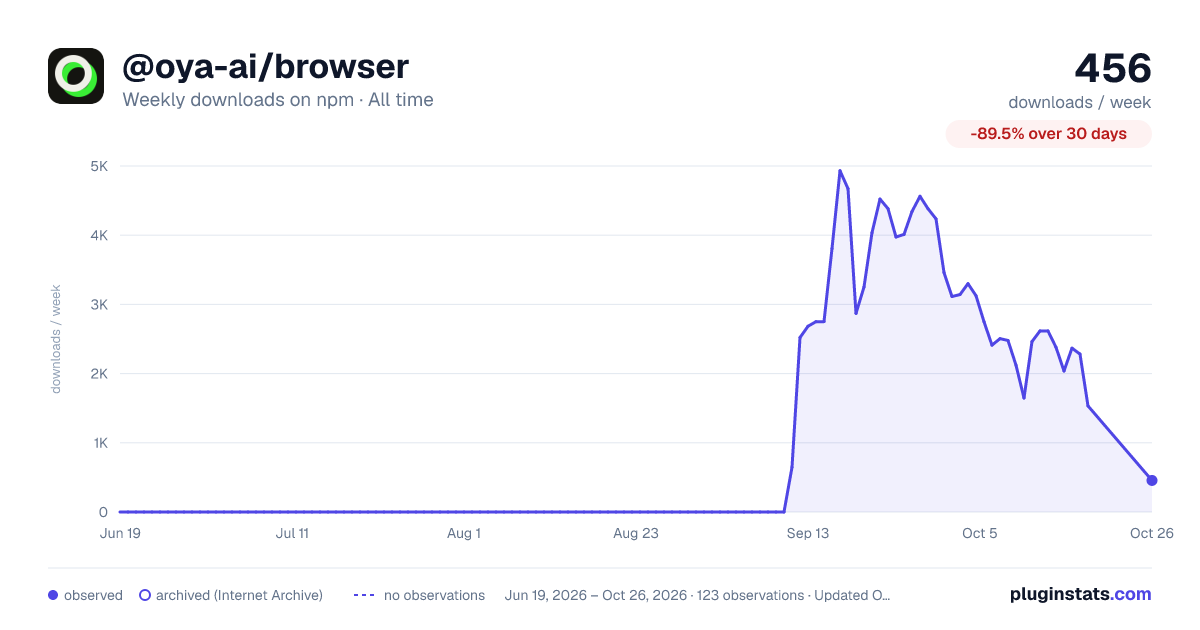

Adoption over time


7/30/90-day growth


Filled points are observed values; hollow points come from Internet Archive snapshots of the listing page. Dashed segments span periods with no observations — values between points are not interpolated.
Recent observations
Full history (121)Similar npm Claude Code plugins
Data source
Weekly downloads (trailing 7 complete days) come from the official npm downloads API. Downloads include CI and mirrors and are not equivalent to installs or users. npm publishes no ratings.
Listing: https://www.npmjs.com/package/@oya-ai/browser. First seen Oct 17, 2026; last successful collection Oct 18, 2026. See the methodology.