 PluginStats
monomind weekly downloads statistics
By monoes (2 listings) · npm · Claude Code
Open-source CLI extension for Claude Code, OpenCode, Antigravity, Kimi Code, and Codex. Adds an MCP server with a codebase knowledge graph, persistent memory, multi-agent coordination, and reusable slash commands. Apache 2.0 licensed. See https://github.c
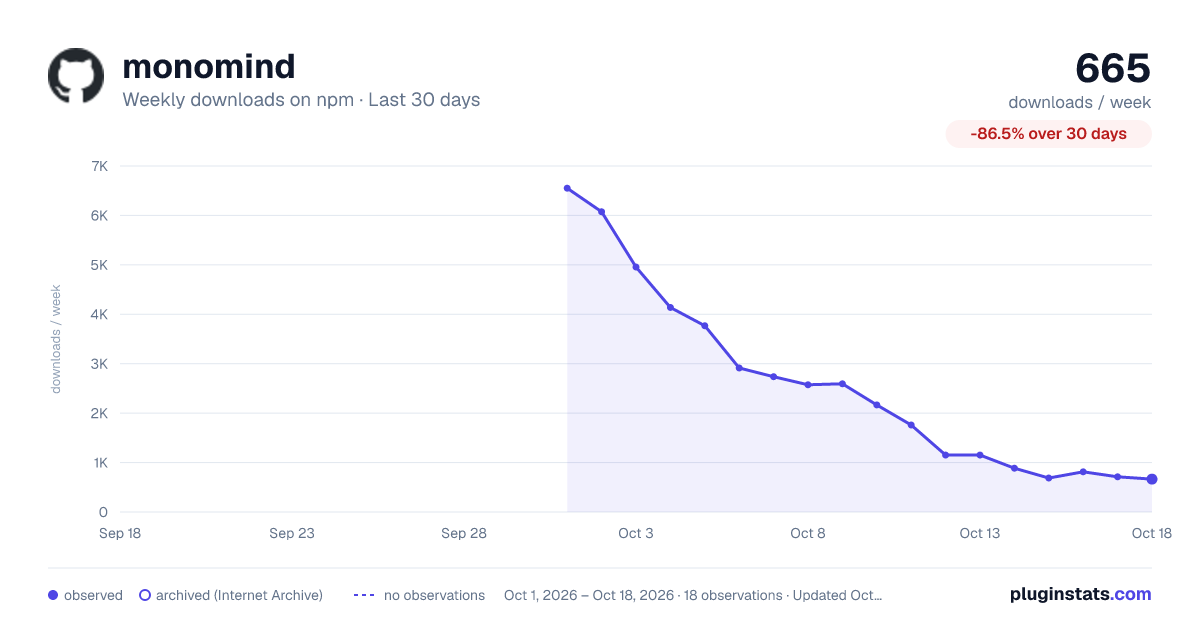
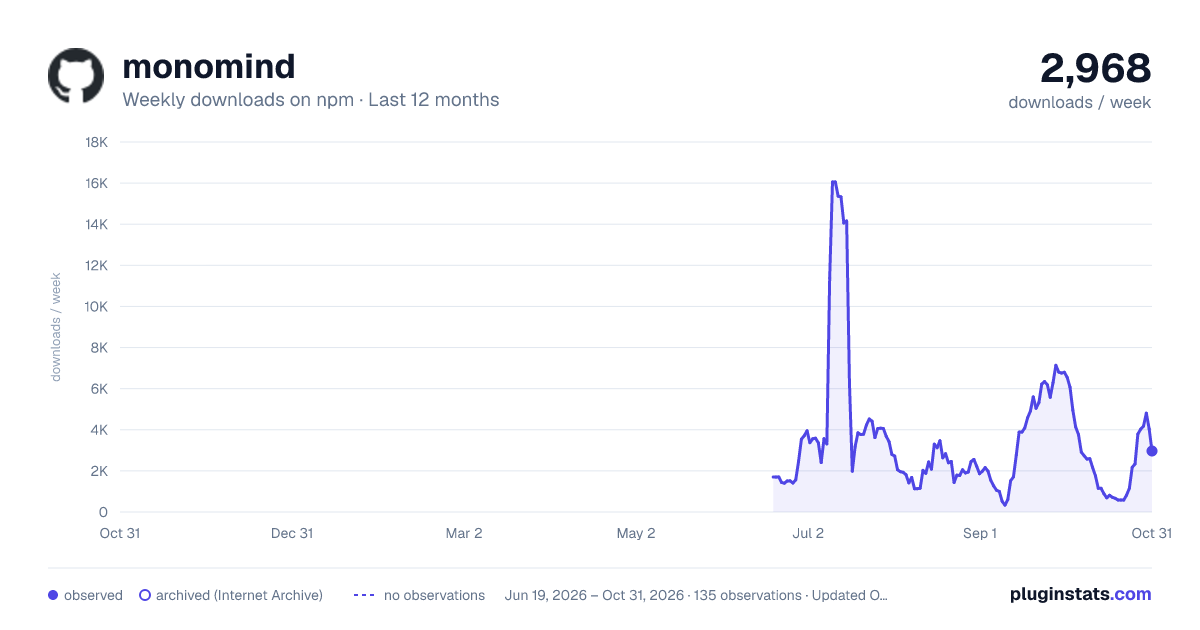
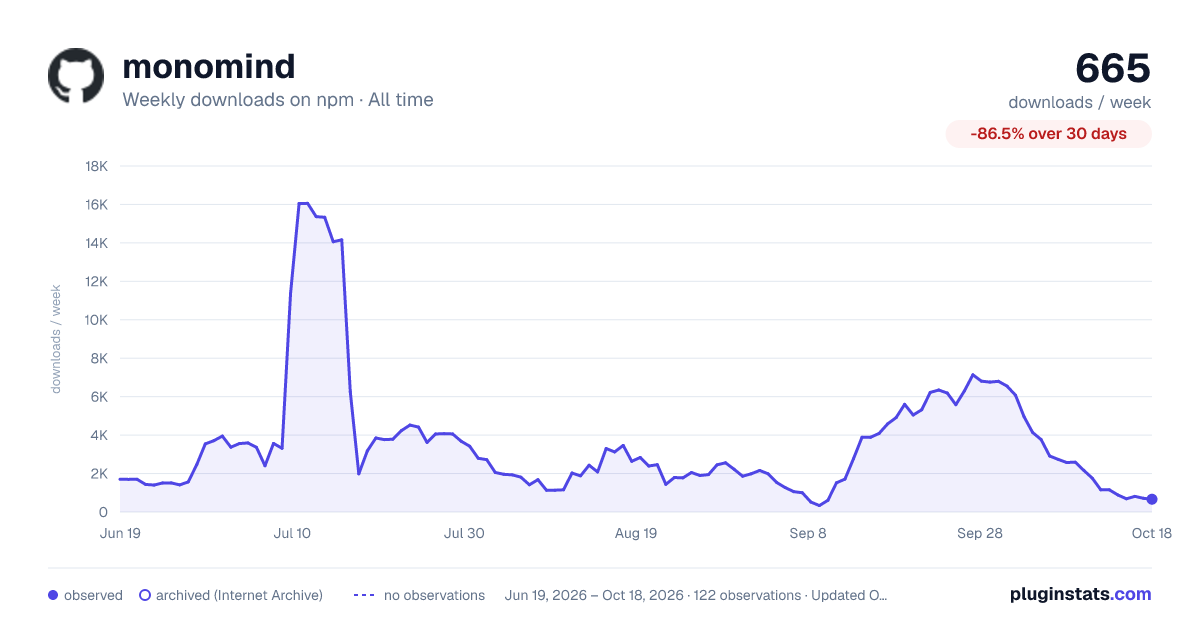
monomind has 712 recorded weekly downloads on npm, a decrease of 84.5% over the past 30 days.
It ranks #1448 of 2,251 tracked npm listings by weekly downloads.
Over 90 days, weekly downloads changed by -81.5%.
PluginStats has 121 daily observations since Jun 19, 2026; the latest is from Oct 17, 2026.
About monomind
Monomind
An open-source MCP server that extends Claude Code with a codebase knowledge graph, persistent memory, and multi-agent coordination. Apache 2.0 licensed · Monomind keeps its own state on your machine; the AI tools it drives send prompts and code to their model providers — see Trust & Security
=22.12" />
🏢 Orgs · 🚀 Quickstart · ⚡ Mastermind · 🧩 Agents & Skills · 📋 Commands · 🏗️ Architecture
What is Monomind?
Monomind is an open-source CLI and MCP server that plugs into Claude Code, OpenCode, Antigravity, Kimi Code, and Codex via the standard Model Context Protocol. It adds capabilities these assistants don't ship with out of the box:
• Codebase knowledge graph — tree-sitter parses your code into a SQLite-backed graph of files, functions, classes, and their relationships. Query imports, callers, and blast radius before making changes. • Persistent memory — a JSON pattern store with episodic recall that survives across sessions. Agents and orgs share context without re-prompting. • Multi-agent coordination — in-session, spawn ad-hoc agent teams via Claude Code's Task tool; for persistent background work, monomind org run starts a real SDK-backed daemon with policy-gated role agents and a live dashboard. Roles can run on Claude or on other installed coding agents (see Agent runtimes). • Agents, skills and picking — ships 83 pickable agents, 82 skills and 560 Org skills, and you add your own as Markdown files. One index of all of them ranks the best fit for each task, by keyword or, when you configure one, with a Jev decision model (MONOMIND_JEV_URL for a self-hosted OpenJev server). The prompt hook puts the result in Claude's context as a [PICK] line, and monomind pick or the pick MCP tool return it on request. See Agents & Skills and Routing. • Reusable slash commands — 40 workflows (plan, execute, review, debug, release, research, worktree) available as /mastermind:* commands inside Claude Code.
monomind init installs the core pack: the everyday /mastermind:* workflows (plan, execute, review, debug, do, …), 20 core agents and the memory, GitHub and browser toolkits, small enough that Claude Code shows every description. Everything else ships as opt-in packs (orgs, org-admin, swarm, github, testing, specialists, business, extras): pick them with monomind init --packs orgs,github or --all-packs, or add one later with monomind packs add . monomind packs list shows each pack and how much of the listing it uses.
Org skills come from the bundled library, from your own Markdown files, and from imports: monomind org skills import pulls MIT or Apache-2.0 skills from another repo and records the licence, source and commit on each one (the library includes a bundle from anthropics/knowledge-work-plugins). For skills you want reviewed before roles can use them, monomind catalog stages, approves and activates them under a policy (Catalog).
monomind init sets up only the coding systems installed on your machine: Claude Code, Antigravity, OpenCode, Kimi Code and Codex each count when their CLI is on your PATH or their config directory is in your home, and Claude Code is the default when none is found. A re-run also keeps every system the project already has. It prints what it detected; --platforms claude,codex names the systems yourself and --all-platforms writes all five. It never runs npm install or edits your package.json: the code graph uses the @monoes/monograph copy bundled with the CLI.
Two things init leaves off unless you ask: Claude Code's experimental Agent Teams (--agent-teams writes CLAUDE_CODE_EXPERIMENTAL_AGENT_TEAMS=1; nothing in Monomind reads it) and dashboard auto-start at every session (--dashboard). monomind doctor reports a leftover Agent Teams flag from an older init, and monomind init upgrade --settings removes it (a backup stays in settings.json.bak-agent-teams).
init writes .mcp.json (and the other systems' configs) pinned to the installed version; --pin latest keeps the floating monomind@latest, and monomind init --force re-pins after an upgrade.
Using Antigravity (agy)?
Nothing extra to do when Antigravity is installed (agy/gemini on PATH or ~/.gemini): monomind init then writes GEMINI.md, .gemini/rules/, and a live status bar wired through .gemini/settings.json. The MCP server config is shared with Claude Code (.mcp.json). See Antigravity guide →.
Using opencode instead?
monomind init sets up the coding systems it detects on your machine (CLI on PATH or config directory in your home), OpenCode included when it is installed. --target opencode initializes only OpenCode; the legacy --opencode flag remains an alias. You get the same MCP tools, agent roster, commands, skills, and security gates, plus a /monomind-status command. See OpenCode guide →.
Using Kimi Code instead?
monomind init includes Kimi Code when it is installed (kimi on PATH or ~/.kimi). --target kimicode initializes only Kimi Code; the legacy --kimicode flag remains an alias. You get the same MCP tools, agent roster, skills, and commands (as project-level flow skills). Install the generated plugin once for /monomind:* slash commands and security gates: /plugins install ./.kimi-code/plugin. See Kimi Code guide →.
Using Codex?
This emits a project-scoped .codex/config.toml that registers Monomind's MCP server, plus AGENTS.md with Codex-specific guidance. Codex must trust the project before it loads project-scoped configuration. To run persistent Monomind organizations through Codex, set "runtime": "codex" in the org definition.
Use monomind init --target codex (or --codex) to initialize only Codex. See Codex guide →.
Trust & Security
| Concern | Answer |…
Description from the npm listing.
- claude
- claude-code
- anthropic
- ai
- ai-agents
- mcp
- model-context-protocol
- automation
- workflow
- cli
- developer-tools
- devtools
- coding-assistant
- code-generation
- knowledge-graph
- code-analysis
- monomind
- organizations
- autonomous-agents
- hooks
Where monomind sits in the listing
Each band is one page of 20. Weekly downloads on a log scale. Placement is projected from weekly downloads, so it can differ from the marketplace's own sort order. Hover a dot to see the listing.


Charts
Images: 30d · 1y · all time · 1600×900 dark

Adoption over time


7/30/90-day growth


Filled points are observed values; hollow points come from Internet Archive snapshots of the listing page. Dashed segments span periods with no observations — values between points are not interpolated.
Recent observations
Full history (121)Similar npm Claude Code plugins
Data source
Weekly downloads (trailing 7 complete days) come from the official npm downloads API. Downloads include CI and mirrors and are not equivalent to installs or users. npm publishes no ratings.
Listing: https://www.npmjs.com/package/monomind. First seen Oct 16, 2026; last successful collection Oct 18, 2026. See the methodology.