 PluginStats
@hostinger/mcp weekly downloads statistics
By hostinger (4 listings) · npm · MCP servers
MCP server for Hostinger API
@hostinger/mcp has 49,939 recorded weekly downloads on npm, an increase of 2517% over the past 30 days, ranking #587 of 2,322 tracked listings.
About @hostinger/mcp
hostinger-api-mcp
Model Context Protocol (MCP) server for Hostinger API.
Quick start: Hosted remote server
If you don't want to install or run anything locally, connect directly to Hostinger's hosted MCP server:
https://mcp.hostinger.com
Claude Code
claude mcp add --transport http hostinger https://mcp.hostinger.com
This opens a browser window to authorize via OAuth. Once approved, the operations below are reachable through execute in your session.
Other MCP-compatible clients
Add https://mcp.hostinger.com as a remote Streamable HTTP MCP server in your client's configuration and complete the OAuth prompt when it appears. Refer to your client's docs for how it exposes "add remote MCP server" / "custom connector" settings.
Prerequisites
- Node.js version 24 or higher
If you don't have Node.js installed, you can download it from the official website. Alternatively, you can use a package manager like Homebrew (for macOS) or Chocolatey (for Windows) to install Node.js.
We recommend using NVM (Node Version Manager) to install and manage installed Node.js versions. After installing NVM, you can install Node.js with the following command:
nvm install v24
nvm use v24
Installation
To install the MCP server, run one of the following command, depending on your package manager:
# Install globally from npm
npm install -g @hostinger/mcp

# Or with yarn
yarn global add @hostinger/mcp

# Or with pnpm
pnpm add -g @hostinger/mcp
Update
To update the MCP server to the latest version, use one of the following commands, depending on your package manager:
# Update globally from npm
npm update -g @hostinger/mcp

# Or with yarn
yarn global upgrade @hostinger/mcp

# Or with pnpm
pnpm update -g @hostinger/mcp
Binaries
This package installs the following MCP server commands:
hostinger-api-mcp— unified server over every operation (403 total)hostinger-agency-hosting-mcp— 42 operations for agency-hostinghostinger-agent-readiness-mcp— 3 operations for agent-readinesshostinger-billing-mcp— 9 operations for billinghostinger-dns-mcp— 8 operations for dnshostinger-domains-mcp— 42 operations for domainshostinger-ecommerce-mcp— 29 operations for ecommercehostinger-horizons-mcp— 6 operations for horizonshostinger-hosting-mcp— 66 operations for hostinghostinger-mail-mcp— 38 operations for mailhostinger-reach-mcp— 56 operations for reachhostinger-vps-mcp— 67 operations for vpshostinger-wordpress-mcp— 40 operations for wordpress
Every binary exposes the same three tools; a scoped binary only searches and executes its own group's operations. hostinger-api-mcp remains the backwards-compatible default.
Configuration
The following environment variables can be configured when running the server:
DEBUG: Enable debug logging (true/false) (default: false)HOSTINGER_API_TOKEN: Your API token, which will be sent in theAuthorizationheader. When set, OAuth is bypassed entirely.API_TOKEN: Deprecated alias forHOSTINGER_API_TOKEN. Will be removed in a future version — preferHOSTINGER_API_TOKEN.OAUTH_ISSUER: OAuth server base URL (default:https://auth.hostinger.com). Only used whenHOSTINGER_API_TOKENis not set.
Authentication
The server supports two authentication methods:
API Token (recommended for CI/scripts)
Set HOSTINGER_API_TOKEN in the environment or .env file. When present it always takes precedence — no OAuth code runs.
OAuth 2.0 with PKCE (interactive sign-in)
When HOSTINGER_API_TOKEN is not set and the server runs in stdio mode, OAuth 2.0 with PKCE is used automatically on the first authenticated tool call:
- A dynamic OAuth client is registered with the issuer (RFC 7591) — once per machine.
- A browser window opens to the authorization page.
- After sign-in, the server captures the redirect on a local ephemeral port, exchanges the code for tokens, and stores them.
- Subsequent calls reuse the stored access token; expired tokens are refreshed automatically. If a refresh token is revoked, the browser flow is re-launched.
Credentials are stored at:
- macOS / Linux:
~/.config/hostinger-mcp/credentials.json(mode 0600) - Windows:
%APPDATA%\hostinger-mcp\credentials.json
Credentials are shared across all Hostinger MCP binaries (hostinger-api-mcp, hostinger-vps-mcp, etc.).
Manual commands:
# Run the OAuth sign-in flow immediately (don't wait for the first tool call)
hostinger-api-mcp --login

# Revoke stored credentials
hostinger-api-mcp --logout
HTTP transport note: OAuth sign-in is not supported in --http mode. Set HOSTINGER_API_TOKEN before using --http.
Usage
JSON configuration for Claude, Cursor, etc.
{
    "mcpServers": {
        "hostinger-api": {
            "command": "hostinger-api-mcp",
            "env": {
                "DEBUG": "false",
                "HOSTINGER_API_TOKEN": "YOUR API TOKEN"
            }
        }
    }
}
Transport Options
The MCP server supports two transport modes:
Standard I/O Transport
The server can use standard input / output (stdio) transport (default). This provides local streaming:
Streamable HTTP Transport
The server can use HTTP streaming transport. This provides bidirectional streaming over HTTP:
# Default HTTP transport on localhost:8100
hostinger-api-mcp --http

# Specify custom host and port
hostinger-api-mcp --http --host 0.0.0.0 --port 8150
Command Line Options…
Description from the npm listing.
- hostinger
- mcp
- server
- rest
- api
README badge
Show your rank in a README or on your website. The badge updates automatically.
Charts
Images: 30d · 1y · all time · 1600×900 dark
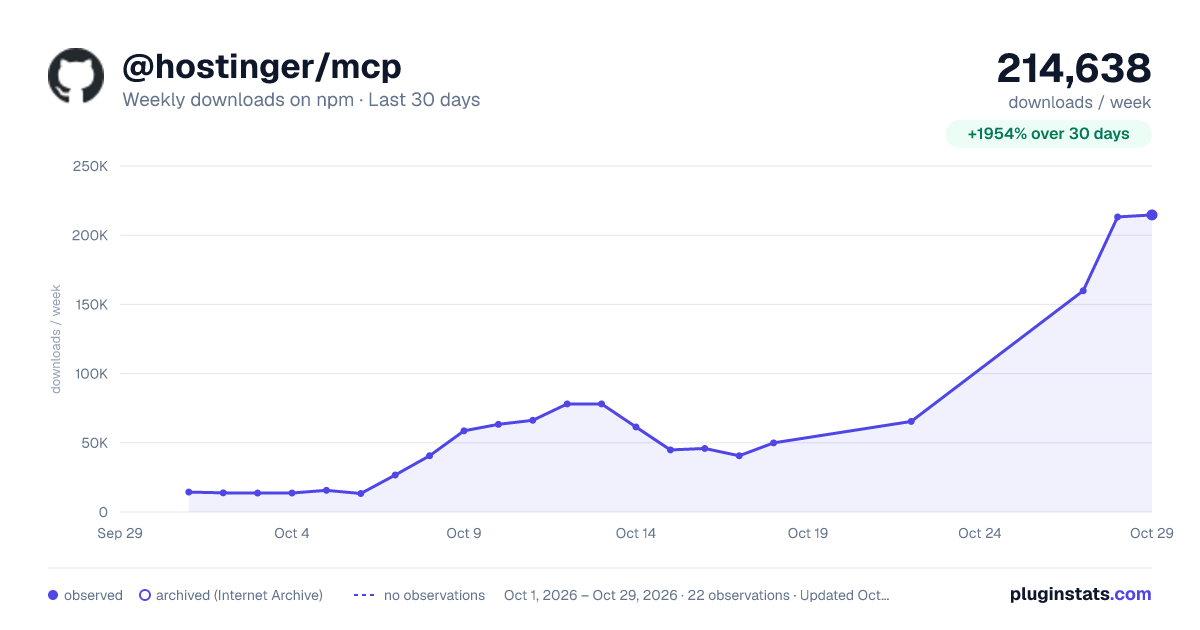
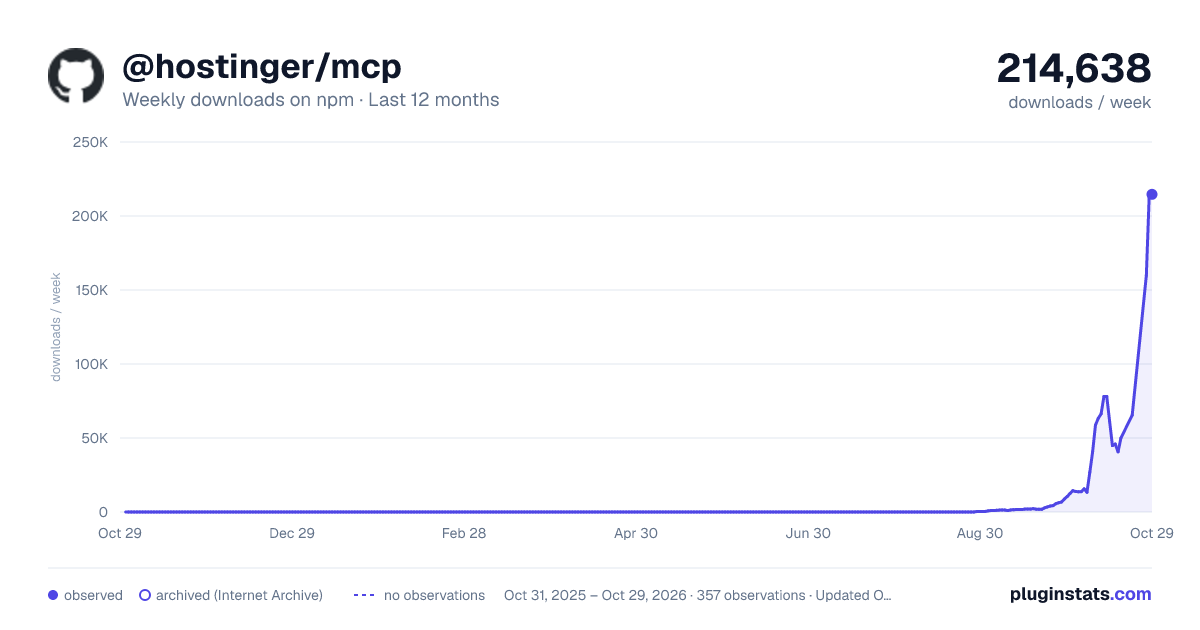
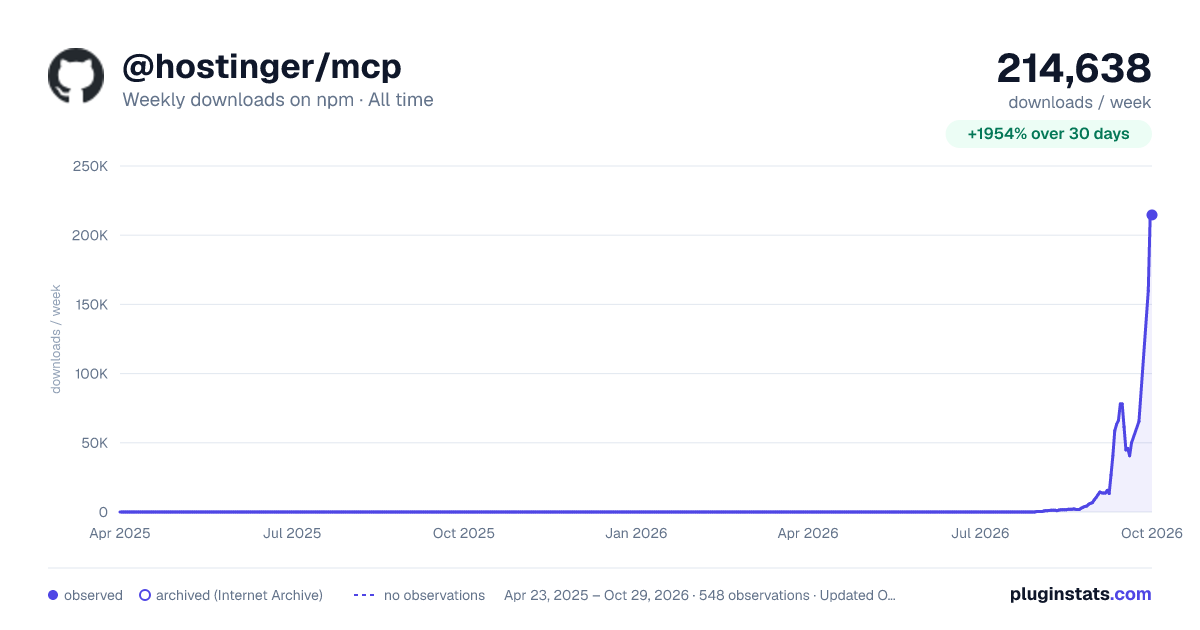

Adoption over time
7/30/90-day growth
Ranking history
Listing placement
Listing placement
Filled points are observed values; hollow points come from Internet Archive snapshots of the listing page. Dashed segments span periods with no observations — values between points are not interpolated.
Each band is one page of 20. Weekly downloads on a linear scale. Placement is projected from weekly downloads, so it can differ from the marketplace's own sort order. Hover a dot to see the listing.
Recent observations
Full history (544)Similar npm MCP servers plugins
All 20 @hostinger/mcp alternativesData source
Weekly downloads (trailing 7 complete days) come from the official npm downloads API. Downloads include CI and mirrors and are not equivalent to installs or users. npm publishes no ratings.
Listing: https://www.npmjs.com/package/@hostinger/mcp. First seen Oct 16, 2026; last successful collection Oct 20, 2026. See the methodology.