 PluginStats
mcp-local-rag weekly downloads statistics
By shinpr (2 listings) · npm · Claude Code
Local RAG MCP Server - Easy-to-setup document search with minimal configuration
mcp-local-rag has 1,847 recorded weekly downloads on npm, a decrease of 65.3% over the past 30 days.
It ranks #1301 of 2,251 tracked npm listings by weekly downloads.
Over 90 days, weekly downloads changed by -23.3%.
PluginStats has 121 daily observations since Jun 19, 2026; the latest is from Oct 17, 2026.
About mcp-local-rag
MCP Local RAG
English | 简体中文 | Deutsch | Español | Português (Brasil) | Français
Search private documents from an MCP client or the terminal without sending them to an embedding API.
mcp-local-rag indexes PDF, DOCX, Markdown, and text files on your machine. Search combines semantic similarity with keyword matching, so queries can match both intent and exact technical terms such as API names, class names, and error codes. Results include source passages and, where available, headings, line numbers, or page numbers so you can check and cite the original document.
No API key, Docker, Python, or external database is required. After the initial model download, text ingestion and search work offline.
Quick Start
Requirements
• Node.js 22 or later • Internet access on first use to download the npm package and embedding model • A directory containing the documents you want to search
Set BASE_DIR to that directory. It is also the security boundary for file operations. Replace /absolute/path/to/your/documents below with the directory's absolute path.
Use one of the examples below, or register npx -y mcp-local-rag and set BASE_DIR using your client's MCP configuration format.
Set DB_PATH and CACHE_DIR to absolute paths as well. Relative paths resolve from the server's working directory, so starting the server from different projects creates a separate index and model cache in each.
Claude Code
Run this command:
Codex
Add to ~/.codex/config.toml:
OpenCode
Add to ~/.config/opencode/opencode.json (or opencode.jsonc):
Cursor
Add to ~/.cursor/mcp.json:
Restart the client, then ask it to build the index:
The first sync downloads the default embedding model (about 90 MB) and may take 1–2 minutes before ingestion starts. Later runs use the local cache.
Once the sync completes:
CLI Quick Start
To use the CLI without an MCP client:
The CLI uses the current directory as its document root by default. Run both commands from the same directory so they use the same default index, or set BASE_DIR and DB_PATH explicitly.
Supported Content
| Input | How to ingest |
| PDF, DOCX, TXT, Markdown | File ingestion or directory sync | | HTML already fetched by the client | ingest_data | | Plain text or Markdown held in memory | ingest_data with a stable source identifier |
HTML fetching is not built into the server. An MCP client can fetch a page and pass its HTML to ingest_data.
Excel, PowerPoint, standalone images, and source-code file extensions are not supported by file ingestion. PDFs can optionally use a local vision model to describe figures, but this is not OCR or image search.
Using the Index
Sync after adding, editing, or removing documents. For searches and follow-up reading, ask your MCP client:
You can also ingest a single file or HTML already fetched by the client. To refresh an existing entry, ingest the document again using the same path or source identifier. sync skips unchanged files. MCP file paths must be absolute and inside a configured document root.
PDF section headings may be inaccurate. Check the original page when you need the exact heading.
MCP Tools
| Tool | Purpose |
| sync_start | Reconcile the index with all configured roots or one path | | sync_status | Poll a running sync job | | ingest_file | Ingest or replace one file | | ingest_data | Ingest text, Markdown, or HTML already held by the client | | query_documents | Search with semantic matching and keyword boost | | read_chunk_neighbors | Read surrounding chunks from a search result | | list_files | Show supported files and their ingestion state | | delete_file | Delete an indexed file or an ingest_data item | | status | Show index and search status |
CLI
Use the CLI to update the index, narrow searches, or remove indexed content:
ingest imports the selected files; sync also removes entries for deleted files and skips unchanged files. Use --scope to restrict search results to a path prefix, repeating it to include multiple prefixes.
Global options such as --db-path, --cache-dir, and --model-name go before the subcommand. Subcommand options go after it:
Run npx mcp-local-rag --help for the complete command reference.
query writes its results to stdout as JSON, best match first, so it can be piped into another tool. The field-by-field contract is in docs/schema/query-output.schema.json.
If you move a project and want to keep its index, stop the MCP server and other database writers, move the files and database together without changing the directory layout, then run:
Update BASE_DIR/BASE_DIRS, DB_PATH, and any other moved paths in your MCP configuration, then restart the client.
Agent Skills
Agent Skills provide query and ingestion guidance for AI assistants:
Installed skills cover query formulation, result refinement, and HTML ingestion. Ask the assistant to use the mcp-local-rag skill explicitly if it does not activate automatically.
Advanced Options
Start with the defaults. Open the sections below when you need different document roots, better results for your corpus, or searchable PDF figures.
Storage and Document Roots
The MCP server reads environment variables. The CLI accepts the listed variables and flags. Keep the same DB_PATH when commands should use the same index.
| Environment Variable | CLI Flag | Default | Description |
| BASE_DIR | --base-dir | Current directory | One document root; the CLI flag is repeatable on ingest, list, and sync | | BASE_DIRS | N/A | (unset) | JSON array of document roots; takes precedence over BASE_DIR | | DB_PATH | --db-path | ./lancedb/ | Vector database location | | CACHE_DIR | --cache-dir | ./models/ | Model cache directory | | HF_ENDPOINT | N/A | https://huggingface.co | Hugging Face model download endpoint; use a mirror URL when direct downloads are blocked | | MAX_FILE_SIZE | --max-file-size | 104857600 (100MB) | Maximum file size in bytes |…
Description from the npm listing.
- typescript
- mcp
- mcp-server
- model-context-protocol
- rag
- vector-search
- semantic-search
- embeddings
- lancedb
- transformers
- huggingface
- local-ai
- offline
- privacy
- document-search
- claude-code
- cursor
- codex
- skills
Where mcp-local-rag sits in the listing
Each band is one page of 20. Weekly downloads on a log scale. Placement is projected from weekly downloads, so it can differ from the marketplace's own sort order. Hover a dot to see the listing.


Charts
Images: 30d · 1y · all time · 1600×900 dark
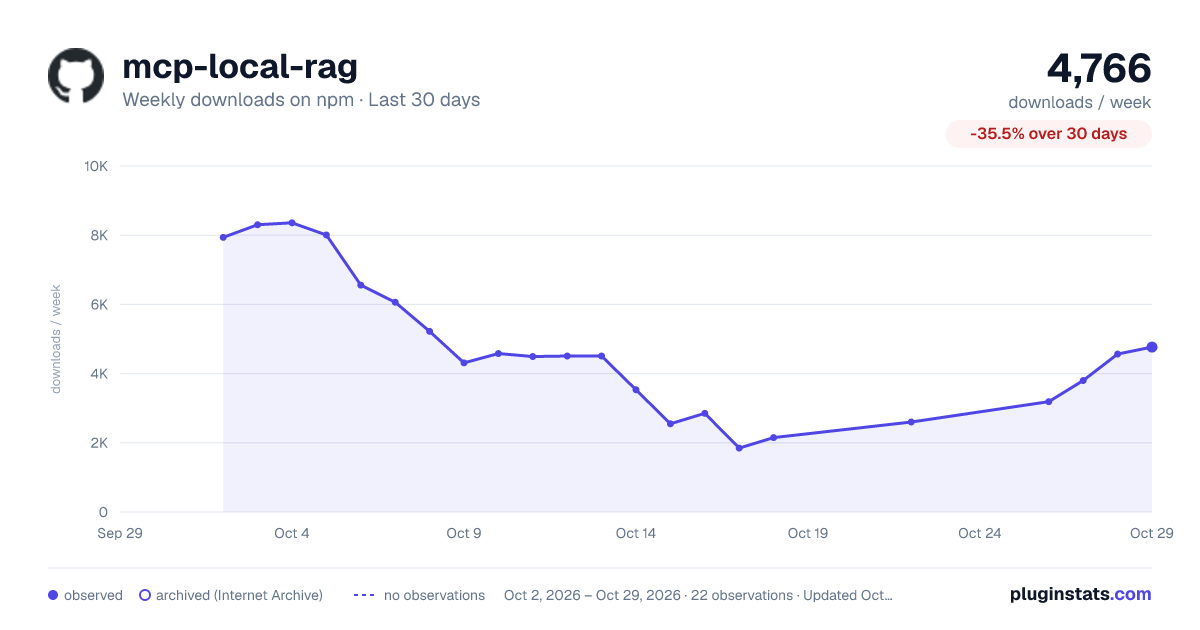
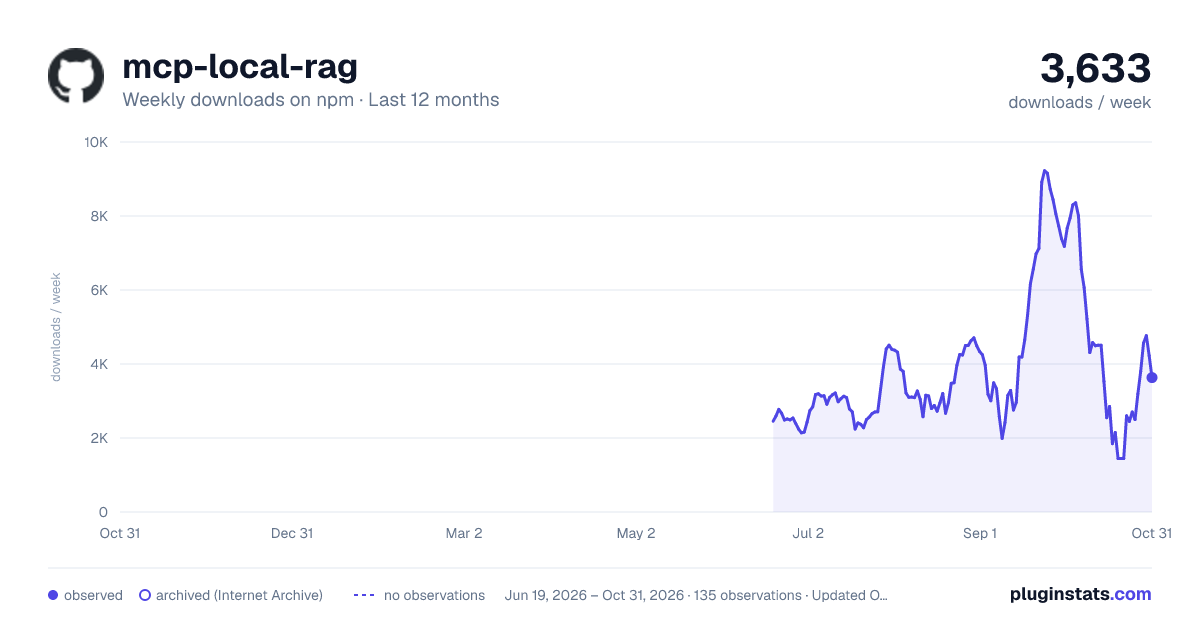
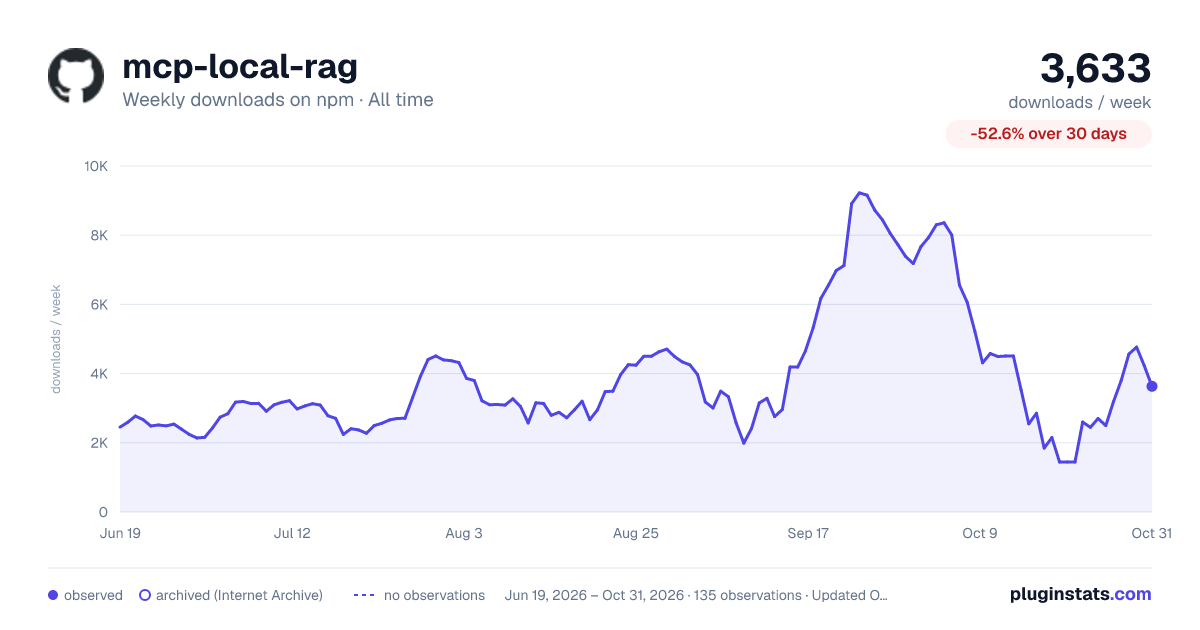

Adoption over time


7/30/90-day growth


Filled points are observed values; hollow points come from Internet Archive snapshots of the listing page. Dashed segments span periods with no observations — values between points are not interpolated.
Recent observations
Full history (121)Similar npm Claude Code plugins
Data source
Weekly downloads (trailing 7 complete days) come from the official npm downloads API. Downloads include CI and mirrors and are not equivalent to installs or users. npm publishes no ratings.
Listing: https://www.npmjs.com/package/mcp-local-rag. First seen Oct 16, 2026; last successful collection Oct 18, 2026. See the methodology.