 PluginStats
vite-plugin-babel weekly downloads statistics
By owlsdepartment · npm · Vite plugins
Runs Babel in Vite during all commands
vite-plugin-babel has 131,337 recorded weekly downloads on npm, a decrease of 51.6% over the past 30 days.
It ranks #423 of 2,256 tracked npm listings by weekly downloads.
Over 90 days, weekly downloads changed by -56.3%.
PluginStats has 121 daily observations since Jun 19, 2026; the latest is from Oct 17, 2026.
About vite-plugin-babel
Vite Plugin Babel
Run Babel during any Vite command, also during serve.
Motivations
Most Vite plugins runs Babel only during build, not serve, and only other possible way to do this is via @vitejs/plugin-react. ESBuild is awesome tool, but doesn't support some experimental features, like decorators (issue #2349) or class instance fields, out of box. You can use them in TypeScript, but not pure JS. This plugin was made to enable usage of such features and runs babel during optimizeDeps, dev and build stages, but it can be configured.
Installation
Usage
Add it to your Vite config
Config
Babel config can be either passed to babelConfig field or via Babel config file. For all babel options see: Babel Options.
By default, babel is run for JS/JSX files (include defaults to /\.jsx?$/). To scope it to other files, set include / exclude and add the matching Babel presets/plugins to babelConfig yourself.
Migrating from 1.6.x: in 1.7.0 the default of include changed from undefined to /\.jsx?$/. If you previously relied on filter alone to scope files, set include explicitly to your desired scope — filter is now combined with include as an AND, so it can only narrow further, not expand. filter is deprecated; prefer include / exclude.
| Name | Type | Default | Description |
| apply | 'serve' \| 'build' \| (config: UserConfig, env: ConfigEnv) => boolean | undefined | Limits plugin usage to only build or only serve. If not specified, will be run during both cycles. Same as apply in Vite Plugins API | | enforce | 'pre' \| 'post' | pre | Force plugin's order execution. More details: Vite Plugin Ordering | | babelConfig | object | {} | Babel Transform Options | | include | string \| RegExp \| Array | /\.jsx?$/ | Which files to include. Defaults to .js / .jsx. Set explicitly to scope to other extensions — the matching Babel presets/plugins are your responsibility. | | exclude | string \| RegExp \| Array | undefined | Which files to exclude. Takes priority over include. | | filter | RegExp \| (id: string) => boolean | undefined | Deprecated. Combined with include as an AND — can only narrow further, not expand. Prefer include / exclude. | | loader | Loader or (path: string) => Loader | undefined | Vite 7 and lower This tells esbuild how to interpret the contents after babel's transformation. For example, the js loader interprets the contents as JavaScript and the css loader interprets the contents as CSS. The loader defaults to js if it's not specified. See the Content Types page for a complete list of all built-in loaders. | | optimizeOnSSR | boolean | false | Run dependency optimization during SSR. Could be useful when running a project on a cloud workers, like @cloudflare/vite-plugin |
Tips
Vite team didn't enable and include Babel by default, because they wanted to keep experience as fast as possible and esbuild can already do a lot of things, you would probably do with Babel. Because of that, we recommend to only include those Babel plugins you really need. You can use option babelConfig.configFile and omit Babel config file usage:
or just use Babel config file.
NOTE: Any babel plugins and presets need to be installed seperately and are not included with this package.
Troubleshooting
[ERROR] The JSX syntax extension is not currently enabled
This usually happens when you're using this plugin to only transform part of a .jsx file (such as decorators), and leaving the JSX syntax untouched. By default, esbuild interprets contents as .js, so you'll need to specify the loader esbuild should use.
Example:
License
Library is under MIT License
Description from the npm listing.
- vite-plugin
- vite
- babel
Charts
Images: 30d · 1y · all time · 1600×900 dark
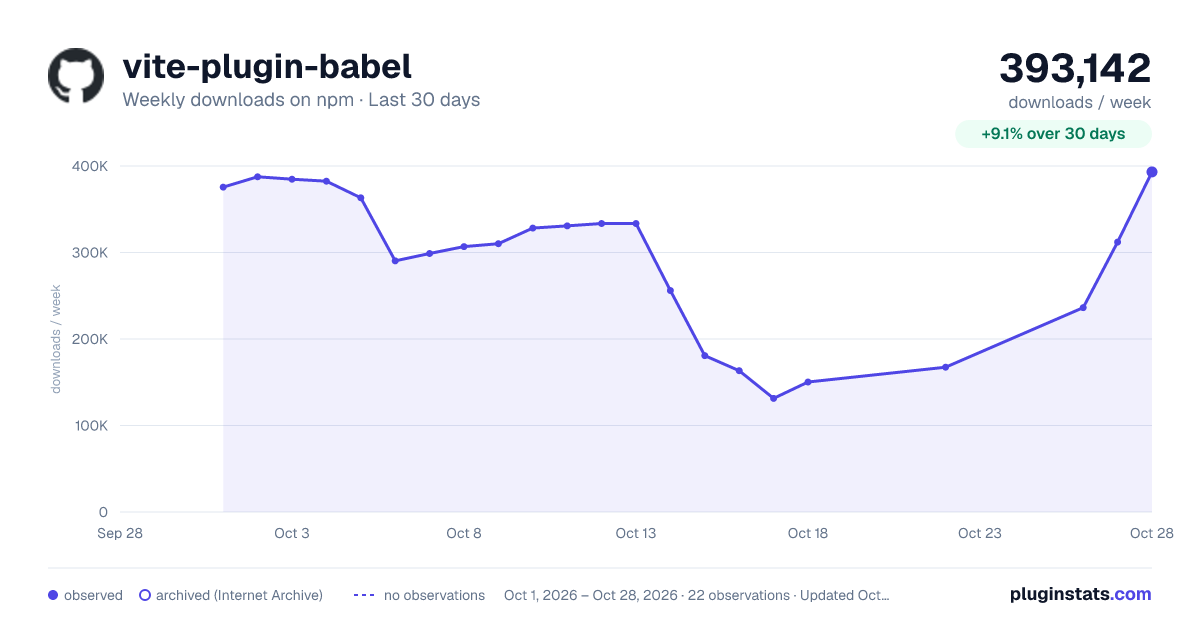
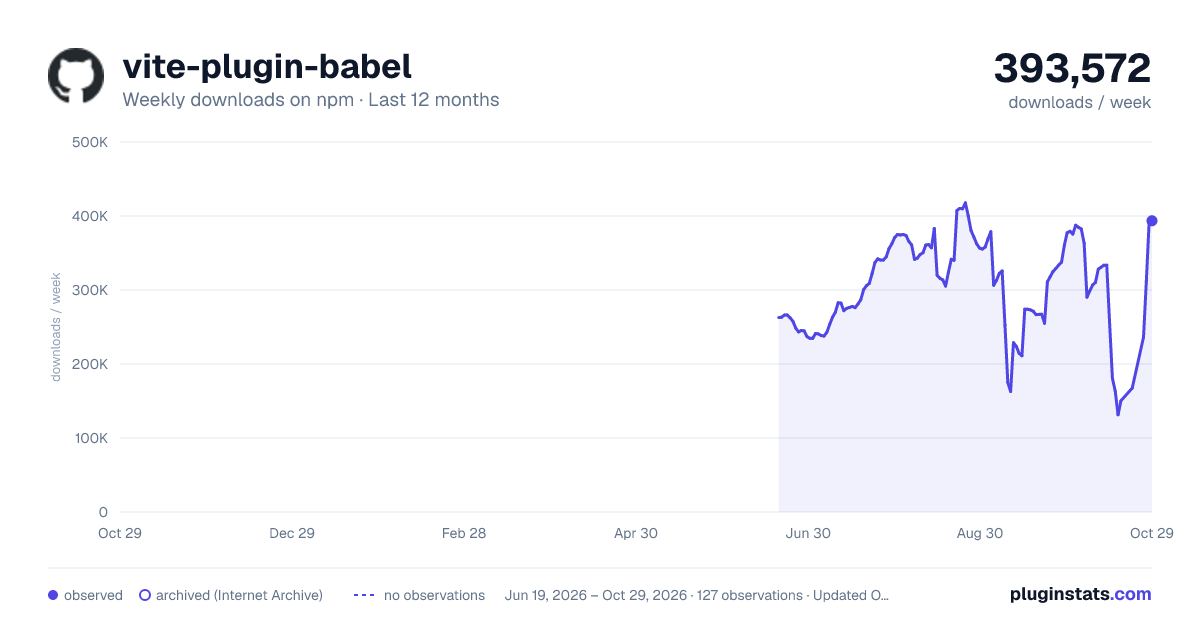
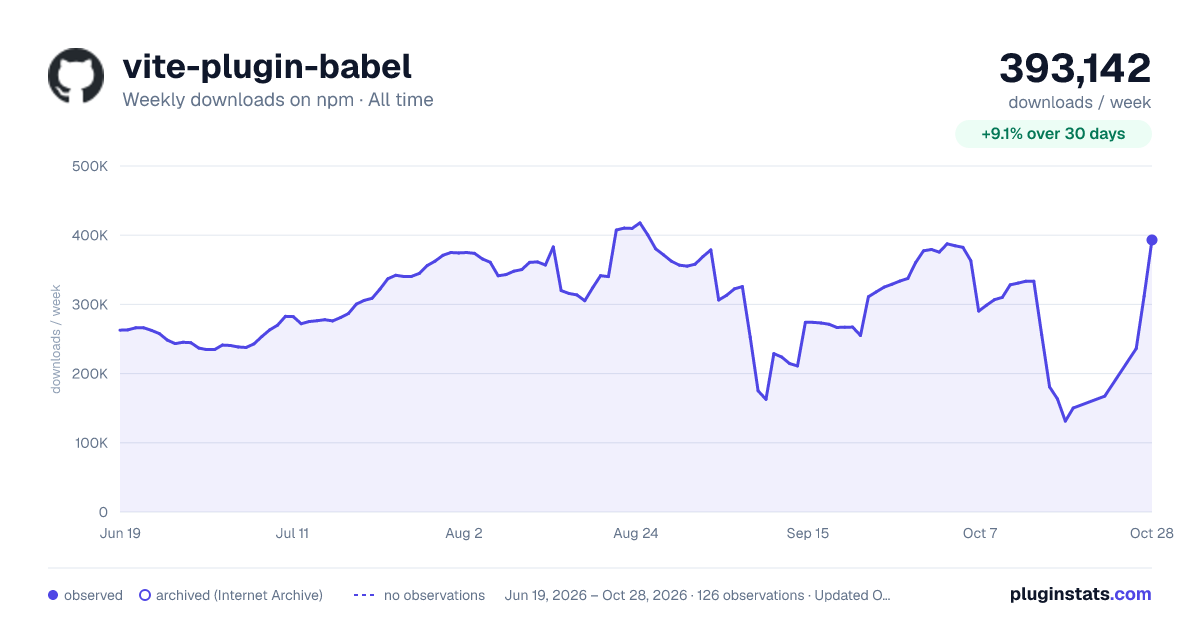

Adoption over time


7/30/90-day growth


Listing placement


Filled points are observed values; hollow points come from Internet Archive snapshots of the listing page. Dashed segments span periods with no observations — values between points are not interpolated.
Each band is one page of 20. Weekly downloads on a log scale. Placement is projected from weekly downloads, so it can differ from the marketplace's own sort order. Hover a dot to see the listing.
Recent observations
Full history (121)Similar npm Vite plugins plugins
All 20 vite-plugin-babel alternativesData source
Weekly downloads (trailing 7 complete days) come from the official npm downloads API. Downloads include CI and mirrors and are not equivalent to installs or users. npm publishes no ratings.
Listing: https://www.npmjs.com/package/vite-plugin-babel. First seen Oct 16, 2026; last successful collection Oct 19, 2026. See the methodology.