 PluginStats
@designbycode/tailwindcss-text-shadow weekly downloads statistics
By designbycode (7 listings) · npm · Tailwind plugins
Tailwindcss utilities for text stroke
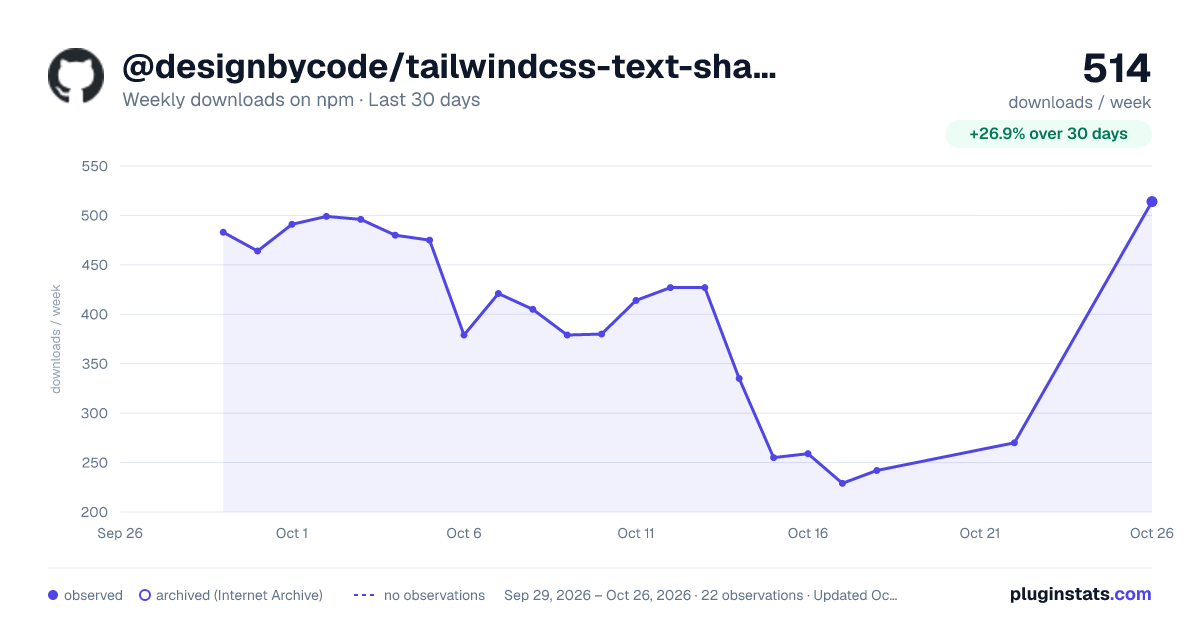
@designbycode/tailwindcss-text-shadow has 229 recorded weekly downloads on npm, a decrease of 27.3% over the past 30 days.
It ranks #1580 of 2,256 tracked npm listings by weekly downloads.
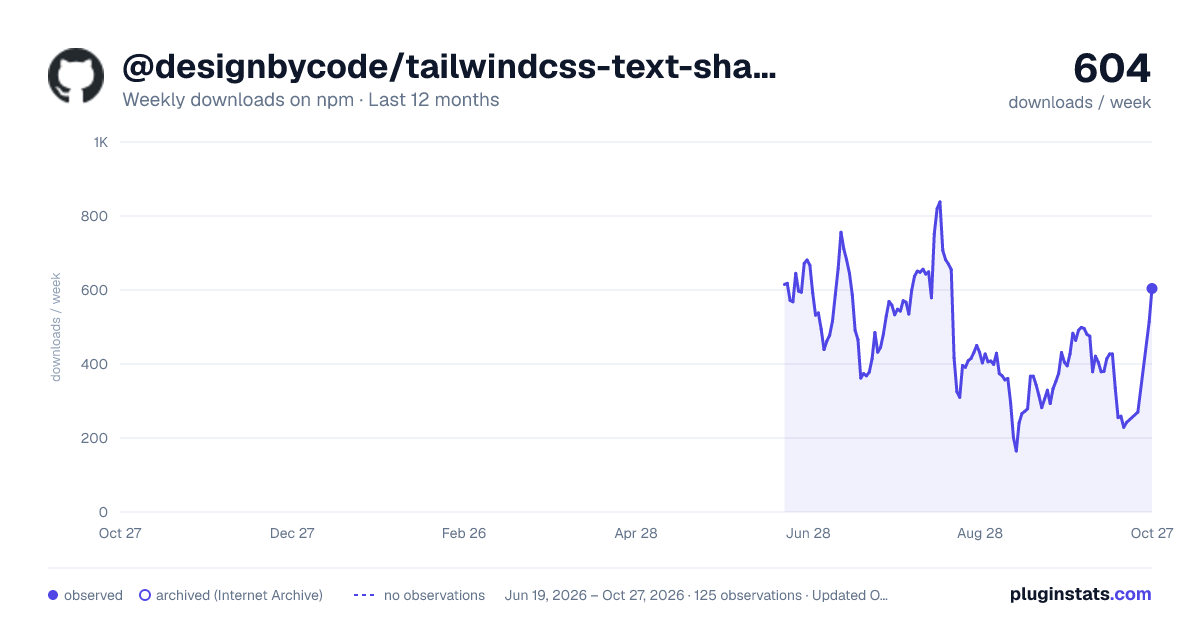
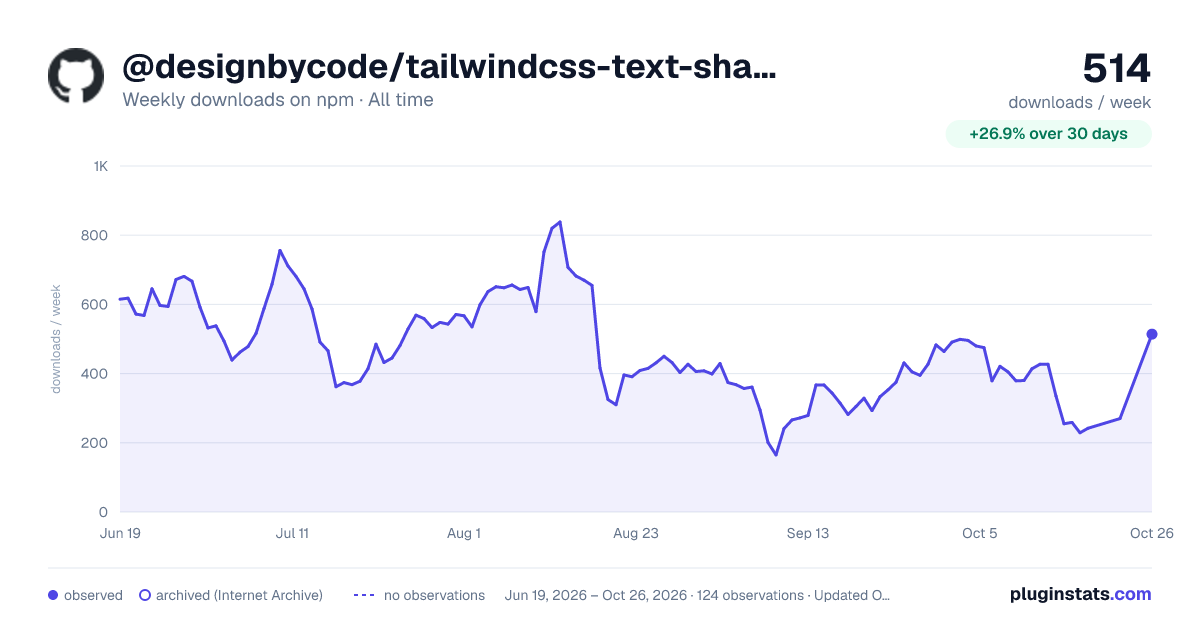
Over 90 days, weekly downloads changed by -39.4%.
PluginStats has 121 daily observations since Jun 19, 2026; the latest is from Oct 17, 2026.
About @designbycode/tailwindcss-text-shadow
Tailwind CSS Text Shadow Plugin
The Tailwind CSS Text Shadow Plugin extends the default set of utility classes in Tailwind CSS to provide easy text shadow customization for your web projects. With this plugin, you can apply custom text shadows using utility classes or define your own text shadow variations based on predefined steps and color palettes.
📇 Table of Contents
• Installation • Using pnpm • Using npm • Using yarn • Setup • Default configuration styles • Use • Video Tutorial • Apply Text Shadows • Text shadow blur modifier • Text shadow x and y modifiers • Text shadow color modifier • Text shadow color opacity • Long shadow • Customization • Example • Contributing • License • Author • Acknowledgments
Installation
To use this plugin, you need to have Tailwind CSS installed in your project. If you haven't installed Tailwind CSS yet, follow these steps:
Using pnpm
Using npm
Using yarn
Setup
1. Add the Plugin to your Tailwind CSS Config In your tailwind.config.js file, add the plugin to the plugins array:
Default configuration styles
2. If the default styles do not suit your preferences, you can effortlessly customize them using the following configuration options
Use
Video Tutorial
See plugin in action in video below. 👇
Apply Text Shadows
Once the plugin is added to your Tailwind CSS configuration, you can use the provided utility classes to apply text shadows to your HTML elements.
Text shadow blur modifier
To make the spread or blur bigger add the .text-shadow-blur-{value}
Text shadow x and y modifiers
The shadow can be moved on the xy axis using .text-shadow-x-{value} and .text-shadow-y-{value}
Text shadow color modifier
In the example above, the element will have a red text shadow with an x offset of 3px, a y offset of 4px, and a blur radius of 2px. The text-shadow class enables the text shadow styles, while the text-shadow-x-md, text-shadow-y-lg, and text-shadow-blur-2 classes customize the horizontal offset, vertical offset, and blur radius, respectively.
Text shadow color opacity
To change the opacity of the text-shadow-color use the following method
Warning New experimental long shadow feature
Note the latest version doesn't need experimental anymore
Long text shadow
The long shadow is a new experimental feature that I add. It creates shadow that stacks to any amount. The classes is .text-shadow-sm or .text-shadow-[steps]
Customization
You can customize the available text shadow options by modifying the theme.textShadowSteps property in your tailwind.config.js file. The steps defined in this object will be used to generate utility classes for each aspect of the text shadow.
Example
In this example, we have customized the textShadowSteps object with only four steps for sm, md, lg, and xl, and removed the rest. The plugin will generate utility classes accordingly.
Change class name prefix
If you don't like to use class name .text-shadow or are getting conflicts in application you can change it to whatever you want like .textShadow, ts or whatever you want. Change it in theme settings.
Use
Contributing
Contributions to this plugin are welcome! If you encounter any issues, have feature requests, or want to improve the plugin, feel free to create a pull request or submit an issue on the GitHub repository.
Contributors
License
This project is licensed under the MIT License - see the LICENSE file for details.
Author
Claude Myburgh
• Github: @designbycode • Npm: @designbycode_
Acknowledgments
• This plugin is inspired by the needs of web developers using Tailwind CSS. • Special thanks to the Tailwind CSS team for creating such an amazing framework.
Description from the npm listing.
- front-end
- frontend
- css
- tailwindcss
- plugin
- tailwindcss-plugin
- tailwindcss text-shadow
- text-shadow
- designbycode
Where @designbycode/tailwindcss-text-shadow sits in the listing
Each band is one page of 20. Weekly downloads on a log scale. Placement is projected from weekly downloads, so it can differ from the marketplace's own sort order. Hover a dot to see the listing.


Charts
Images: 30d · 1y · all time · 1600×900 dark

Adoption over time


7/30/90-day growth


Filled points are observed values; hollow points come from Internet Archive snapshots of the listing page. Dashed segments span periods with no observations — values between points are not interpolated.
Recent observations
Full history (121)Similar npm Tailwind plugins plugins
Data source
Weekly downloads (trailing 7 complete days) come from the official npm downloads API. Downloads include CI and mirrors and are not equivalent to installs or users. npm publishes no ratings.
Listing: https://www.npmjs.com/package/@designbycode/tailwindcss-text-shadow. First seen Oct 16, 2026; last successful collection Oct 19, 2026. See the methodology.