 PluginStats
@gongrzhe/server-gmail-autoauth-mcp weekly downloads statistics
By gongrzhe · npm · MCP servers
Gmail MCP server with auto authentication support
@gongrzhe/server-gmail-autoauth-mcp has 8,436 recorded weekly downloads on npm, a decrease of 48.7% over the past 30 days.
It ranks #956 of 2,251 tracked npm listings by weekly downloads.
Over 90 days, weekly downloads changed by -75.9%.
PluginStats has 543 daily observations since Apr 23, 2025; the latest is from Oct 17, 2026.
About @gongrzhe/server-gmail-autoauth-mcp
Gmail AutoAuth MCP Server
A Model Context Protocol (MCP) server for Gmail integration in Claude Desktop with auto authentication support. This server enables AI assistants to manage Gmail through natural language interactions.
Features
• Send emails with subject, content, attachments, and recipients • Full attachment support - send and receive file attachments • Download email attachments to local filesystem • Support for HTML emails and multipart messages with both HTML and plain text versions • Full support for international characters in subject lines and email content • Read email messages by ID with advanced MIME structure handling • Enhanced attachment display showing filenames, types, sizes, and download IDs • Search emails with various criteria (subject, sender, date range) • Comprehensive label management with ability to create, update, delete and list labels • List all available Gmail labels (system and user-defined) • List emails in inbox, sent, or custom labels • Mark emails as read/unread • Move emails to different labels/folders • Delete emails • Batch operations for efficiently processing multiple emails at once • Full integration with Gmail API • Simple OAuth2 authentication flow with auto browser launch • Support for both Desktop and Web application credentials • Global credential storage for convenience
Installation & Authentication
Installing via Smithery
To install Gmail AutoAuth for Claude Desktop automatically via Smithery:
Installing Manually
1. Create a Google Cloud Project and obtain credentials:
a. Create a Google Cloud Project: • Go to Google Cloud Console • Create a new project or select an existing one • Enable the Gmail API for your project
b. Create OAuth 2.0 Credentials: • Go to "APIs & Services" > "Credentials" • Click "Create Credentials" > "OAuth client ID" • Choose either "Desktop app" or "Web application" as application type • Give it a name and click "Create" • For Web application, add http://localhost:3000/oauth2callback to the authorized redirect URIs • Download the JSON file of your client's OAuth keys • Rename the key file to gcp-oauth.keys.json
2. Run Authentication:
You can authenticate in two ways:
a. Global Authentication (Recommended):
b. Local Authentication:
The authentication process will: • Look for gcp-oauth.keys.json in the current directory or ~/.gmail-mcp/ • If found in current directory, copy it to ~/.gmail-mcp/ • Open your default browser for Google authentication • Save credentials as ~/.gmail-mcp/credentials.json
Note: - After successful authentication, credentials are stored globally in ~/.gmail-mcp/ and can be used from any directory - Both Desktop app and Web application credentials are supported - For Web application credentials, make sure to add http://localhost:3000/oauth2callback to your authorized redirect URIs
3. Configure in Claude Desktop:
Docker Support
If you prefer using Docker:
1. Authentication:
2. Usage:
Cloud Server Authentication
For cloud server environments (like n8n), you can specify a custom callback URL during authentication:
Setup Instructions for Cloud Environment
1. Configure Reverse Proxy: • Set up your n8n container to expose a port for authentication • Configure a reverse proxy to forward traffic from your domain (e.g., gmail.gongrzhe.com) to this port
2. DNS Configuration: • Add an A record in your DNS settings to resolve your domain to your cloud server's IP address
3. Google Cloud Platform Setup: • In your Google Cloud Console, add your custom domain callback URL (e.g., https://gmail.gongrzhe.com/oauth2callback) to the authorized redirect URIs list
4. Run Authentication:
5. Configure in your application:
This approach allows authentication flows to work properly in environments where localhost isn't accessible, such as containerized applications or cloud servers.
Available Tools
The server provides the following tools that can be used through Claude Desktop:
1. Send Email (send_email)
Sends a new email immediately. Supports plain text, HTML, or multipart emails with optional file attachments.
Basic Email:
Email with Attachments:
HTML Email Example:
Multipart Email Example (HTML + Plain Text):
2. Draft Email (draft_email)
Creates a draft email without sending it. Also supports attachments.
3. Read Email (read_email)
Retrieves the content of a specific email by its ID. Now shows enhanced attachment information.
Enhanced Response includes attachment details:
4. Download Attachment (download_attachment)
NEW: Downloads email attachments to your local filesystem.
Parameters: • messageId: The ID of the email containing the attachment • attachmentId: The attachment ID (shown in enhanced email display) • savePath: Directory to save the file (optional, defaults to current directory) • filename: Custom filename (optional, uses original filename if not provided)
5. Search Emails (search_emails)
Searches for emails using Gmail search syntax.
6. Modify Email (modify_email)
Adds or removes labels from emails (move to different folders, archive, etc.).
7. Delete Email (delete_email)
Permanently deletes an email.
8. List Email Labels (list_email_labels)
Retrieves all available Gmail labels.
9. Create Label (create_label)
Creates a new Gmail label.
10. Update Label (update_label)
Updates an existing Gmail label.
11. Delete Label (delete_label)
Deletes a Gmail label.
12. Get or Create Label (get_or_create_label)
Gets an existing label by name or creates it if it doesn't exist.
13. Batch Modify Emails (batch_modify_emails)
Modifies labels for multiple emails in efficient batches.
14. Batch Delete Emails (batch_delete_emails)
Permanently deletes multiple emails in efficient batches.
14. Create Filter (create_filter)
Creates a new Gmail filter with custom criteria and actions.
15. List Filters (list_filters)
Retrieves all Gmail filters.
16. Get Filter (get_filter)
Gets details of a specific Gmail filter.
17. Delete Filter (delete_filter)…
Description from the npm listing.
- gmail
- mcp
- cursor
- ai
- oauth
- model-context-protocol
- google-gmail
- claude
- auto-auth
Where @gongrzhe/server-gmail-autoauth-mcp sits in the listing
Each band is one page of 20. Weekly downloads on a log scale. Placement is projected from weekly downloads, so it can differ from the marketplace's own sort order. Hover a dot to see the listing.


Charts
Images: 30d · 1y · all time · 1600×900 dark
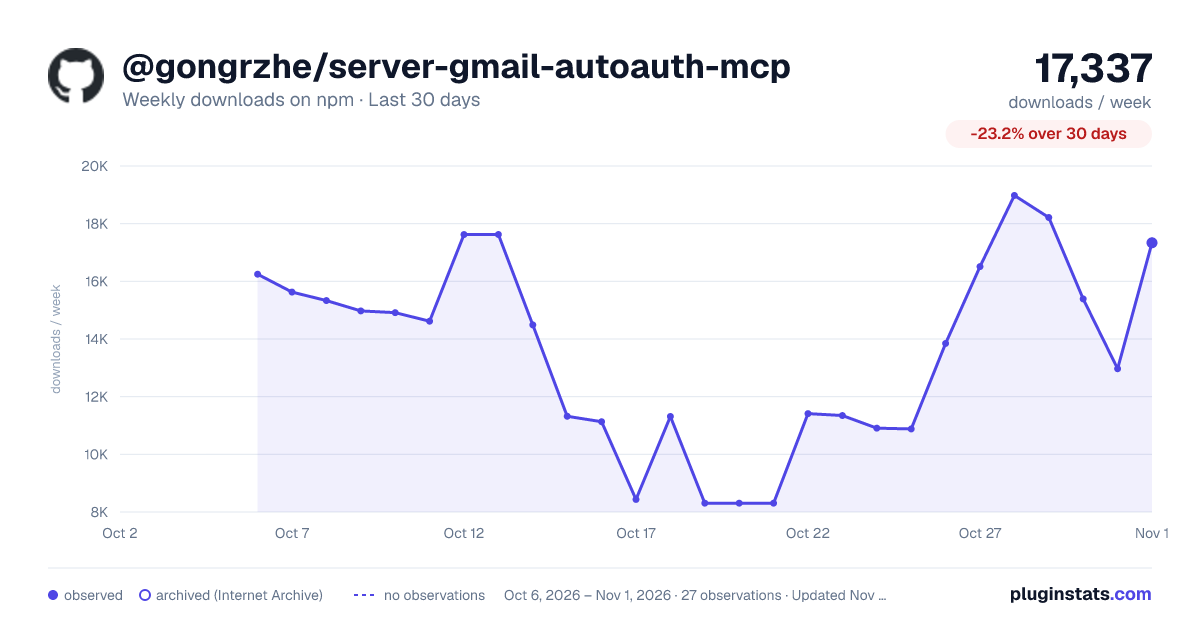
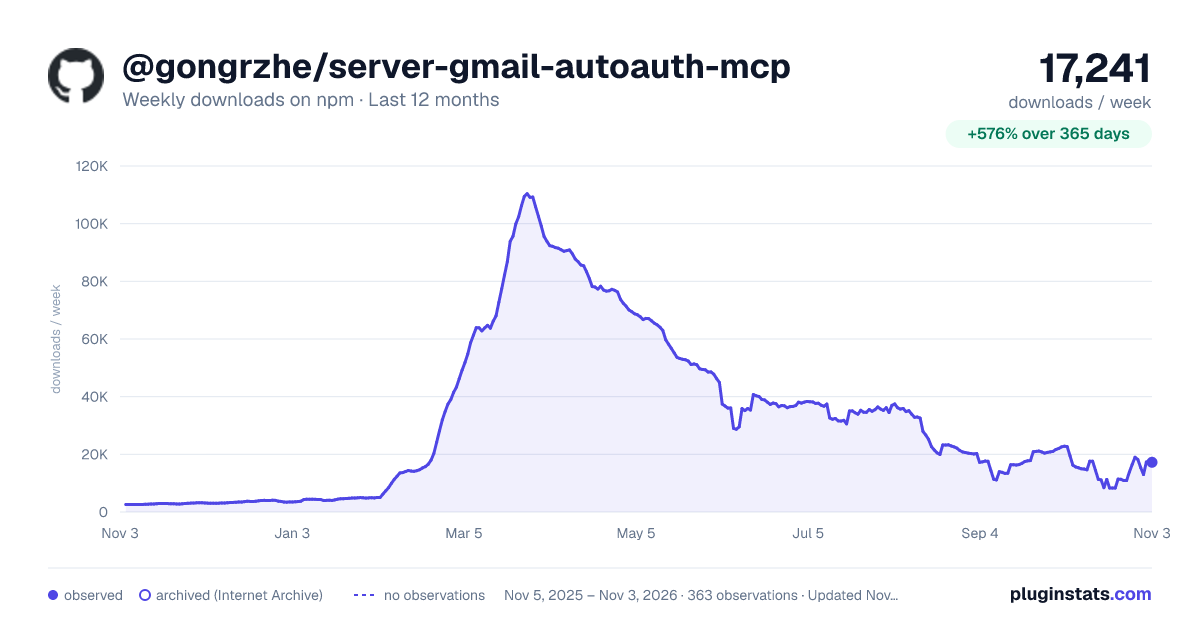
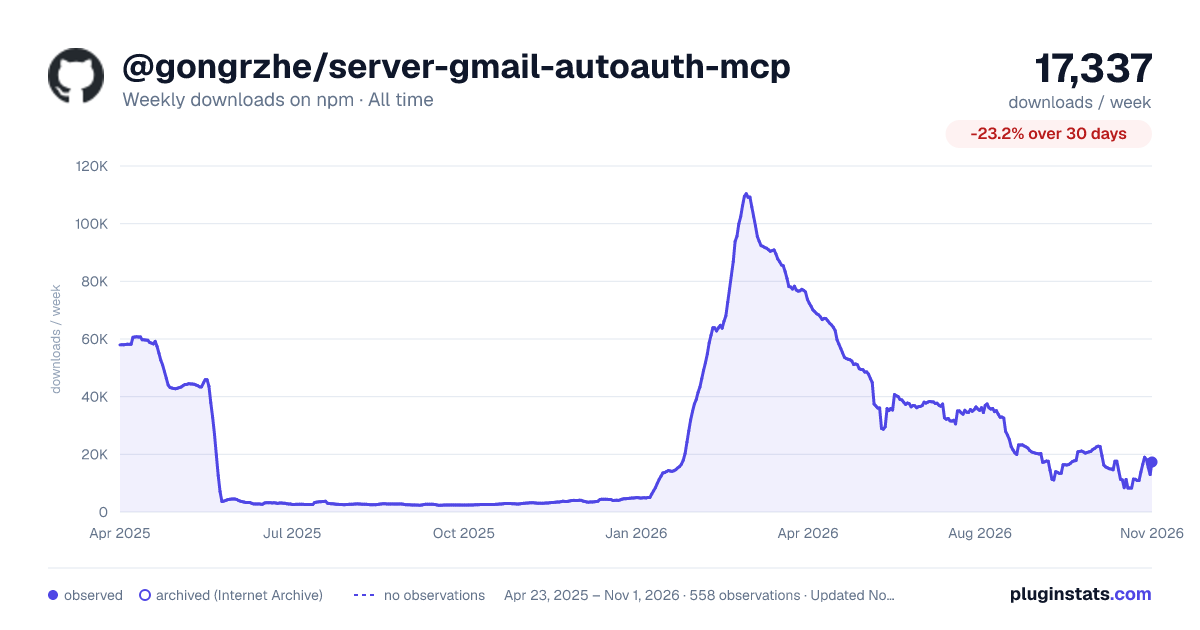

Adoption over time


7/30/90-day growth


Filled points are observed values; hollow points come from Internet Archive snapshots of the listing page. Dashed segments span periods with no observations — values between points are not interpolated.
Recent observations
Full history (543)Similar npm MCP servers plugins
Data source
Weekly downloads (trailing 7 complete days) come from the official npm downloads API. Downloads include CI and mirrors and are not equivalent to installs or users. npm publishes no ratings.
Listing: https://www.npmjs.com/package/@gongrzhe/server-gmail-autoauth-mcp. First seen Oct 16, 2026; last successful collection Oct 18, 2026. See the methodology.