 PluginStats
comfyui-mcp weekly downloads statistics
By artokun · npm · MCP servers
Local-first, agent-native control plane for ComfyUI — MCP server + autonomous sidebar agent that drives your live graph in natural language on ANY LLM: Claude/ChatGPT/Gemini on your subscription (no API key), free local models via Ollama (fully offline),
comfyui-mcp has 13,063 recorded weekly downloads on npm, a decrease of 65.9% over the past 30 days.
It ranks #845 of 2,251 tracked npm listings by weekly downloads.
Over 90 days, weekly downloads changed by -53.0%.
PluginStats has 121 daily observations since Jun 19, 2026; the latest is from Oct 17, 2026.
About comfyui-mcp
comfyui-mcp — drive ComfyUI with ANY LLM
[!NOTE] Limited maintenance has resumed. We support the local Agent Panel and your choice of provider, including offline models. Releases focus on verified critical fixes; there is no broad feature roadmap. Automatic issue reporting remains disabled.
We will reassess support when Comfy’s official local panel becomes publicly available. Maintenance update.
The Agent panel driving ComfyUI end to end. It reads what is installed locally, wires the graph, frees VRAM, and runs the render. Watch the 76s demo →
The local-first, agent-native control plane for ComfyUI. An MCP server plus a live sidebar agent that generates images, video and audio, authors and runs workflows, manages models and custom nodes, and edits your live ComfyUI graph in natural language. Bring whatever model you have: Claude or ChatGPT on your subscription, Gemini on your Google login, a free local model via Ollama (fully offline), or any hosted model over one API key (DeepSeek, GLM, MiMo, Kimi, GPT, Claude via OpenRouter). The tools and the panel are the same on every tier, and the built-in LLM Arena scores each model on real ComfyUI tasks so you know what yours can do. One config targets local installs, LAN, VPS, or Comfy Cloud.
One-click GPU pod. A ready-to-run ComfyUI with this project + Agent Panel + ComfyUI-Manager v2 preinstalled, on your own GPU. No setup.
Works on macOS, Linux, and Windows. Auto-detects your ComfyUI installation and port.
Stuck or have a question? Join the Discord for help, model tips, and release announcements.
38 MCP tools | 42 AI skills (Flux · WAN · LTX 2.3 video · MiniMax H3 · Qwen · Z-Image · Ideogram 4 · ERNIE · ANIMA · model registry · Civitai · node authoring · launch/perf flags) | 56 installer packs | 11 slash commands | 4 autonomous agents | 3 hooks
The plugin ships skills that grow with every release: model-specific generation guides with curated download URLs, workflow recipes, troubleshooting, and custom-node authoring. With them, Claude knows the right sampler, CFG, resolution, and model files for each architecture without trial and error.
### Now available: the ComfyUI Agent Panel on ComfyUI-Manager & the Comfy Registry An autonomous AI agent in your ComfyUI sidebar, running on Claude, ChatGPT, Gemini, or ANY local/hosted LLM (Ollama and every OpenAI-compatible endpoint). Subscriptions work with no API key; local models work with no account at all. Pick a provider and it drives your live graph: edits, spatial layout, one-shot workflow/pack loads, rewind/rollback, a pending-message tray, activity cards, multi-tab. It asks before spending paid API credits. Search comfyui-agent-panel in ComfyUI-Manager to install. Read more →
Full documentation: comfyui-mcp.artokun.io/docs
Quick Start
1. Install ComfyUI (if you haven't already): ComfyUI Desktop or from source
2. Add the MCP server to your Claude Code config (~/.claude/settings.json):
3. Start using it. With ComfyUI running, ask Claude to generate an image:
Claude will find (or download) a checkpoint, build a workflow, execute it, and return the image.
Note: This runs as a standalone MCP server, so there is no need to clone this repo. npx downloads and runs it.
Scope: local, remote, or Comfy Cloud
comfyui-mcp is local-first. A self-hosted ComfyUI on Mac/Linux/Windows is the primary target, and the same agent reaches remote installs (RunPod, VPS, LAN, reverse-proxied) from one config. Local-first, not local-only.
More than a bridge. Most ComfyUI MCP servers are thin connectors. They forward a prompt and hand back an image. comfyui-mcp is a full control plane. It authors and edits the graph node by node, runs and iterates on workflows, manages models and custom nodes, and ships model-specific expertise (samplers, CFG, resolutions, curated model URLs) so the agent gets it right without trial and error. If you want a minimal local relay, a lightweight server is fine. If you want an agent that *operates* ComfyUI, that's this project.
For Comfy Cloud users, Comfy-Org ships its own agent tooling: Comfy Cloud MCP (public beta, hosted on Comfy Cloud GPUs), the Comfy In-App Agent (private alpha, inside Comfy Cloud), and a first-party Comfy Local MCP (private test, not publicly available yet), all maintained by the Comfy team. If you don't have a GPU or you want zero setup, that's the better path; go use it.
Where this project differs is that it runs on your install and your choice of model, including a free local one via Ollama with no account and no network at all. comfyui-mcp *also* includes a community cloud mode (set COMFYUI_API_KEY, see Deployment modes) so a single MCP can target all three deployment shapes from one config.
Local vs. Comfy Cloud agent is a side-by-side comparison, including when Comfy Cloud is the right answer. *(Statuses above are as of July 2026. Comfy-Org ships fast, so check their docs for the current state.)*
Remote / hosted connector (one command)
To use comfyui-mcp from Claude Desktop's Custom Connectors or any remote client, like Comfy's own cloud.comfy.org/mcp connector, run it as an authenticated, publicly reachable Streamable-HTTP server with one flag:
This forces the HTTP transport, generates an auth token, opens a cloudflared quick tunnel, and prints a ready-to-paste https://…/mcp URL + token + Claude Desktop connector snippet. Auth accepts Authorization: Bearer or X-API-Key: (matching Comfy Cloud's convention). See the Remote / hosted connector guide for the full walkthrough and headless usage.
Auth is opt-in. With no COMFYUI_MCP_HTTP_TOKEN set and no --tunnel, the default stdio (and plain --http on loopback) behavior is unchanged. It stays open and local. OAuth (Comfy's browser sign-in flow) is a planned follow-up.
Claude Code Plugin
This package also ships as a Claude Code plugin that adds slash commands, skills, agents, and hooks on top of the MCP tools.
Install as a plugin
Slash commands
| Command | Description |…
Description from the npm listing.
- comfyui
- mcp
- mcp-server
- comfyui-mcp
- comfyui-mcp-server
- local-first
- model-context-protocol
- comfyui-ai-agent
- comfyui-agent
- comfyui-copilot
- comfyui-assistant
- comfyui-claude
- comfyui-chatgpt
- autonomous-agent
- natural-language-workflow
- claude-code
- claude-plugin
- claude-skills
- agent-skills
- chatgpt
Where comfyui-mcp sits in the listing
Each band is one page of 20. Weekly downloads on a log scale. Placement is projected from weekly downloads, so it can differ from the marketplace's own sort order. Hover a dot to see the listing.


Charts
Images: 30d · 1y · all time · 1600×900 dark
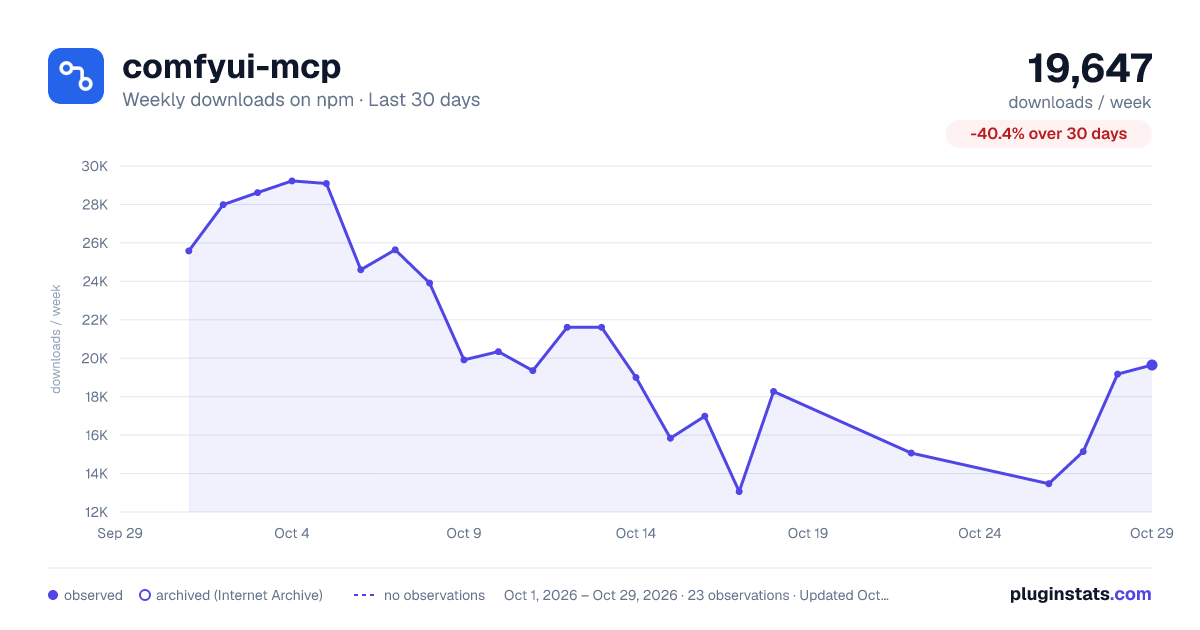
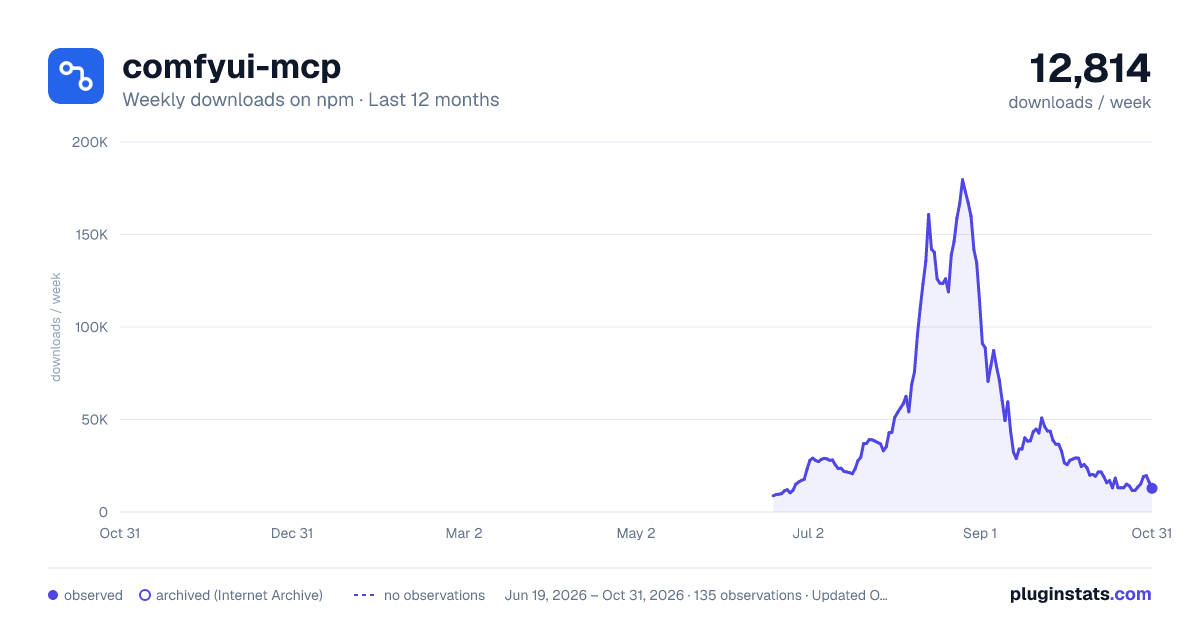
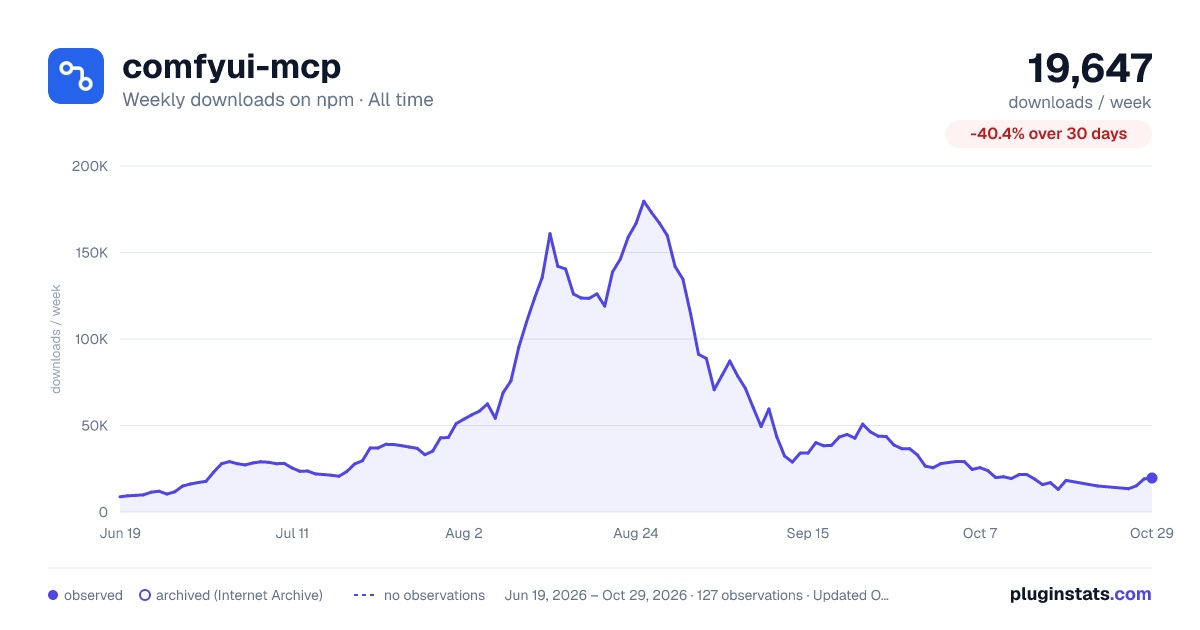

Adoption over time


7/30/90-day growth


Filled points are observed values; hollow points come from Internet Archive snapshots of the listing page. Dashed segments span periods with no observations — values between points are not interpolated.
Recent observations
Full history (121)Similar npm MCP servers plugins
Data source
Weekly downloads (trailing 7 complete days) come from the official npm downloads API. Downloads include CI and mirrors and are not equivalent to installs or users. npm publishes no ratings.
Listing: https://www.npmjs.com/package/comfyui-mcp. First seen Oct 16, 2026; last successful collection Oct 18, 2026. See the methodology.