 PluginStats
minimizer-webpack-plugin weekly downloads statistics
By webpack (4 listings) · npm · Webpack plugins
Minimizer plugin for webpack
minimizer-webpack-plugin has 7,358,214 recorded weekly downloads on npm, a decrease of 36.3% over the past 30 days.
It ranks #123 of 2,251 tracked npm listings by weekly downloads.
Over 90 days, weekly downloads changed by +17.1%.
PluginStats has 543 daily observations since Apr 23, 2025; the latest is from Oct 17, 2026.
About minimizer-webpack-plugin
[![npm][npm]][npm-url] [![node][node]][node-url] [![tests][tests]][tests-url] [![cover][cover]][cover-url] [![discussion][discussion]][discussion-url] [![size][size]][size-url]
minimizer-webpack-plugin
This plugin minifies your assets in a webpack build. It ships with several built-in minimizers covering JavaScript, JSON, HTML, CSS, and images — pick one with the minify option and target the right files with test.
JavaScript minimizers:
• terser — MinimizerPlugin.terserMinify (default). The same JavaScript-based minifier that webpack uses out of the box; produces small, well-tested output and supports the full set of extractComments modes. • uglify-js — MinimizerPlugin.uglifyJsMinify. ES5-only minifier, useful when you specifically need UglifyJS-compatible output. Requires npm install --save-dev uglify-js. • @swc/core — MinimizerPlugin.swcMinify. A very fast Rust-based JavaScript/TypeScript minifier. Requires npm install --save-dev @swc/core. • esbuild — MinimizerPlugin.esbuildMinify. An extremely fast JS bundler/minifier; legal comments are always preserved (no extractComments support). Requires npm install --save-dev esbuild.
JSON minimizer:
• JSON.stringify — MinimizerPlugin.jsonMinify. Built in (no extra dependency); supports space and replacer options.
HTML minimizers:
• webpack's own — webpack.html.syntax.htmlMinify. Ships with webpack (>= 5.111.0), so it needs no extra dependency, and it is the one that minifies what a document nests: an inline , every style="", a , an subtree. See webpack's own minimizers. • html-minifier-terser — MinimizerPlugin.htmlMinifierTerser. JavaScript-based, no native dependency. Requires npm install --save-dev html-minifier-terser. • @swc/html — MinimizerPlugin.swcMinifyHtml (full HTML documents) and MinimizerPlugin.swcMinifyHtmlFragment (HTML fragments, e.g. or partial HTML strings). • MinimizerPlugin.minifyHtmlNode — uses @minify-html/node.
The HTML minimizers are optional peer dependencies — install only the one you actually use:
Note
HTML assets typically come from plugins like copy-webpack-plugin, html-webpack-plugin, or webpack's asset modules.
Note
Whitespace handling differs between tools (defaults):
- @swc/html — removes/collapses whitespace only in safe places (around html/body, inside , between // etc.). - html-minifier-terser — always collapses multiple whitespaces to a single space (never removes entirely); configurable via its options. - @minify-html/node — see its whitespace docs.
html-minifier-terser
html-minifier-terser is a JavaScript-based HTML minifier with no native dependency.
webpack.config.js
@swc/html — HTML documents
Use swcMinifyHtml for complete HTML documents (i.e. with a doctype and // tags).
webpack.config.js
@swc/html — HTML fragments
Use swcMinifyHtmlFragment for partial HTML — for example, content of tags or HTML strings that get injected into another document.
webpack.config.js
Note
The difference between swcMinifyHtml and swcMinifyHtmlFragment is the error reporting — invalid or broken syntax is reported at build time.
@minify-html/node
@minify-html/node is a Rust HTML minifier.
webpack.config.js
You can also stack multiple MinimizerPlugin instances to compress different files with different minify functions in the same build (e.g. JS with terserMinify, HTML with htmlMinifierTerser, JSON with jsonMinify).
CSS
The plugin can minify CSS assets too. Pick one of the bundled CSS minimizers and set test to match your CSS files.
Available CSS minimizers:
• webpack.css.syntax.cssMinify — webpack's own, shipped with webpack itself, so it needs no extra dependency. The one that can minify the CSS a document nests. See webpack's own minimizers. • MinimizerPlugin.cssnanoMinify — uses cssnano (via postcss). • MinimizerPlugin.cssoMinify — uses csso. • MinimizerPlugin.cleanCssMinify — uses clean-css. • MinimizerPlugin.esbuildMinifyCss — uses esbuild with the CSS loader. • MinimizerPlugin.lightningCssMinify — uses lightningcss. • MinimizerPlugin.swcMinifyCss — uses @swc/css.
The CSS minimizers are optional peer dependencies — install only the ones you actually use:
Note
CSS assets typically come from plugins like mini-css-extract-plugin or webpack's asset modules.
cssnano
cssnano runs as a PostCSS plugin.
webpack.config.js
csso
csso is a CSS minifier with structural optimisations.
webpack.config.js
clean-css
clean-css is a widely-used CSS optimiser.
webpack.config.js
esbuild
esbuild ships with a fast CSS minifier (used via its CSS loader).
webpack.config.js
lightningcss
lightningcss is a Rust-based CSS parser, transformer, and minifier.
webpack.config.js
@swc/css
@swc/css is a Rust-based CSS minifier.
webpack.config.js
webpack's own minimizers
webpack ships a CSS and an HTML minimizer of its own. They need no extra dependency — if you have webpack, you have them — and they are the two that can hand out what a document or a stylesheet nests inside itself, so pairing them with terserMinify and jsonMinify is what minifies embedded source (see Embedded source). They are reached through webpack's public css.syntax and html.syntax exports, and need **webpack 5.111.0 or newer**.
Each one dispatches itself, so test only has to be wide enough to let the assets through: cssMinify claims *.css and htmlMinify claims *.html through their own filter, and both run in the worker pool.
| | cssMinify | htmlMinify |
| getTypes() | css | html | | getEmbeddedTypes() | svg, css, html, json, javascript | css, javascript, json, svg, html | | filter | /\.css(\?.*)?$/i | /\.html(\?.*)?$/i | | supportsWorkerThreads() | true | true |
Their options are optimization.minimize.css and optimization.minimize.html respectively. environment carries what the target can read ({ browsers, vendorPrefixes }, the CSS entries of output.environment), so a spelling the target could not parse is never reached for.
cssMinify options…
Description from the npm listing.
- avif
- clean-css
- compress
- compressor
- css
- cssnano
- csso
- esbuild
- html
- html-minifier
- html-minifier-terser
- image
- imagemin
- images
- jpeg
- lightningcss
- min
- minification
- minifier
- minify
Where minimizer-webpack-plugin sits in the listing
Each band is one page of 20. Weekly downloads on a log scale. Placement is projected from weekly downloads, so it can differ from the marketplace's own sort order. Hover a dot to see the listing.


Charts
Images: 30d · 1y · all time · 1600×900 dark
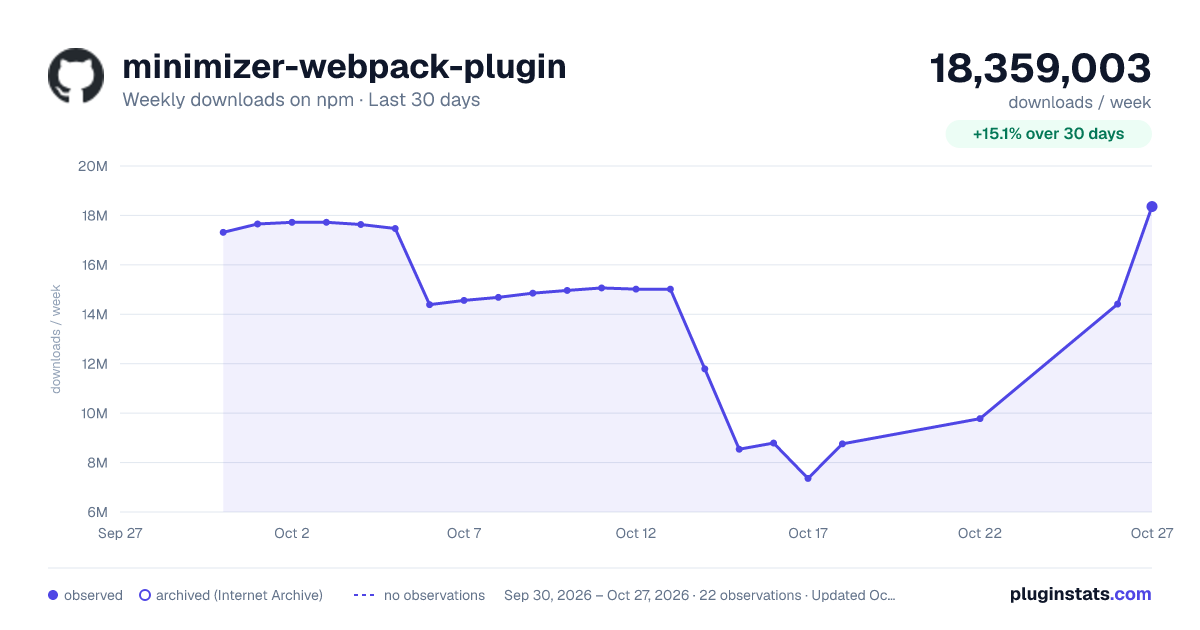
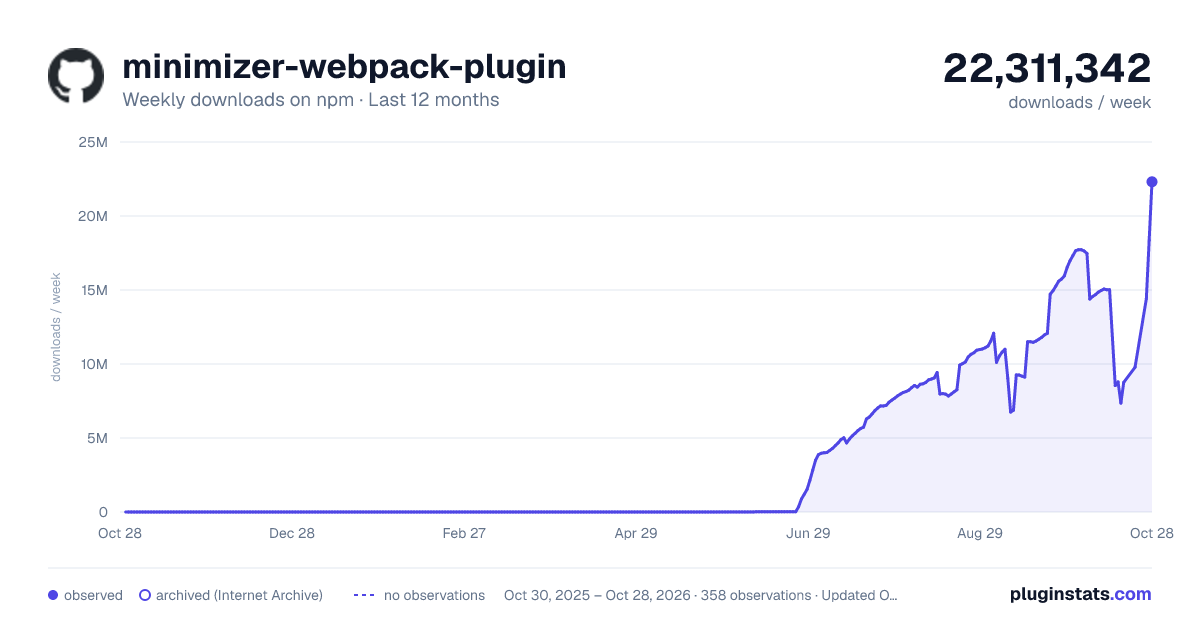
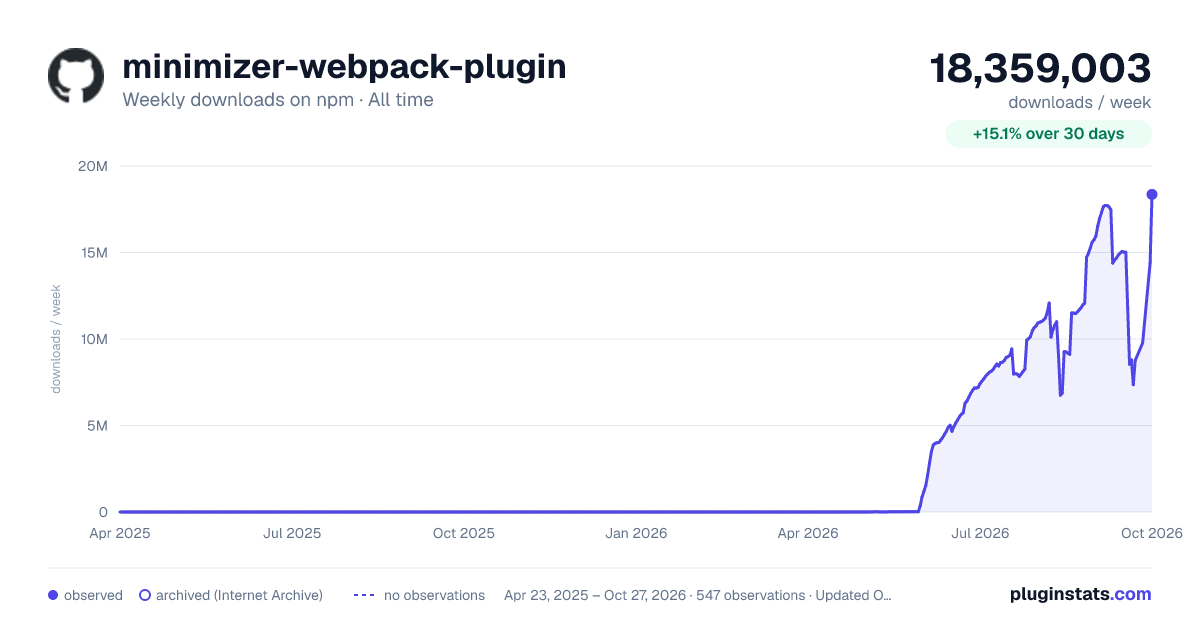

Adoption over time


7/30/90-day growth


Filled points are observed values; hollow points come from Internet Archive snapshots of the listing page. Dashed segments span periods with no observations — values between points are not interpolated.
Recent observations
Full history (543)Similar npm Webpack plugins plugins
Data source
Weekly downloads (trailing 7 complete days) come from the official npm downloads API. Downloads include CI and mirrors and are not equivalent to installs or users. npm publishes no ratings.
Listing: https://www.npmjs.com/package/minimizer-webpack-plugin. First seen Oct 16, 2026; last successful collection Oct 18, 2026. See the methodology.