 PluginStats
@cocal/google-calendar-mcp weekly downloads statistics
By cocal · npm · MCP servers
Google Calendar MCP Server with extensive support for calendar management
@cocal/google-calendar-mcp has 4,453 recorded weekly downloads on npm, a decrease of 46.5% over the past 30 days.
About @cocal/google-calendar-mcp
Google Calendar MCP Server
A Model Context Protocol (MCP) server that provides Google Calendar integration for AI assistants like Claude.
<table> <tr> <td> <h3><a href="https://cocal.io/?utm_source=google_calendar_mcp&utm_medium=listing&utm_campaign=release"><img src="docs/images/cocal/logo.svg" alt="Cocal" width="144"></a></h3> <p>I built <a href="https://cocal.io/?utm_source=google_calendar_mcp&utm_medium=listing&utm_campaign=release">Cocal</a> as a separate hosted calendar assistant, taking this project further with a <strong>full visual calendar inside your chat with Claude.</strong> Connect your Google accounts without creating a Google Cloud project or running a server.</p> <ul> <li><strong>Plan across accounts.</strong> Check availability and catch conflicts across your work, personal, and shared Google Calendars in one conversation.</li> <li><strong>Use it on desktop and mobile.</strong> See and manage your calendars in Claude on web, desktop, iOS, and Android.</li> <li><strong>Carry your preferences into new chats.</strong> Save rules like “no meetings before 10” or which calendar to use for personal plans.</li> </ul> <p> <a href="docs/images/cocal/day-view.png"><img src="docs/images/cocal/day-view.png" alt="Cocal visual calendar showing work meetings and a personal gym session together on a timeline" width="300"></a> <a href="docs/images/cocal/event-details.png"><img src="docs/images/cocal/event-details.png" alt="Cocal event card showing attendees, timezone context, a description, and no conflicts" width="300"></a> </p> <p><sub>Real Cocal UI with sample calendar data. Click either screenshot to enlarge.</sub></p> <p><strong><a href="https://cocal.io/?utm_source=google_calendar_mcp&utm_medium=listing&utm_campaign=release">Try Cocal →</a></strong></p> </td> </tr> </table>Features
- Multi-Account Support: Connect multiple Google accounts (e.g., work, personal) and query them simultaneously
- Multi-Calendar Support: List events from multiple calendars in a single request
- Cross-Account Conflicts: Detect overlapping events across any combination of calendars
- Event Management: Create, update, delete, and search calendar events
- Recurring Events: Advanced modification capabilities for recurring events
- Free/Busy Queries: Check availability across calendars
- Smart Scheduling: Natural language understanding for dates and times
- Intelligent Import: Add calendar events from images, PDFs, or web links
Quick Start
Prerequisites
- A Google Cloud project with the Calendar API enabled
- OAuth 2.0 credentials (Desktop app type)
Google Cloud Setup
- Go to the Google Cloud Console
- Create a new project or select an existing one.
- Enable the Google Calendar API for your project. Ensure that the right project is selected from the top bar before enabling the API.
- Create OAuth 2.0 credentials:
- Go to Credentials
- Click "Create Credentials" > "OAuth client ID"
- Choose "User data" for the type of data that the app will be accessing
- Add your app name and contact information
- Add the following scopes (optional):
https://www.googleapis.com/auth/calendar.eventsandhttps://www.googleapis.com/auth/calendar
- Select "Desktop app" as the application type (Important!)
- Save the auth key, you'll need to add its path to the JSON in the next step
- Add your email address as a test user under the Audience screen
- Note: it might take a few minutes for the test user to be added. The OAuth consent will not allow you to proceed until the test user has propagated.
- Note about test mode: While an app is in test mode the auth tokens will expire after 1 week and need to be refreshed (see Re-authentication section below).
Installation
Option 1: Use with npx (Recommended)
Add to your Claude Desktop configuration:
macOS: ~/Library/Application Support/Claude/claude_desktop_config.json
Windows: %APPDATA%\Claude\claude_desktop_config.json
{
  "mcpServers": {
    "google-calendar": {
      "command": "npx",
      "args": ["@cocal/google-calendar-mcp"],
      "env": {
        "GOOGLE_OAUTH_CREDENTIALS": "/path/to/your/gcp-oauth.keys.json"
      }
    }
  }
}
⚠️ Important Note for npx Users: When using npx, you must specify the credentials file path using the GOOGLE_OAUTH_CREDENTIALS environment variable.
Option 2: Local Installation
git clone https://github.com/nspady/google-calendar-mcp.git
cd google-calendar-mcp
npm install
npm run build
Then add to Claude Desktop config using the local path or by specifying the path with the GOOGLE_OAUTH_CREDENTIALS environment variable.
Option 3: Docker Installation
git clone https://github.com/nspady/google-calendar-mcp.git
cd google-calendar-mcp
cp /path/to/your/gcp-oauth.keys.json .
docker compose up
See the Docker deployment guide for detailed configuration options including HTTP transport mode.
First Run
- Start Claude Desktop
- Ask Claude to authenticate with the Google Calendar MCP server (e.g., "Authenticate with Google Calendar"). This step is required before using any calendar tool — without it, requests will fail with a
-32600error. - Complete the OAuth flow in your browser
- You're ready to use calendar features!
Using Claude Code? The same steps apply — just ask Claude to authenticate with the Google Calendar MCP server from your CLI session before using any calendar tool.
Re-authentication…
Description from the npm listing.
- mcp
- model-context-protocol
- claude
- google-calendar
- calendar
- ai
- llm
- integration
README badge
Show your rank in a README or on your website. The badge updates automatically.
Charts
Images: 30d · 1y · all time · 1600×900 dark
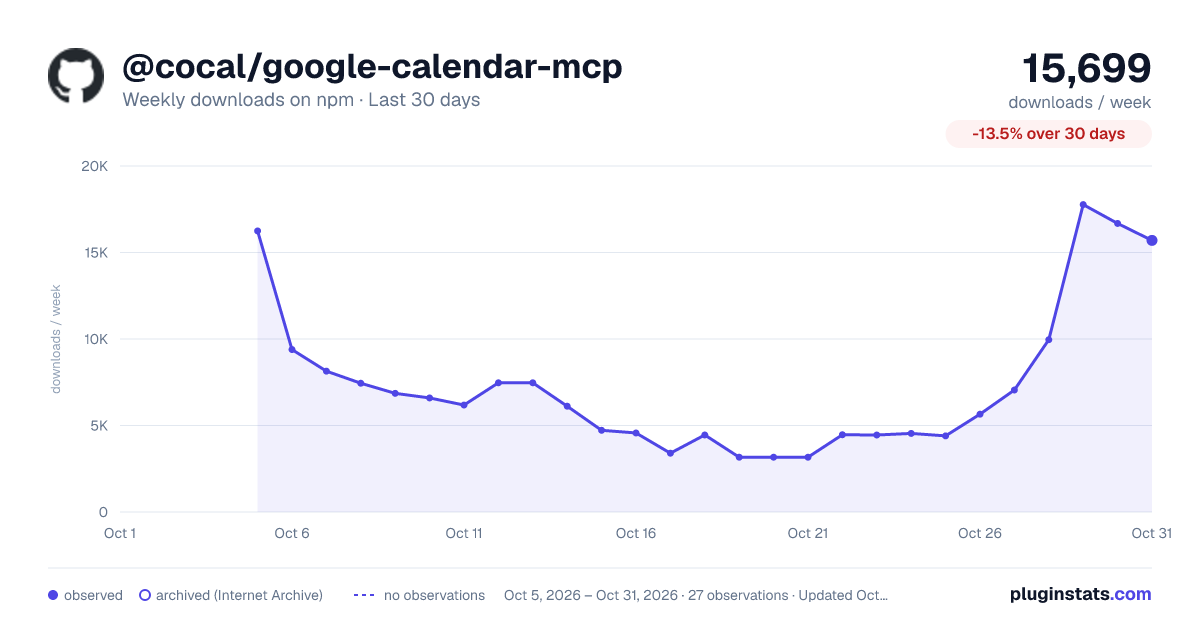
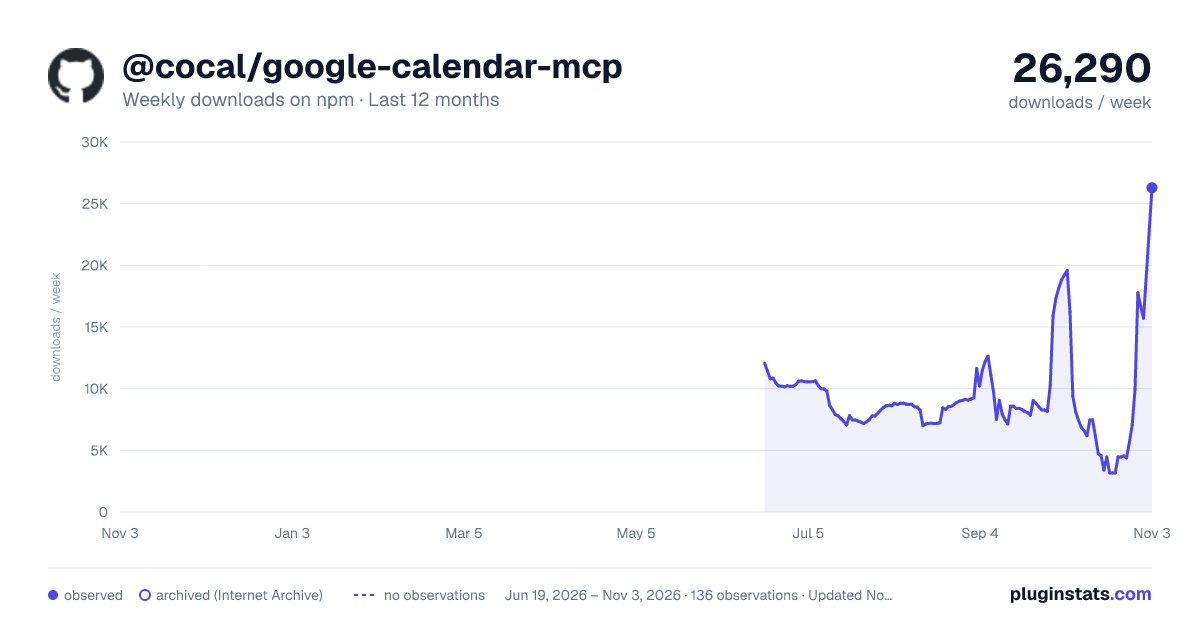
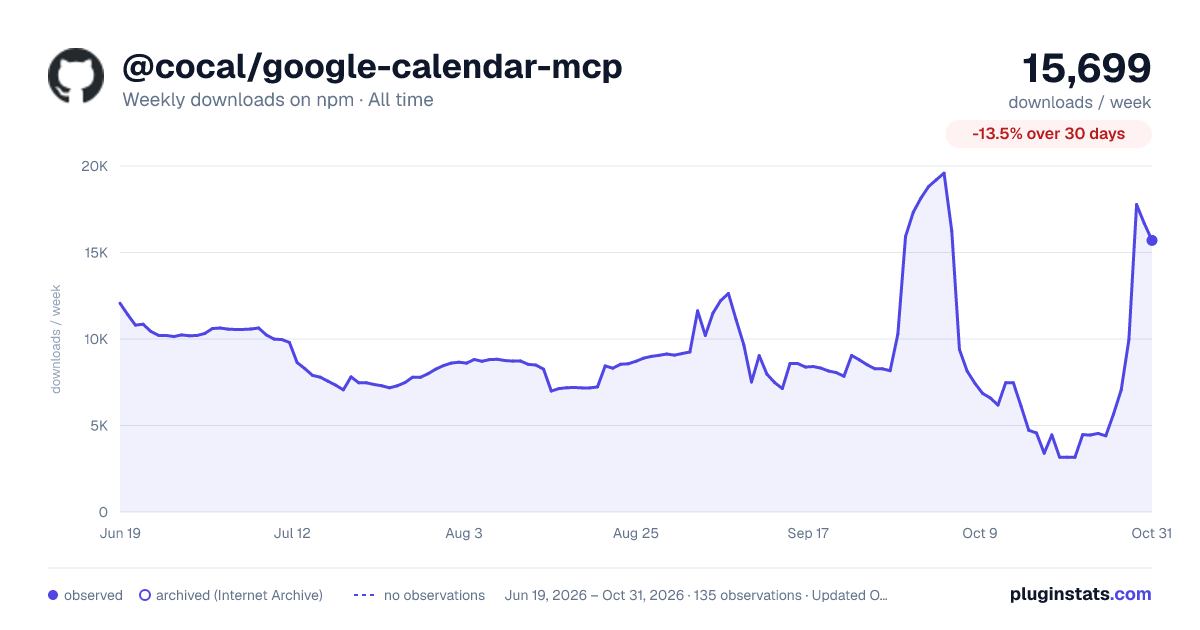

Adoption over time
7/30/90-day growth
Ranking history
Listing placement
Listing placement
Filled points are observed values; hollow points come from Internet Archive snapshots of the listing page. Dashed segments span periods with no observations — values between points are not interpolated.
Each band is one page of 20. Weekly downloads on a linear scale. Placement is projected from weekly downloads, so it can differ from the marketplace's own sort order. Hover a dot to see the listing.
Recent observations
Full history (122)Similar npm MCP servers plugins
All 20 @cocal/google-calendar-mcp alternativesData source
Weekly downloads (trailing 7 complete days) come from the official npm downloads API. Downloads include CI and mirrors and are not equivalent to installs or users. npm publishes no ratings.
Listing: https://www.npmjs.com/package/@cocal/google-calendar-mcp. First seen Oct 16, 2026; last successful collection Oct 23, 2026. See the methodology.