 PluginStats
@ui5/mcp-server weekly downloads statistics
By ui5 · npm · MCP servers
MCP server for SAPUI5/OpenUI5 development
@ui5/mcp-server has 48,054 recorded weekly downloads on npm, a decrease of 37.9% over the past 30 days, ranking #599 of 2,322 tracked listings.
About @ui5/mcp-server
UI5 MCP Server
A Model Context Protocol server for UI5 application development.




Description
The UI5 Model Context Protocol server offers tools to improve the developer experience when working with agentic AI tools.
Key Features
- Helps with the creation of new UI5 projects when working with agentic AI tools
- Supports the developer to detect and fix UI5-specific errors in the code
- Provides additional UI5-specific information for agentic AI tools
[!TIP] Make sure to also check out our announcement blog post in the SAP Community!
Available Tools
create_integration_card: Scaffolds a new UI Integration Card.create_ui5_app: Scaffolds a new UI5 application based on a set of templates.get_api_reference: Fetches and formats UI5 API documentation.get_guidelines: Provides access to UI5 development best practices.get_integration_cards_guidelines: Provides access to UI Integration Cards development best practices.get_project_info: Extracts metadata and configuration from a UI5 project.get_typescript_conversion_guidelines: Provides guidelines for converting UI5 applications and controls from JavaScript to TypeScript.get_version_info: Retrieves version information for the UI5 framework.run_manifest_validation: Validates the manifest against the UI5 Manifest schema.run_ui5_linter: Integrates with@ui5/linterto analyze and report issues in the UI5 code.
Requirements
- Node.js Version v20.17.0, v22.9.0 or higher
- npm Version v8.0.0 or higher
- An MCP client, such as VS Code (GitHub Copilot), Cline, Claude Code, Codex, or any other MCP-compatible client
Setup
Standard Configuration for Most Clients
This configuration works for most MCP clients:
{
    "mcpServers": {
        "@ui5/mcp-server": {
            "type": "stdio",
            "command": "npx",
            "args": [
                "-y",
                "@ui5/mcp-server"
            ]
        }
    }
}
{
    "mcpServers": {
        "@ui5/mcp-server": {
            "type": "stdio",
            "command": "cmd",
            "args": [
                "/c",
                "npx -y @ui5/mcp-server"
            ]
        }
    }
}
Specific MCP Clients
Besides the general configuration outlined above, some MCP clients offer shortcuts for installing MCP servers. Below are instructions for some popular clients, but you can also refer to your specific client's documentation for more details.
VS Code
Preferred: Install from the GitHub MCP server registry
Alternatively you can use the VS Code CLI:
# Using VS Code CLI
code --add-mcp '{"name":"@ui5/mcp-server","type": "stdio","command":"npx","args":["-y", "@ui5/mcp-server"]}'
Cline
- Open the Cline panel in VSCode.
- Click on the "MCP Servers" icon at the top, next to the "plus" symbol
- Change to the "Configure" tab, then click "Configure MCP servers"
- In the editor that opens, insert the above Standard Configuration for Most Clients
See docs.cline.bot/mcp/adding-and-configuring-servers for details.
Claude Code
claude mcp add --transport stdio --scope user ui5-mcp-server -- npx -y @ui5/mcp-server
Codex
codex mcp add --transport stdio ui5-mcp-server -- npx -y @ui5/mcp-server
Adding Rules to your Project
The following rules guide large language models (LLMs) in using the UI5 MCP server correctly. Add these rules to your existing global or project-specific AGENTS.md file. The exact location may vary depending on the MCP client. For example, Claude Code uses a CLAUDE.md file instead of AGENTS.md.
## Guidelines for UI5

Use the `get_guidelines` tool of the UI5 MCP server to retrieve the latest coding standards and best practices for UI5 development.
Configuration
The UI5 MCP server can be configured using the following environment variables. It does not accept any command-line arguments.
Configuration Options:…
Description from the npm listing.
- openui5
- sapui5
- ui5
- development
- mcp
README badge
Show your rank in a README or on your website. The badge updates automatically.
Charts
Images: 30d · 1y · all time · 1600×900 dark
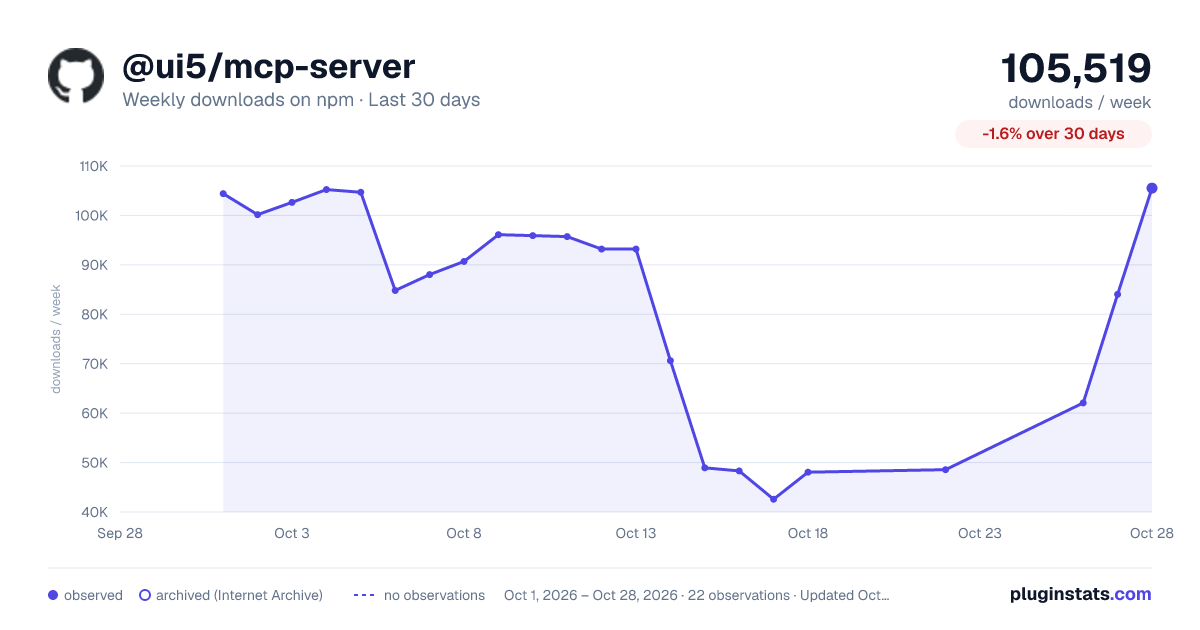
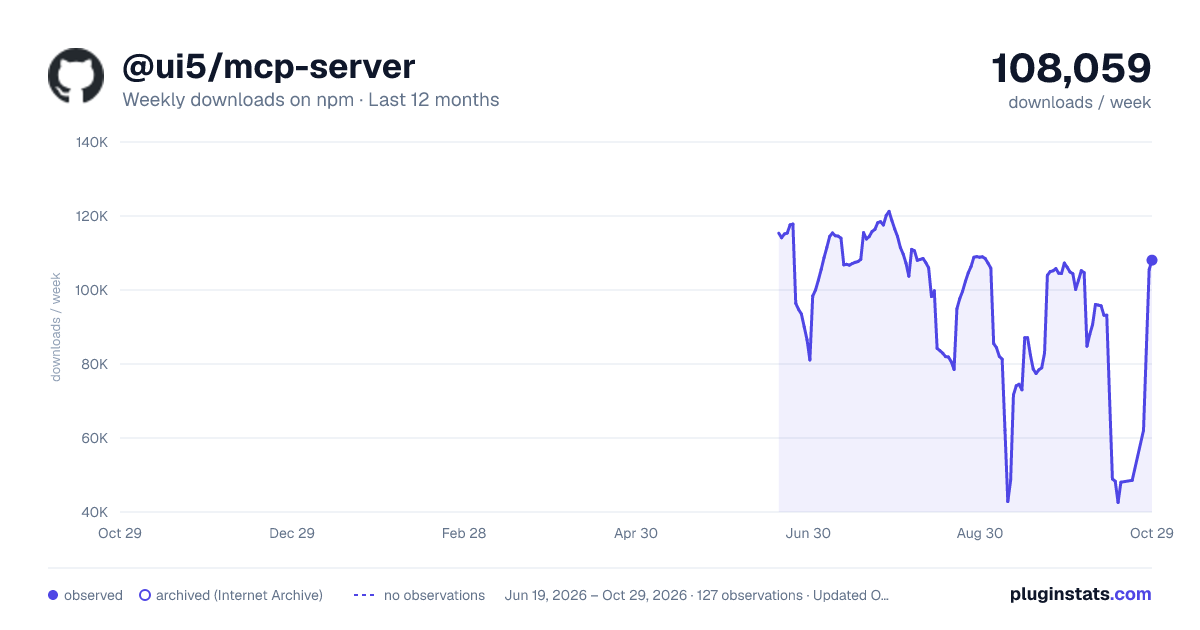
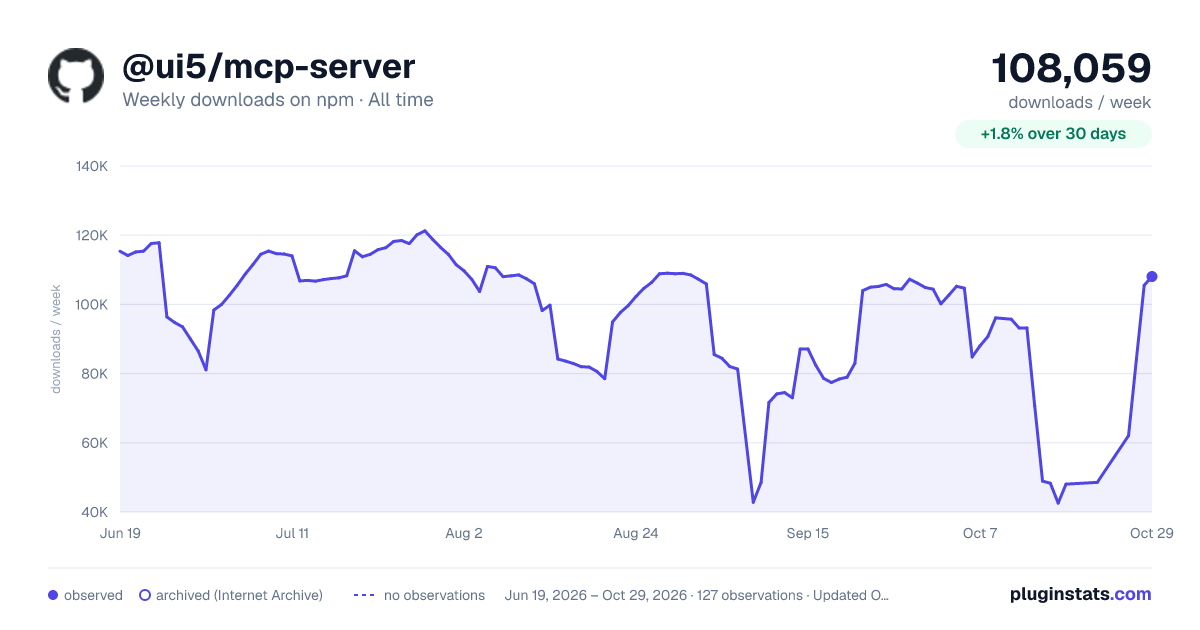

Adoption over time
7/30/90-day growth
Ranking history
Listing placement
Listing placement
Filled points are observed values; hollow points come from Internet Archive snapshots of the listing page. Dashed segments span periods with no observations — values between points are not interpolated.
Each band is one page of 20. Weekly downloads on a linear scale. Placement is projected from weekly downloads, so it can differ from the marketplace's own sort order. Hover a dot to see the listing.
Recent observations
Full history (122)Similar npm MCP servers plugins
All 20 @ui5/mcp-server alternativesData source
Weekly downloads (trailing 7 complete days) come from the official npm downloads API. Downloads include CI and mirrors and are not equivalent to installs or users. npm publishes no ratings.
Listing: https://www.npmjs.com/package/@ui5/mcp-server. First seen Oct 16, 2026; last successful collection Oct 20, 2026. See the methodology.