 PluginStats
prettier-plugin-auto-sort-imports weekly downloads statistics
By crmapache (2 listings) · npm · Prettier plugins
Zero-config Prettier plugin that sorts and groups imports with blank lines between groups. Discovers your tsconfig/jsconfig path aliases automatically - no regex configuration. Works with TypeScript and JavaScript, frontend and backend.
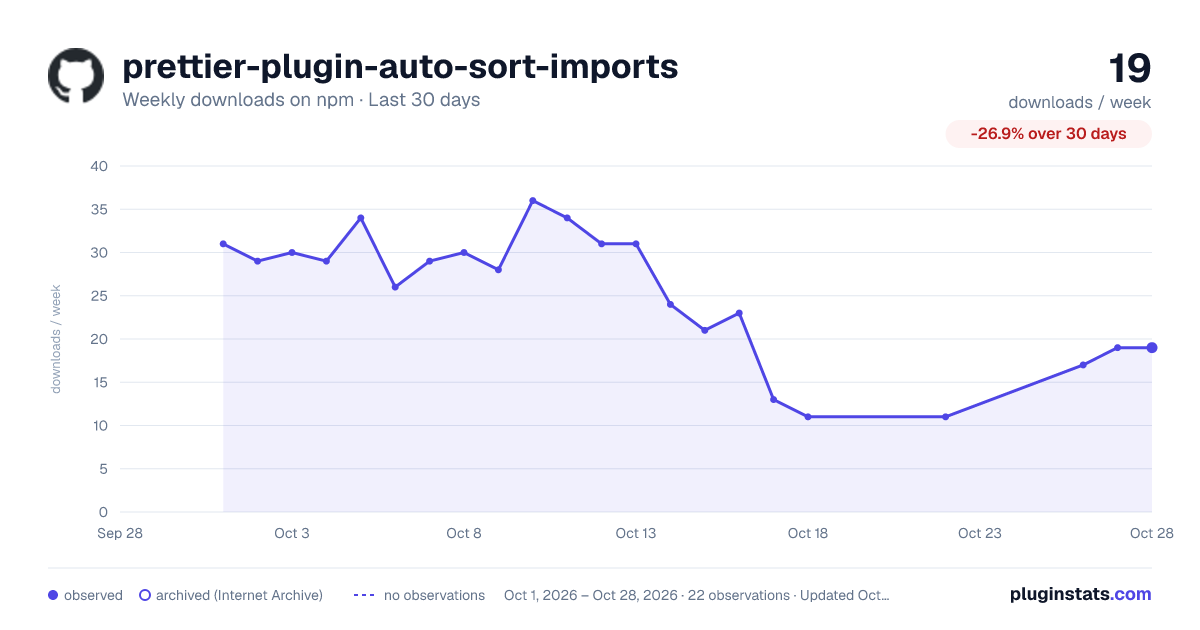
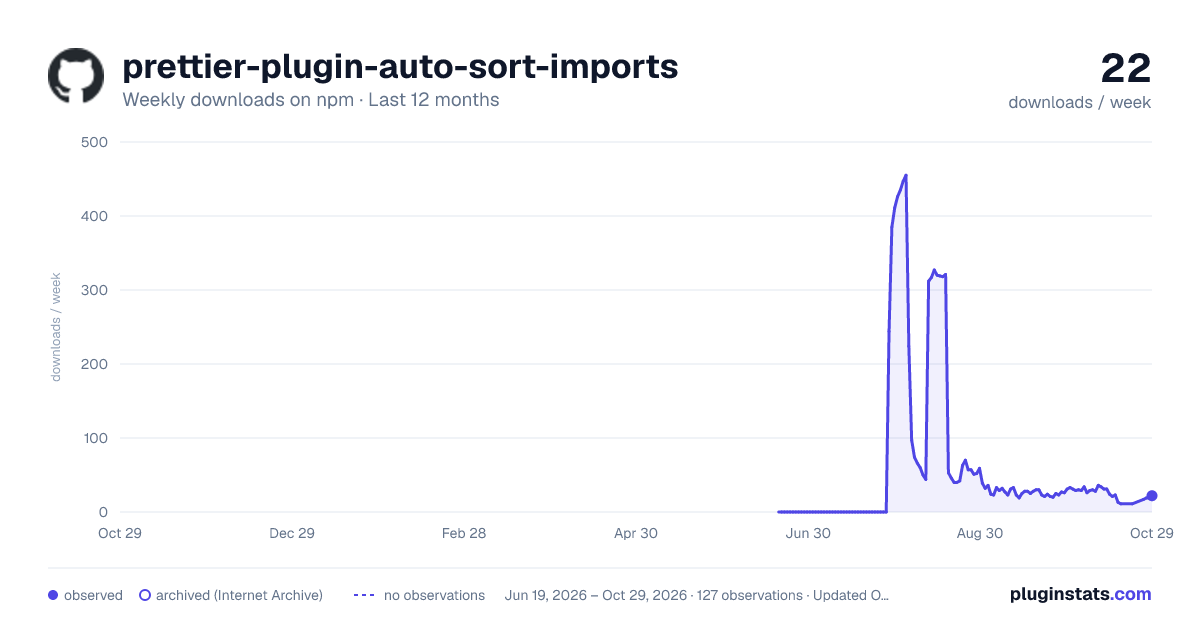
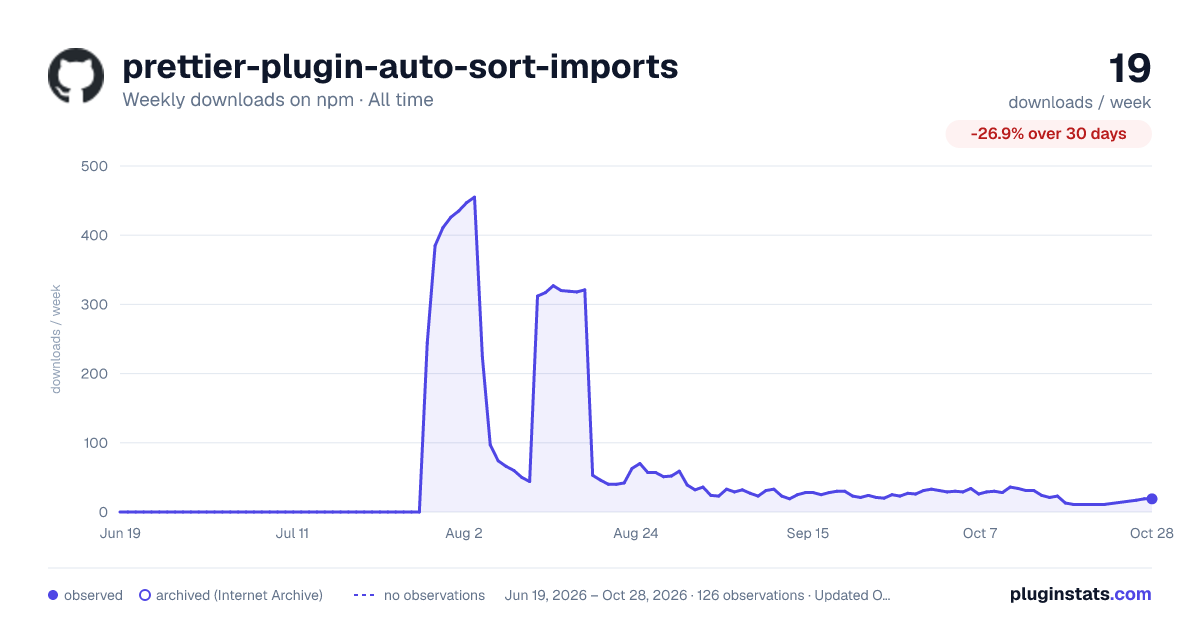
prettier-plugin-auto-sort-imports has 13 recorded weekly downloads on npm, a decrease of 53.6% over the past 30 days.
It ranks #1889 of 2,256 tracked npm listings by weekly downloads.
PluginStats has 121 daily observations since Jun 19, 2026; the latest is from Oct 17, 2026.
About prettier-plugin-auto-sort-imports
prettier-plugin-auto-sort-imports
Sorts and groups your imports, with blank lines between groups, without asking you to write a single regular expression.
It reads your tsconfig.json / jsconfig.json and works out which imports are your own path aliases, which are npm packages, which are Node builtins and which are relative. Install it, and it does the right thing.
Try it in the playground → Paste your own file, pick a preset, and see what this plugin would do to it.
Why another one
The popular plugins make you choose between control and convenience:
| | auto-sort-imports | @trivago/…sort-imports | @ianvs/…sort-imports | …organize-imports |
| Works with zero configuration | Yes | No | No | Yes | | Requires hand-written regexes | No | Yes | Yes | No | | Blank lines between groups | Yes | Yes | Yes | No | | Finds your aliases from tsconfig itself | Yes | No | No | No | | Groups your monorepo packages | Yes | No | No | No | | Needs TypeScript installed | No | No | No | Yes | | Removes unused imports | Opt-in | No | No | Always | | Prettier 2 and 3 | Both | Both | Both | Both |
With the regex-based plugins, a project using @core, @ui and @server has to declare and maintain something like:
Here you declare nothing. Those aliases are already in your tsconfig.json, so the plugin uses them.
Install
Usage
Prettier 3 (plugins must be listed explicitly):
Prettier 2 works with the same config.
That is the whole setup. Everything below is optional.
Live playground
prettier-plugin-sort-imports.vercel.app runs this plugin on a server and formats as you type. Pick one of the nine framework presets, edit the sample or paste your own file, and flip the options to see what each one changes.
Nothing there is a simulation: the page sends your code to the published package and prints what comes back.
Example
Input
Output
Groups
Imports are placed into these groups, in this order:
| Group | What lands there |
| builtin | Node builtins: node:fs, path, crypto | | library | Unscoped npm packages, plus any package you pinned as a priority | | scoped | Scoped npm packages such as @mui/material | | workspace | Packages from your own monorepo | | alias | Your own path aliases from tsconfig/jsconfig | | relative | ./foo, ../bar |
Within a group, packages are ordered by depth and then alphabetically. Depth is measured from the package name, so @mui/material ranks alongside axios rather than alongside lodash/debounce - a scope is part of the name, not a folder level. Relative paths count every slash, so ../shallow comes before ../../deep.
A scope is one family, so it is never split in two. Pinning @nestjs/common as a priority package brings @nestjs/swagger and the rest of @nestjs into the library group with it, instead of leaving them behind in the scoped group.
Side-effect imports stay where you put them
import './styles.css', import 'reflect-metadata', import './setup/dayjs' - an import with no bindings exists only to run code, so its position is part of how your program behaves. A stylesheet loaded later wins the cascade; a setup module has to run before whatever depends on it. Nothing about the import itself says which, so the plugin never moves them.
They act as boundaries instead, and the imports around them are sorted in the runs they define:
In practice you write these at the top or the bottom of the block anyway, and there they stay - which is why the example above puts ./styles.scss last.
Monorepos
Packages from your own repository are dependencies, so by default they would sort next to react and lodash even though they are your code. They get their own group instead, between third-party libraries and the aliases of the package you are editing:
Membership is detected from whichever of these your setup uses, so there is nothing to configure:
• a workspace: version range in package.json (pnpm, yarn berry, bun) • a workspaces field in the repository root package.json (npm, yarn classic) • pnpm-workspace.yaml
Aliases are resolved from the tsconfig nearest to the file being formatted, so each package in the monorepo gets its own. Set sortImportsDetectWorkspace: false to sort workspace packages among the libraries instead.
Frameworks
The auto preset reads the nearest package.json and picks defaults for React, Next.js, NestJS, Vue, Nuxt, Svelte, Angular or plain Node. This only affects which packages get pinned to the top of the library group, for example react and next for a Next.js app, or @nestjs/common and typeorm for a Nest service.
Single-file components work too. Prettier hands blocks to its JavaScript and TypeScript parsers, which is where this plugin attaches, so .vue, .svelte and .astro files are sorted alongside your regular sources.
Options
Everything is optional.
| Option | Type | Default |
| sortImportsPreset | auto \| react \| next \| nest \| node \| vue \| nuxt \| svelte \| angular \| none | auto | | sortImportsGroups | array of group ids | preset default | | sortImportsPriorityPackages | array of package names | preset default | | sortImportsAliases | array of alias prefixes | [] | | sortImportsSpecifierOrder | length \| alphabetical \| none | length | | sortImportsSeparator | boolean | true | | sortImportsGroupScoped | boolean | true | | sortImportsDetectWorkspace | boolean | true | | sortImportsRemoveUnused | boolean | false | | sortImportsIgnorePragma | string | @sort-imports-ignore |
Example:
sortImportsAliases is only needed for bundler aliases that are defined in Vite or webpack but not mirrored in your tsconfig.
Removing unused imports
Off by default. Deleting code while formatting should be a deliberate choice.
When enabled, the plugin skips whole files where the analysis could be wrong:…
Description from the npm listing.
- prettier
- prettier-plugin
- plugin
- sort
- sort-imports
- import-order
- organize-imports
- imports
- formatting
- typescript
- javascript
- react
- next
- vue
- nuxt
- svelte
- nestjs
- node
- monorepo
Where prettier-plugin-auto-sort-imports sits in the listing
Each band is one page of 20. Weekly downloads on a log scale. Placement is projected from weekly downloads, so it can differ from the marketplace's own sort order. Hover a dot to see the listing.


Charts
Images: 30d · 1y · all time · 1600×900 dark

Adoption over time


7/30/90-day growth


Filled points are observed values; hollow points come from Internet Archive snapshots of the listing page. Dashed segments span periods with no observations — values between points are not interpolated.
Recent observations
Full history (121)Similar npm Prettier plugins plugins
Data source
Weekly downloads (trailing 7 complete days) come from the official npm downloads API. Downloads include CI and mirrors and are not equivalent to installs or users. npm publishes no ratings.
Listing: https://www.npmjs.com/package/prettier-plugin-auto-sort-imports. First seen Oct 16, 2026; last successful collection Oct 19, 2026. See the methodology.