 PluginStats
@tacticlaunch/mcp-linear weekly downloads statistics
By tacticlaunch · npm · MCP servers
A Model Context Protocol (MCP) server implementation for the Linear GraphQL API that enables AI assistants to manage Linear projects and search issues by text, state, and date.
@tacticlaunch/mcp-linear has 17,840 recorded weekly downloads on npm, a decrease of 39.1% over the past 30 days, ranking #814 of 2,322 tracked listings.
About @tacticlaunch/mcp-linear
MCP Linear
A Model Context Protocol (MCP) server for the Linear GraphQL API, built for real project-management workflows — not just basic issue CRUD.


Features
MCP Linear bridges AI assistants and Linear by implementing the MCP protocol. With it you can:
- Retrieve issues, projects, teams, cycles, milestones, roadmaps, customers, customer needs, and workspace/project/initiative/team/issue/release/cycle documents
- Create and update issues, change status, assign, and comment
- Manage projects, full diff-aware project and initiative update lifecycles, milestones, roadmaps, saved views, and favorites
- Create and manage workspace webhooks, including updates and signing-secret rotation
- Prepare OAuth app manifests and authorization URLs, issue scoped client-credentials tokens, or manage child OAuth apps when authenticated as a managing OAuth application
- Work with templates, custom fields, and attachments
- Work with customer records, customer statuses/tiers, and customer needs linked to issues or projects
- Read notifications, subscriptions, sessions, audits, and integrations without leaving MCP
- Inspect rate-limit and server health before running heavy planning sessions
See TOOLS.md for the full inventory.
MCP-native resources and prompts
The server exposes MCP resources and prompts in addition to tools, including:
- Resources:
linear://viewer,linear://organization,linear://teams,linear://projects,linear://project/{id},linear://project/{id}/issues,linear://project/{id}/documents,linear://issue/{id},linear://document/{id},linear://roadmap/{id},linear://milestone/{id},linear://rate-limit - Prompts:
summarize-project-status,draft-project-update,triage-issue,summarize-document
Example prompts
Once connected, you can use prompts like:
- "Show me all my Linear issues"
- "Create a new issue titled 'Fix login bug' in the Frontend team"
- "Change the status of issue FE-123 to 'In Progress'"
- "Assign issue BE-456 to John Smith"
- "Show all open issues in this project grouped by milestone and cycle"
- "Draft a weekly project update from the current Linear state"
- "Find the newest documents related to a project and summarize the key decisions"
- "Show the pinned documents and links on this team's home page"
- "Create a document for ENG-123 with resource ordering metadata"
- "Get the latest project update diff and archive an outdated update"
- "Show customer needs for this project and mark the important ones"
- "Create an initiative update and hide the generated diff from the update body"
- "Prepare a private OAuth app for my GitHub issue pipeline with client credentials enabled"
- "Issue a narrowly scoped client-credentials token for that GitHub pipeline"
- "Create a webhook for Issue and Comment events, then rotate its signing secret"
Installation
Authentication
Personal API key (default)
- Log in to your Linear account at linear.app
- Click on your organization avatar (top-left corner)
- Select Settings
- Navigate to Security & access in the left sidebar
- Under Personal API Keys click New API Key
- Give your key a name (e.g.,
MCP Linear Integration) - Copy the generated API token and store it securely — you won't be able to see it again
Personal API keys support the normal Linear and workspace-webhook tools. They cannot call Linear's alpha managed-child-OAuth-application API because that API requires the caller itself to be an OAuth application. With a personal API key, linear_generateOAuthApplicationSetup still prepares an official manifest and pre-filled Linear setup URL for an administrator to confirm.
OAuth access token (managed OAuth applications)
To let MCP actually create and manage child OAuth applications, authenticate it with an access token belonging to a Linear OAuth application that is eligible to manage those child applications:
export LINEAR_OAUTH_ACCESS_TOKEN=YOUR_OAUTH_ACCESS_TOKEN
mcp-linear
Or pass --oauth-token YOUR_OAUTH_ACCESS_TOKEN. Explicit command-line credentials take precedence over environment variables; when both environment credential types are present, OAuth authentication is selected. See Linear's OAuth documentation and OAuth application manifests.
Each MCP server process uses one Linear credential. If the managing app token uses actor=app (which cannot receive admin) and you also need admin-scoped workspace-webhook tools, configure two MCP server entries: one with the managing OAuth token for child-app operations and one with a workspace administrator's personal API key for workspace webhooks. A user-actor OAuth token carrying admin can cover the webhook side instead.
OAuth scopes are selected when an authorization URL or client-credentials token is requested; they are not mutable fields on an OAuth application. The MCP validates current Linear scopes, prepares authorization URLs, and can issue app-actor tokens with linear_createOAuthClientCredentialsToken. For GitHub-hosted pipelines, enable the client_credentials grant and request the narrowest useful scope, such as issues:create.…
Description from the npm listing.
- mcp
- linear
- cursor
- claude
- ai
- model-context-protocol
- project-management
README badge
Show your rank in a README or on your website. The badge updates automatically.
Charts
Images: 30d · 1y · all time · 1600×900 dark
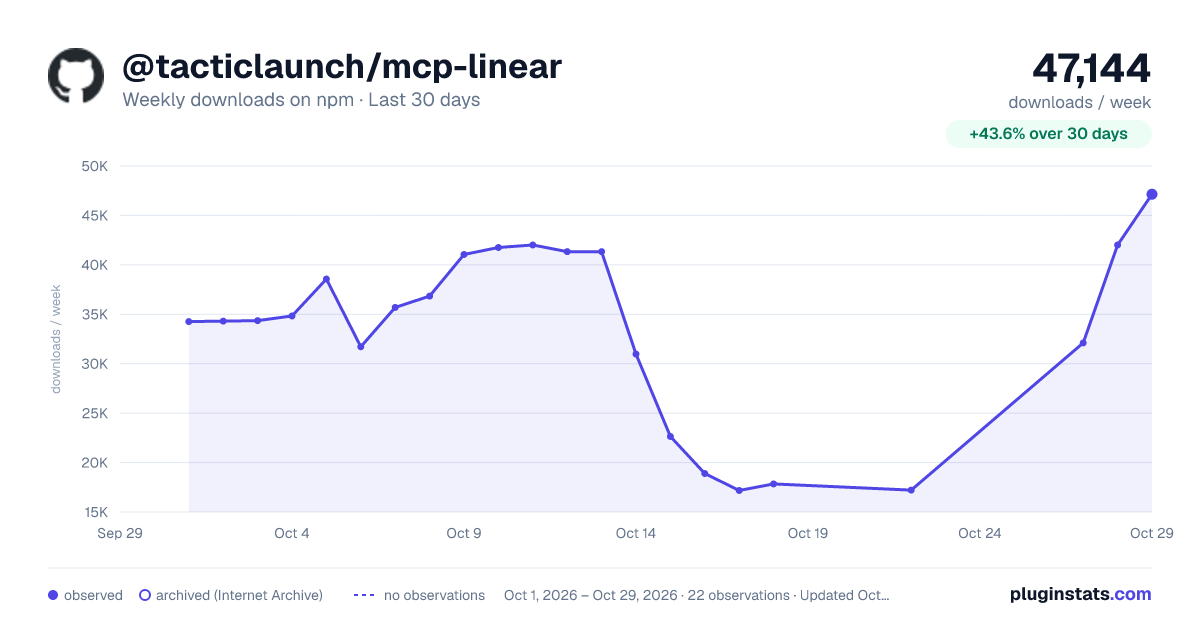
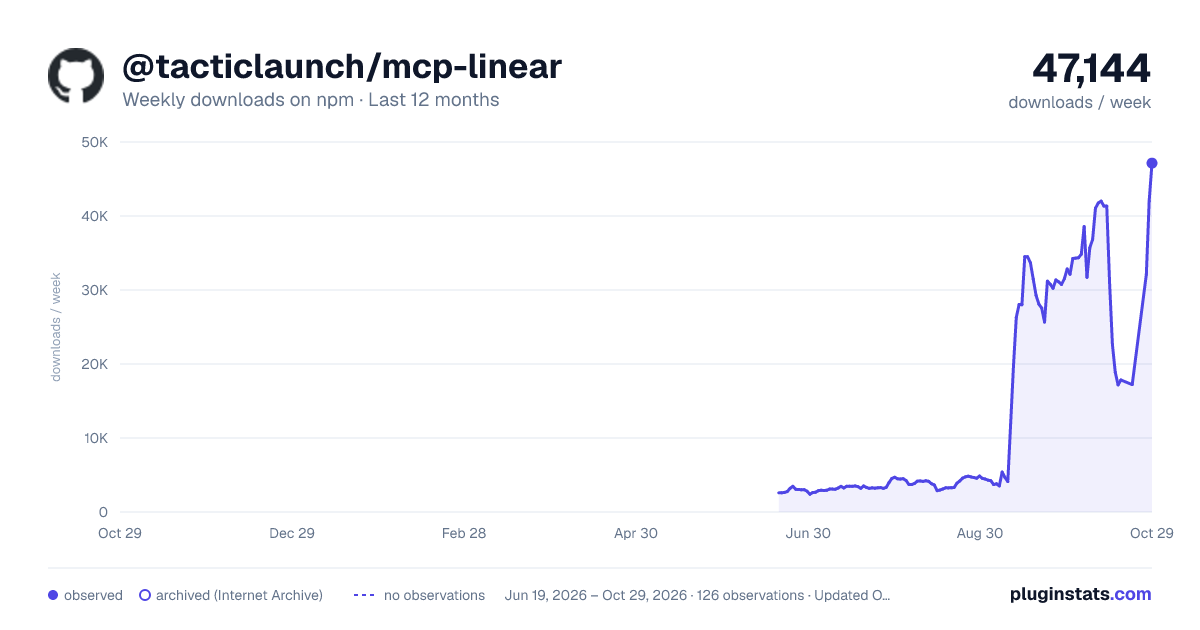
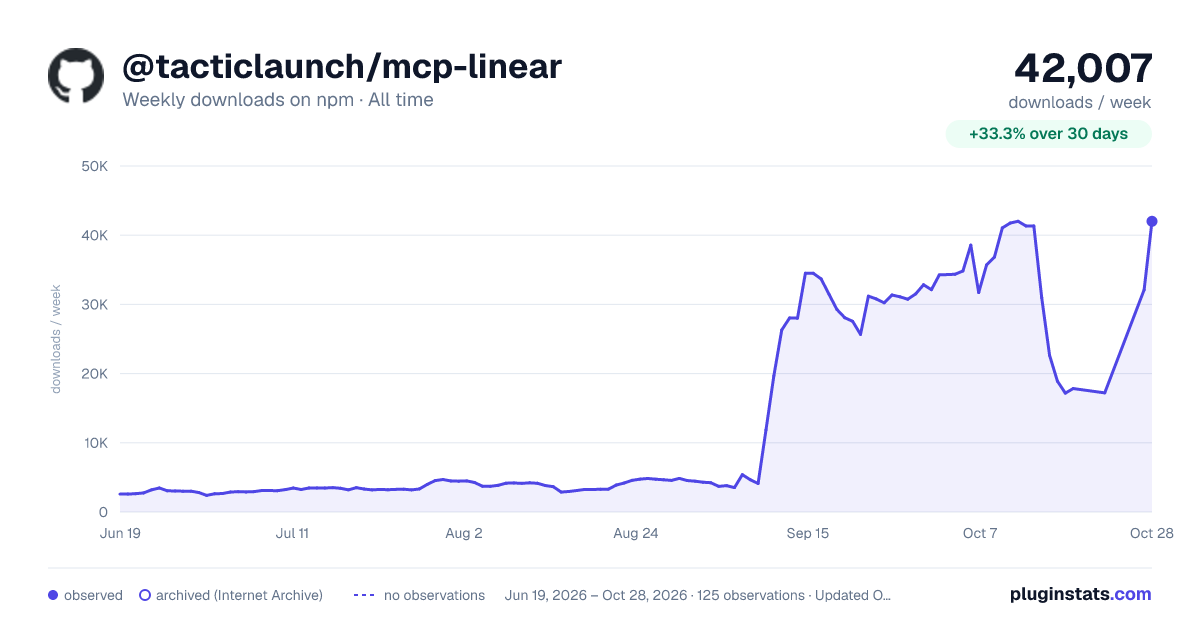

Adoption over time
7/30/90-day growth
Ranking history
Listing placement
Listing placement
Filled points are observed values; hollow points come from Internet Archive snapshots of the listing page. Dashed segments span periods with no observations — values between points are not interpolated.
Each band is one page of 20. Weekly downloads on a linear scale. Placement is projected from weekly downloads, so it can differ from the marketplace's own sort order. Hover a dot to see the listing.
Recent observations
Full history (122)Similar npm MCP servers plugins
All 20 @tacticlaunch/mcp-linear alternatives- 17.4K weekly downloads-50.4%
Data source
Weekly downloads (trailing 7 complete days) come from the official npm downloads API. Downloads include CI and mirrors and are not equivalent to installs or users. npm publishes no ratings.
Listing: https://www.npmjs.com/package/@tacticlaunch/mcp-linear. First seen Oct 16, 2026; last successful collection Oct 20, 2026. See the methodology.