 PluginStats
env.style weekly downloads statistics
By QuadDepo · npm · Vite plugins
Environment-tinted favicons for Next.js and Vite — see at a glance whether a tab is dev, preview, staging, or production.
env.style has 14,929 recorded weekly downloads on npm, a decrease of 19.5% over the past 30 days, ranking #824 of 2,306 tracked listings.
About env.style
env.style 🎨
Five browser tabs, all the same favicon — dev, preview, production — and you keep
editing the wrong one. env.style tints your existing favicon per environment at build
time, Vercel-style: same mark, different color.
Production is never touched.
Install
pnpm add env.style
# or: npm install env.style
Usage
Next.js
// next.config.ts
import { withEnvStyles } from 'env.style'

export default withEnvStyles(nextConfig)
That's the only change needed. No layout edits, no manual favicon files.
Vite
// vite.config.ts
import { defineConfig } from 'vite'
import react from '@vitejs/plugin-react'
import { envStyle } from 'env.style/vite'

export default defineConfig({
  plugins: [react(), envStyle()],
})
Default colors
| environment | color |
|---|---|
| development | #3b82f6 blue |
| preview | #f59e0b amber |
| anything else | #6b7280 gray |
| production | never touched |
Environment names are plain strings: whatever detection yields (e.g.
ENV_STYLES_ENV=staging, or a Vercel custom environment via VERCEL_TARGET_ENV) is
used as the color key. Any env without a color gets the gray fallback — except
production, which is never touched.
Options
enabled?: boolean— kill switch for the whole tool. Defaulttrue.color?: Partial<Record<string, string>>— override the tint color per environment.environment?: string— force the environment instead of detecting it.excludeColors?: string[]— keep pixels near these colors untinted (e.g. white backgrounds or marks in an icon that shouldn't shift).icon?: string | Partial<Record<string, string>>— path to a ready-made icon, or a per-environment map of paths (e.g.{ staging: 'staging-icon.png' }), served as-is for styled environments. Tinting andexcludeColorsare skipped entirely. An env missing from the map falls back to normal tinting.
export default withEnvStyles(nextConfig, {
  color: { staging: '#ff00ff' },
  excludeColors: ['#fff'],
})
How it works
- Detects the environment:
environmentoption →ENV_STYLES_ENV→VERCEL_TARGET_ENV→VERCEL_ENV. If none is set, Next.js falls back toNODE_ENV; Vite falls back to the command (dev server = development,vite build= production — setENV_STYLES_ENVto tint a build). - Tints your existing favicon with
sharpand writes it topublic/__envstyle/, which self-gitignores. - Next.js: serves the tinted icon at your normal favicon URLs via
beforeFilesrewrites, withCache-Control: no-storeso stale icons don't linger after switching envs. - Vite: rewrites
<link rel="icon">tags inindex.htmlto point at the tinted icon (injecting one if none exists) and serves it withno-storefrom dev-server middleware.
Known limits
- Environment is resolved at build time — a single build promoted across environments won't restyle.
- CDN-only favicons aren't intercepted; on Next.js, custom metadata
iconspaths aren't either. - Icon source changes need a dev server or build restart to pick up.
Development
pnpm test— unit tests (vitest);pnpm typecheck— TypeScript.pnpm test:visual— fetches real brand favicons and writes a before/after tint gallery to.tmp/visual/index.html(needs network; Node >= 22.18 to run the.tsscript directly).- Runnable examples:
cd examples/nextjs && pnpm install && pnpm dev(same forexamples/vite-react) — the tab favicon should render tinted green.
License
MIT
Description from the npm listing.
- nextjs
- vite
- vite-plugin
- favicon
- environment
- dx
- staging
- preview
README badge
Show your rank in a README or on your website. The badge updates automatically.
Charts
Images: 30d · 1y · all time · 1600×900 dark
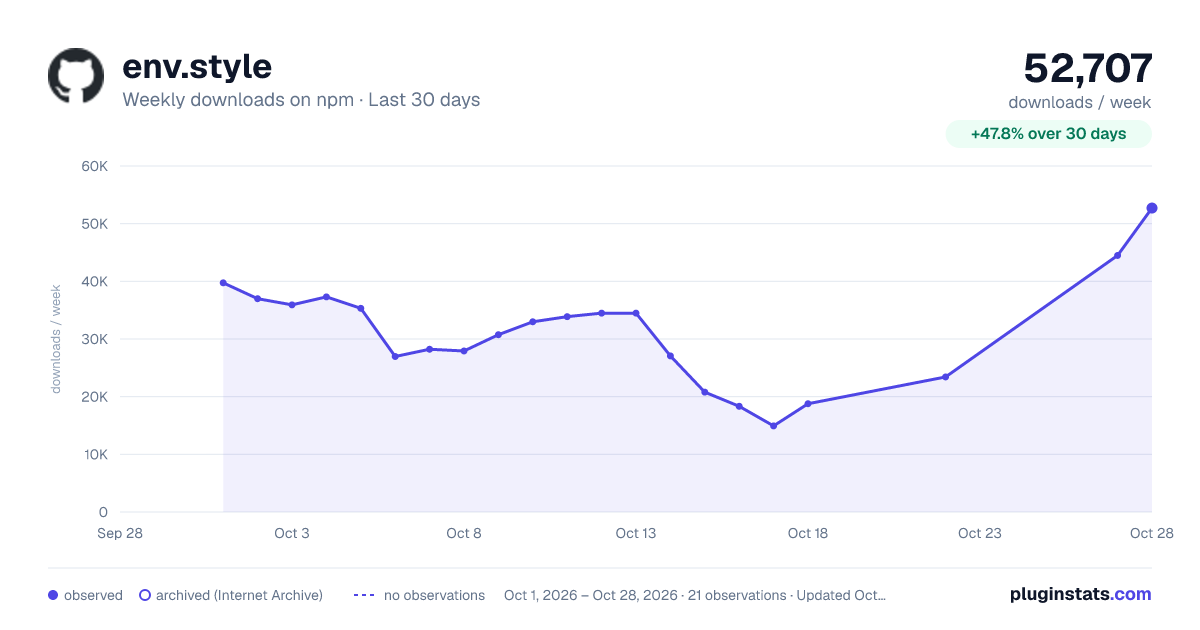
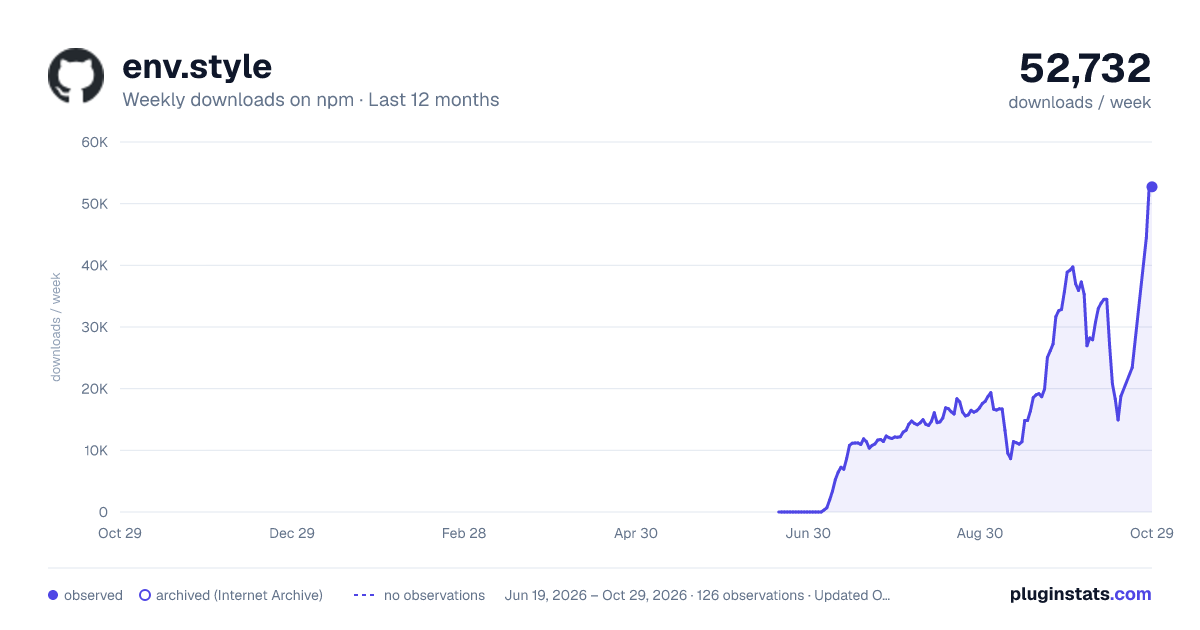
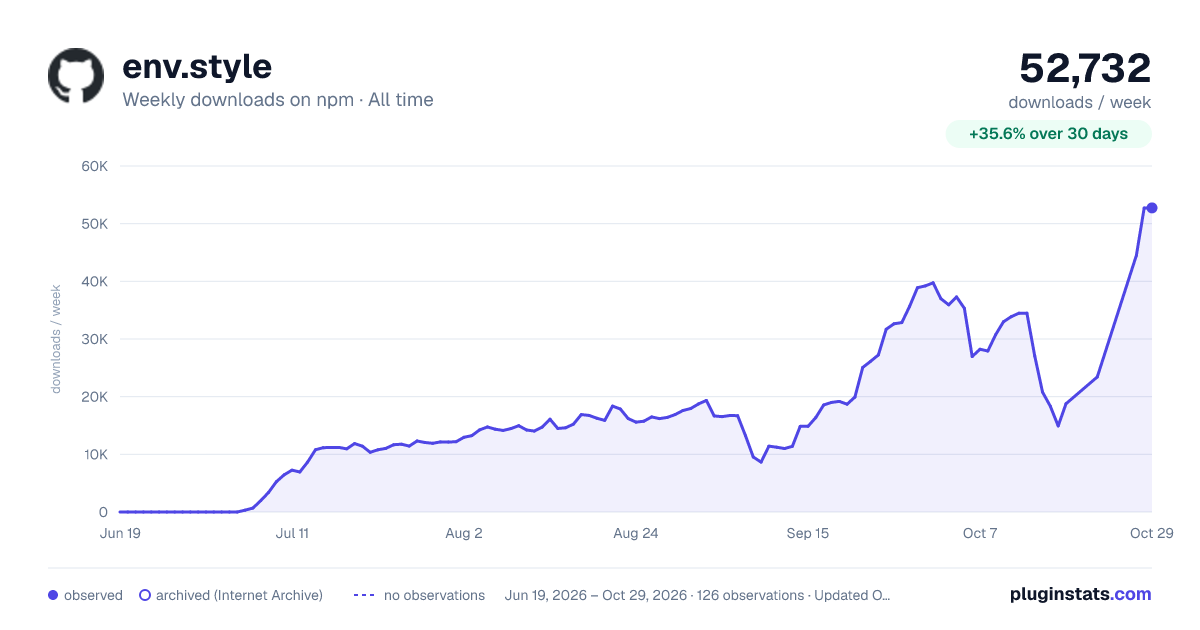

Adoption over time
7/30/90-day growth
Ranking history
Listing placement
Listing placement
Filled points are observed values; hollow points come from Internet Archive snapshots of the listing page. Dashed segments span periods with no observations — values between points are not interpolated.
Each band is one page of 20. Weekly downloads on a linear scale. Placement is projected from weekly downloads, so it can differ from the marketplace's own sort order. Hover a dot to see the listing.
Recent observations
Full history (122)Similar npm Vite plugins plugins
All 20 env.style alternativesData source
Weekly downloads (trailing 7 complete days) come from the official npm downloads API. Downloads include CI and mirrors and are not equivalent to installs or users. npm publishes no ratings.
Listing: https://www.npmjs.com/package/env.style. First seen Oct 16, 2026; last successful collection Oct 20, 2026. See the methodology.