 PluginStats
figma-console-mcp weekly downloads statistics
By southleft · npm · MCP servers
The most comprehensive MCP server for Figma — design tokens, variables, components, write tools, version history diff, accessibility audits, FigJam, Slides, and more. Local (WebSocket Desktop Bridge plugin) and Cloudflare Workers (paired + remote) modes.
figma-console-mcp has 3,812 recorded weekly downloads on npm, a decrease of 40.4% over the past 30 days.
It ranks #1155 of 2,256 tracked npm listings by weekly downloads.
Over 90 days, weekly downloads changed by -80.9%.
PluginStats has 543 daily observations since Apr 23, 2025; the latest is from Oct 17, 2026.
About figma-console-mcp
Figma Console MCP Server
Your design system as an API. A design-system-focused Model Context Protocol server for Figma. It works in both directions (Figma ⇄ code), writes to Figma, and runs deterministic checks for design-code parity, accessibility, and design-system health. It hands the AI exact tokens, variants, bindings, and states as structured data rather than prescribing a framework or house style, so generated code follows your team's own stack and conventions.
🆕 Accuracy & safety fixes (latest v1.40.9): Nine patches since v1.40.0's Design System Extraction, driven by community reports. Generated component docs now describe every variant accurately — backgrounds, hidden layers and the properties that show them, per-corner radius and border tokens, typography and layer structure across variants, and source links pinned to a commit. figma_export_tokens can no longer overwrite a token file from the wrong Figma file, overrides in extended variable collections are visible, min/max sizing survives every JSON extraction path, colors set to another color at an opacity export and import with their link intact, and the published package passes npm audit cleanly. Server-only — no plugin re-import needed. See what's new →
What is this?
Figma Console MCP connects AI assistants (like Claude) to Figma, enabling:
• 🎨 Design system extraction - Pull variables, components, and styles • 🧬 Codebase → design system extraction - Scan a production codebase, mine its de-facto styling into DTCG tokens with per-token provenance, scaffold a design-system package with a wired Storybook workshop, and gate it with deterministic fidelity evals — then round-trip the tokens into Figma variables (Local Mode) • 🔁 Bidirectional token sync - Export Figma variables to DTCG JSON (legacy or 2025.10 dialect) + 9 more formats; push code-side edits back to Figma with full apply — creates, renames, alias re-targeting, and replace-gated deletes. Replaces Style Dictionary and Tokens Studio's export pipeline. • 📸 Visual debugging - Take screenshots for context • ✏️ Design creation - Create UI components, frames, and layouts directly in Figma — including one-call component-set creation from a variant axes matrix • 🔧 Variable management - Create, update, rename, and delete design tokens • 🕰 Version history & time-series awareness - List versions, diff snapshots, generate markdown changelogs, trace property/variant introduction via binary-search blame, and fold per-component design + git history into generated component docs • ⚡ Real-time monitoring - Watch console logs from the Desktop Bridge plugin • 📌 FigJam boards - Create stickies, flowcharts, tables, and code blocks on collaborative boards • 🎞️ Slides presentations - Build and manage Figma Slides decks programmatically • ♿ Accessibility scanning - 14 WCAG design checks with conformance level tagging, component scorecards, axe-core code scanning, design-to-code parity • 🔍 Design-code parity & component docs - Deterministic comparison of a Figma component with its code (visual, spacing, typography, tokens, component API, accessibility), and generated component documentation with per-variant tokens and an optional design + git changelog • 📋 Design-system health audits - Lighthouse-style scored audit across naming, tokens, component metadata, accessibility, consistency, and coverage — available as a plain tool for any MCP client (with per-finding auto-fix guidance) and as a visual dashboard app • 🛡 Cross-MCP identity - Every tool response carries _mcp: "figma-console-mcp" and errors are prefixed [figma-console-mcp] so attribution stays unambiguous in agents running multiple Figma MCPs • ☁️ Cloud Write Relay - Web AI clients (Claude.ai, v0, Replit) can design in Figma via cloud pairing • 🔄 Four ways to connect - Remote SSE, Cloud Mode, NPX, or Local Git
⚡ Quick Start
Choose Your Setup
First, decide what you want to do:
| I want to... | Setup Method | Time |
| Create and modify designs with AI | NPX Setup (Recommended) | ~10 min | | Design from the web (Claude.ai, v0, Replit, Lovable) | Cloud Mode | ~5 min | | Contribute to the project | Local Git Setup | ~15 min | | Just explore my design data (read-only) | Remote SSE | ~2 min |
⚠️ Important: Capability Differences
| Capability | NPX / Local Git | Cloud Mode | Remote SSE |
| Read design data | ✅ | ✅ | ✅ | | Create components & frames | ✅ | ✅ | ❌ | | Edit existing designs | ✅ | ✅ | ❌ | | Manage design tokens/variables | ✅ | ✅ | ❌ | | FigJam boards (stickies, flowcharts) | ✅ | ✅ | ❌ | | Real-time monitoring (console, selection) | ✅ | ❌ | ❌ | | Codebase → design system extraction (figma_ds_*) | ✅ | ❌ | ❌ | | Desktop Bridge plugin | ✅ | ✅ | ❌ | | Requires Node.js | Yes | No | No | | Total tools available | 121 | 96 after pairing | Read-only subset |
Bottom line: Remote SSE is read-only until you pair the plugin. Cloud Mode unlocks write access (96 tools) from web AI clients without Node.js. NPX/Local Git gives the full 121 tools with real-time monitoring.
🚀 NPX Setup (Recommended)
Best for: Designers who want full AI-assisted design capabilities.
What you get: All 121 tools including design creation, variable management, and component instantiation.
Prerequisites
• [ ] Node.js 18+ — Check with node --version (Download) • [ ] Figma Desktop installed (not just the web app) • [ ] An MCP client (Claude Code, Cursor, Windsurf, Claude Desktop, etc.)
Step 1: Get Your Figma Token
1. Go to Manage personal access tokens in Figma Help 2. Follow the steps to create a new personal access token 3. Enter description: Figma Console MCP 4. Set scopes: File content (Read), File versions (Read), Variables (Read), Comments (Read and write) 5. Copy the token — you won't see it again! (starts with figd_)
Step 2: Configure Your MCP Client
Claude Code (CLI):
Cursor / Windsurf / Claude Desktop:
Add to your MCP config file (see Where to find your config file below):
📂 Where to Find Your Config File…
Description from the npm listing.
- mcp
- figma
- plugin
- design-tokens
- design-systems
- variables
- figjam
- slides
- accessibility
- ai
- anthropic
- claude
- cloudflare
Where figma-console-mcp sits in the listing
Each band is one page of 20. Weekly downloads on a log scale. Placement is projected from weekly downloads, so it can differ from the marketplace's own sort order. Hover a dot to see the listing.


Charts
Images: 30d · 1y · all time · 1600×900 dark
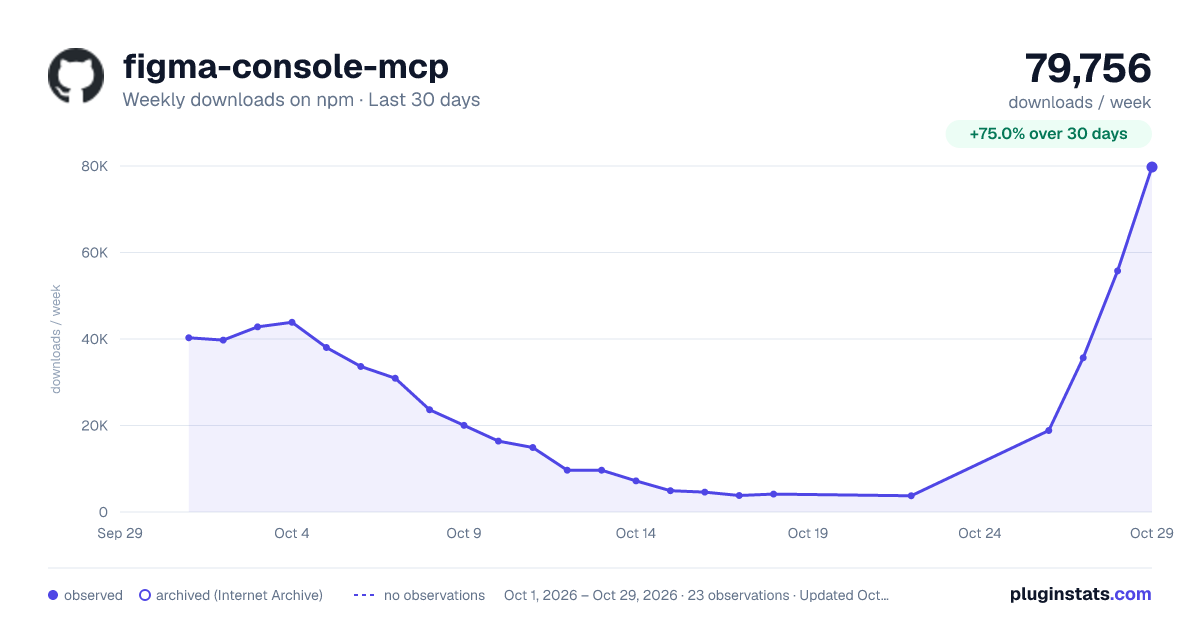
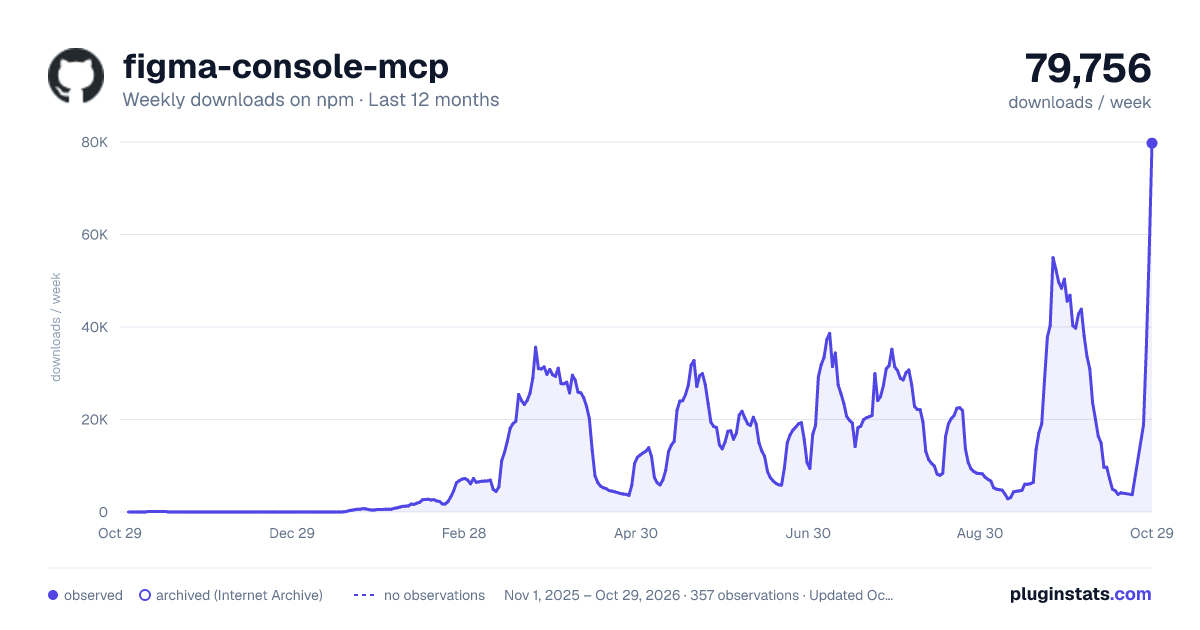
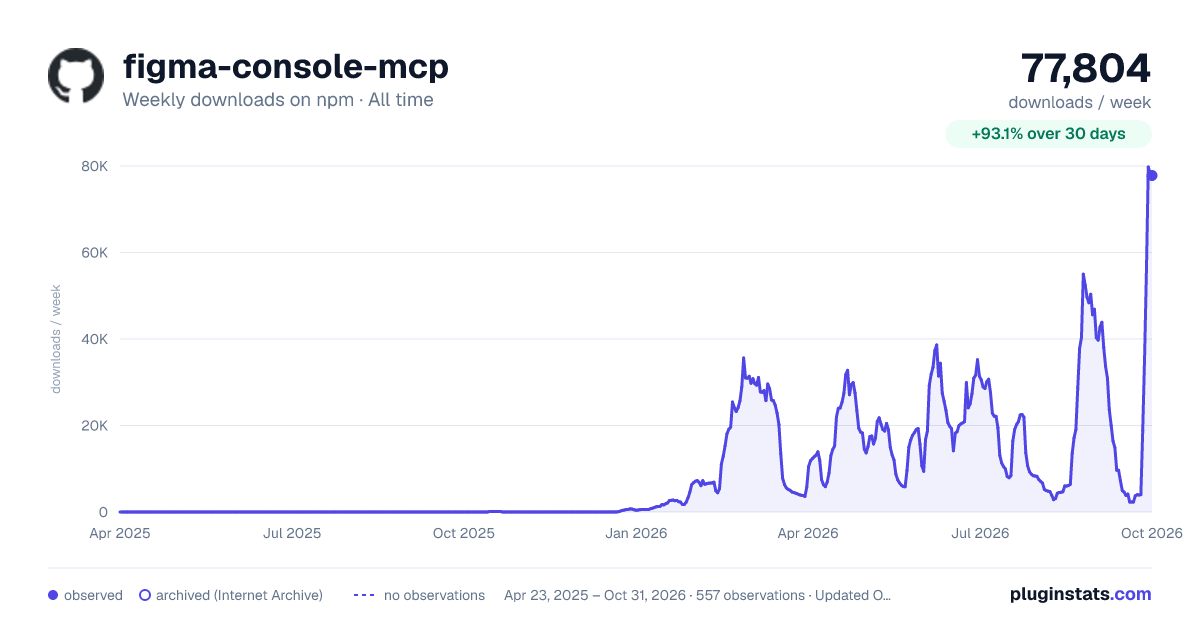

Adoption over time


7/30/90-day growth


Filled points are observed values; hollow points come from Internet Archive snapshots of the listing page. Dashed segments span periods with no observations — values between points are not interpolated.
Recent observations
Full history (543)Similar npm MCP servers plugins
Data source
Weekly downloads (trailing 7 complete days) come from the official npm downloads API. Downloads include CI and mirrors and are not equivalent to installs or users. npm publishes no ratings.
Listing: https://www.npmjs.com/package/figma-console-mcp. First seen Oct 16, 2026; last successful collection Oct 19, 2026. See the methodology.