 PluginStats
async-css-plugin weekly downloads statistics
By andreashuber69 · npm · Webpack plugins
Minimal webpack plugin that transforms links to css files such that they are loaded asynchronously.
async-css-plugin has 16 recorded weekly downloads on npm, a decrease of 62.8% over the past 30 days.
It ranks #1862 of 2,251 tracked npm listings by weekly downloads.
Over 90 days, weekly downloads changed by -70.9%.
PluginStats has 121 daily observations since Jun 19, 2026; the latest is from Oct 17, 2026.
About async-css-plugin
async-css-plugin
Browsers load CSS files (stylesheets) synchronously such that rendering of a page is delayed until all linked stylesheets have been downloaded. This behavior is typically desired because unstyled HTML is not something you want your users to see.
However, synchronous CSS loading can also get in the way, namely when a framework like Vue bundles your single page application such that all stylesheets are linked in *index.html*, but none of those styles are necessary to render the page initially. One common example is when *index.html* is designed to quickly show a loading indicator, then load all required assets in the background to finally transition to the main page when everything is ready. With synchronous CSS downloads the rendering of the loading indicator can be delayed to the point where e.g. a mobile user is shown a white screen for many seconds before the indicator finally shows up.
This is where asynchronous CSS loading can lead to a manifold decrease of the time to First Paint and thus to a much better perceived responsiveness of your site.
Prerequisites
This plugin is designed for applications that are built using webpack. More specifically, your application must satisfy one of the following conditions:
• Your application is built using webpack directly or a framework that allows for the configuration of webpack with *webpack.config.js*, like e.g. React. • Your application is built using a framework like Vue that "abstracts away" *webpack.config.js* but provides a different way to modify the webpack configuration.
NOTE: Unfortunately, this plugin does not seem to work with apps based on Angular, see this repo for more information. The steps still work with Angular v14, except for step 9, which can be safely skipped (with v14 css is always extracted, the extractCss setting is therefore no longer supported).
Getting Started
Installation
npm install async-css-plugin --save-dev
Configuration
AsyncCssPlugin configuration depends on how your project is set up, please see Prerequisites for more information.
webpack.config.js for webpack v4 & v5
If your project is configurable with *webpack.config.js*, it most likely already contains this file. For example, if you create a new React application with create-react-app and then run npm run eject, you'll find the file in the *config* folder. In this case you usually only need to add 2 lines of code:
If you started with webpack directly, e.g. as described here, then you've probably already created *webpack.config.js* yourself. In this case, you first need to get webpack to generate HTML, with html-webpack-plugin. Moreover, for CSS to be generated into separate files it is recommended to use mini-css-extract-plugin and css-loader. You can add these dependencies as follows:
npm install html-webpack-plugin mini-css-extract-plugin css-loader --save-dev
Given the configuration recommendations for these plugins with added asynchronous CSS loading your *webpack.config.js* should minimally look something like this:
vue.config.js for Vue v3
If your Vue v3 project does not yet contain *vue.config.js*, please create one in the same folder as *package.json*. Otherwise, please adapt accordingly:
By default, Vue already generates separate *.css* files, so there should be no need to make additional changes in *vue.config.js*.
vue.config.js for Vue v2
If your Vue v2 project does not yet contain *vue.config.js*, please create one in the same folder as *package.json*. Otherwise, please adapt accordingly:
Note that for Vue v2 it seems to be necessary to add HtmlWebpackPlugin even though the plugin is already used internally. In Vue v3 however, adding this plugin leads to an error during build, so the config must be different in v2 vs. v3.
Usage
Once webpack is configured as detailed above, stylesheet links in the generated HTML will look similar to the following:
For details on why and how this works, please see The Simplest Way to Load CSS Asynchronously by the filament group.
As mentioned above, async CSS loading only makes sense when the CSS being loaded does not affect the currently visible page. It is your responsibility to show a different page (e.g. a loading indicator) while this happens, check out Net Worth for an example.
Options
The AsyncCssPlugin constructor accepts an (optional) Options object.
Credits
This plugin was inspired by async-stylesheet-webpack-plugin.
Description from the npm listing.
- async
- css
- stylesheet
- webpack
- webpack-plugin
Where async-css-plugin sits in the listing
Each band is one page of 20. Weekly downloads on a log scale. Placement is projected from weekly downloads, so it can differ from the marketplace's own sort order. Hover a dot to see the listing.


Charts
Images: 30d · 1y · all time · 1600×900 dark
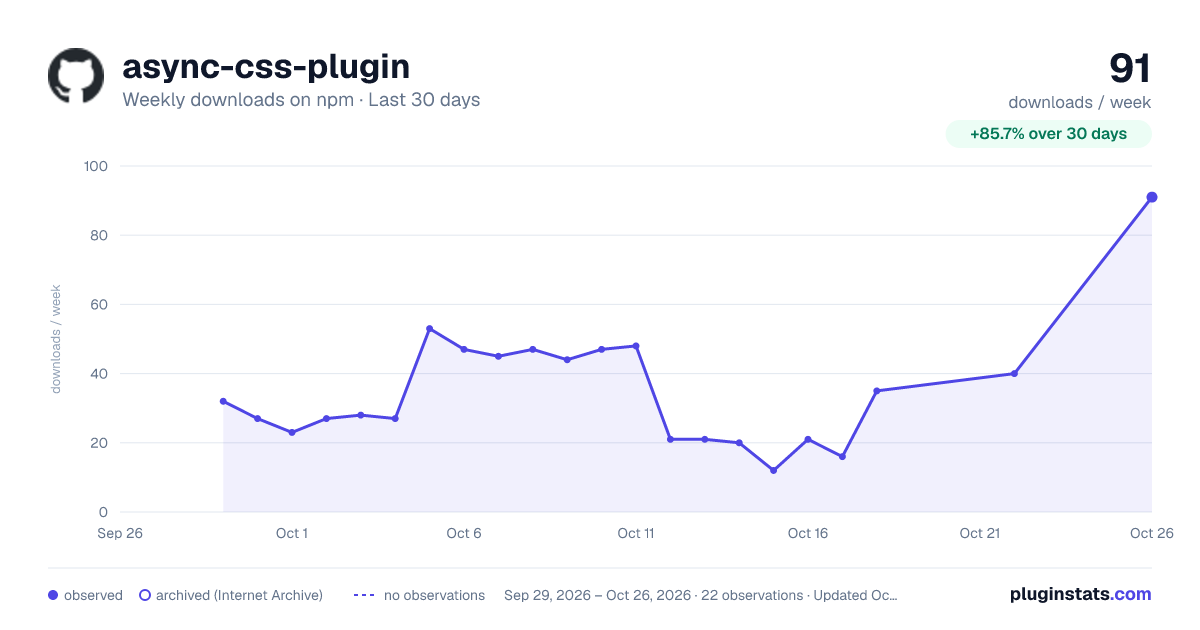
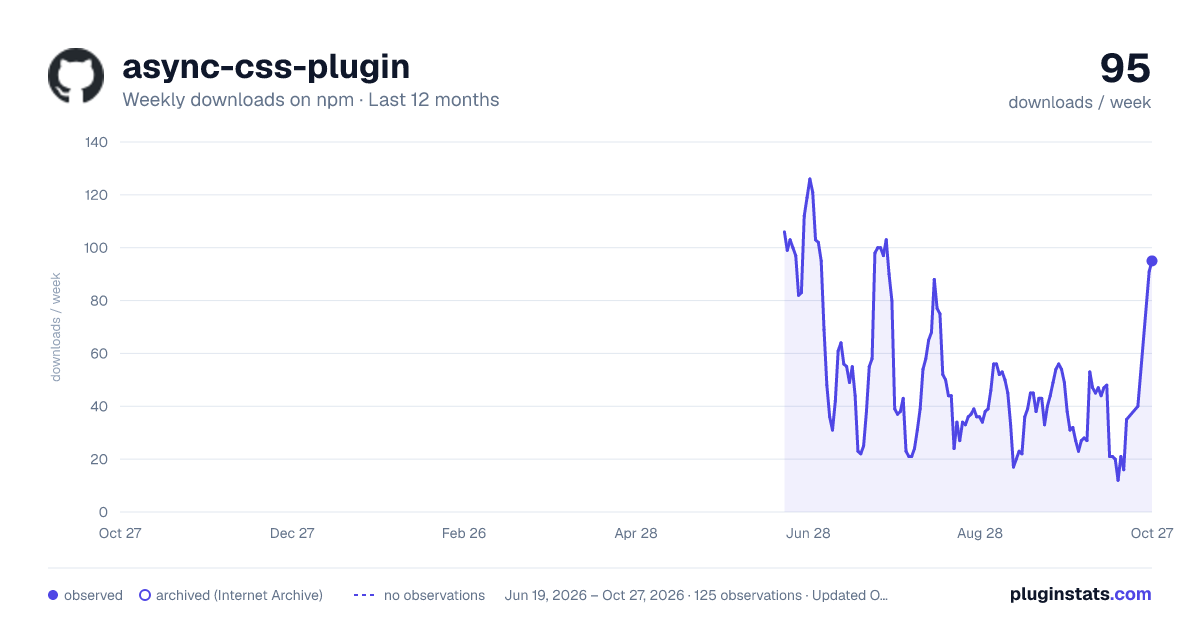
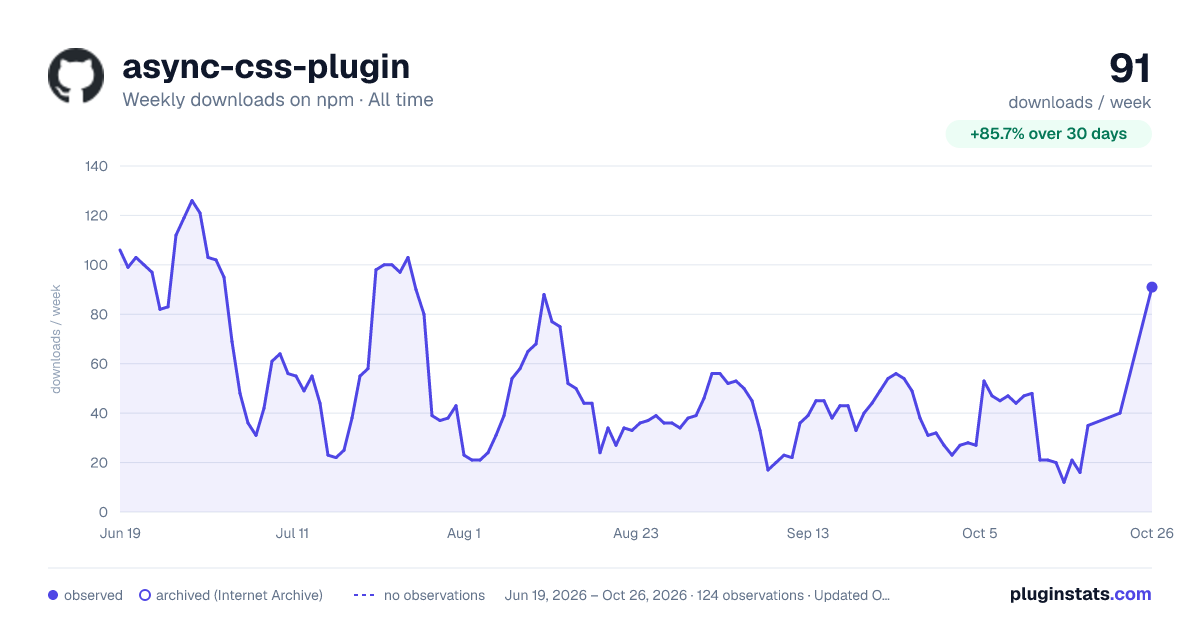

Adoption over time


7/30/90-day growth


Filled points are observed values; hollow points come from Internet Archive snapshots of the listing page. Dashed segments span periods with no observations — values between points are not interpolated.
Recent observations
Full history (121)Similar npm Webpack plugins plugins
Data source
Weekly downloads (trailing 7 complete days) come from the official npm downloads API. Downloads include CI and mirrors and are not equivalent to installs or users. npm publishes no ratings.
Listing: https://www.npmjs.com/package/async-css-plugin. First seen Oct 16, 2026; last successful collection Oct 18, 2026. See the methodology.