 PluginStats
prettier-plugin-embed weekly downloads statistics
By Sec-ant · npm · Prettier plugins
A configurable Prettier plugin to format embedded languages in JS/TS files.
prettier-plugin-embed has 45,615 recorded weekly downloads on npm, a decrease of 59.8% over the past 30 days.
It ranks #581 of 2,251 tracked npm listings by weekly downloads.
Over 90 days, weekly downloads changed by -38.4%.
PluginStats has 121 daily observations since Jun 19, 2026; the latest is from Oct 17, 2026.
About prettier-plugin-embed
Prettier Plugin Embed
A configurable Prettier plugin to format embedded languages in JS/TS Files.
Introduction
What?
This Prettier plugin formats embedded languages in template literals within JavaScript and TypeScript files.
Why?
It adds per-language formatting controls, configurable block comments and tags, and per-identifier overrides to Prettier's embedded formatting. See prettier/prettier#4424 and prettier/prettier#5588 for related use cases.
How?
The plugin extends the embed method of Prettier's estree printer. Each integration delegates formatting to Prettier or a loaded language plugin. See the printer implementation for the integration point.
Features
• Support for Additional Languages: Extend embedded formatting to languages such as XML, SQL, PHP, and more. See Language-Specific Options for the supported languages and their default identifiers. • Dual Identification Modes: Identify embedded languages by block comments ` /* comment */ ... or tags tag... ` preceding the template literals. • Customizable Language Comments or Tags: Customize the comments or tags used for identifying the embedded languages. • Formatting Opt-out Mechanism: Offer the capability to deactivate formatting for certain comments or tags, including the built-in ones (html, css...) supported by the embedded-language-formatting option. • Configurable Formatting Style: Provide additional options to tailor the formatting style for embedded languages. • Strongly Typed API: Benefit from comprehensive type support for configuring this plugin's options. • Easy Integration: Integrate with the existing Prettier setup seamlessly, requiring minimal configuration to get started.
Installation
Install Prettier 3 in the project that runs formatting. The consumer supplies the formatter and its language plugins.
Install the formatter plugin for each embedded language you use as a separate project dependency; the Language-Specific Options section shows which integrations require one.
Choose Prettier and runtime versions supported by every loaded language plugin. Parser availability and syntax support follow the installed formatter version.
Dependency resolution in strict installations
The plugin loads Prettier through static imports, which resolve from the plugin's installation location. Standard project installs and Yarn's default Plug'n'Play dependency fallback allow these imports to access the project's installed Prettier.
Yarn projects using pnpFallbackMode: none, and pnpm projects using enableGlobalVirtualStore: true with hoisting disabled, need an explicit dependency relationship for this resolution. For these configurations, add the following to .yarnrc.yml (Yarn) or pnpm-workspace.yaml (pnpm) to connect the plugin to the project's installed Prettier:
Projects can also use Yarn's default pnpFallbackMode: dependencies-only or pnpm's project-local virtual store (enableGlobalVirtualStore: false).
Usage
Getting Started
This is a Prettier plugin, which follows the standard usage pattern of many other Prettier plugins:
CLI:
Via --plugin:
API:
Via the plugins options:
Configuration File:
For Yarn Plug'n'Play, load plugin objects from a JavaScript config so the imports resolve through Yarn's dependency map.
Quick Start Config Examples
See Config Examples for complete language plugin configurations and sample output.
An Overview of the Philosophy
Set embeddedLanguageFormatting to "auto" (Prettier's default) to enable embedded formatting.
This plugin uses Prettier's built-in parsers and existing language plugins, adding the integration needed to format their languages inside template literals.
Install and load the formatter plugin for each additional language you use. For example, embedded XML requires both this plugin and @prettier/plugin-xml. The Language-Specific Options section lists the required plugins.
A preceding block comment such as ` /* xml */ ... or a tag such as xml... identifies the embedded language. Configure each language with embeddedComments and embeddedTags`. A leading block comment is checked first; templates without one are matched by their tag.
Tags support exact identifiers, member expressions, and regular expression strings in /pattern/flags form. Simple identifiers support patterns too: "/^query$/" matches the tag query. Member and call expressions use a normalized form for pattern matching; for example, factory(argument).query becomes factory().query.
For example, this JSON configuration matches prisma.$queryRaw, client.$queryRaw, and ctx.prisma.$queryRaw. JSON and JavaScript strings escape each backslash as \\:
Add comments or tags to embeddedNoopComments or embeddedNoopTags to preserve their template content as written. These options take priority among matching languages. Other overlapping matches use the first matching language in the internal registry; assign distinct identifiers or non-overlapping patterns to select a language explicitly.
[!IMPORTANT]
Specify comments or tags explicitly to keep language identification stable across plugin versions.
Language-Specific Options
Supported embedded languages and their default comment/tag identifiers are:…
Description from the npm listing.
- prettier
- plugin
- prettier-plugin
- embed
- embedded
- embedded-language
- format
Where prettier-plugin-embed sits in the listing
Each band is one page of 20. Weekly downloads on a log scale. Placement is projected from weekly downloads, so it can differ from the marketplace's own sort order. Hover a dot to see the listing.


Charts
Images: 30d · 1y · all time · 1600×900 dark
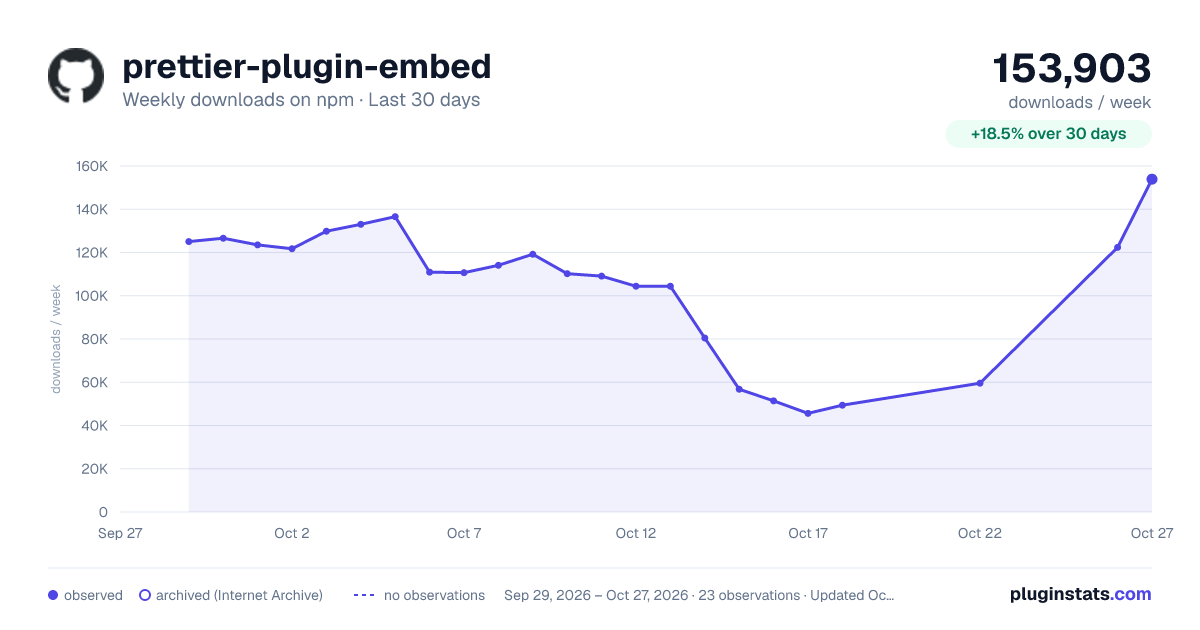
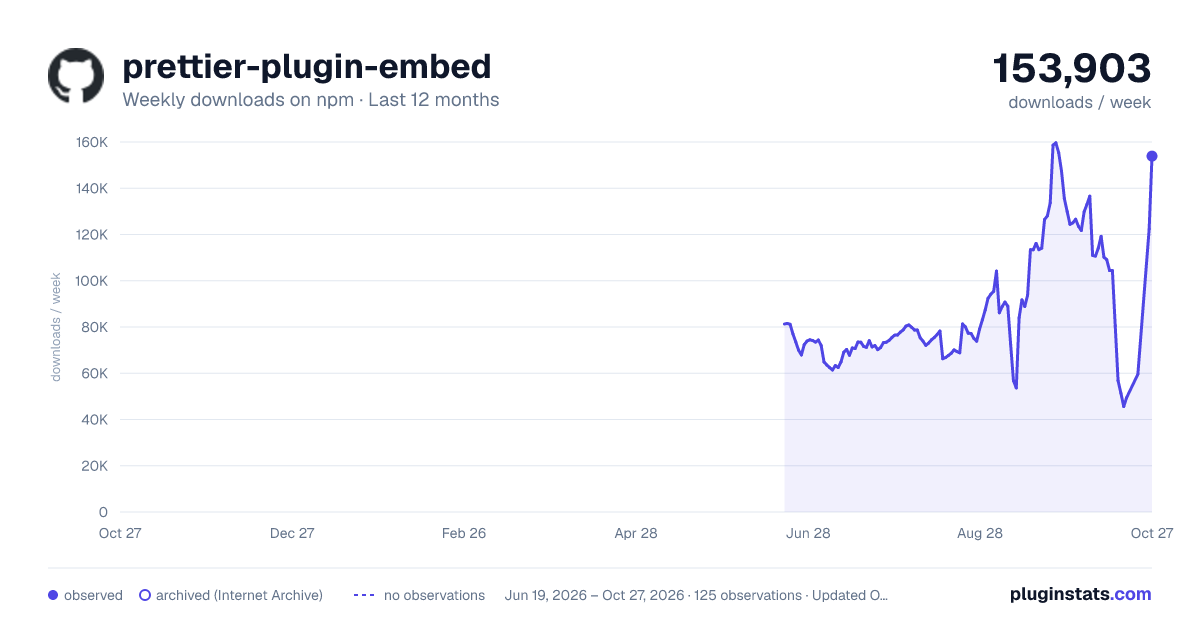
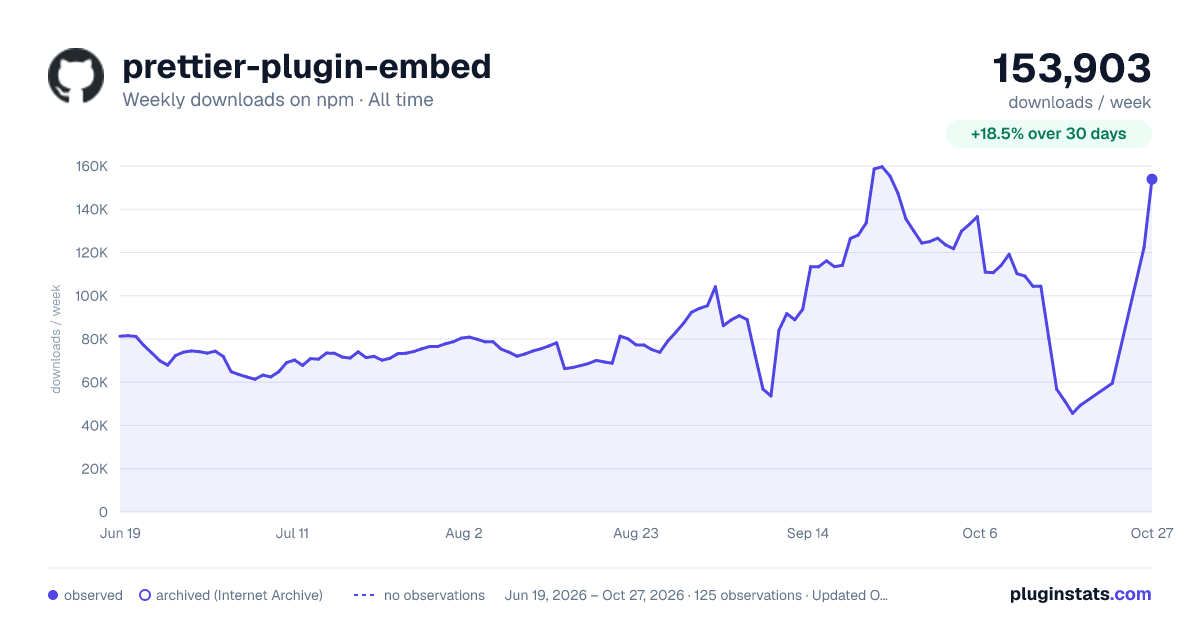

Adoption over time


7/30/90-day growth


Filled points are observed values; hollow points come from Internet Archive snapshots of the listing page. Dashed segments span periods with no observations — values between points are not interpolated.
Recent observations
Full history (121)Similar npm Prettier plugins plugins
Data source
Weekly downloads (trailing 7 complete days) come from the official npm downloads API. Downloads include CI and mirrors and are not equivalent to installs or users. npm publishes no ratings.
Listing: https://www.npmjs.com/package/prettier-plugin-embed. First seen Oct 16, 2026; last successful collection Oct 18, 2026. See the methodology.