 PluginStats
add-mcp weekly downloads statistics
By neon-solutions · npm · MCP servers
Add MCP servers to your favorite coding agents with a single command.
add-mcp has 94,900 recorded weekly downloads on npm, a decrease of 30.9% over the past 30 days, ranking #458 of 2,256 tracked listings.
About add-mcp
add-mcp
Add MCP servers to your favorite coding agents with a single command.
Supports Claude Code, Codex, Cursor, OpenCode, VS Code, Grok Build and 16 more.
Docs and registry: add-mcp.com
Install an MCP Server
Install an MCP server by remote URL or package name:
Example installing the Context7 remote MCP server:
Example installing the Context7 remote MCP server via the programmatic API — great for integrating add-mcp in your own CLI tool:
You can add env variables and arguments (stdio) and headers (remote) to the server config using the --env, --args and --header options. With ${VAR} placeholders, interactive installs prompt for each variable (omit skipped optional keys so empty strings are not written to config).
Find MCP Servers
Find and install MCP servers from the add-mcp registry:
The first find/search run automatically saves the add-mcp registry to ~/.config/add-mcp/config.json (or $XDG_CONFIG_HOME/add-mcp/config.json). You can edit that file to replace the default registry, add the official Anthropic registry, or point at any registry-compatible server.
Supported Agents
MCP servers can be installed to any of these agents:
| Agent | --agent | Project Path | Global Path |
| Antigravity | antigravity | - | ~/.gemini/config/mcp_config.json (shared by Antigravity, Antigravity IDE, and Antigravity CLI) | | Cline VSCode Extension | cline | - | ~/Library/Application Support/Code/User/globalStorage/saoudrizwan.claude-dev/settings/cline_mcp_settings.json | | Cline CLI | cline-cli | - | ~/.cline/data/settings/cline_mcp_settings.json | | Claude Code | claude-code | .mcp.json | ~/.claude.json | | Claude Desktop | claude-desktop | - | ~/Library/Application Support/Claude/claude_desktop_config.json | | Codex | codex | .codex/config.toml | ~/.codex/config.toml | | Cursor | cursor | .cursor/mcp.json | ~/.cursor/mcp.json | | fx | fx | - | ~/.fx/mcp.json | | Gemini CLI | gemini-cli | .gemini/settings.json | ~/.gemini/settings.json | | Goose | goose | .goose/config.yaml | ~/.config/goose/config.yaml | | GitHub Copilot CLI | github-copilot-cli | .mcp.json (or existing .github/mcp.json) | $COPILOT_HOME/mcp-config.json (defaults to ~/.copilot/mcp-config.json) | | Grok Build | grok-build | .grok/config.toml | $GROK_HOME/config.toml (defaults to ~/.grok/config.toml) | | Kilo Code | kilo-code | kilo.json (or existing .kilo/, .kilocode/, or root kilo.jsonc config) | ~/.config/kilo/kilo.json (or existing ~/.config/kilo/kilo.jsonc) | | Kimi Code | kimi-code | .kimi-code/mcp.json | $KIMI_CODE_HOME/mcp.json (defaults to ~/.kimi-code/mcp.json) | | Kiro CLI | kiro-cli | .kiro/settings/mcp.json | ~/.kiro/settings/mcp.json (shared with the Kiro IDE) | | Mastra Code | mastracode | .mastracode/mcp.json | ~/.mastracode/mcp.json | | MCPorter | mcporter | config/mcporter.json | ~/.mcporter/mcporter.json (or existing ~/.mcporter/mcporter.jsonc) | | OpenCode | opencode | opencode.jsonc (or existing opencode.json / .opencode/ config) | ~/.config/opencode/opencode.jsonc (or existing opencode.json) | | Pi | pi | .pi/mcp.json | $PI_CODING_AGENT_DIR/mcp.json (defaults to ~/.pi/agent/mcp.json) | | VS Code | vscode | .vscode/mcp.json | ~/Library/Application Support/Code/User/mcp.json | | Windsurf | windsurf | - | ~/.codeium/windsurf/mcp_config.json | | Zed | zed | .zed/settings.json | ~/Library/Application Support/Zed/settings.json |
Aliases: codeium, cascade → windsurf, cline-vscode → cline, gemini → gemini-cli, github-copilot → vscode, grok → grok-build, kilo, kilocode → kilo-code, kimi → kimi-code, kiro → kiro-cli, mastra → mastracode, pi-agent → pi
Mastra Code also reads project .mcp.json for Claude Code compatibility. add-mcp writes .mastracode/mcp.json so a mixed Claude + Mastra install does not share that file.
Pi has no built-in MCP. add-mcp writes the Pi-owned files pi-mcp-adapter reads (pi install npm:pi-mcp-adapter). A running Pi session picks the change up after /reload.
Kimi Code only loads a project-level .kimi-code/mcp.json after you trust the folder in the CLI, so a project install may not take effect until then.
fx reads MCP servers only from ~/.fx/mcp.json. A project file cannot add a server. A running session applies the change with /mcp reload.
OpenCode keeps the shape already in the file: mcp. on a V1 or empty config, mcp.servers. when that native map is already there. In a mixed file, a native entry wins over a legacy entry with the same name. Adding a new name to a mixed file still writes V1; renaming a server keeps it in the map it already uses.
GitHub Copilot CLI project installs write .mcp.json. If .mcp.json is absent, an existing .github/mcp.json is reused. Copilot CLI does not read .vscode/mcp.json (that path is the VS Code agent). Entries left in .vscode/mcp.json from older Copilot CLI installs stay there for VS Code; rerun with --agent github-copilot-cli to write the CLI path. .mcp.json is shared with Claude Code: removing a server from either agent removes it for both. add-mcp will not create .mcp.json when .github/mcp.json already exists, because Copilot CLI would then ignore the GitHub file. Merge those servers into .mcp.json under mcpServers first. Copilot writes replace the file with strict JSON, so comments in that file are dropped (including global ~/.copilot/mcp-config.json). Copilot CLI loads a project file only after the folder is trusted; confirm with copilot mcp list --json.
Installation Scope
| Scope | Flag | Location | Use Case |
| Project | (default) | .cursor/mcp.json etc. | Committed with your project, shared with team | | Global | -g | ~/.cursor/mcp.json | Available across all projects |
Smart Detection
The CLI automatically detects agents based on your environment:
Default (project mode):
• Detects project-level config files (.cursor/, .vscode/, .mcp.json, etc.) • Selects detected agents (have project config in the current directory) by default • Shows detected agents plus all other supported agents for selection
With -g (global mode):…
Description from the npm listing.
- cli
- mcp
- model-context-protocol
- ai-agents
- antigravity
- cline
- claude-code
- claude-desktop
- codex
- cursor
- fx
- github-copilot-cli
- gemini-cli
- goose
- grok
- grok-build
- kilo-code
- kimi-code
- kiro
- kiro-cli
README badge
Show your rank in a README or on your website. The badge updates automatically.
Charts
Images: 30d · 1y · all time · 1600×900 dark
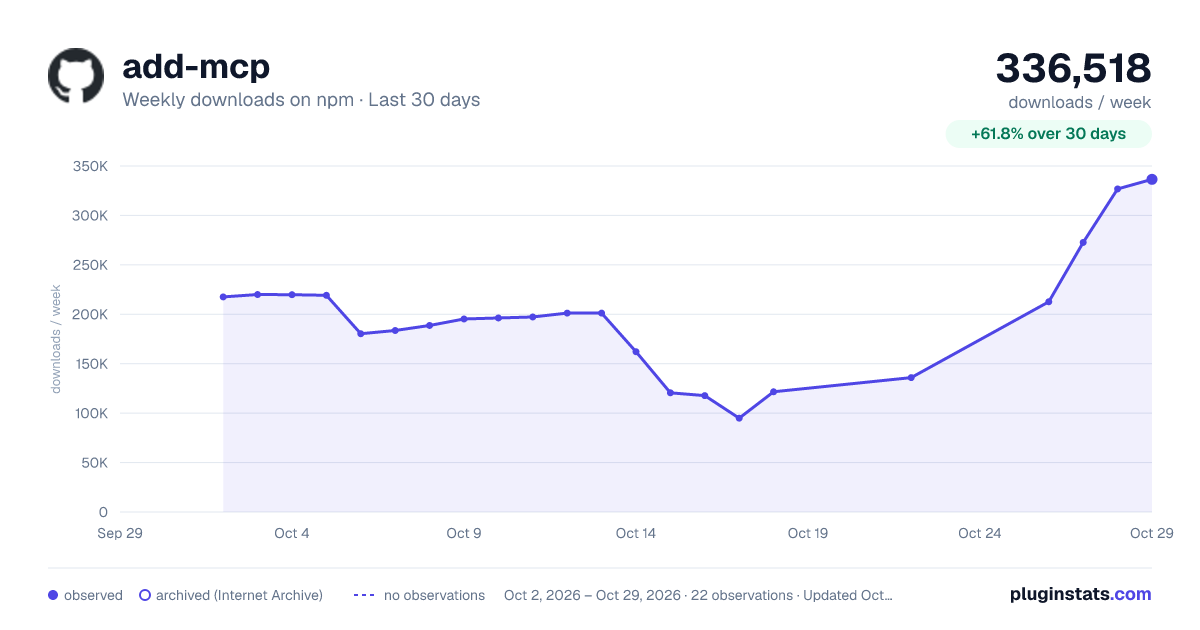
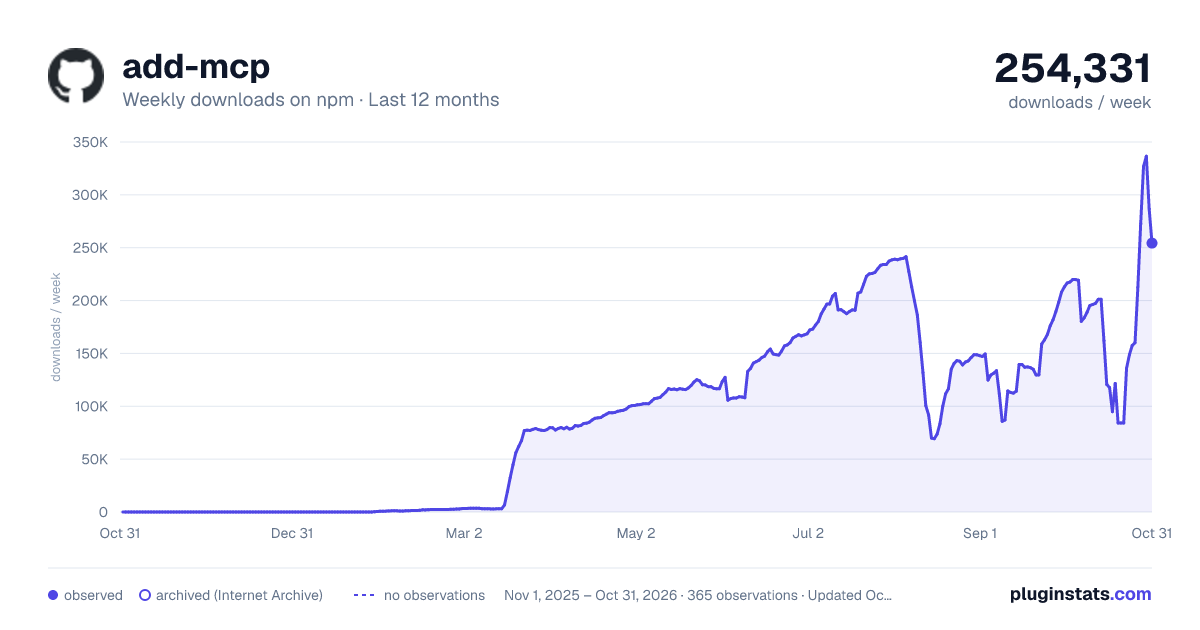
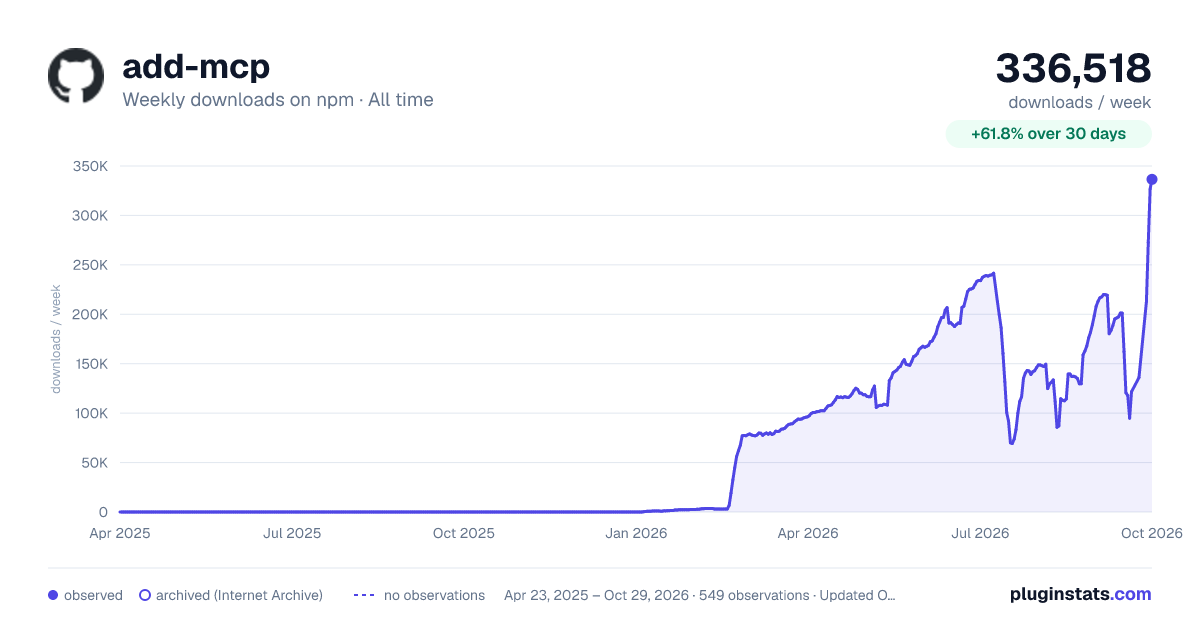

Adoption over time
7/30/90-day growth
Ranking history
Listing placement
Listing placement
Filled points are observed values; hollow points come from Internet Archive snapshots of the listing page. Dashed segments span periods with no observations — values between points are not interpolated.
Each band is one page of 20. Weekly downloads on a linear scale. Placement is projected from weekly downloads, so it can differ from the marketplace's own sort order. Hover a dot to see the listing.
Recent observations
Full history (543)Similar npm MCP servers plugins
All 20 add-mcp alternativesData source
Weekly downloads (trailing 7 complete days) come from the official npm downloads API. Downloads include CI and mirrors and are not equivalent to installs or users. npm publishes no ratings.
Listing: https://www.npmjs.com/package/add-mcp. First seen Oct 16, 2026; last successful collection Oct 19, 2026. See the methodology.