 PluginStats
ai-cli weekly downloads statistics
By vercel-labs (7 listings) · npm · AI SDKs
Generate anything from your terminal
ai-cli has 966 recorded weekly downloads on npm, a decrease of 44.4% over the past 30 days.
It ranks #1399 of 2,256 tracked npm listings by weekly downloads.
Over 90 days, weekly downloads changed by -31.9%.
PluginStats has 121 daily observations since Jun 19, 2026; the latest is from Oct 17, 2026.
About ai-cli
ai
Generate anything from your terminal
Create text, images, video, and audio, and make typed decisions with composable commands, stdin support, and predictable outputs. Built with the Vercel AI SDK and AI Gateway for access to hundreds of models.
Install
Requires Node.js 22+ and an AI Gateway API key or a provider-specific key (e.g. OPENAI_API_KEY).
Usage
Piping and References
Common Options
Generation commands support:
When using --json, stdout contains only metadata. Generated text, image, video and audio outputs are written to files even when stdout is piped. For image and video --n, fewer returned outputs than requested are reported as an incomplete result with a nonzero exit code. Available media is still saved. When a batching limit splits generation into calls, successful calls are saved even if another call fails. For generateImage and video generation, JSON results include successful call diagnostics in batches and failed call or download details in failures. For image/video generation, exit 1 means every model result is unsuccessful, including a partial result that saved files. Exit 2 means some models succeeded and others did not. Input validation errors also exit 1.
Model IDs can be specified as creator/model-name or just model-name (resolved against models fetched from the gateway):
Model IDs must contain printable ASCII characters without spaces. This applies to both --model values and the AI_CLI_*_MODEL environment variables.
decide
ai evaluate remains available as a backward-compatible alias for ai decide.
Make decisions with named Boolean, Choice, and Score questions using AI SDK evaluation models:
All questions share one unchanged input. Text keeps its line breaks; JSON objects and arrays keep their shape. Each question has an explicit type and a unique ID. Choices and levels bind to that ID regardless of flag order. Repeat the flags to ask more questions in the same request.
• Boolean returns probability: P(true) from 0 to 1, including strong no answers near zero. • Choice returns one supplied option and its distribution when available. • Score returns a fractional position on ordered levels, starting at zero, and a distribution when available. Jev uses the probability-weighted mean.
The command calls AI SDK's experimental_decide: stdin maps to state, and typed flags build its named questions. --choices creates a Choice criteria map; --levels creates a Score criteria array. The file form uses the SDK question schema directly. Jev is the default evaluation model; other supported evaluation models use the same interface.
Pass images with -i, --images (paths, data URLs, or public URLs; repeatable). They follow stdin as file parts in the same state, in order; stdin is optional when images are given:
For richer criteria, save a named question map to triage.json:
Question files support string, JSON object, or array instructions and descriptions; descriptions may also be null. Boolean criteria optionally describe true and false; Choice criteria are an option map; Score criteria are ordered levels. There is no implicit rubric. Model-specific limits are enforced by the SDK and provider. Inline comma-separated choices use each label as its name and description. Use a file for labels containing commas or separate names and descriptions. Files and inline questions can be combined; duplicate IDs are errors.
Output is always JSON on stdout; no --json flag is needed and no files are created. Output is the JSON-serialized SDK result: answers, usage, warnings, response, and optional rounding and providerMetadata. Fields and values are preserved; score indices refer to your supplied criteria. Native confidence is distinct from option probability and stays in provider metadata. Missing distributions or confidence are not synthesized. Usage has inputTokens, outputTokens, and totalTokens; unknown values are omitted, and known zeros remain zero. response retains model information, provider headers and body when available, and an ISO timestamp. Use shell time for elapsed command time.
Stdin is buffered through EOF. Auto mode tries one complete JSON value, then text. Malformed JSON-looking input fails; use --input text for literal logs. JSON state must be a string, object, or array. Empty stdin and binary input fail; explicit empty JSON objects, arrays, and strings are valid. To read JSONL as a shared array, use jq -s . tickets.jsonl | ai decide --questions triage.json. Provider context limits apply; input and questions are never silently split or truncated.
Valid evaluations exit 0, including false and uncertain answers. Input errors, provider failures, timeouts, and invalid answers exit 1 with no partial JSON. Apply thresholds, sorting, and routing in your code; jq -e above owns its exit status.
Ask small, focused questions with complete instructions and meaningful criteria. Question IDs are for your code and are not instructions to Jev. Questions in one call are independent; use follow-up calls for dependencies. Use ai text when you need prose, explanations, or code. Typed output does not guarantee correct judgments.
Supply the context each question needs, including a reference date for questions about "today"; the CLI does not add the current date. Keep exact arithmetic, counting, age cutoffs, and date comparisons in code. TypeSafe documents numeric and date limitations in Jev 1.13. Adding context can clarify a question without making the model a reliable calculator. Validate questions and probability thresholds against positive and negative examples, including quotations and negations. A high probability can still be a wrong judgment.
Requires AI_GATEWAY_API_KEY with access to the evaluation provider. Override the default with AI_CLI_EVALUATION_MODEL or -m; -m jev resolves to typesafe-ai/jev. Discover models with ai models --type evaluation.
See Decide for the complete interface.
image…
Description from the npm listing.
- ai
- cli
- generative
- image
- video
- audio
- speech
- transcription
- text
- ai-sdk
- vercel
Where ai-cli sits in the listing
Each band is one page of 20. Weekly downloads on a log scale. Placement is projected from weekly downloads, so it can differ from the marketplace's own sort order. Hover a dot to see the listing.


Charts
Images: 30d · 1y · all time · 1600×900 dark
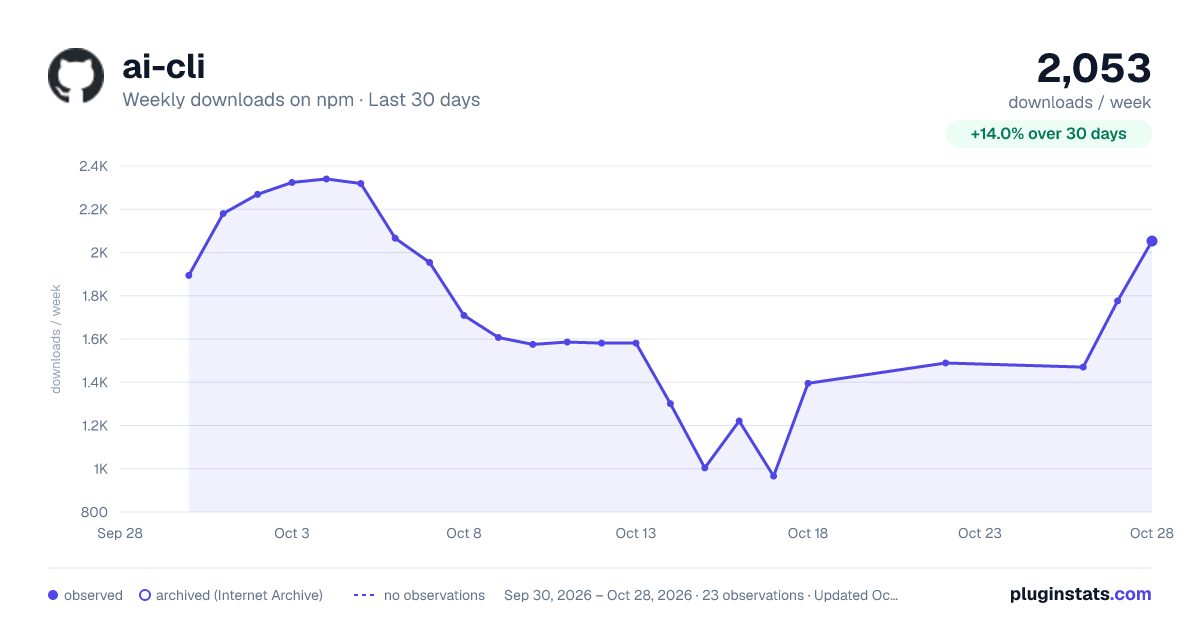
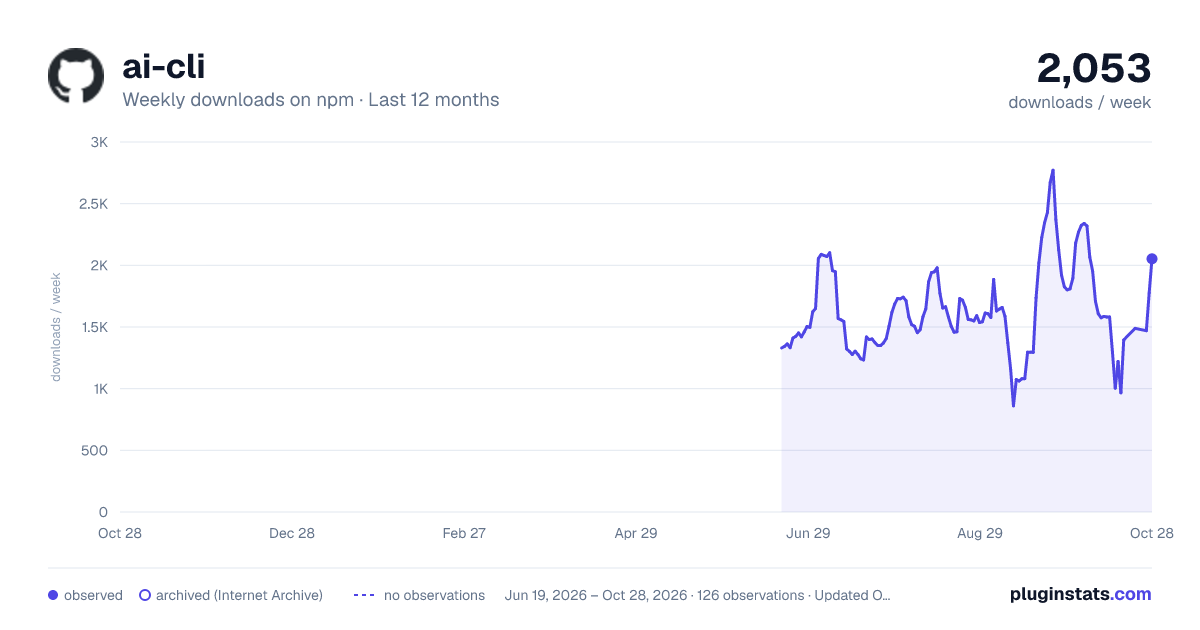
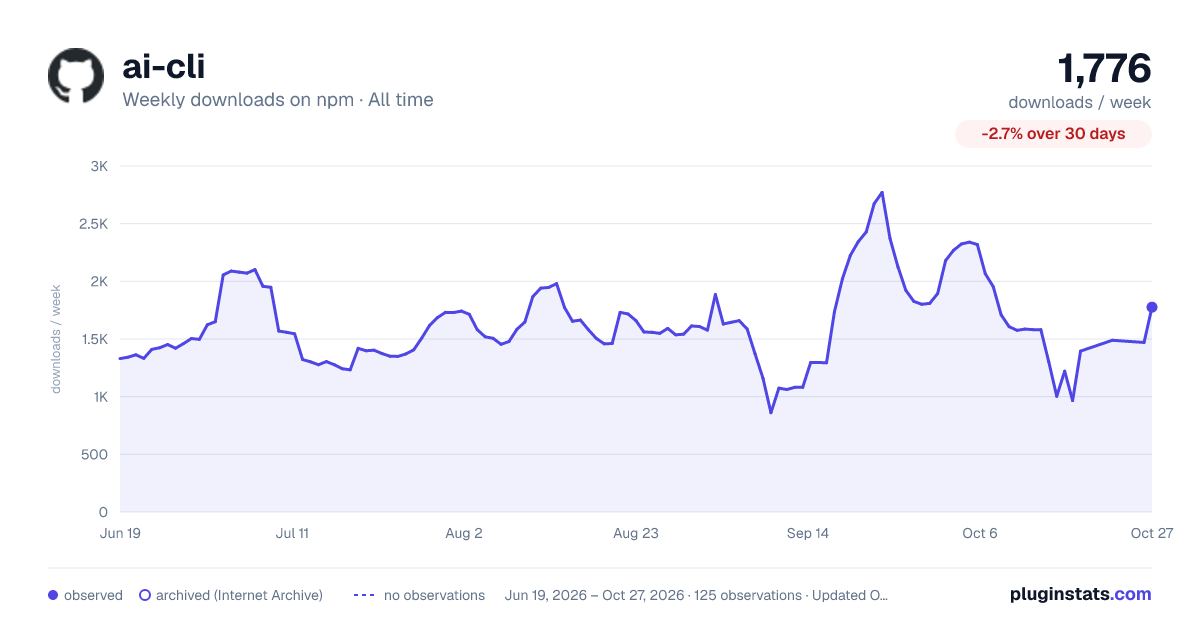

Adoption over time


7/30/90-day growth


Filled points are observed values; hollow points come from Internet Archive snapshots of the listing page. Dashed segments span periods with no observations — values between points are not interpolated.
Recent observations
Full history (121)Similar npm AI SDKs plugins
Data source
Weekly downloads (trailing 7 complete days) come from the official npm downloads API. Downloads include CI and mirrors and are not equivalent to installs or users. npm publishes no ratings.
Listing: https://www.npmjs.com/package/ai-cli. First seen Oct 16, 2026; last successful collection Oct 19, 2026. See the methodology.