 PluginStats
@visulima/vite-overlay weekly downloads statistics
By visulima · npm · Vite plugins
Improved vite overlay
@visulima/vite-overlay has 33,237 recorded weekly downloads on npm, a decrease of 42.4% over the past 30 days.
It ranks #644 of 2,251 tracked npm listings by weekly downloads.
Over 90 days, weekly downloads changed by +38.8%.
PluginStats has 543 daily observations since Apr 23, 2025; the latest is from Oct 17, 2026.
About @visulima/vite-overlay
Improved vite overlay
[![typescript-image][typescript-badge]][typescript-url] [![mit licence][license-badge]][license] [![npm downloads][npm-downloads-badge]][npm-downloads] [![Chat][chat-badge]][chat] [![PRs Welcome][prs-welcome-badge]][prs-welcome]
Daniel Bannert's open source work is supported by the community on GitHub Sponsors
| Light Mode | Dark Mode | Solution Mode |
| | | |
Features
• Enhanced Error Display - Rich, interactive error overlays with syntax highlighting • Source Map Integration - Shows original .tsx/.ts files instead of compiled paths • Cause Chain Navigation - Navigate through multi-level error chains with original source locations • Console Method Forwarding - Intercept and display console.error, console.warn, and other console methods • Beautiful UI - Modern, accessible interface with light/dark theme support and floating balloon button • Intelligent Solutions - AI-powered error analysis and suggested fixes • Real-time Updates - Hot Module Replacement (HMR) integration for instant error feedback • Comprehensive Testing - Extensive e2e test coverage for reliability
Installation
Usage
Add the plugin to your Vite configuration:
Configuration Options
The plugin accepts an optional configuration object:
Options
| Option | Type | Default | Description |
| forwardConsole | boolean | true | Enable/disable client-side runtime error logging and overlay display | | forwardedConsoleMethods | string[] | ["error"] | Array of console method names to intercept and forward to overlay | | framework | "react" \| "vue" \| "svelte" \| "preact" \| "solid" | undefined | Explicit framework override; skips auto-detection | | interceptUnhandledRejection | boolean | true | Capture process-wide unhandledRejection and render it in the overlay | | reactPluginName | string | undefined | Custom React plugin name for detection | | vuePluginName | string | undefined | Custom Vue plugin name for detection | | sveltePluginName | string | undefined | Custom Svelte plugin name for detection | | preactPluginName | string | undefined | Custom Preact plugin name for detection | | solidPluginName | string | undefined | Custom Solid plugin name for detection | | showBalloonButton | boolean | true | Whether to show the floating balloon button for error navigation | | overlay | OverlayConfig | undefined | Overlay configuration options | | overlay.balloon | BalloonConfig | undefined | Balloon button configuration | | overlay.balloon.style | string \| CSS.Properties | undefined | Balloon button styles (string or CSS.Properties object) | | overlay.customCSS | string \| CSS.Properties | undefined | Custom CSS to inject for styling customization (string or CSS.Properties object) | | solutionFinders | SolutionFinder[] | [] | Array of custom solution finder functions for enhanced error analysis | | showBallonButton | boolean | undefined | @deprecated Misspelling of showBalloonButton | | logClientRuntimeError | boolean | undefined | @deprecated Use forwardConsole instead |
Error Handling
The plugin automatically handles various types of errors:
Client-Side Errors
• Runtime JavaScript errors • Unhandled promise rejections • Console method interception (configurable via forwardedConsoleMethods) • React component errors (when React plugin is detected) • Async context errors
Server-Side Errors (SSR)
• Build-time errors during SSR • Import resolution failures • Module loading errors • Plugin-specific errors
Special Cases
• Vue SFC Compilation Errors - Enhanced parsing for .vue files • Import Resolution Errors - Smart suggestions for missing modules • TypeScript Errors - Source map integration for .tsx/.ts files • Framework-Specific Issues - Detection and handling for React, Vue, Svelte, and Astro
User Interface
Floating Balloon Button
When errors occur, a floating balloon button appears in the bottom-right corner of the screen. Click it to:
• View the most recent error details • Navigate through multiple errors • Access error overlay controls
The balloon button can be disabled by setting showBalloonButton: false in the plugin options.
Keyboard Shortcuts
• ESC - Close error overlay (client-side errors only) • ← / → - Navigate between multiple errors • Tab - Switch between original/compiled code views
Advanced Configuration
Custom Solution Finders
You can extend the plugin with custom solution finders:
All public option types are exported from the package, so you can type a shared config object or a custom solution finder without reaching into @visulima/error:
React Plugin Detection
The plugin automatically detects React plugins, but you can specify a custom plugin name:
Vue Plugin Detection
Similar to React detection, you can specify a custom Vue plugin name:
Console Method Forwarding
By default, only console.error calls are intercepted and displayed in the overlay. You can customize which console methods to forward:
Theming
The error overlay uses a custom design system with CSS custom properties:
Custom CSS Injection
You can inject custom CSS to override the default styles of the overlay and button elements. The overlay.customCSS option accepts a CSS string (recommended) or a CSS.Properties object:
Note: For customCSS, using a CSS string is recommended since you need CSS selectors. CSS.Properties objects are mainly useful for inline styles (like balloon.style).
Balloon Button Styling
The balloon.style option supports both string and CSS.Properties object. Using CSS.Properties provides type safety and autocomplete:
Note: When using CSS.Properties, property names should be in camelCase (e.g., borderRadius), and they will be automatically converted to kebab-case CSS properties (e.g., border-radius) when applied.
Available Element IDs for Customization
The following element IDs can be targeted in your custom CSS:
Main Overlay Elements:…
Description from the npm listing.
- error-handling
- error-overlay
- overlay
- react
- source-map
- svelte
- typescript
- visulima
- vite
- vite-error-overlay
- vite-overlay
- vite-plugin
- vue
Where @visulima/vite-overlay sits in the listing
Each band is one page of 20. Weekly downloads on a log scale. Placement is projected from weekly downloads, so it can differ from the marketplace's own sort order. Hover a dot to see the listing.


Charts
Images: 30d · 1y · all time · 1600×900 dark
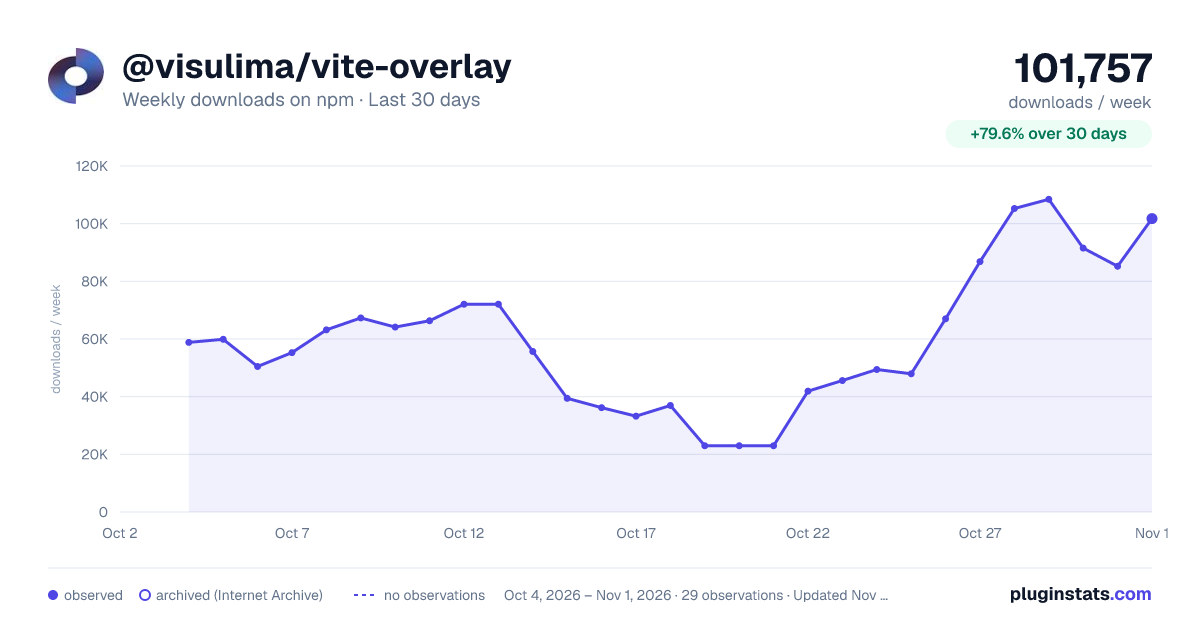
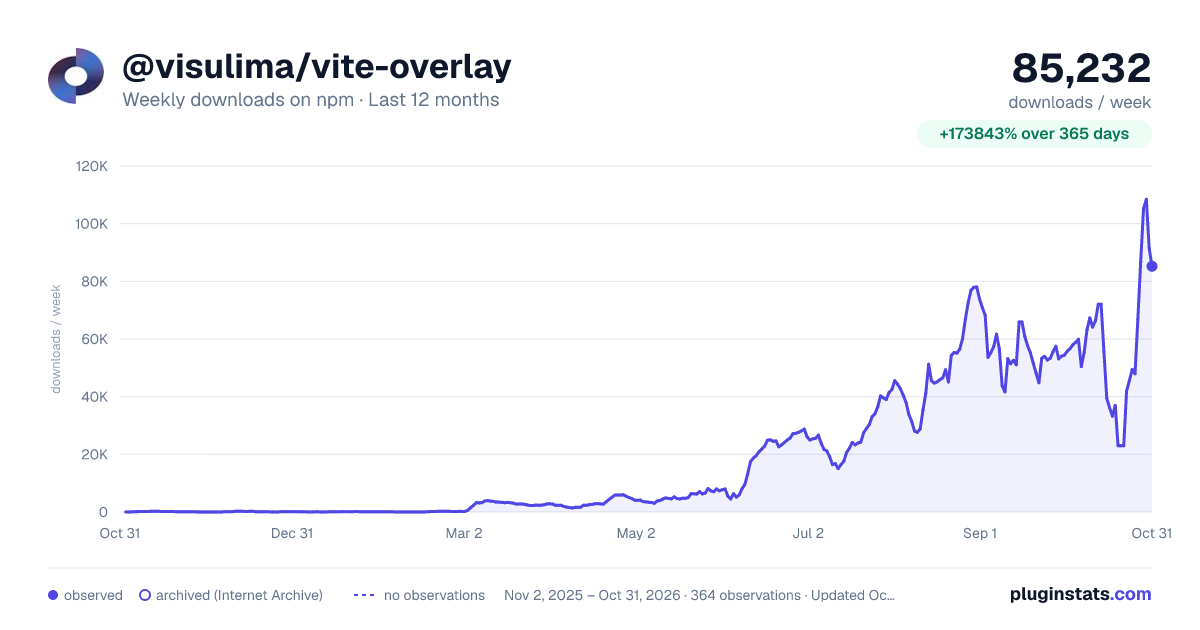
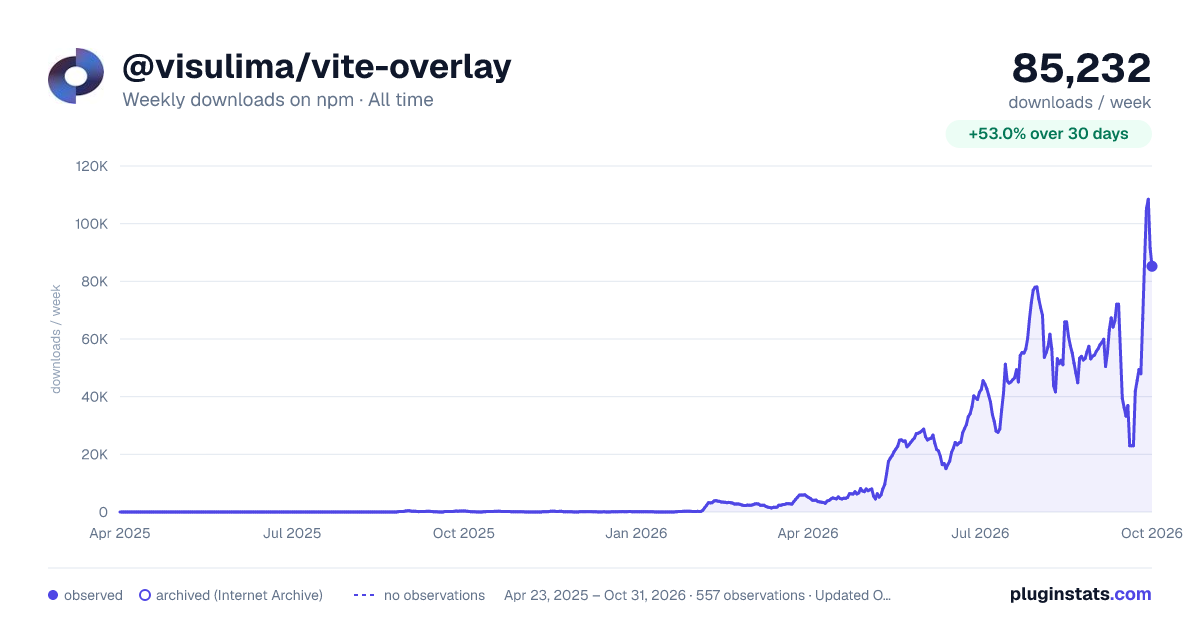

Adoption over time


7/30/90-day growth


Filled points are observed values; hollow points come from Internet Archive snapshots of the listing page. Dashed segments span periods with no observations — values between points are not interpolated.
Recent observations
Full history (543)Similar npm Vite plugins plugins
Data source
Weekly downloads (trailing 7 complete days) come from the official npm downloads API. Downloads include CI and mirrors and are not equivalent to installs or users. npm publishes no ratings.
Listing: https://www.npmjs.com/package/@visulima/vite-overlay. First seen Oct 16, 2026; last successful collection Oct 18, 2026. See the methodology.