 PluginStats
@chat-adapter/linear weekly downloads statistics
By chat-adapter (14 listings) · npm · AI SDKs
Linear adapter for Chat SDK — @mentions in issue comments and Linear agent sessions
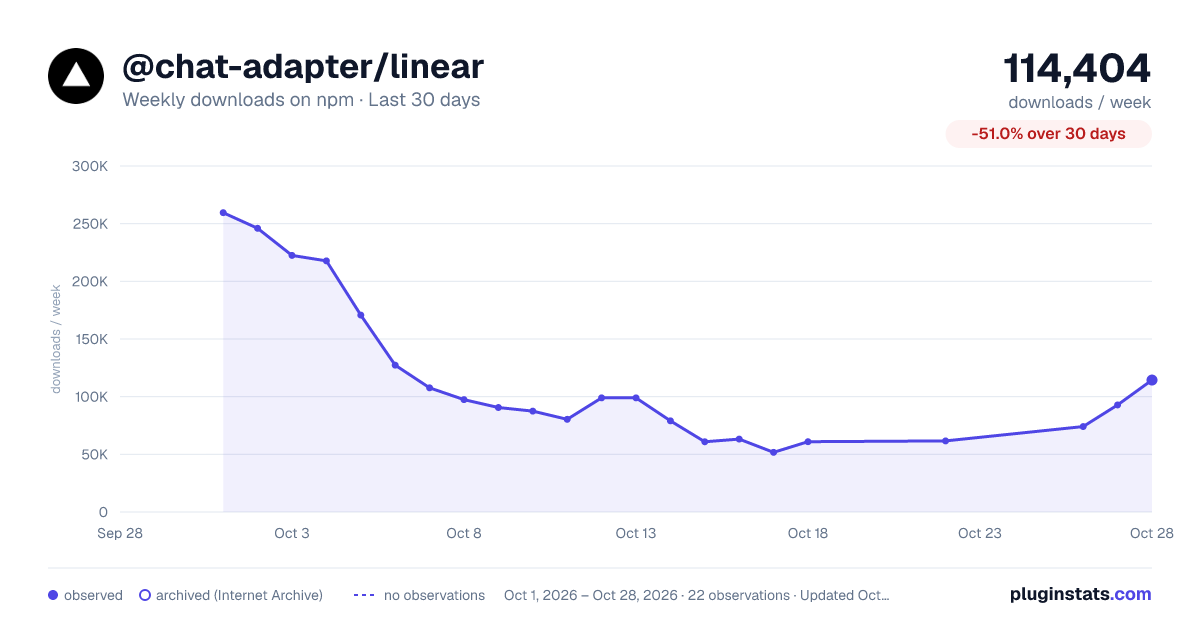
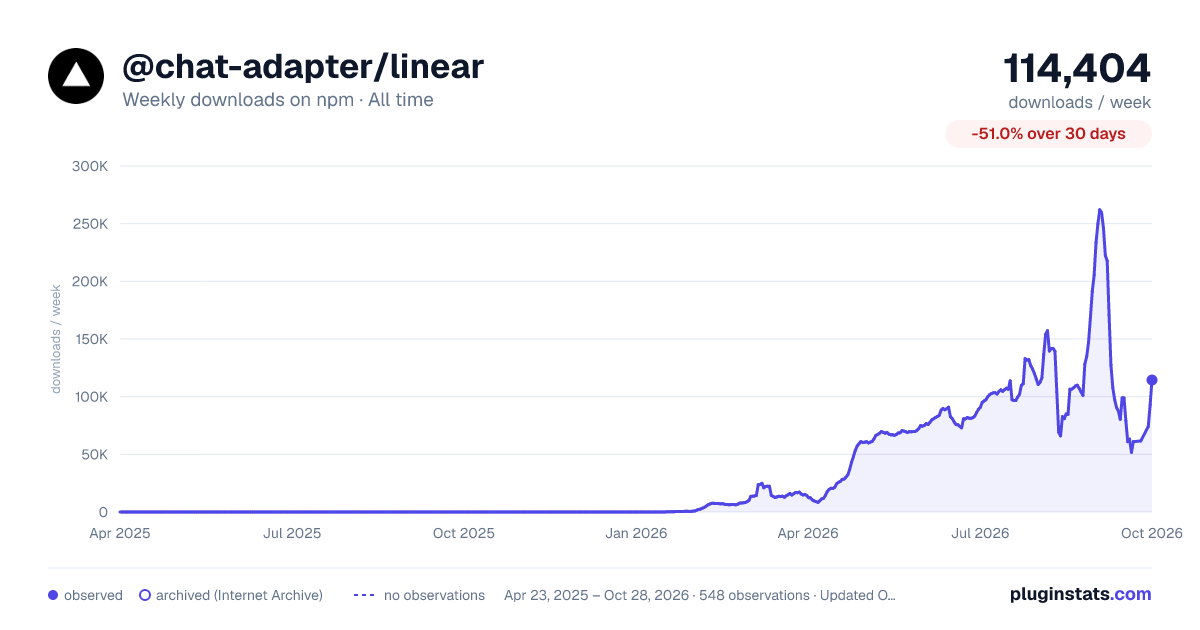
@chat-adapter/linear has 51,728 recorded weekly downloads on npm, a decrease of 52.7% over the past 30 days.
It ranks #554 of 2,256 tracked npm listings by weekly downloads.
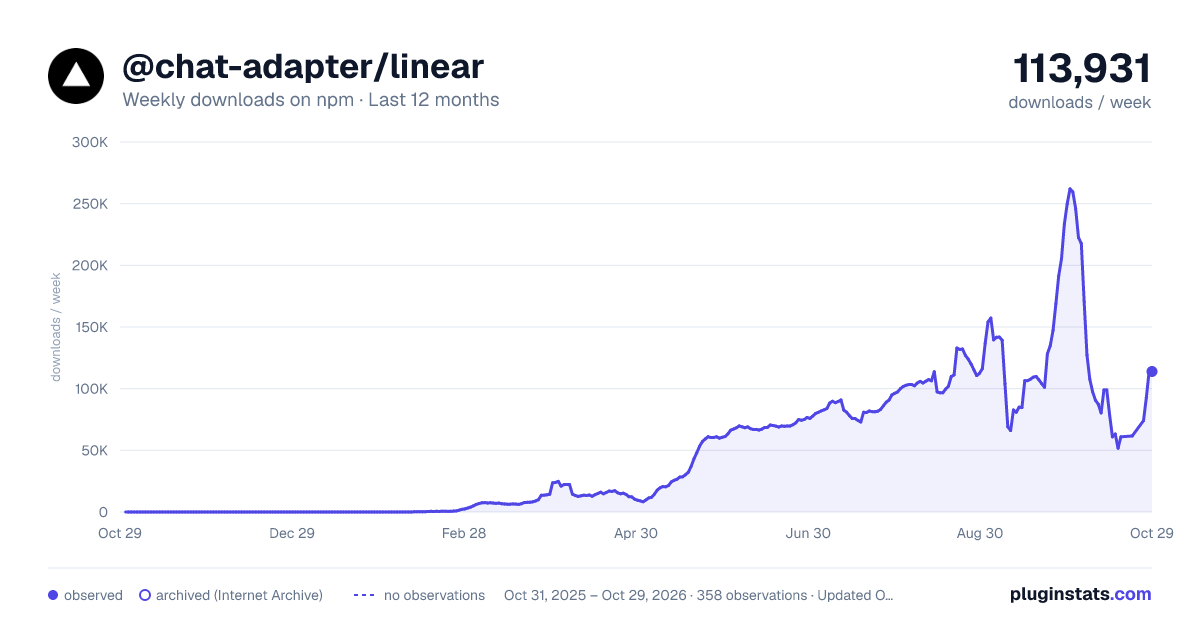
Over 90 days, weekly downloads changed by -36.0%.
PluginStats has 543 daily observations since Apr 23, 2025; the latest is from Oct 17, 2026.
About @chat-adapter/linear
@chat-adapter/linear
npm package: @chat-adapter/linear
Linear adapter for Chat SDK. Respond to @mentions in issue comment threads and Linear app-actor agent sessions.
The Linear adapter treats issue comments as messages and issues as threads.
Documentation: chat-sdk.dev/adapters/official/linear · Guides: vercel.com/kb/chat-sdk
Installation
Scaffold with the CLI
To scaffold a new Linear bot with this adapter preselected:
Visit the adapters directory to see other available official and vendor-official adapters.
Quick start
For managed credentials and webhook verification, see Vercel Connect.
The adapter auto-detects credentials from LINEAR_API_KEY, LINEAR_ACCESS_TOKEN, LINEAR_CLIENT_CREDENTIALS_CLIENT_ID/LINEAR_CLIENT_CREDENTIALS_CLIENT_SECRET, or LINEAR_CLIENT_ID/LINEAR_CLIENT_SECRET, plus LINEAR_WEBHOOK_SECRET and LINEAR_BOT_USERNAME:
The adapter defaults to mode: "comments" and handles Comment webhooks. For Vercel Connect and Linear app-actor installations, we recommend explicitly setting mode: "agent-sessions" to handle AgentSessionEvent webhooks, including mentions and replies within a session.
Configuration
All options are auto-detected from environment variables when not provided.
| Option | Required | Description |
| apiKey | No* | Personal API key. Auto-detected from LINEAR_API_KEY | | accessToken | No* | OAuth access token. Accepts a string, or (Vercel Connect) a () => string \| Promise resolver invoked per API call. Auto-detected from LINEAR_ACCESS_TOKEN | | clientId | No* | Multi-tenant OAuth app client ID. Auto-detected from LINEAR_CLIENT_ID | | clientSecret | No* | Multi-tenant OAuth app client secret. Auto-detected from LINEAR_CLIENT_SECRET | | encryptionKey | No | AES-256-GCM key for encrypting stored OAuth tokens. Auto-detected from LINEAR_ENCRYPTION_KEY | | clientCredentials | No* | Single-tenant client credentials config | | clientCredentials.scopes | No | Scopes for client credentials auth. Defaults to ["read", "write", "comments:create", "issues:create"] | | mode | No | Inbound webhook handling mode. Defaults to "comments". Set "agent-sessions" for the recommended Connect setup | | webhookSecret | No** | Webhook signing secret. Auto-detected from LINEAR_WEBHOOK_SECRET | | webhookVerifier | No** | Custom verifier (request, body) => unknown \| Promise used in place of webhookSecret. Takes precedence over webhookSecret/LINEAR_WEBHOOK_SECRET. Required in Connect mode | | userName | No | Bot display name. Auto-detected from LINEAR_BOT_USERNAME (default: "linear-bot") | | apiUrl | No | Override the Linear GraphQL API base URL. Auto-detected from LINEAR_API_URL | | logger | No | Logger instance (defaults to ConsoleLogger("info")) |
*One of apiKey, accessToken (string or Vercel Connect resolver), top-level clientId/clientSecret, or clientCredentials is required (via config or env vars).
**Either webhookSecret (via config or LINEAR_WEBHOOK_SECRET) or a webhookVerifier is required. When webhookVerifier is set it takes precedence and the secret is ignored.
Authentication
Option A — Vercel Connect
Use Vercel Connect to source the Linear access token at runtime instead of storing a long-lived token or OAuth secret. Pass accessToken as a resolver and verify inbound webhooks with webhookVerifier (a Vercel OIDC token from Connect trigger forwarding) instead of a webhook secret.
The simplest path is the connectLinearAdapter() helper from @vercel/connect/chat:
Or wire the fields yourself:
We recommend agent sessions for Vercel Connect bots. Enable Agent session events on the Linear app and use an app-actor installation. Omitting mode keeps the "comments" default; existing bots do not need to change their configuration. Changing the adapter mode does not change the app's webhook subscriptions or permissions.
accessToken accepts a string or () => string | Promise resolver invoked per API call, so it composes with Connect's short-lived tokens. When webhookVerifier is set it takes precedence over webhookSecret and LINEAR_WEBHOOK_SECRET.
Freshness: OIDC verification replaces Linear's signature + timestamp check, so request freshness relies on the short-lived OIDC token's expiry rather than the >5 min timestamp rejection, and there is no built-in delivery de-duplication. Keep your webhook handlers idempotent (Linear can also deliver events out of order).
Option B — Personal API key
Best for personal projects, testing, or single-workspace bots. Actions are attributed to you as an individual.
1. Go to Settings > Security & Access 2. Under Personal API keys, click Create key 3. Select Only select permissions and enable Create issues, Create comments 4. Choose team access 5. Click Create and set LINEAR_API_KEY
Option C — Pre-obtained OAuth access token
Use this when your app already manages the OAuth flow and you just want the adapter to operate with a single workspace token.
Option D — Multi-tenant OAuth installs
Use top-level clientId / clientSecret for Slack-style multi-tenant installs. Each Linear workspace installation is stored separately, webhook requests resolve the correct workspace token by organizationId, and withInstallation() lets you target a specific organization outside webhook handling.
1. Go to Settings > API > Applications 2. Create an OAuth2 application with your bot's name and icon 4. Note the Client ID and Client Secret
Example callback route:
Example background job:
Option E — Single-tenant client credentials
If you want app identity without multi-tenant installs, use the explicit clientCredentials config. The adapter fetches and refreshes the token automatically.
Token encryption
For multi-tenant OAuth installs, pass a base64-encoded 32-byte key as encryptionKey (or set LINEAR_ENCRYPTION_KEY) to encrypt stored access and refresh tokens at rest using AES-256-GCM:…
Description from the npm listing.
- chat
- chat-sdk
- chatbot
- linear
- linear-bot
- bot
- adapter
- issues
- project-management
- ai-agent
- ai-sdk
- vercel
Where @chat-adapter/linear sits in the listing
Each band is one page of 20. Weekly downloads on a log scale. Placement is projected from weekly downloads, so it can differ from the marketplace's own sort order. Hover a dot to see the listing.


Charts
Images: 30d · 1y · all time · 1600×900 dark

Adoption over time


7/30/90-day growth


Filled points are observed values; hollow points come from Internet Archive snapshots of the listing page. Dashed segments span periods with no observations — values between points are not interpolated.
Recent observations
Full history (543)Similar npm AI SDKs plugins
Data source
Weekly downloads (trailing 7 complete days) come from the official npm downloads API. Downloads include CI and mirrors and are not equivalent to installs or users. npm publishes no ratings.
Listing: https://www.npmjs.com/package/@chat-adapter/linear. First seen Oct 16, 2026; last successful collection Oct 19, 2026. See the methodology.