 PluginStats
@xtruder/opencode-claude-max-plugin has 180 recorded weekly downloads on npm, an increase of 97.8% over the past 30 days.
It ranks #1608 of 2,256 tracked npm listings by weekly downloads.
Over 90 days, weekly downloads changed by +959%.
PluginStats has 121 daily observations since Jun 19, 2026; the latest is from Oct 17, 2026.
About @xtruder/opencode-claude-max-plugin
@xtruder/opencode-claude-max-plugin
Use Claude Pro/Max subscription credentials in OpenCode, with a subscription-usage sidebar and /usage dialog. The plugin uses the official Anthropic SDK through OpenCode's AI SDK adapter.
Requires OpenCode 2.0.16 or later. OpenCode v1 is not supported. Model availability depends on your account.
Installation
Sign in to Claude Code, then add the plugin to ~/.config/opencode/opencode.json or your existing opencode.jsonc:
OpenCode installs the package and discovers both its provider and terminal UI. No separate provider configuration is needed. Restart OpenCode after changing the configuration; if you use a shared server, restart it and the terminal client.
When migrating from v1, replace the old plugin entry with the v2 plugins configuration and remove any separate registration of src/tui.tsx. Use a v2-compatible plugin release; version 0.4.6 predates this migration.
Authentication
For subscription access, sign in with Claude Code:
The plugin reads ~/.claude/.credentials.json. Credential refresh is deferred until an inference request needs it.
Authentication is selected in this order:
1. An explicit apiKey plugin option. 2. The ANTHROPIC_API_KEY environment variable. 3. Claude Code's OAuth credentials.
If you intend to use your subscription, make sure an API key is not overriding it. API-key requests use API billing rather than subscription access.
For a custom credentials file, supply server plugin options:
The credentials must be accessible to the process running the provider. The usage TUI reads credentials on the machine running the terminal client.
Usage
Choose a model from the anthropic-sdk provider in OpenCode, or run:
Registered models (each row is a separate selectable entry):
| Model | OpenCode model ID |
| Claude Haiku 5.5 | claude-haiku-5-5 | | Claude Sonnet 5 | claude-sonnet-5 | | Claude Sonnet 5.5 | claude-sonnet-5-5 | | Claude Opus 4.8 | claude-opus-4-8 | | Claude Opus 5 | claude-opus-5 | | Claude Opus 5.5 | claude-opus-5-5 | | Claude Fable 5 | claude-fable-5 | | Claude Fable 5.1 | claude-fable-5-1 |
Claude Opus 5 remains available as a legacy model; it is not an alias for Opus 5.5. Anthropic names it “Claude Opus 5”, not “Claude Opus 5.0”.
Haiku 4.5, Sonnet 4.6, Opus 4.6 (including the -1m variant), and Opus 4.7 are no longer registered by this plugin. Select a supported model when continuing sessions that used them.
Registration does not guarantee account access to a model. Use these OpenCode IDs rather than dated API aliases.
Model settings
Use OpenCode v2's providers configuration for model overrides. For example, to disable refusal fallback for a model:
The provider supports model-specific prompts, prompt caching, thinking, tool calls, pause-turn continuation, and server-side refusal fallbacks. See RESEARCH.md for request-format details.
Subscription usage
The terminal sidebar shows available 5-hour and 7-day usage windows and reset times. Run /usage or select it from the command palette for additional model-specific windows and extra-usage status. Press Escape to close the dialog.
Usage comes from subscription data, not estimates derived from token counts. It is separate from OpenCode's native token/cost statistics.
The display checks its shared cache every 60 seconds by default. Usage API results are cached for five minutes; opening /usage does not bypass that cache or rate-limit backoff. Failed requests retain cached values with a status notice. Fetching usage does not send an inference request or launch Claude Code to refresh credentials.
TUI settings
Defaults work with the server plugin registration alone. To customize the terminal UI, add an entry to ~/.config/opencode/cli.json:
| Option | Default | Description |
| enabled | true | Enable the usage TUI. | | sidebar | true | Show sidebar usage. Disabling it keeps /usage available. | | poll_interval | 60 | Cache polling interval in seconds; minimum 10. | | credentialsPath | ~/.claude/.credentials.json | Credentials file used by the usage TUI. |
Server plugin options are not automatically passed to the TUI. Set a custom TUI credentials path in cli.json, even if it is already configured for the server. The usage cache is shared within an XDG state directory, not separated by credentials file or account.
Development
Building and testing require Node.js 26.4+ and npm. Bun is not required for this workflow. Run these commands from a checkout of the repository:
Vite builds three ESM entrypoints: build/index.js (AI SDK provider), build/server.js (OpenCode registration), and build/tui.js (terminal UI). It compiles Solid JSX for OpenTUI and embeds prompt .txt files into JavaScript. Keep the entire build/ directory together, including shared chunks.
The build currently also runs TypeScript declaration generation for the exported provider API. npm run typecheck checks types without emitting files. npm run dev watches JavaScript and prompt changes; run the full build before packaging to refresh declarations.
The aisdk: prefix is applied internally to the provider's runtime file URL. Do not add it to the plugin name in your configuration. Runtime packages remain external to the bundle; the plugin uses OpenCode's adapter rather than maintaining a second transport implementation.
Testing
npm test builds the plugin and runs offline tests with Vitest. It does not perform Claude inference.
For a real terminal integration check:
This requires OpenCode, Python, and uv. It starts an isolated OpenCode instance with fixture usage data and checks the sidebar, dialog, resizing, polling, and error states. It does not attach to your running server or send model prompts.
Live Claude tests are explicit opt-in:
These tests can consume quota and refresh credentials.…
Description from the npm listing.
- ai-sdk
- anthropic
- claude
- opencode
- provider
Charts
Images: 30d · 1y · all time · 1600×900 dark
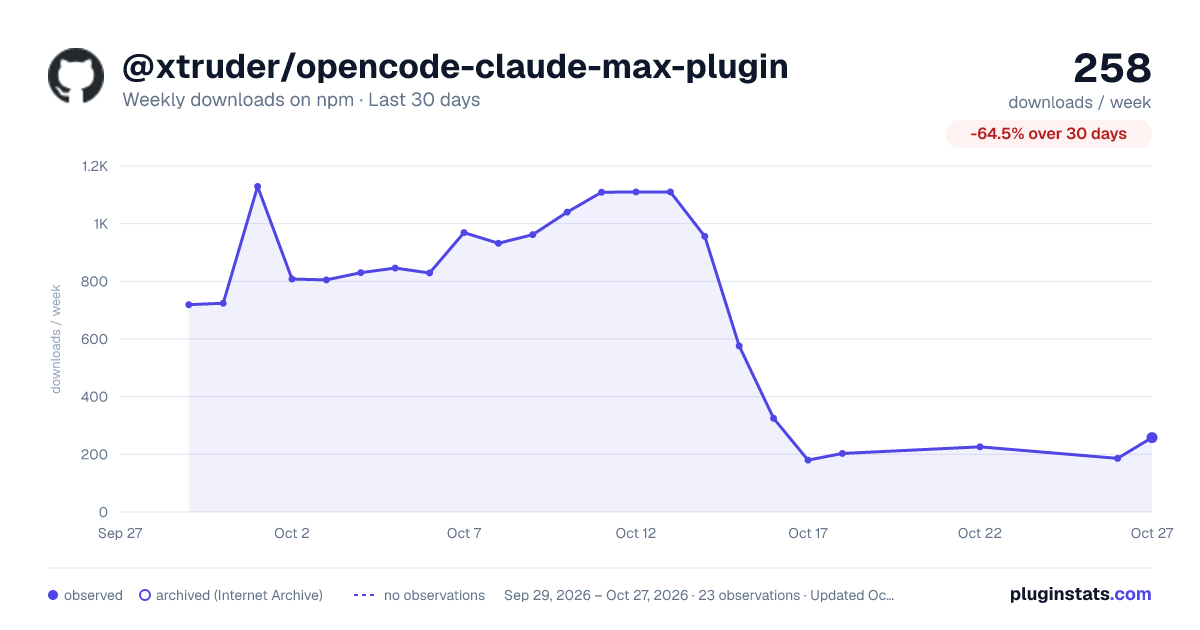
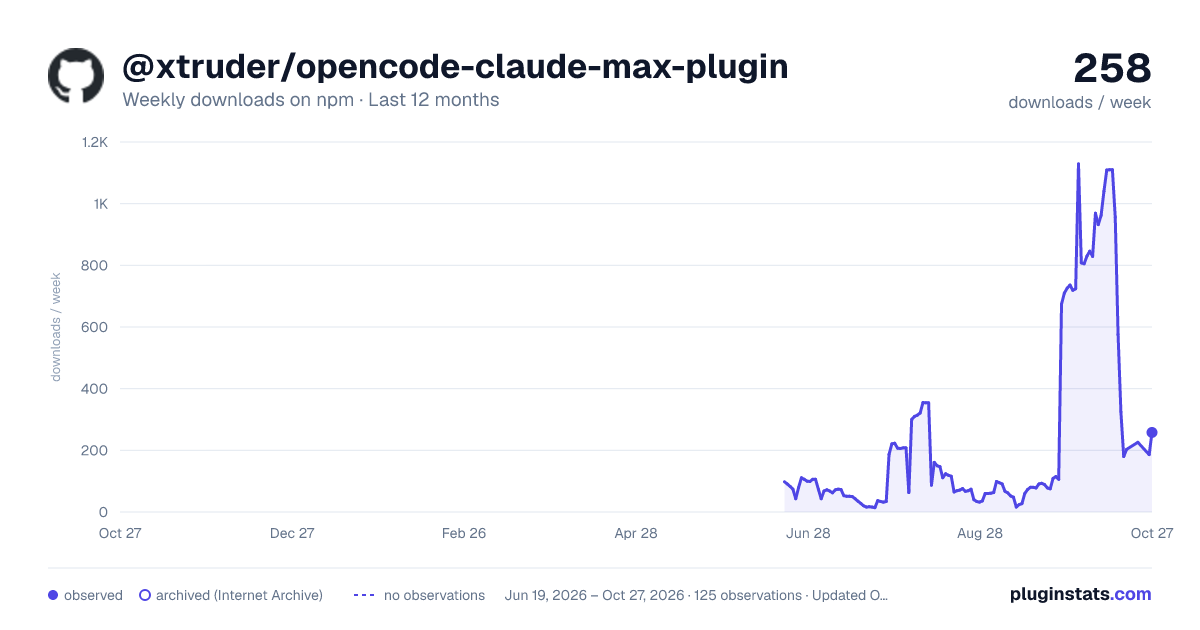
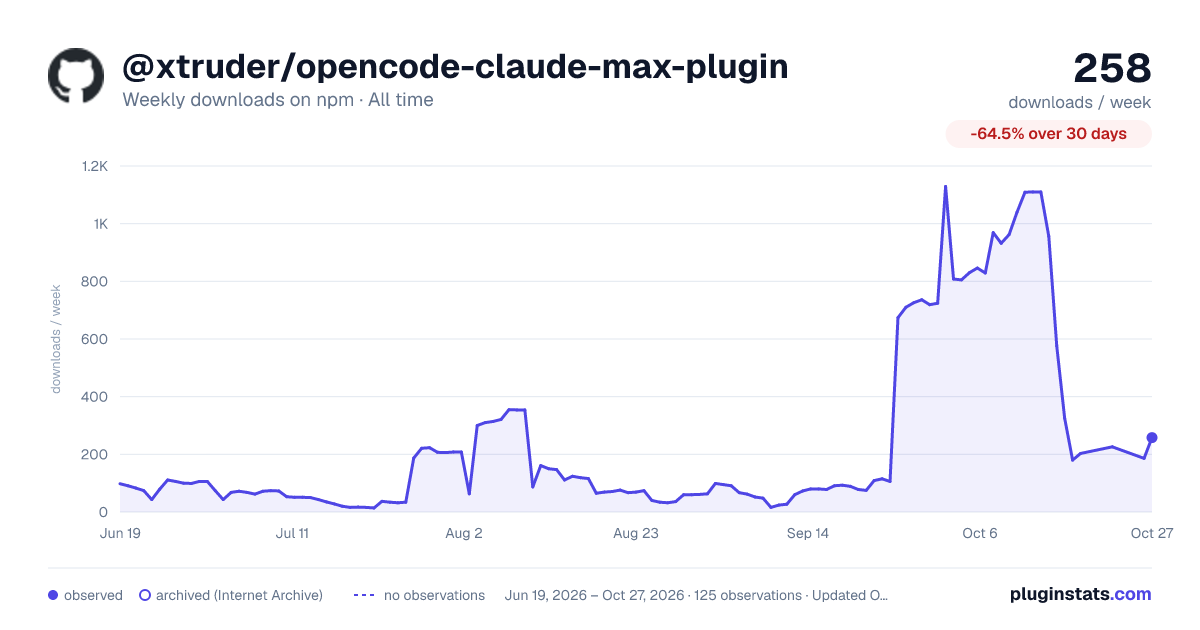

Adoption over time


7/30/90-day growth


Ranking history


Listing placement


Filled points are observed values; hollow points come from Internet Archive snapshots of the listing page. Dashed segments span periods with no observations — values between points are not interpolated.
Each band is one page of 20. Weekly downloads on a log scale. Placement is projected from weekly downloads, so it can differ from the marketplace's own sort order. Hover a dot to see the listing.
Recent observations
Full history (121)Similar npm AI SDKs plugins
All 20 @xtruder/opencode-claude-max-plugin alternativesData source
Weekly downloads (trailing 7 complete days) come from the official npm downloads API. Downloads include CI and mirrors and are not equivalent to installs or users. npm publishes no ratings.
Listing: https://www.npmjs.com/package/@xtruder/opencode-claude-max-plugin. First seen Oct 16, 2026; last successful collection Oct 19, 2026. See the methodology.