 PluginStats
@chat-adapter/telegram weekly downloads statistics
By chat-adapter (14 listings) · npm · AI SDKs
Telegram adapter for Chat SDK — Bot API webhooks, inline keyboards, reactions, and streaming
@chat-adapter/telegram has 151,600 recorded weekly downloads on npm, a decrease of 34.4% over the past 30 days.
It ranks #409 of 2,256 tracked npm listings by weekly downloads.
Over 90 days, weekly downloads changed by -4.8%.
PluginStats has 121 daily observations since Jun 19, 2026; the latest is from Oct 17, 2026.
About @chat-adapter/telegram
@chat-adapter/telegram
npm package: @chat-adapter/telegram
Telegram adapter for Chat SDK. Configure for bot webhooks and messaging.
Documentation: chat-sdk.dev/adapters/official/telegram · Guides: vercel.com/kb/chat-sdk
Installation
Scaffold with the CLI
To scaffold a new Telegram bot with this adapter preselected:
Visit the adapters directory to see other available official and vendor-official adapters.
Quick start
For managed credentials, see Vercel Connect.
The adapter auto-detects TELEGRAM_BOT_TOKEN, TELEGRAM_WEBHOOK_SECRET_TOKEN, TELEGRAM_ALLOW_UNVERIFIED_WEBHOOKS, TELEGRAM_BOT_USERNAME, TELEGRAM_MENTION_ON_REPLY, and TELEGRAM_API_BASE_URL from environment variables:
Configuration
Most options are auto-detected from environment variables when not provided. nativeStreaming and streamingEditIntervalMs are config only and have no environment variables.
| Option | Required | Description |
| allowUnverifiedWebhooks | No | Accept webhook requests without secret-token verification. Auto-detected from TELEGRAM_ALLOW_UNVERIFIED_WEBHOOKS=true. Use only for local development or behind a trusted verifying proxy | | allowedUserIds | No | Telegram user IDs allowed to trigger the adapter. Auto-detected from TELEGRAM_ALLOWED_USER_IDS (comma-separated). All users are allowed when omitted or empty | | botToken | No* | Telegram bot token. Auto-detected from TELEGRAM_BOT_TOKEN | | secretToken | Webhook* | Webhook secret token. Auto-detected from TELEGRAM_WEBHOOK_SECRET_TOKEN | | mode | No | Adapter mode: auto (default), webhook, or polling | | longPolling | No | Optional long polling config for getUpdates (timeout, limit, allowedUpdates, deleteWebhook, dropPendingUpdates, retryDelayMs) | | businessMode | No | Enable Telegram Business mode (business_connection, business_message, edited_business_message). Defaults to false | | userName | No | Bot username used for mention detection. Auto-detected from TELEGRAM_BOT_USERNAME or getMe | | mentionOnReply | No | Treat a reply to one of the bot's own messages as a mention, so it routes to onNewMention. Defaults to false. Auto-detected from TELEGRAM_MENTION_ON_REPLY=true. Implicit forum-topic replies and the bot's own messages never count | | nativeStreaming | No | Stream with Telegram's native draft previews in private chats. Defaults to false, which uses post-and-edit in every chat type | | streamingEditIntervalMs | No | Minimum interval between edits on the post-and-edit streaming path. Defaults to 1100 in private chats and 3100 in other chats, and acts as a floor for the Chat-level streamingUpdateIntervalMs | | apiUrl | No | Telegram API base URL. Auto-detected from TELEGRAM_API_BASE_URL. Use apiUrl for cross-adapter consistency; the legacy apiBaseUrl alias is still accepted | | logger | No | Logger instance (defaults to ConsoleLogger("info")) |
*botToken is always required. Webhook mode also requires secretToken unless allowUnverifiedWebhooks is explicitly enabled. Polling mode does not require webhook verification.
Authentication
Use Vercel Connect to manage the outbound bot token, or provide the token directly. Both options use Telegram's native webhook verification; polling does not require a webhook secret.
Option A — Vercel Connect
Use connectTelegramAdapter to resolve the outbound bot token from Vercel Connect:
Connect does not forward Telegram webhooks. Keep TELEGRAM_WEBHOOK_SECRET_TOKEN when using webhook mode, or use polling mode without an inbound webhook. TELEGRAM_BOT_TOKEN is not needed when using the Connect helper. The adapter derives webhook deduplication scope from Telegram's stable bot identity, so token rotation does not split update claims. If bot identity lookup fails at startup, the next accepted webhook retries it.
Option B — Bot token
Create a bot via BotFather and provide its token directly to the adapter:
1. Send /newbot and follow the prompts. 2. Copy the token to TELEGRAM_BOT_TOKEN. 3. Optionally pick a username and copy it to TELEGRAM_BOT_USERNAME.
Webhook route
Configure this URL as your bot webhook in BotFather / Telegram API:
Business mode (Connected Business Bots)
Enable Telegram Business mode when your bot manages customer conversations on behalf of a connected business account:
With businessMode: true, the adapter:
• Handles business_connection, business_message, and edited_business_message updates • Skips messages typed by the business owner, messages the bot itself sent on the account's behalf (sender_business_bot), and connections without can_reply • Encodes business threads as telegram:biz:{connectionId}:{chatId}. Each business conversation is its own channel, kept apart from any direct chat the same customer has with the bot • Passes business_connection_id on outbound sendMessage, edits, typing, file uploads, and on threads created from inline-keyboard callbacks • Routes /commands from business chats through onSlashCommand, the same as regular chats • Deletes messages with deleteBusinessMessages, which needs the can_delete_sent_messages right on the connection • Stores connection state in the Chat SDK state adapter, so a revoked or disabled connection is honoured by every running instance
Reactions are not available on business threads. The Bot API has no business variant of setMessageReaction, so addReaction and removeReaction throw a NotImplementedError there.
When polling, the adapter always sends an explicit allowed_updates list in Business mode: the default update types plus the business ones, or your longPolling.allowedUpdates merged with the business ones. Telegram otherwise reuses whatever list an earlier call set, which can silently exclude business updates. When registering a webhook yourself, include the business update types:…
Description from the npm listing.
- chat
- chat-sdk
- chatbot
- telegram
- telegram-bot
- bot
- adapter
- bot-api
- messaging
- ai-agent
- ai-sdk
- vercel
Where @chat-adapter/telegram sits in the listing
Each band is one page of 20. Weekly downloads on a log scale. Placement is projected from weekly downloads, so it can differ from the marketplace's own sort order. Hover a dot to see the listing.


Charts
Images: 30d · 1y · all time · 1600×900 dark
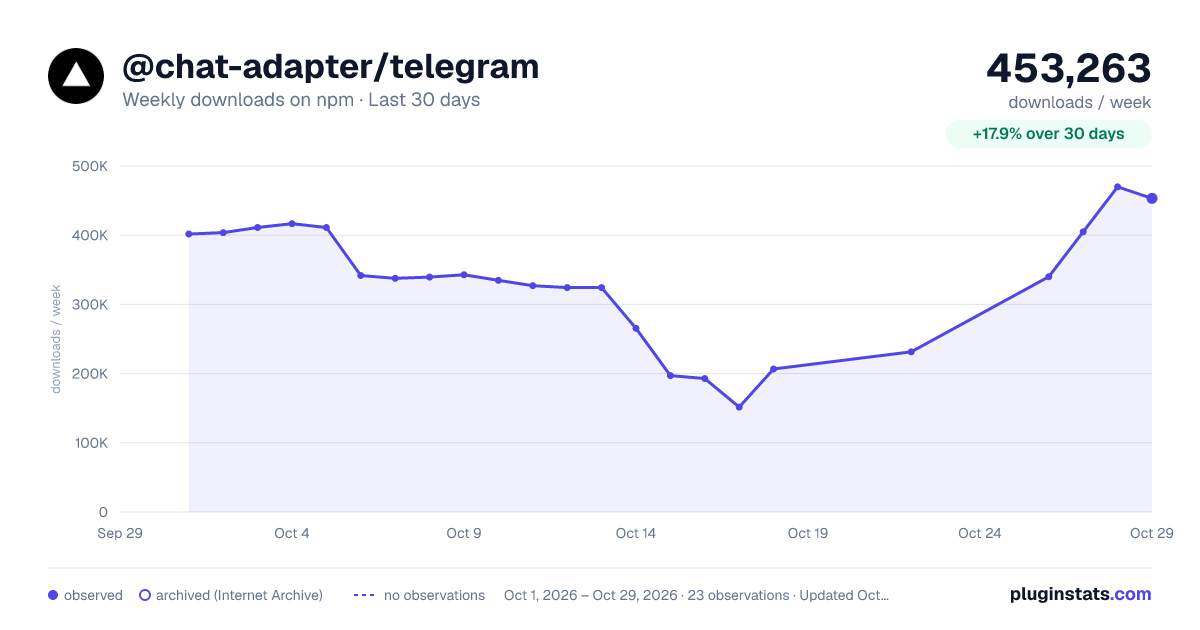
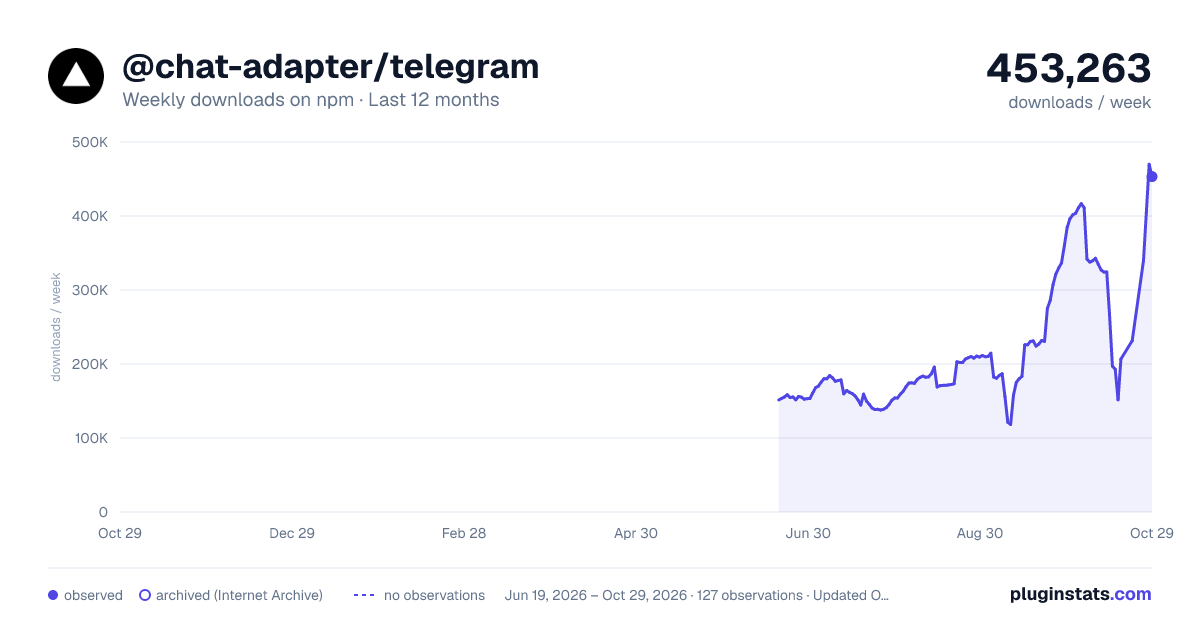
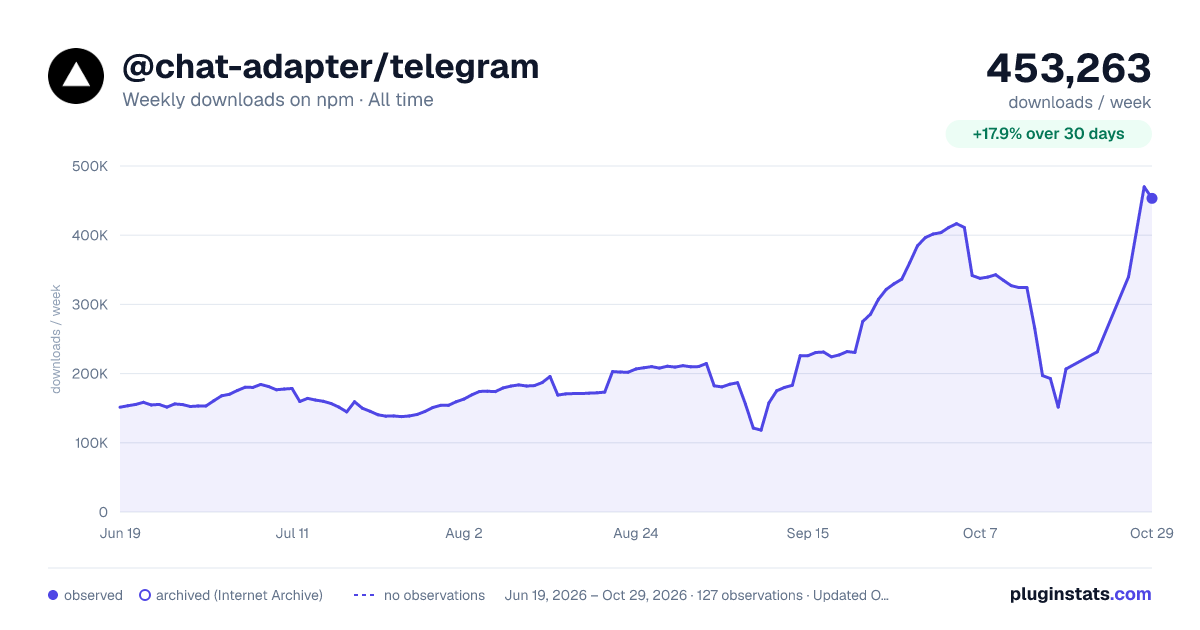

Adoption over time


7/30/90-day growth


Filled points are observed values; hollow points come from Internet Archive snapshots of the listing page. Dashed segments span periods with no observations — values between points are not interpolated.
Recent observations
Full history (121)Similar npm AI SDKs plugins
Data source
Weekly downloads (trailing 7 complete days) come from the official npm downloads API. Downloads include CI and mirrors and are not equivalent to installs or users. npm publishes no ratings.
Listing: https://www.npmjs.com/package/@chat-adapter/telegram. First seen Oct 16, 2026; last successful collection Oct 19, 2026. See the methodology.