 PluginStats
@mutagent/cli weekly downloads statistics
By mutagent · npm · Claude Code
Bun-native CLI for the MutagenT AI platform - auth, provider config, and lifecycle-tool installer for AI-native workflows
@mutagent/cli has 9,508 recorded weekly downloads on npm, an increase of 5.9% over the past 30 days.
It ranks #919 of 2,251 tracked npm listings by weekly downloads.
Over 90 days, weekly downloads changed by +3345%.
PluginStats has 543 daily observations since Apr 23, 2025; the latest is from Oct 17, 2026.
About @mutagent/cli
Mutagent CLI
Run Helix and your own agents in cloud sandboxes, from your terminal or your coding agent.
mutagent is the command-line client for the Mutagent platform. With it you can:
• sign in and choose a workspace; • add your own LLM provider keys (BYOK); • store the variables and secrets your agents' tools need; • run Helix on a task in a cloud sandbox, and follow or steer the session; • deploy and run managed agents (agent.md folders); • connect GitHub and Slack, and set up triggers and routines that start runs; • install the Helix binary on your own machine.
Every command supports --json, so a coding agent can drive the CLI as easily as a person can.
Documentation: docs.mutagent.io/cli
Contents
• Install • Quick start • Concepts • Commands • Scripts, CI and coding agents • Configuration • Links
Install
Requires Node.js 22.18 or later, or Bun 1.1 or later.
Quick start
To run Helix on your own machine instead, install the Helix binary with mutagent install helix.
Concepts
• Workspace: the scope most commands act in. Your sign-in key works in every workspace you belong to in its organization. mutagent workspaces use selects one, and --workspace overrides it for a single command. • LLM provider (BYOK): a model provider key (OpenAI, Anthropic, Google, ...) stored in the workspace, encrypted. Helix uses it to call models in the cloud. Manage them with mutagent providers. • Environment: a named set of variables and secrets an agent's tools need, such as a GitHub token or a database URL. Load one into a run with --env . Values are write-only: mutagent env show prints names and fingerprints, never a value. LLM provider keys do not belong here. • Helix session: a cloud run of Helix, addressed by a reference (hs1_...) that is printed when the run starts. mutagent helix session lists sessions, attaches to them, sends input, stops, checkpoints and restores them. A sandbox idle for 15 minutes is stopped, and an interactive session in it is checkpointed first. • Managed agent: a folder whose entry file is agent.md (YAML frontmatter, then the standing prompt). mutagent agent deploy stores each change as a new revision. A slot is the agent in one Environment (--env). • Sandbox provider and preset: where a cloud run executes, and the named sandbox definition it uses. Both are managed by the platform. You choose one per run with --sandbox-provider and --preset. • Gateway: connects GitHub and Slack, and runs Helix when an event or a schedule fires.
Commands
Run mutagent --help, or mutagent --help, for the full and current flags of any command. The command reference covers each group in detail.
Sign in and workspaces
mutagent auth login is the same command as mutagent login. Create or change workspaces in the dashboard at app.mutagent.io.
LLM providers (providers)
LLM provider types: openai, anthropic, google, moonshot, glm, zai-coding-plan, deepseek, xai, openrouter, azure, vertex, bedrock, custom. Keys are stored encrypted and never returned. mutagent providers add --help lists the extra flags for Azure, Vertex, Bedrock and custom endpoints.
Environments (env)
set creates the Environment or merges into it. --replace --force overwrites it and removes every entry you do not name. A variable named like an LLM provider key (ANTHROPIC_API_KEY, ...) is refused unless you pass --allow-provider-key. Environment names use letters, digits, ., _ and - (up to 64 characters). Variable names use A-Z, 0-9 and _, and cannot start with a digit. An Environment holds up to 64 KiB.
Run Helix in the cloud (helix)
| Run option | What it does |
| -p "" | Run the task to completion and print the final answer | | --mode json "" | Stream events as JSON lines | | --mode rpc, --rpc | Read JSON commands on stdin, write events on stdout | | --prime | Run the lean Prime agent instead of the full orchestrator | | --model | Model to use (default: the workspace default model) | | --env | Workspace Environment to load | | --preset | Sandbox preset (default: the server's Helix preset) | | --sandbox-provider | Run on this sandbox provider | | --cwd | Working directory in the sandbox | | --repository | Run in a checkout of this GitHub repository (needs the workspace's GitHub connection) | | --branch | Branch of --repository to check out |
There is no terminal chat UI: choose -p, --mode json or --mode rpc. Each run prints its session reference (hs1_...) on stderr. Ctrl-C stops the session.
Only an interactive session (--mode rpc) accepts session send. A send to a session whose sandbox was stopped for idling wakes it from its last checkpoint.
Managed agents (agent)
The agent.md frontmatter fields name, description, model, thinking, tools, disallowed_tools and skills are a local brief. Deployment settings live in one optional harness: block (tools, skills, files, bindings, runtime). name is the slug, and model is provider/model as mutagent helix models lists it.
Each deploy of new content is the next revision (v1, v2, ...). --no-activate stores it without moving the slot. @slug:vN pins a revision and @slug:latest runs the newest one.
Compiling needs Bun 1.4.2 on PATH (or MUTAGENT_BUN_BIN). agent run needs a local Helix binary (mutagent install helix).
GitHub, Slack, triggers and routines (gateway)
Routines need --tz. Destructive verbs (disconnect, repos unlink, triggers delete, routines delete, runs cancel) need --force. See mutagent gateway --help for every verb.
Reports, findings, triage and inbox
Trace sources (integrations)
Connects Langfuse or OpenObserve trace sources and pulls their traces. Credentials are write-only.
Setup: Helix binary, project, skill and hooks…
Description from the npm listing.
- ai
- agent
- cli
- mutagent
- byok
- providers
- diagnostics
- evaluator
- claude-code
Where @mutagent/cli sits in the listing
Each band is one page of 20. Weekly downloads on a log scale. Placement is projected from weekly downloads, so it can differ from the marketplace's own sort order. Hover a dot to see the listing.


Charts
Images: 30d · 1y · all time · 1600×900 dark
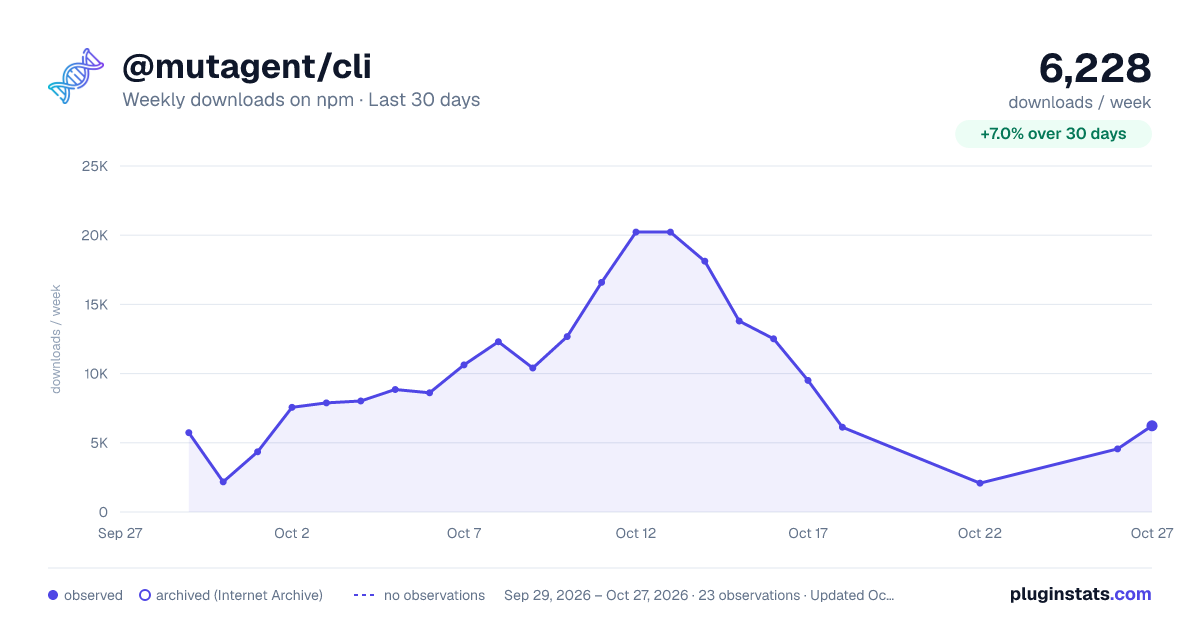
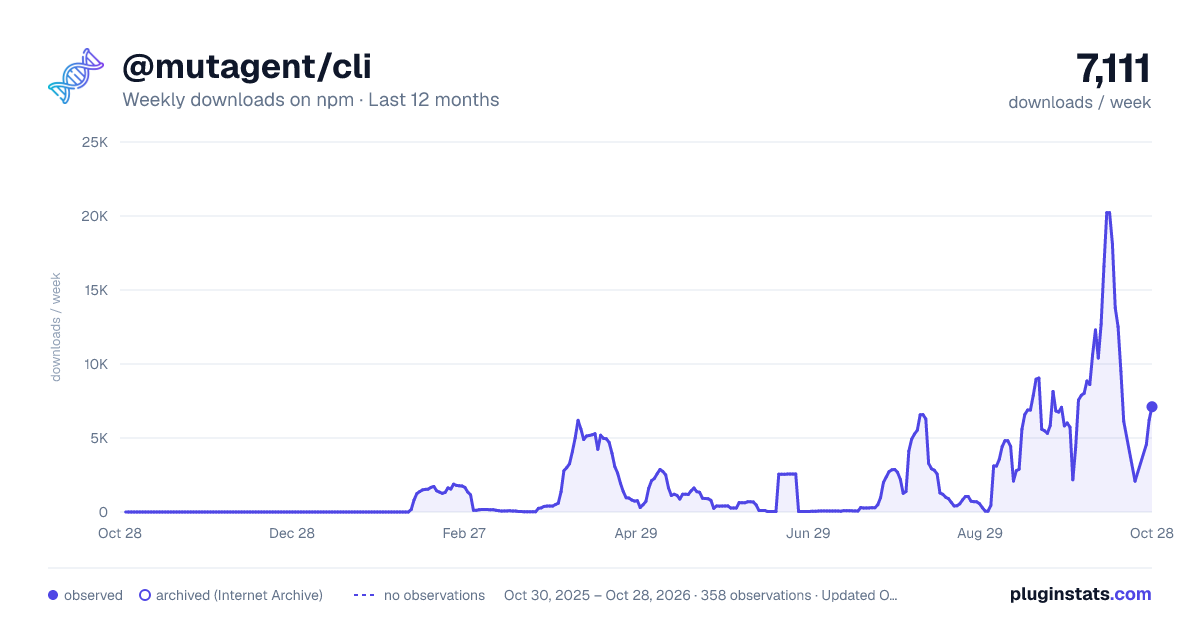
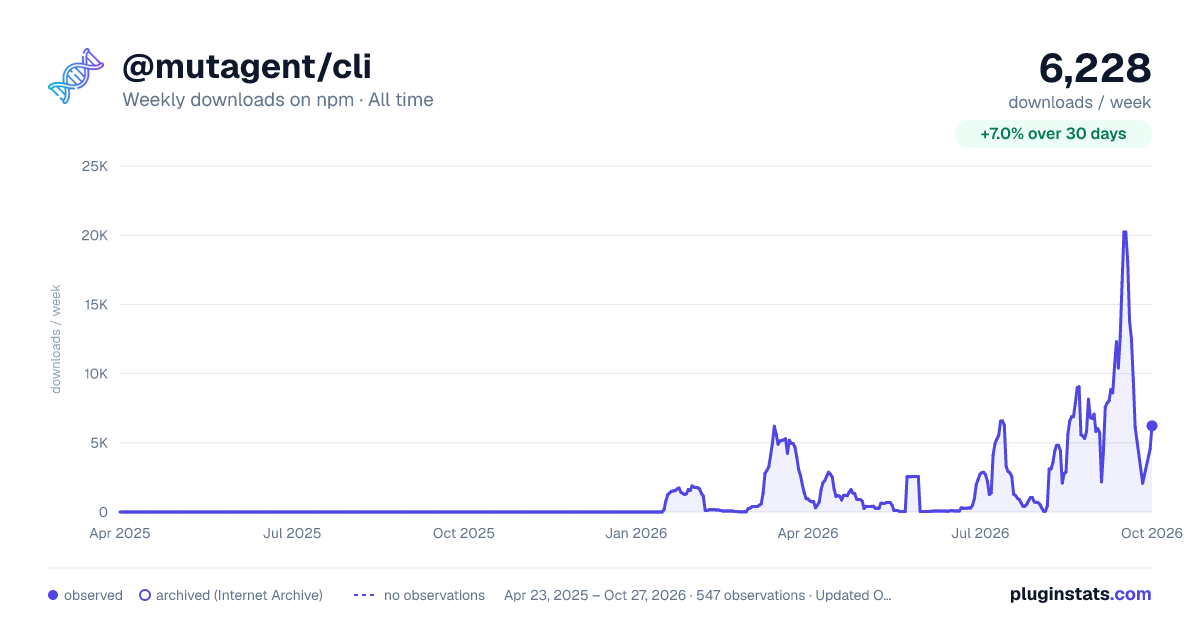

Adoption over time


7/30/90-day growth


Filled points are observed values; hollow points come from Internet Archive snapshots of the listing page. Dashed segments span periods with no observations — values between points are not interpolated.
Recent observations
Full history (543)Similar npm Claude Code plugins
Data source
Weekly downloads (trailing 7 complete days) come from the official npm downloads API. Downloads include CI and mirrors and are not equivalent to installs or users. npm publishes no ratings.
Listing: https://www.npmjs.com/package/@mutagent/cli. First seen Oct 16, 2026; last successful collection Oct 18, 2026. See the methodology.