 PluginStats
squeezit weekly downloads statistics
By ghaschel · npm · Webpack plugins
Lossless image optimizer CLI, JS/TS API, and bundler plugins for PNG, JPEG, GIF, WebP, SVG, AVIF, HEIC, JXL, ICO, BMP, and more.
squeezit has 11 recorded weekly downloads on npm, a decrease of 80.0% over the past 30 days.
It ranks #1904 of 2,251 tracked npm listings by weekly downloads.
Over 90 days, weekly downloads changed by -50.0%.
PluginStats has 121 daily observations since Jun 19, 2026; the latest is from Oct 17, 2026.
About squeezit
squeezit is a CLI for aggressively compressing images without casually degrading them. It is designed for codebases, asset folders, and content repositories where you want smaller files, predictable behavior, and a command you can trust in day-to-day workflows.
It supports direct file paths, shell-style patterns like *.png, glob expressions like images/**/*.webp, and a no-argument compress mode that scans supported image files in the current directory. Recursive scanning is available when you ask for it.
Why Squeezit
• Lossless-first workflow across common web and design formats • APNG, JXL, and ICO support alongside common web asset formats • Friendly CLI output with clear summaries, skips, and failures • Safe threshold-based replacement so tiny wins do not churn your files • Pattern matching that works with both regular shell parameters and glob expressions • Works well as a local cleanup tool before commits or releases • Published for Node users, while Bun remains the development and build toolchain
Installation
For npm and Bun global installations, use Node.js 22.13 or later. Homebrew and the standalone archives provide Node themselves; see their installation notes below.
npm
bun
Homebrew (macOS)
The personal tap is the easiest macOS installation because the formula installs Node and Squeezit's native optimizer tools as dependencies:
Upgrade a formula installation with Homebrew:
Confirm the complete runtime and optimizer toolchain after installation:
Standalone GitHub archives
Each GitHub release includes .tar.gz archives for darwin-arm64, darwin-x64, and linux-x64, plus a SHA256SUMS file. Download the archive for your platform and SHA256SUMS from the same release, then verify it before extracting it:
Replace and with the downloaded archive's values. On Linux, replace shasum -a 256 -c - with sha256sum --check -. The archives embed a Node runtime, so no separate Node installation is required; they do not bundle native image optimizer tools. Install the tools for your platform and run sqz doctor to see exactly what is missing before optimizing images.
After installation, both commands are available:
Quick Start
Compress supported images in the current directory:
Preview changes without modifying files:
Strip metadata only, without recompressing:
Target only top-level PNGs:
Target nested files with glob expressions:
Optimize an icon container in dry-run mode:
Run the shorter alias:
Check for a newer published version:
Self-update to the latest release:
Integrations
squeezit is now structured to expose first-party integrations from the same package.
Available today:
• Root JS/TS API via import { optimizeFile, optimizeFiles, stripMetadata } from "squeezit" • Gulp plugin via import { squeezitGulp } from "squeezit/gulp" • Grunt plugin via const { registerSqueezitTask } = require("squeezit/grunt") • Vite plugin via import { squeezitVite } from "squeezit/vite" • Webpack plugin via import { squeezitWebpack } from "squeezit/webpack" • Rollup plugin via import { squeezitRollup } from "squeezit/rollup" • Parcel optimizer plugin with implementation exported at squeezit/parcel • Astro wrapper via import { squeezitAstro } from "squeezit/astro" • Next.js wrapper via import { withSqueezit } from "squeezit/next" • esbuild plugin via import { squeezitEsbuild } from "squeezit/esbuild" • Babel plugin via import { squeezitBabel } from "squeezit/babel"
The supported programmatic integration surfaces are the root JS/TS API, the Gulp plugin, the Grunt plugin, the Vite plugin, the Webpack plugin, the Rollup plugin, the Parcel optimizer plugin, the Astro wrapper, the Next.js wrapper, the esbuild plugin, and the Babel plugin.
Gulp
The Gulp plugin runs as a Vinyl transform, uses the default compression strategy, and always enables metadata stripping. It supports buffered Vinyl files, stream-backed Vinyl files by buffering them internally before optimization, and path-backed null Vinyl files when file.path is available. Null Vinyl files without a usable path pass through unchanged. It does not expose or use max mode.
Grunt
The Grunt plugin registers a real multi-task, uses the default compression strategy, and always enables metadata stripping. v1 respects Grunt file mappings, so it can optimize files in place or write optimized output to mapped destination paths. It does not expose or use max mode.
Vite
The Vite plugin runs only for production builds, optimizes emitted assets from the output directory, uses the default compression strategy, and always enables metadata stripping. It does not expose or use max mode.
Webpack
The Webpack plugin runs after assets are written to the configured output directory, optimizes emitted image files from that directory, uses the default compression strategy, and always enables metadata stripping. It does not expose or use max mode.
Rollup
The Rollup plugin optimizes emitted image assets with the default compression strategy and always enables metadata stripping. It prefers in-memory asset optimization during bundle generation, including hash-safe filename/reference updates when asset bytes change, and uses a post-write output pass as a fallback for emitted files not already handled in memory. It does not expose or use max mode.
Parcel
squeezit/parcel exports the Parcel optimizer implementation, but Parcel itself only accepts optimizer specifiers that match its parcel-optimizer-* naming convention. When consuming it from the main squeezit package, point .parcelrc at the built plugin file inside node_modules:
.parcelrc
package.json
The Parcel integration is a real Parcel optimizer plugin. It runs in Parcel's asset pipeline, uses the default compression strategy, always enables metadata stripping, and is production-only by default. Its small config surface is read from package.json under squeezit.parcel, and it does not expose or use max mode.
Astro…
Description from the npm listing.
- squeezit
- image
- images
- image-compression
- image-optimizer
- image-optimization
- lossless
- lossless-compression
- compress-images
- optimize-images
- cli
- javascript
- typescript
- vite-plugin
- webpack-plugin
- rollup-plugin
- parcel-plugin
- astro-integration
- esbuild-plugin
- gulp-plugin
Where squeezit sits in the listing
Each band is one page of 20. Weekly downloads on a log scale. Placement is projected from weekly downloads, so it can differ from the marketplace's own sort order. Hover a dot to see the listing.


Charts
Images: 30d · 1y · all time · 1600×900 dark
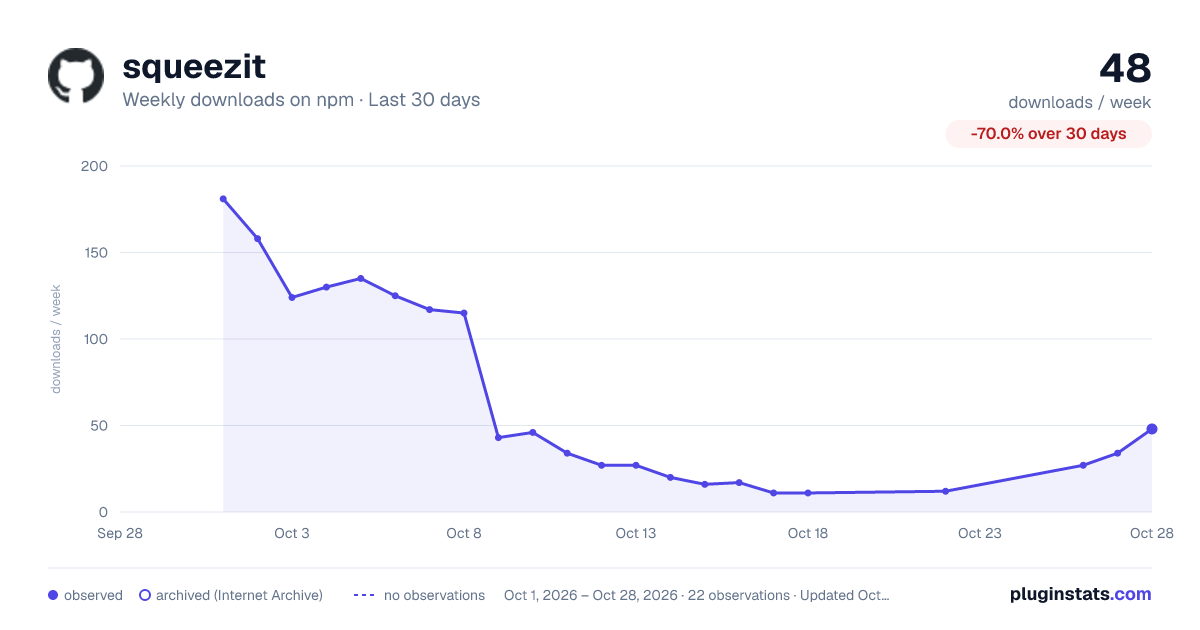
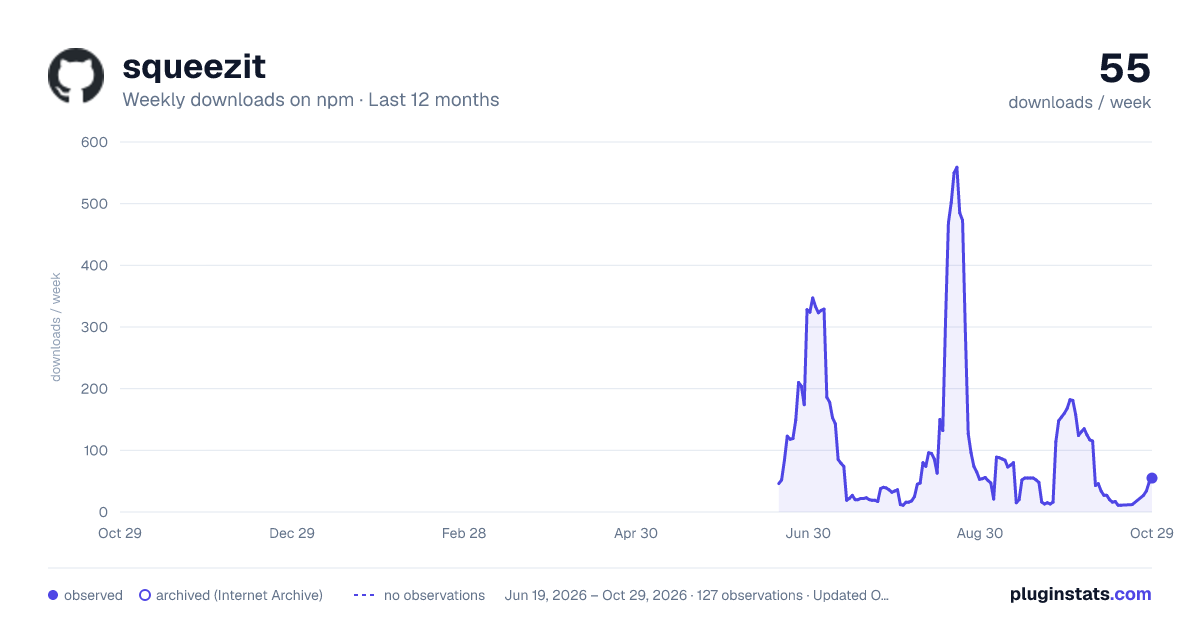
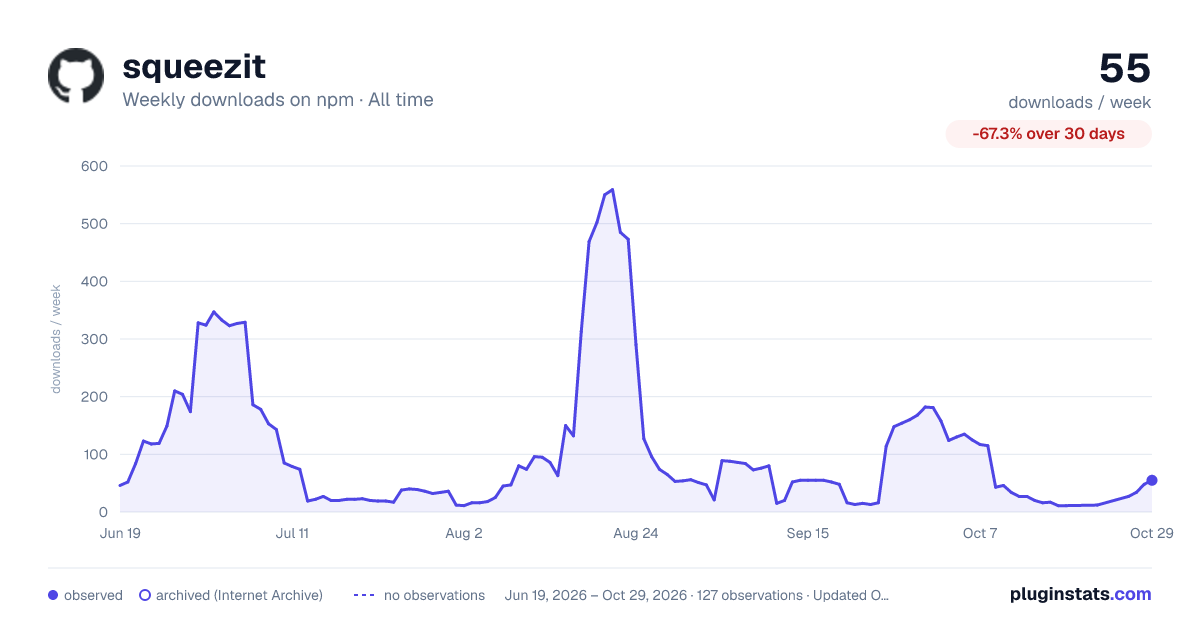

Adoption over time


7/30/90-day growth


Filled points are observed values; hollow points come from Internet Archive snapshots of the listing page. Dashed segments span periods with no observations — values between points are not interpolated.
Recent observations
Full history (121)Similar npm Webpack plugins plugins
Data source
Weekly downloads (trailing 7 complete days) come from the official npm downloads API. Downloads include CI and mirrors and are not equivalent to installs or users. npm publishes no ratings.
Listing: https://www.npmjs.com/package/squeezit. First seen Oct 16, 2026; last successful collection Oct 18, 2026. See the methodology.