 PluginStats
@chat-adapter/x weekly downloads statistics
By chat-adapter (14 listings) · npm · AI SDKs
X (Twitter) adapter for Chat SDK: reply to mentions, send direct messages, and post from your bot account with the X API v2, plus encrypted XChat conversations from the @chat-adapter/x/chat subpath
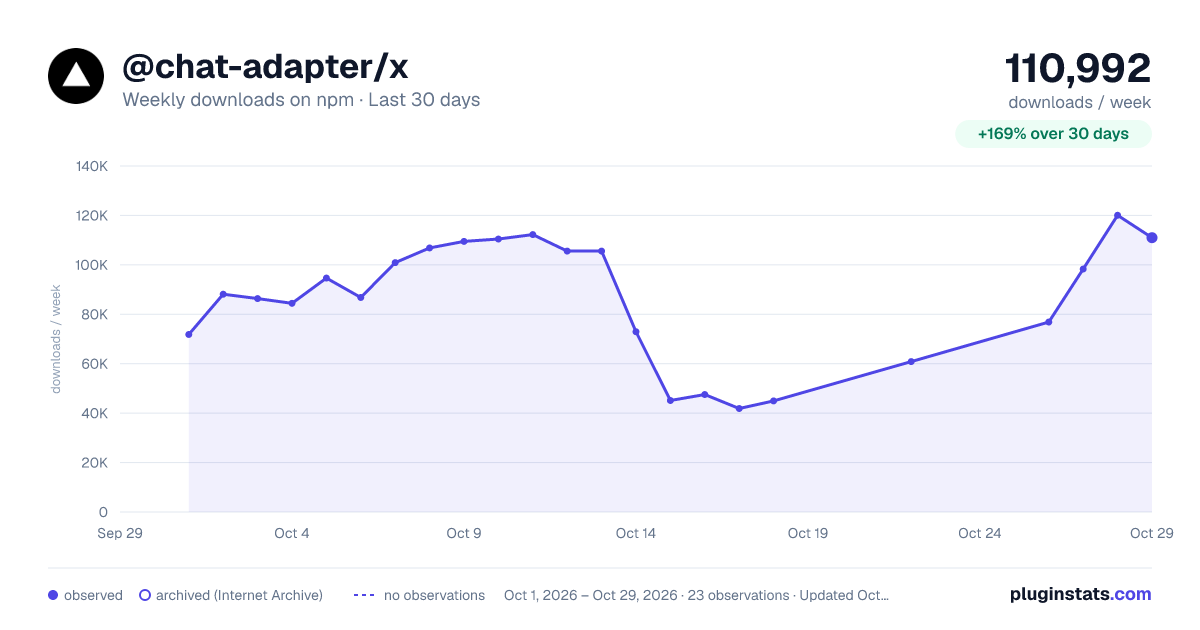
@chat-adapter/x has 41,872 recorded weekly downloads on npm, an increase of 145% over the past 30 days.
It ranks #597 of 2,251 tracked npm listings by weekly downloads.
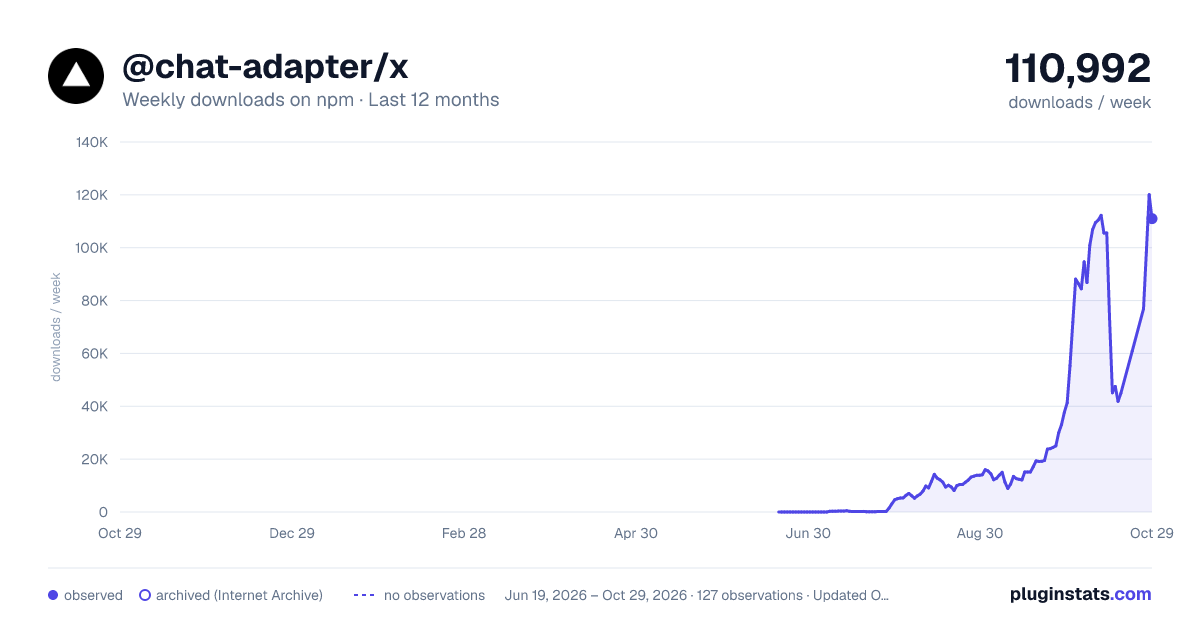
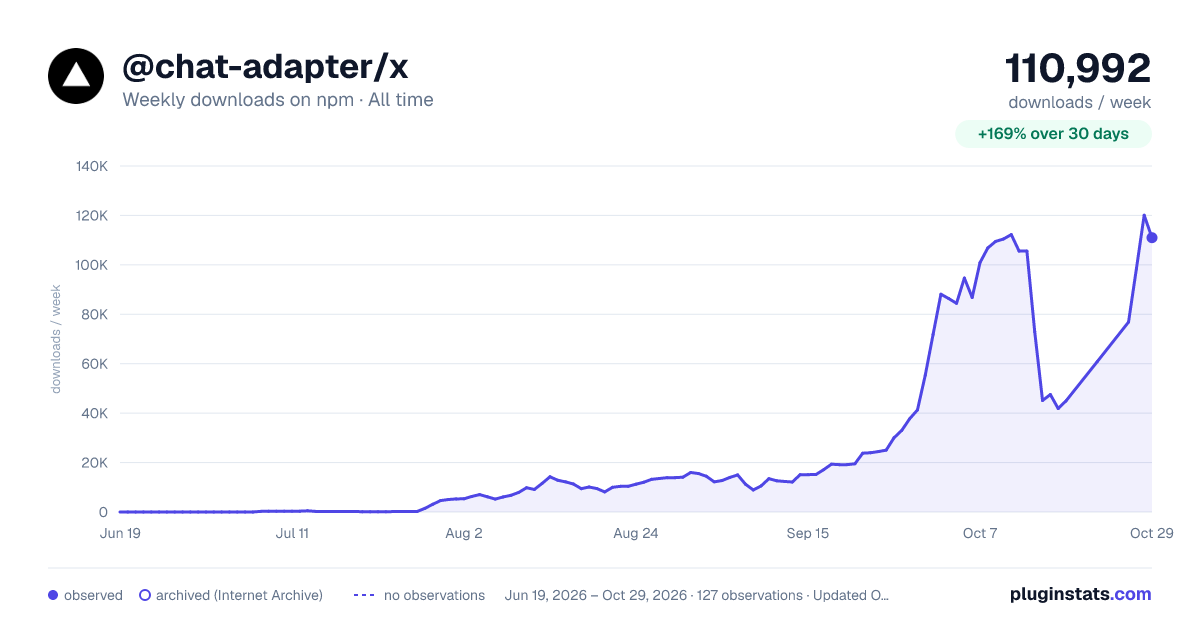
Over 90 days, weekly downloads changed by +17642%.
PluginStats has 121 daily observations since Jun 19, 2026; the latest is from Oct 17, 2026.
About @chat-adapter/x
@chat-adapter/x
npm package: @chat-adapter/x
X (Twitter) adapter for Chat SDK, using the X API v2 and the X Activity API. Reply to public mentions, hold DM conversations, post from the bot account, and like posts.
Documentation: chat-sdk.dev/adapters/official/x · Guides: vercel.com/kb/chat-sdk
Installation
Scaffold with the CLI
To scaffold a new X bot with this adapter preselected:
Visit the adapters directory to see other available official and vendor-official adapters.
Usage
When using createXAdapter() without arguments, credentials are auto-detected from environment variables.
X setup
1. Create an X app
1. Go to the X developer portal and create a Project and App 2. Under Keys and tokens, copy the API Key Secret (consumer secret): this becomes X_CONSUMER_SECRET 3. Enable OAuth 2.0 user authentication with the scopes tweet.read, tweet.write, users.read, dm.read, dm.write, like.write, and offline.access 4. Complete the OAuth 2.0 flow for the bot account. Either store the access token as X_USER_ACCESS_TOKEN, or store X_CLIENT_ID plus X_REFRESH_TOKEN to let the adapter manage token refresh
2. Register a webhook
X delivers events through the X Activity API. Set this up once in the X developer console, which handles the auth for you:
1. Register your webhook URL (https://your-domain.com/api/webhooks/x). It must be public HTTPS without a port. X immediately sends a CRC challenge, which the adapter answers automatically 2. Create subscriptions for the events the adapter consumes: post.mention.create, dm.received, and dm.sent (private events, so the bot user must have authorized your app first)
Subscription and webhook management is one-time setup, not adapter runtime. If you script it instead of using the console, the Activity API endpoints are auth-picky and operation-specific and do not fully match the published spec (creating a private-event subscription needed OAuth 1.0a user context in testing, while list and delete used the app-only bearer token), so the console is the simpler path.
3. Environment variables
Token refresh
X OAuth 2.0 user tokens are short-lived (about two hours). With X_CLIENT_ID and X_REFRESH_TOKEN set, the adapter refreshes the access token before expiry and persists the rotated refresh token in your state adapter, so the bot survives restarts. Set X_ENCRYPTION_KEY to store those tokens AES-256-GCM encrypted.
Alternatively, pass a token provider and plug in your own refresh logic:
Webhook setup
X uses two webhook mechanisms, both handled by the adapter:
1. CRC challenge (GET): X sends a crc_token that the adapter answers with an HMAC-SHA256 response keyed by your consumer secret. X re-validates hourly 2. Event delivery (POST): activity events signed via the x-twitter-webhooks-signature header, verified against the raw request body
Features
Messaging
| Feature | Supported |
| Post message | Yes (mention replies and DMs) | | Top-level posts | Yes (channel.post on x:public) | | Edit message | Posts only (X edit eligibility rules apply) | | Delete message | Posts and own DM events | | Streaming | Buffered (accumulates then posts once) | | Typing indicator | No |
Rich content
| Feature | Supported |
| Card format | Plain text fallback | | Buttons | No (link buttons render as text) | | Tables | ASCII | | Modals | No | | Image uploads | Yes (png, jpeg, webp; up to 4 per post; also DMs) |
Attach images by passing files (or attachments) on the message; the adapter uploads each through X's chunked media endpoints (initialize then append then finalize) and attaches the returned media_ids to the post or DM. A post can carry media with or without text.
Media upload requires the media.write scope on your OAuth 2.0 token, in addition to tweet.write. Mint the token with media.write included or uploads fail with a 403.
Conversations
| Feature | Supported |
| Mentions | Yes (post.mention.create) | | DMs | Yes (dm.received / dm.sent) | | Reactions | Likes only (emoji.heart or "like") | | User lookup | Yes |
Message history
| Feature | Supported |
| Fetch messages | DMs via API, posts from cache | | Fetch single message | Posts via API, DMs from cache |
Thread ID format
Examples: x:post:1943467279943467279, x:dm:783214. X DM webhooks carry no conversation id, only participant ids, so DMs are threaded by the other participant's user id: openDM("783214") returns x:dm:783214, and sends route to POST /2/dm_conversations/with/783214/messages. Top-level posts go through channel.post on the x:public channel.
Automation policy
X enforces automation rules. Before deploying a bot:
• get explicit consent before sending automated replies or DMs, and honor opt-outs immediately • disclose the bot identity in the account profile • never send bulk, duplicate, or aggressive automated content • use only the official API (no scraping or browser automation)
The adapter is strict by default: it never streams by post-and-edit, rejects unsupported interactions loudly, and only replies where your handlers decide to.
XChat (encrypted messaging)
XChat is X's encrypted messaging product. It ships from the @chat-adapter/x/chat subpath of this package, so it installs with @chat-adapter/x and adds no dependencies unless you import it.
The XChat crypto stack (@xdevplatform/chat-xdk, @xdevplatform/xdk, juicebox-sdk) is declared as optional peer dependencies. Install them alongside @chat-adapter/x when you use this subpath.
Usage
Wire the webhook route (e.g. app/api/webhooks/xchat/route.ts in Next.js):
When using createXchatAdapter() without arguments, credentials are auto-detected from environment variables. The bot's @handle is resolved from GET /2/users/me at startup, so mention detection works without any hardcoding.
XChat setup
1. Register encryption keys
The bot account needs registered public keys and a Juicebox-backed private-key store before it can participate in encrypted conversations:…
Description from the npm listing.
- chat
- chat-sdk
- chatbot
- x
- x-api
- bot
- adapter
- messaging
- ai-agent
- ai-sdk
- vercel
- xchat
Where @chat-adapter/x sits in the listing
Each band is one page of 20. Weekly downloads on a log scale. Placement is projected from weekly downloads, so it can differ from the marketplace's own sort order. Hover a dot to see the listing.


Charts
Images: 30d · 1y · all time · 1600×900 dark

Adoption over time


7/30/90-day growth


Filled points are observed values; hollow points come from Internet Archive snapshots of the listing page. Dashed segments span periods with no observations — values between points are not interpolated.
Recent observations
Full history (121)Similar npm AI SDKs plugins
Data source
Weekly downloads (trailing 7 complete days) come from the official npm downloads API. Downloads include CI and mirrors and are not equivalent to installs or users. npm publishes no ratings.
Listing: https://www.npmjs.com/package/@chat-adapter/x. First seen Oct 16, 2026; last successful collection Oct 18, 2026. See the methodology.