 PluginStats
prettier-plugin-sort-props weekly downloads statistics
By sherlockdoyle · npm · Prettier plugins
A opinionated plugin to sort JSX props.
prettier-plugin-sort-props has 1 recorded weekly downloads on npm, a decrease of 92.3% over the past 30 days.
It ranks #2197 of 2,256 tracked npm listings by weekly downloads.
PluginStats has 121 daily observations since Jun 19, 2026; the latest is from Oct 17, 2026.
About prettier-plugin-sort-props
Prettier Plugin Sort Props
A Prettier plugin to logically sort component props based on their name.
This plugin currently only works with JSX (React props) in .jsx and .tsx files.
[!IMPORTANT] Rearranging props can change the order of execution. See .
Installation
Install Prettier and prettier-plugin-sort-props:
Usage
Add the plugin to your Prettier configuration file.
Working
Are you aware of prettier-plugin-css-order? This plugin works just like that plugin, but for JSX props. The problem with JSX props is that they can have arbitrary names, so you can't just use a predefined order like Concentric-CSS. Instead, we use a simple and small (310KB only) AI model to sort the props, which runs offline, completely on your device; and you can disable it too! Other than the AI model, there's also a small list of common props arranged in a predetermined order - which you can find in order.ts.
The props sorting follows 3 steps:
1. Props in sortPropsCustomOrder are sorted first. 2. Remaining props, which are present in the internal order, are sorted next. 3. Anything else is sorted using the AI model.
[!NOTE] For technical details, see the top level README.
Configuration
You can configure the plugin through your Prettier configuration file.
Example .prettierrc.json:
Options
sortPropsUseAI
• Type: String • Default: "stable" • Choices: • "no": Disables AI-powered sorting. Unmatched props maintain their original relative order. • "yes": Uses the AI model's output to sort unmatched props. However, the AI model is not very good and may produce different results every time. • "stable": Uses the AI model's output to sort unmatched props, but first stabilizes the output. This ranks all unmatched props together and then sorts them. This is slower than "yes", but the output doesn't change every time.
This option controls how the plugin uses its underlying AI model to sort props that are not explicitly handled by sortPropsCustomOrder or the predefined order.
sortPropsCustomOrder
• Type: Array • Default: [] • Description: Defines a custom order for JSX props. Props matching entries in this array will be sorted according to their order in the array. • Strings can be exact prop names (e.g., "id", "class name"). • Strings can be prefix wildcards ending with * (e.g., "on *" to match all props starting with on, like onClick, onSubmit). The * matches any sequence of characters. Note that "on *" will match props like onClick, on-submit, on_input, etc. Whereas, "on*" (no space) will match props like onclick, once, onion, etc.
Props listed in sortPropsCustomOrder are prioritized first. Then, any remaining props are sorted based on the predefined order and the sortPropsUseAI setting.
Examples
Before:
After:
With Spread Attributes and Arbitrary Props
Before:
After:
Command Line Interface (CLI)
This plugin provides a CLI utility to help you generate a sortPropsCustomOrder based on the existing prop patterns in your project.
extract-order Command
The extract-order command scans your JSX/TSX files, analyzes the relative order of props as they appear, and then suggests an optimized sortPropsCustomOrder array. This can be a great starting point for your configuration.
[!IMPORTANT] The CLI uses experimental node v22 features and may not work on older versions. It has been tested on v22.15.0 only.
Usage:
Arguments:
• [...]: (Optional) A list of files, directories, or glob patterns to scan. • If not provided, defaults to scanning '/*.tsx' and '/*.jsx'.
Options:
• -e , --exclude : (Optional) A glob pattern to exclude files from scanning. This option can be used multiple times. • Defaults to 'node_modules', '*.test.*', '*.spec.*'.
How it Works:
The CLI parses your source files and observes how props are typically ordered relative to each other within components. It counts pairwise occurrences (e.g., "propA appears before propB X times"). It also normalizes common prefixes like data-, test-, and aria- into wildcards (e.g., data *) to create more general sorting rules. Using this data, it finds an optimal ordering that minimizes conflicts and respects the most common patterns in your code.
Output:
The command will print a JSON array to your console, which you can copy and paste into the sortPropsCustomOrder option in your Prettier configuration file.
Example:
This will scan all .tsx and .jsx files within the src directory (excluding anything under src/legacy/) and then output a suggested sortPropsCustomOrder array.
You might see output like this:
Remember to review and adjust the suggested order to perfectly fit your project's conventions.
Description from the npm listing.
- prettier
- prettier-plugin
- sort-props
- react
- jsx
- tsx
- sort
- props
- order
Where prettier-plugin-sort-props sits in the listing
Each band is one page of 20. Weekly downloads on a log scale. Placement is projected from weekly downloads, so it can differ from the marketplace's own sort order. Hover a dot to see the listing.


Charts
Images: 30d · 1y · all time · 1600×900 dark
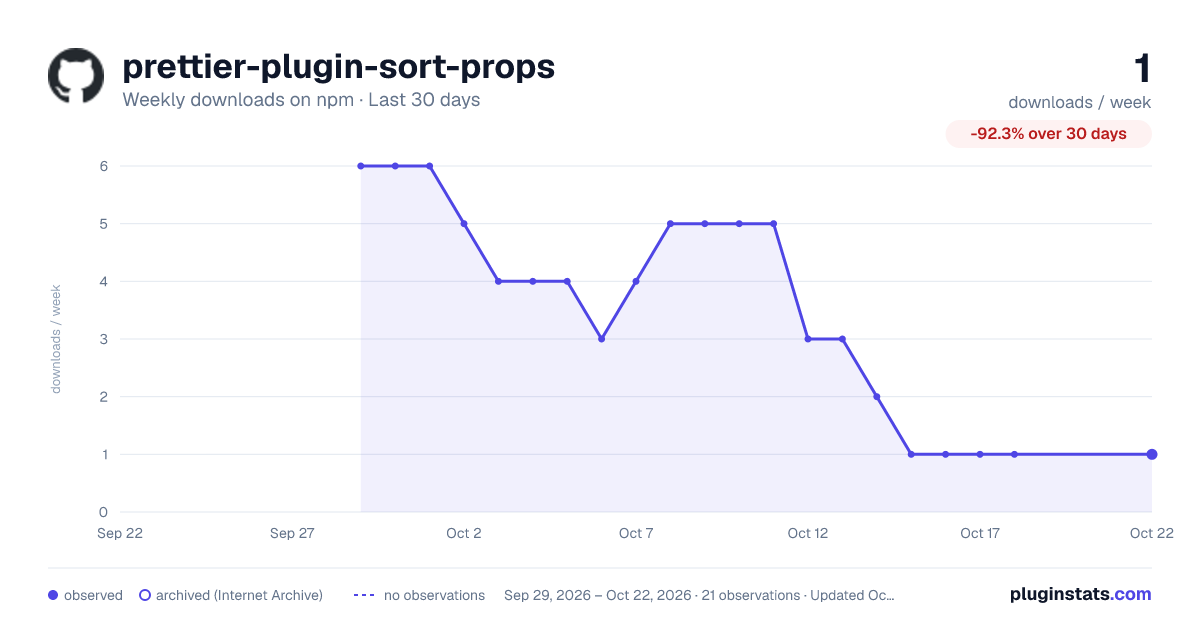
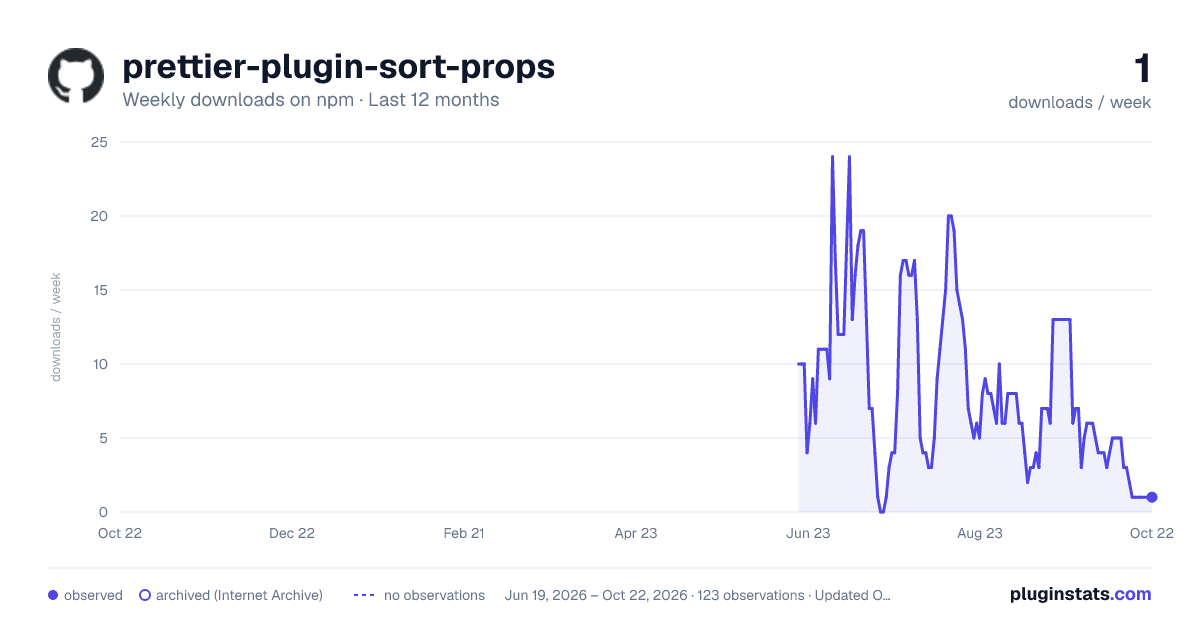
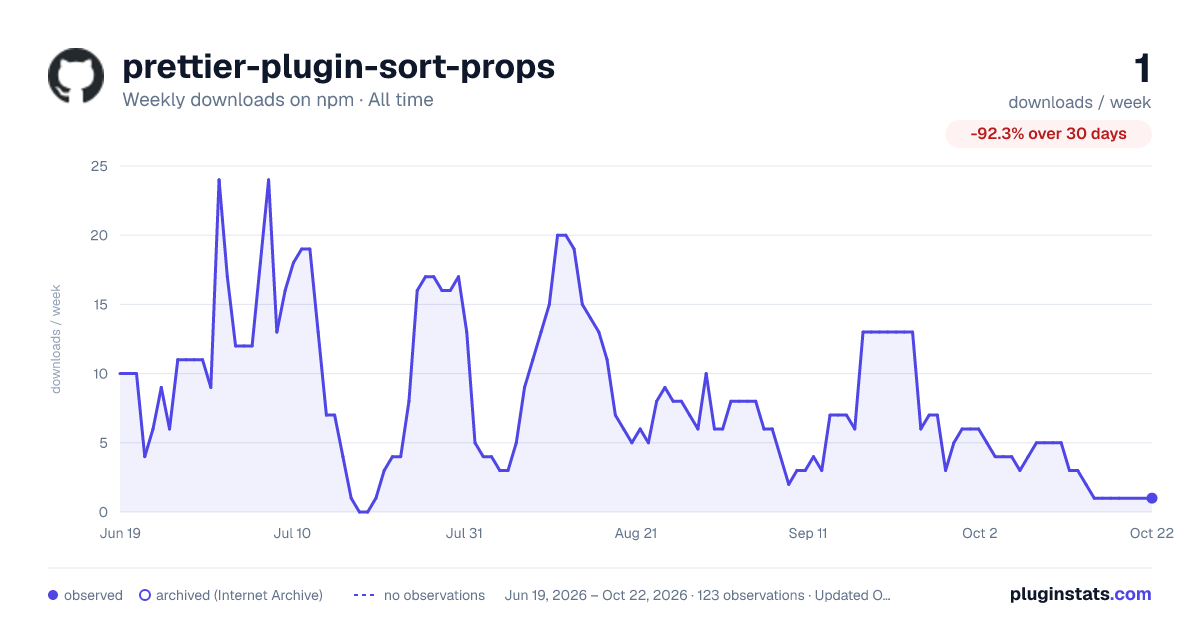

Adoption over time


7/30/90-day growth


Filled points are observed values; hollow points come from Internet Archive snapshots of the listing page. Dashed segments span periods with no observations — values between points are not interpolated.
Recent observations
Full history (121)Similar npm Prettier plugins plugins
Data source
Weekly downloads (trailing 7 complete days) come from the official npm downloads API. Downloads include CI and mirrors and are not equivalent to installs or users. npm publishes no ratings.
Listing: https://www.npmjs.com/package/prettier-plugin-sort-props. First seen Oct 16, 2026; last successful collection Oct 19, 2026. See the methodology.