 PluginStats
vite-ssg weekly downloads statistics
By antfu-collective (2 listings) · npm · Vite plugins
Server-side generation for Vite
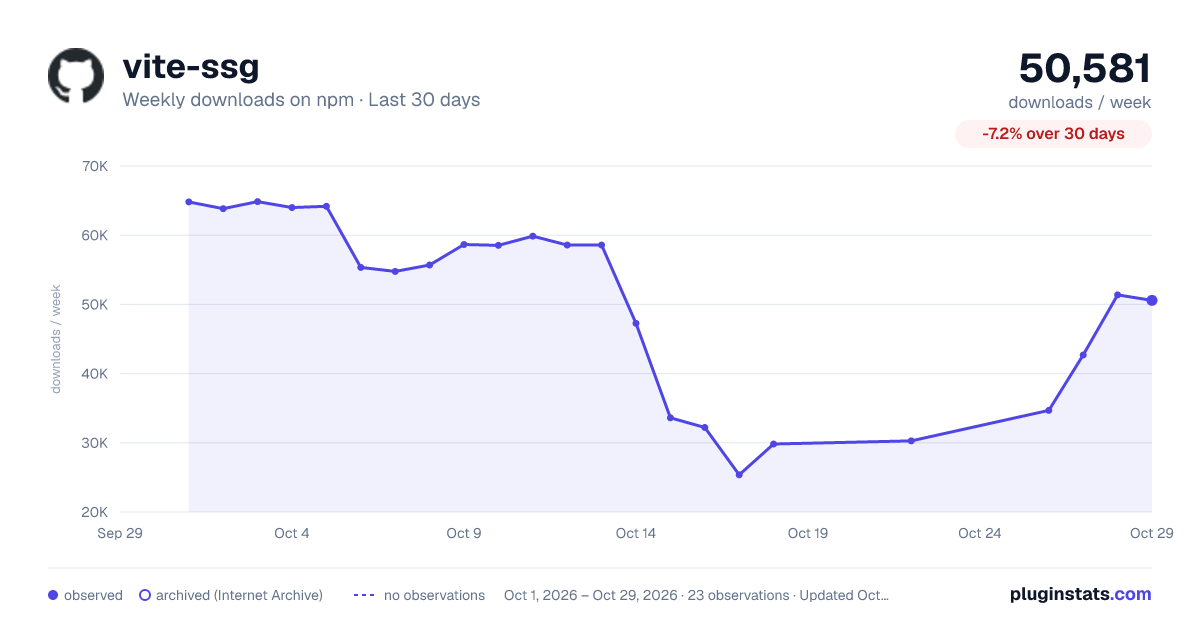
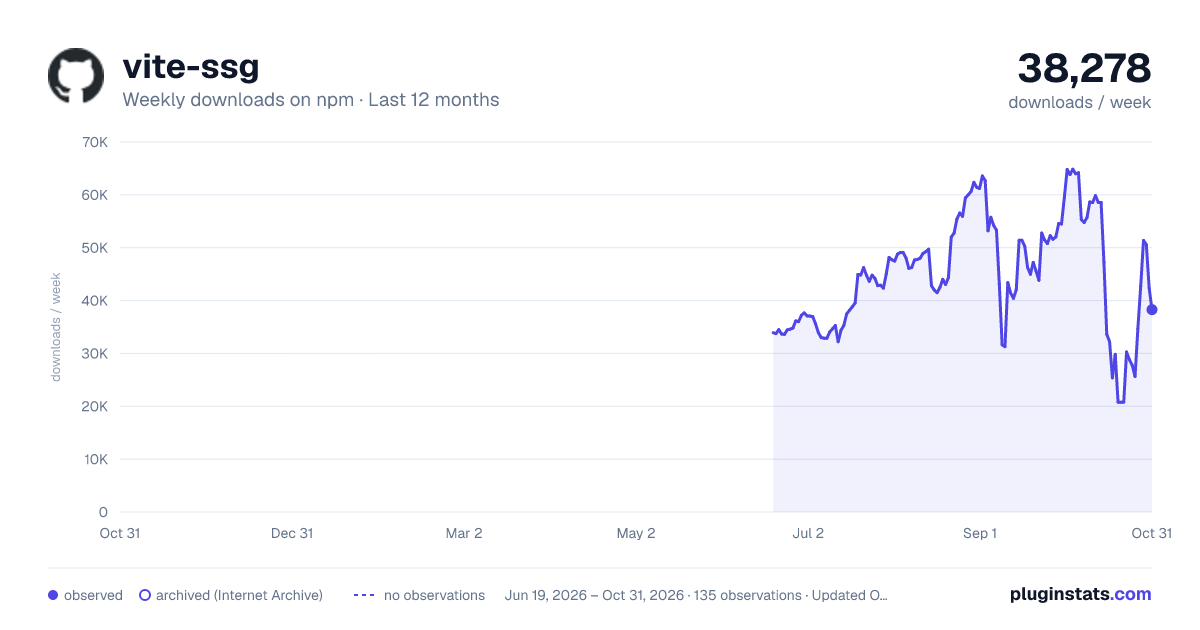
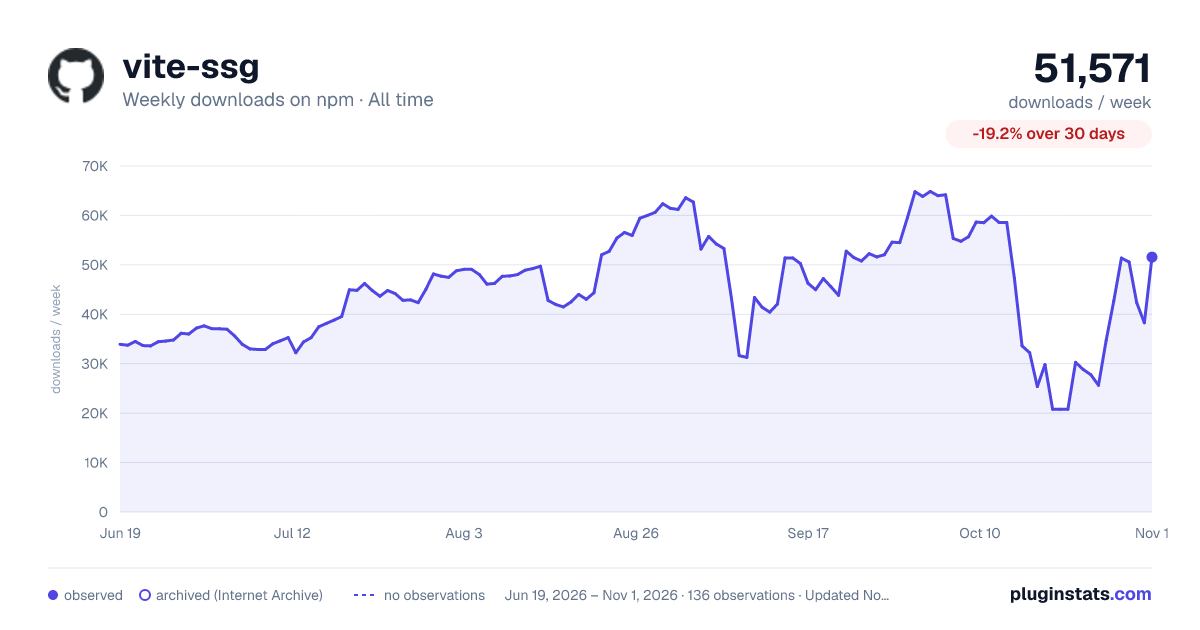
vite-ssg has 25,372 recorded weekly downloads on npm, a decrease of 45.2% over the past 30 days.
It ranks #696 of 2,251 tracked npm listings by weekly downloads.
Over 90 days, weekly downloads changed by -43.6%.
PluginStats has 121 daily observations since Jun 19, 2026; the latest is from Oct 17, 2026.
About vite-ssg
Vite SSG
Static-site generation for Vue 3 on Vite.
ℹ️ ESM-only from v27.0.0 (CJS generation format also dropped).
ℹ️ Vite 2 is supported from v0.2.x, Vite 1's support is discontinued.
Install
This library requires Node.js version >= 14
npm i -D vite-ssg vue-router @unhead/vue
How to allow Rollup tree-shake your client code
In order to allow Rollup tree-shake your client code at build time, you need to wrap your code using import.meta.env.SSR, that's, checking if the build is for the server: Rollup will remove the server code from the client build.
Single Page SSG
For SSG of an index page only (i.e. without vue-router); import vite-ssg/single-page instead, and only install @unhead/vue (npm i -D vite-ssg @unhead/vue).
The ClientOnly component is registered globally when the app is created.
Document head
We ship @unhead/vue v2 to manage the document-head out of the box. You can use it directly in your pages/components. For example:
That's all! No configuration is needed. Vite SSG will automatically handle the server-side rendering and merging.
See @unhead/vue v2's docs for more usage information about useHead.
Critical CSS
Vite SSG has built-in support for generating Critical CSS inlined in the HTML via the beasties package. Install it with:
Critical CSS generation will automatically be enabled for you.
To configure beasties, pass its options into ssgOptions.beastiesOptions in vite.config.ts:
Initial State
The initial state comprises data that is serialized with your server-side generated HTML and is hydrated in the browser when accessed. This data can be data fetched from a CDN, an API, etc, and is typically needed as soon as the application starts or is accessed for the first time.
The main advantage of setting the application's initial state is that the statically generated pages do not need to refetch the data as it is fetched and serialized into the page's HTML at build time.
The initial state is a plain JavaScript object that can be set during SSR. I.e. when statically generating the pages like this:
Typically, you will use this with an application store, such as Vuex or Pinia. See below for examples:
When using Pinia
Following Pinia's guide, you will to adapt your main.{ts,js} file to look like this:
When using Vuex
For an example on how to use a store with an initial state in a single page app, see the single page example.
State Serialization
By default, the state is deserialized and serialized by using JSON.stringify and JSON.parse respectively. If this approach works for you, you should definitely stick to it as it yields far better performance.
You may use the transformState option in the ViteSSGClientOptions options object as shown below. A valid approach besides JSON.stringify and JSON.parse is @nuxt/devalue (which is used by Nuxt.js):
A minor remark when using @nuxt/devalue: In case, you are getting an error because of a require within the package @nuxt/devalue, you have to add the following piece of config to your Vite config:
Async Components
Some applications may make use of Vue features that cause components to render asynchronously (e.g. suspense). When these features are used in ways that can influence initialState, the onSSRAppRendered may be used in order to ensure that all async operations are complete during the initial application render. For example:
Configuration
You can pass options to Vite SSG in the ssgOptions field of your vite.config.js
See src/types.ts. for more options available.
Custom Routes to Render
You can use the includedRoutes hook to include or exclude route paths to render, or even provide some completely custom ones.
Alternatively, you may export the includedRoutes hook from your server entry file. This will be necessary if fetching your routes requires the use of environment variables managed by Vite.
Comparison
Use Vitepress when you want:
• Zero config, out of the box SSG • A single-purpose documentation site • Lightweight (No double payload)
Use Vite SSG when you want:
• More control on the build process and tooling • The flexible plugin system • Multi-purpose application with some SSG to improve SEO and loading speed
Cons:
• Double payload
Example
See Vitesse.
Thanks to the prior work
• vitepress • vue3-vite-ssr-example • vite-ssr
Contribution
Please refer to https://github.com/antfu/contribute.
License
MIT License © 2020-PRESENT Anthony Fu
Description from the npm listing.
- vite
- vite-plugin
- ssg
- ssr
Where vite-ssg sits in the listing
Each band is one page of 20. Weekly downloads on a log scale. Placement is projected from weekly downloads, so it can differ from the marketplace's own sort order. Hover a dot to see the listing.


Charts
Images: 30d · 1y · all time · 1600×900 dark

Adoption over time


7/30/90-day growth


Filled points are observed values; hollow points come from Internet Archive snapshots of the listing page. Dashed segments span periods with no observations — values between points are not interpolated.
Recent observations
Full history (121)Similar npm Vite plugins plugins
Data source
Weekly downloads (trailing 7 complete days) come from the official npm downloads API. Downloads include CI and mirrors and are not equivalent to installs or users. npm publishes no ratings.
Listing: https://www.npmjs.com/package/vite-ssg. First seen Oct 16, 2026; last successful collection Oct 18, 2026. See the methodology.