 PluginStats
vitest-visual-diff weekly downloads statistics
By acoyfellow · npm · Testing
Compare two live elements through structure, computed style, pixels, and accessibility in Vitest Browser Mode.
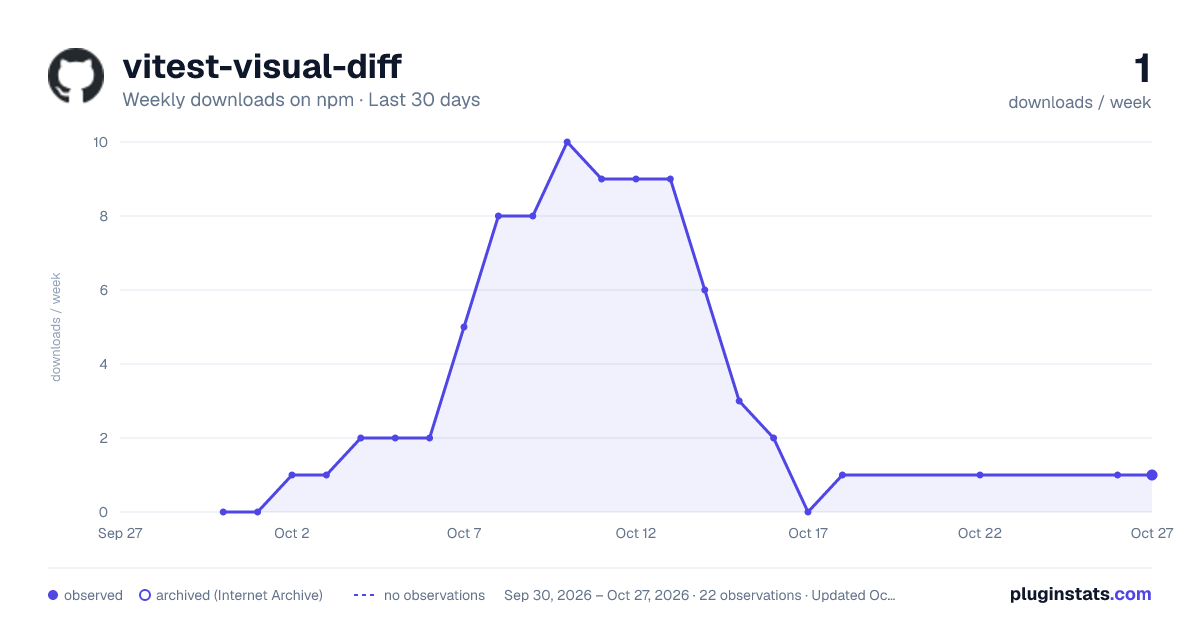
vitest-visual-diff has 0 recorded weekly downloads on npm, a decrease of 100% over the past 30 days.
It ranks #2245 of 2,251 tracked npm listings by weekly downloads.
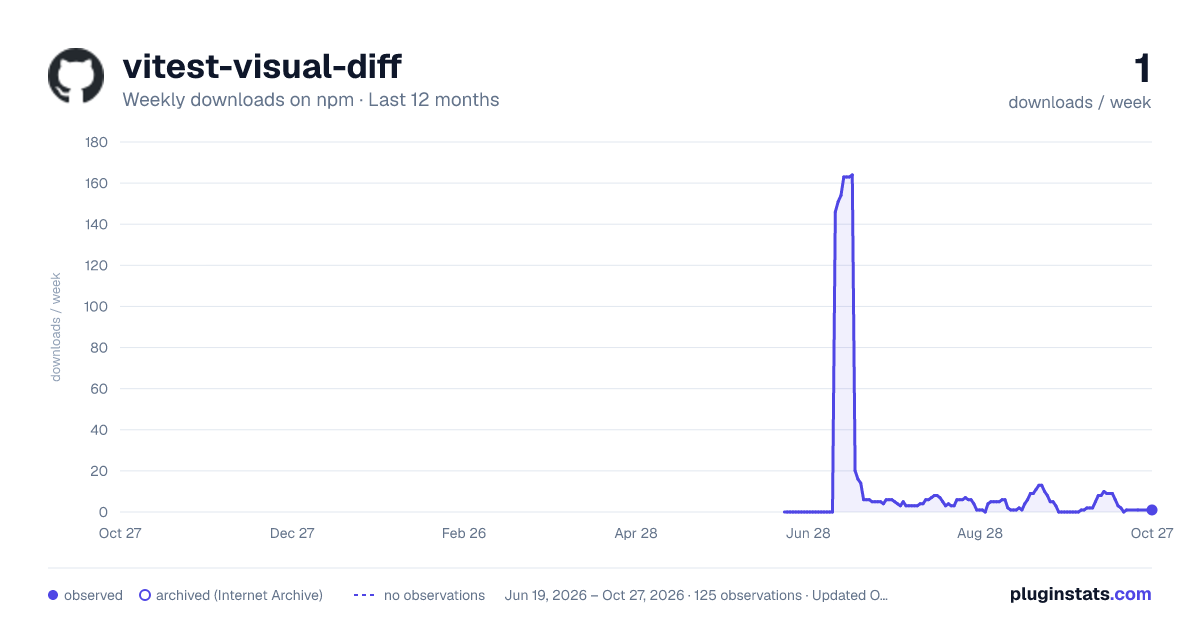
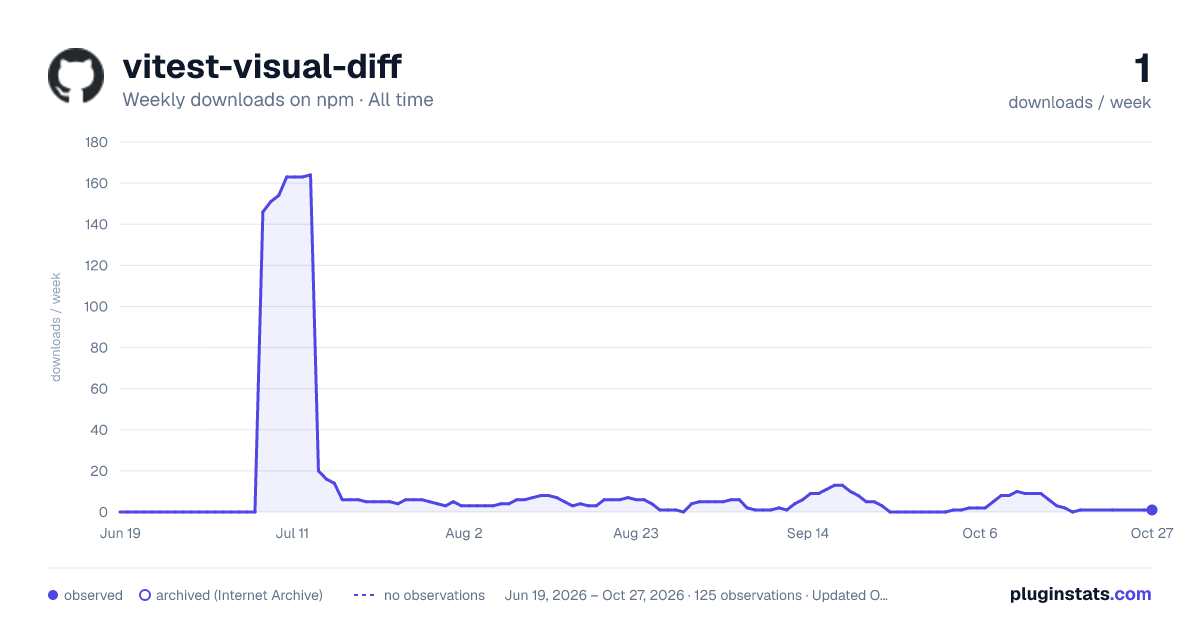
Over 90 days, weekly downloads changed by -100%.
PluginStats has 121 daily observations since Jun 19, 2026; the latest is from Oct 17, 2026.
About vitest-visual-diff
vitest-visual-diff
Docs · source
A Vitest matcher for Browser Mode that answers one question: **are these two elements, rendered live in a real browser, actually the same?**
If the answer is no, the failure tells you *why* — a missing element, a wrong color, a shifted pixel, or a broken screen-reader state — instead of just "these don't match."
Tutorial: your first comparison
This walks through comparing two elements in a real test, from an empty project to a passing (and then a deliberately failing) assertion.
1. Install it.
2. Point Vitest at a real browser. Create vitest.config.ts:
setupFiles: ['vitest-visual-diff'] registers toMatchVisualDiff on expect once, for every test file.
3. Write a test that mounts two elements and compares them.
Run it: bun run test. It passes — same markup, same styles, same pixels.
4. Break something on purpose and watch the failure explain itself.
Remove the new checkbox's checkmark before the assertion (a real regression class: "the checkbox looks right until you check it, and then nothing appears"):
Run it again. It fails, and the message says exactly what's wrong:
That's the shape of the whole library: every failure names the tier that caught it and the concrete thing that differed.
Why position:fixed on the two containers? Two elements sitting next to each other in normal page flow can round their own box height by a fraction of a pixel differently across browser engines (confirmed on Firefox specifically — see Why two fixed-positioned containers). Giving each container its own fixed position removes that coupling. If you're comparing two elements that are already isolated in their own containers (an iframe, a separate test render), you don't need this.
How-to guides
Compare two elements that don't have a stored baseline file
Use toMatchVisualDiff directly with two live elements — no reference image to commit, no --update workflow. This is the case for A/B component variants, a migration's before/after, or a design-reference iframe next to the real render.
Skip the pixel check
Pass { pixels: false } when one side is a bare DOM Element (no screenshot capability) or when you only care about structure and style:
pixels defaults to true automatically when both sides are Locators (screenshot-capable) and false when either side is a plain Element.
Catch an accessibility-only regression
Pass a11y: true to add two checks: Tier S compares accessible names, descriptions, and state; Tier R compares relationships such as label[for], aria-labelledby, and aria-describedby. This catches a checkbox whose aria-checked silently flipped and a label that no longer points to its control:
Tune the style comparison tolerance
Tune the pixel-diff threshold
Run against a different browser engine
Nothing in vitest-visual-diff is Chromium-specific. Add more instances to vitest.config.ts:
Run against a different Vitest Browser Mode provider entirely
vitest-visual-diff never imports a provider package — it only uses the Locator/Element and .screenshot() surface Vitest itself hands the test. Swap @vitest/browser-playwright for @vitest/browser-webdriverio and nothing in src/ needs to change:
Reference
toMatchVisualDiff(baseline, opts?)
Passes only if every requested tier agrees. .not.toMatchVisualDiff(...) works as the negation, same as any Vitest matcher.
| Tier | Checks | Runs when | Catches |
| A — structure | element-tag counts, whole tree and the interactive control subtree | always | missing/extra elements (a checkbox with no checkmark) | | B — style | box model, color, border, background on matched elements | always | a right-shaped, wrong-styled element, and names the property | | C — pixels | pixelmatch over both elements' screenshots, scored against the shared content area | both sides are Locators and pixels is not false | anything A/B can't see in the actual rendered output (text content, gradients, sub-pixel rendering) | | S — semantics | accessible name, description, and ARIA state | opts.a11y === true | a visually-identical control with the wrong name or state | | R — references | shape of for and aria-* ID-reference edges, ignoring generated ID strings | opts.a11y === true | a label or description that no longer points to its control |
Exports
• toMatchVisualDiff — the matcher function itself (already registered on expect as a side effect of importing vitest-visual-diff; import this only if you want to call it directly, e.g. from your own wrapper matcher). • cascade(baselineRender, candidateRender, opts) — the underlying pure tier-composition function, for callers who already have two normalized renders and want the raw {pass, A, B, C, S, R, tiers} result. • sanityCheck(anchors, opts) — run the cascade over a labelled set of known-good/known-broken pairs and report which ones the cascade got wrong. Useful in the library's own tests; most consumers won't need it directly. • walkElement(element) — the in-page DOM walk that produces a normalized render from a live Element. • diffSemantic(baselineRender, candidateRender) — Tier S in isolation. • diffReferenceGraph(baselineElements, candidateElements) — Tier R in isolation, given the elements array from two normalized renders.
Explanation
Why this exists next to Vitest's own visual and accessibility matchers
Vitest Browser Mode already ships two strong native matchers: toMatchScreenshot (compares against a stored reference image, with stable-screenshot detection and a documented CI baseline-update workflow) and toMatchAriaSnapshot/toMatchAriaInlineSnapshot (snapshots the accessibility tree as YAML). Both are good, and vitest-visual-diff doesn't reimplement either one.…
Description from the npm listing.
- vitest
- vitest-plugin
- visual-regression
- visual-diff
- browser-mode
- custom-matcher
- pixelmatch
- accessibility
Where vitest-visual-diff sits in the listing
Each band is one page of 20. Weekly downloads on a log scale. Placement is projected from weekly downloads, so it can differ from the marketplace's own sort order. Hover a dot to see the listing.


Charts
Images: 30d · 1y · all time · 1600×900 dark

Adoption over time


7/30/90-day growth


Filled points are observed values; hollow points come from Internet Archive snapshots of the listing page. Dashed segments span periods with no observations — values between points are not interpolated.
Recent observations
Full history (121)Similar npm Testing plugins
Data source
Weekly downloads (trailing 7 complete days) come from the official npm downloads API. Downloads include CI and mirrors and are not equivalent to installs or users. npm publishes no ratings.
Listing: https://www.npmjs.com/package/vitest-visual-diff. First seen Oct 16, 2026; last successful collection Oct 18, 2026. See the methodology.