 PluginStats
tailwindcss-theme-variants weekly downloads statistics
By JakeNavith · npm · Tailwind plugins
Media-query- or JavaScript-based theme variants with fallback for Tailwind CSS
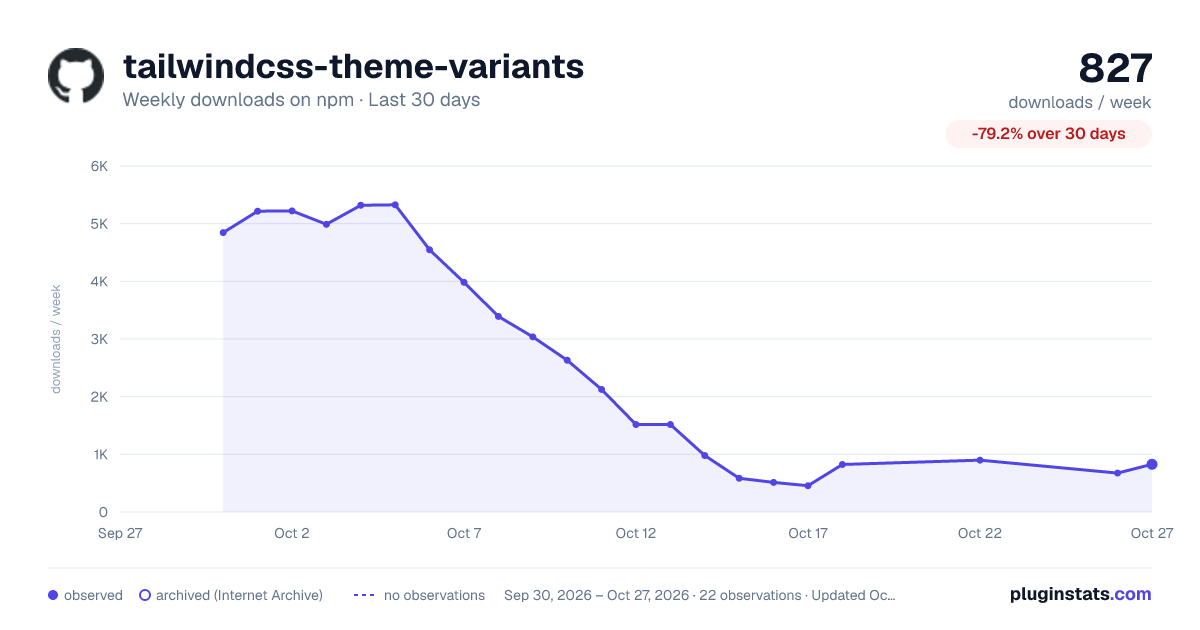
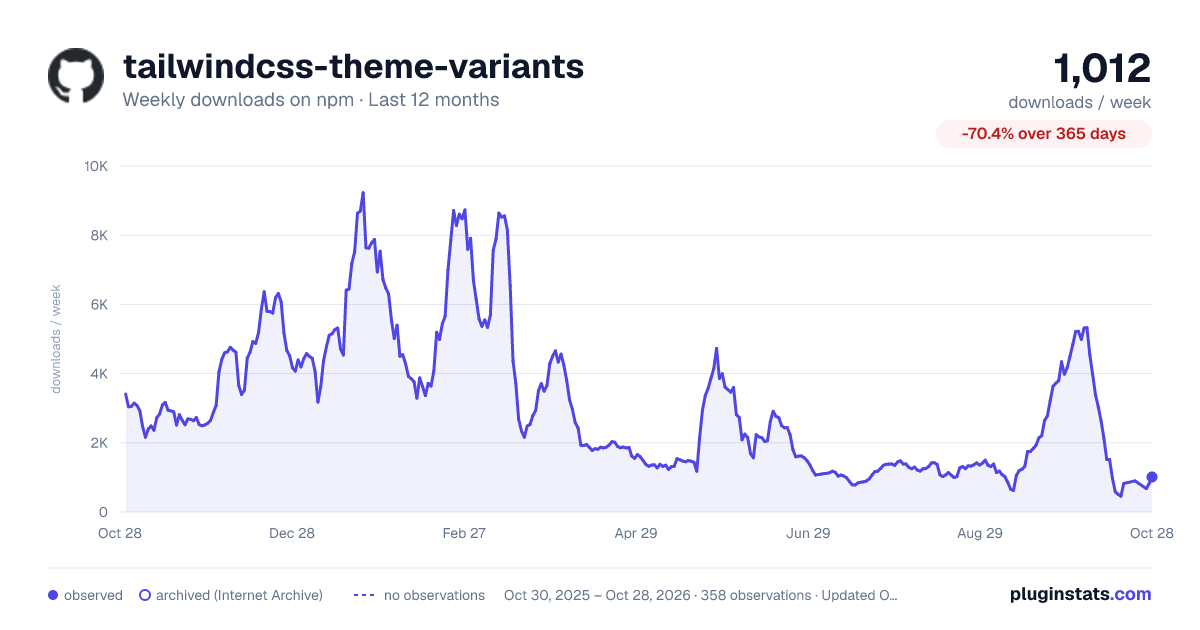
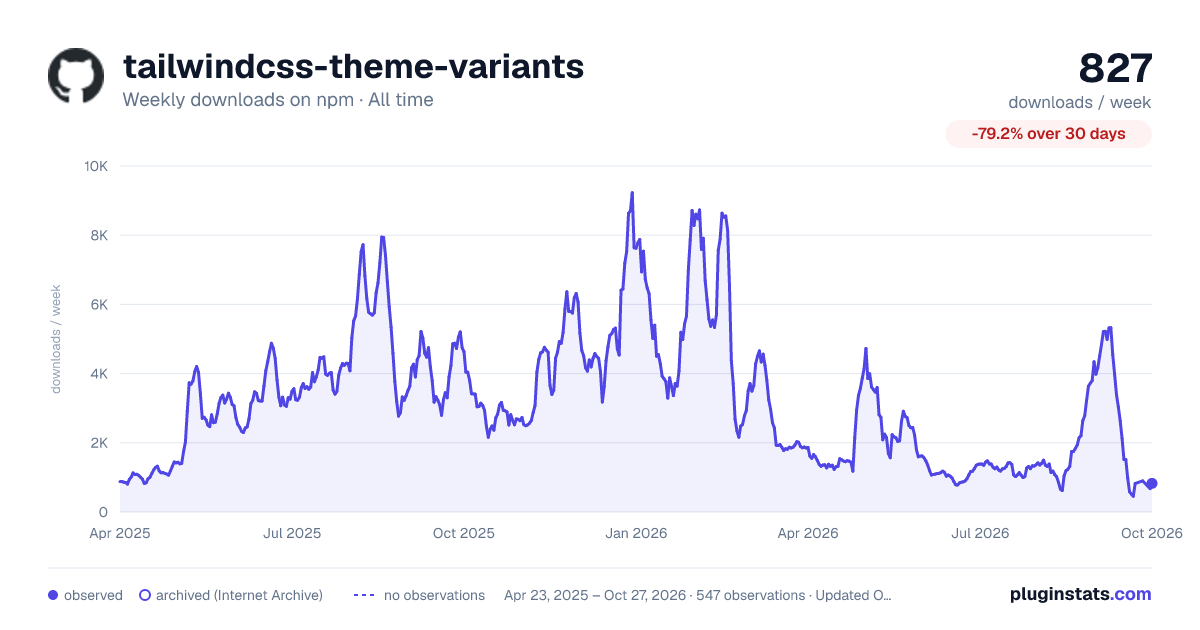
tailwindcss-theme-variants has 456 recorded weekly downloads on npm, a decrease of 76.4% over the past 30 days.
It ranks #1508 of 2,251 tracked npm listings by weekly downloads.
Over 90 days, weekly downloads changed by -49.2%.
PluginStats has 543 daily observations since Apr 23, 2025; the latest is from Oct 17, 2026.
About tailwindcss-theme-variants
🌗 Tailwind CSS Theme Variants
This Tailwind CSS plugin registers variants for theming beyond just light and dark modes *without needing custom properties*. It has support for • Controlling themes with • Media queries, like prefers-color-scheme, print, or anything you want • CSS selectors, like classes and data attributes • Or both at the same time! • Responsive variants • Stacking on extra variants, like hover so you can change a link's hover color depending on the theme • Falling back to a certain theme when no other one could become active, like if a visitor's browser doesn't support JavaScript or the new prefers- media queries • As many themes as you want: light theme, dark theme, red theme, blue theme—just bring your own definitions! The experimental semantics feature makes multiple themes easy to deal with!
You are recommended to check out the comparison table of all Tailwind CSS theming plugins below before committing to any one. By the way, you might have noticed this plugin's documentation / README is *very* long—don't let that frighten you! I designed it to be *overdocumented* and as exhaustive as possible, and since most of it is long code snippets, it's shorter than it looks *and* you don't need to go through it all to do well!
What about Tailwind's upcoming official dark mode?
This plugin will still be maintained! Light and dark mode support is just *one* thing this plugin can do, and the complexity this plugin can provide will not be reflected in Tailwind core (see Design Rationale), so I will still need this around.
⬇️ Installation
🛠 Basic usage
Using selectors to choose the active theme
With this Tailwind configuration,
this CSS is generated:
After also enabling "light" and "dark" variants for textColor and bringing in more colors from the default palette, we can implement a simple themed button in HTML like this:
This will result in dark blue text on a light blue background in the light theme, and light blue text on a dark blue background in the dark theme.
💡 You can choose more than just classes for your selectors. Other, good options include data attributes, like [data-padding=compact]. You *can* go as crazy as .class[data-theme=light]:dir(rtl), for example, but I think that's a bad idea!
Using media queries to choose the active theme
You may rather choose to tie your theme selection to matched media queries, like prefers-color-scheme:
Which generates this CSS:
Keep the variants listed in the same order as in themes in this plugin's configuration for consistency and the most expected behavior: in backgroundColor's variants, light came first, then dark, so we also list light before dark in themeVariants's themes option.
💡 The group feature will take care of this for you!
⚙️ Full configuration
This plugin expects configuration of the form
Where each parameter means:
• group (defaults to not making a group name): the name of the group of themes in this configuration. For example, a sensible name for light and dark would be themes or modes. This will create a themes (or modes) variant that can be listed in variants to generate all the CSS for both light and dark themes in the correct order (matching your configuration). If you want to stack variants (explained in the variants description below), like focus, then similarly named variants like themes:focus will be created. • themes: an object mapping a theme name to the conditions that determine whether or not the theme will be active. • selector: this theme will be active when this selector is on baseSelector. For instance, if baseSelector is html, and the light theme's selector is .light-theme, then the light theme variants will be in effect whenever html has the light-theme class on it. • mediaQuery: this theme will be active when this media query is active. For instance, if the reduced-motion theme has mediaQuery "@media (prefers-reduced-motion: reduce)" (importable as prefersReducedMotion), then the reduced-motion theme variants will be active whenever that media query matches: if the visitor's browser reports preferring reduced motion. • baseSelector (default "" (empty string) if you only use media queries to activate your themes, otherwise ":root"): the selector that each theme's selector will be applied to to determine the active theme. • fallback (default false): when none of the given media queries or selectors are active, then the first theme you listed in themes will activate. You can think of it as the *default* theme for your site.
If you pass fallback: "compact", then your CSS file size will be drastically reduced for free because redundant things will be "canceled out." You are recommended to try this feature and only switch back to true if you encounter issues (which you should please report 😁), because it will become the default option in the future.
• variants (default is {}): an object mapping the name of a variant to a function that gives a selector for when that variant is active. These will be merged with the default variants rather than replace them—this means it works like Tailwind's extend feature.
For example, the default even variant takes a selector and returns ` ${selector}:nth-child(even) . The default group-hover variant returns .group:hover ${selector} `
Each given name and function pair will create an appropriately named variant in combination with each theme for use in the variants section of your Tailwind CSS config, like amoled:my-hover if you have an amoled theme and a my-hover variant in this plugin's configuration. Either way, because hover is one of the default variants, amoled:hover will be created too.
Examples
💡 If you want to see the plugin get stretched to its limits, see the test suite in the tests directory.
Theme groups
Specifying group in this plugin's configuration will create a magical variant you can use in place of manually typing out every single theme's name in the Tailwind variants section!
For instance, you saw before that…
Description from the npm listing.
- plugin
- tailwind
- tailwindcss
- tailwindcss-plugin
- tailwindcss-theme
- tailwindcss-themes
Where tailwindcss-theme-variants sits in the listing
Each band is one page of 20. Weekly downloads on a log scale. Placement is projected from weekly downloads, so it can differ from the marketplace's own sort order. Hover a dot to see the listing.


Charts
Images: 30d · 1y · all time · 1600×900 dark

Adoption over time


7/30/90-day growth


Filled points are observed values; hollow points come from Internet Archive snapshots of the listing page. Dashed segments span periods with no observations — values between points are not interpolated.
Recent observations
Full history (543)Similar npm Tailwind plugins plugins
Data source
Weekly downloads (trailing 7 complete days) come from the official npm downloads API. Downloads include CI and mirrors and are not equivalent to installs or users. npm publishes no ratings.
Listing: https://www.npmjs.com/package/tailwindcss-theme-variants. First seen Oct 16, 2026; last successful collection Oct 18, 2026. See the methodology.