 PluginStats
@superdesign/cli weekly downloads statistics
By superdesign (4 listings) · npm · Claude Code
CLI for SuperDesign Platform - agent skills for Claude Code
@superdesign/cli has 9,065 recorded weekly downloads on npm, an increase of 21.3% over the past 30 days.
It ranks #932 of 2,251 tracked npm listings by weekly downloads.
Over 90 days, weekly downloads changed by +58.2%.
PluginStats has 543 daily observations since Apr 23, 2025; the latest is from Oct 17, 2026.
About @superdesign/cli
SuperDesign helps you (1) find design inspirations/styles and (2) generate/iterate design drafts on an infinite canvas.
Core scenarios (what this skill handles)
1. Help me design X (feature/page/flow) 2. Set design system 3. Help me improve design of X
Quickstart
Install CLI
Usage telemetry
SuperDesign collects anonymous CLI command usage and failure codes to improve reliability. It never sends prompts, file contents, paths, hostnames, or credentials. Set DO_NOT_TRACK=1 (or SUPERDESIGN_TELEMETRY_DISABLED=1) to disable all usage telemetry.
Authentication & environment
• auth status --json — machine-readable auth state: authenticated, source (config | env), team, and the resolved configPath. It is a query, not a gate, so it always exits 0. • SUPERDESIGN_TOKEN — provide the API token directly. It wins over the on-disk config, and when set no config file is required at all (useful in read-only-HOME sandboxes and CI). Never persisted; never sent to telemetry. • SUPERDESIGN_CONFIG_DIR — override the config directory (highest precedence). Otherwise $XDG_CONFIG_HOME/superdesign is used when XDG_CONFIG_HOME is set, falling back to ~/.superdesign. Existing ~/.superdesign installs keep working unchanged. Point this at a writable path if the default location is read-only. • superdesign login --no-browser — do not launch a browser; print the authorization URL and session code so you can complete auth manually (headless/agent use). Add --json to receive the auth-session payload (URL + code) as JSON before polling begins. • list-models — the unified model catalog: draft LLMs (for --model on draft commands) and image/video generation models, each with style notes. list-models prints details (generation models include the full parameter schema). --json keeps the legacy models whitelist key.
Install skills for any coding agent
Prompt in any agent
--
Tooling overview
A) Inspiration & Style Tools (generic, always available)
Use these to discover style direction, references, and brand context:
• Search prompt library (style/components/pages) • Get full prompt details • Extract brand guide from a URL
B) Canvas Design Tools
Use design agent to generate high quality design drafts:
• Create project (auto-detects .superdesign/design-system.md as prompt) • Create design draft • Iterate design draft (replace / branch) • Plan flow pages → execute flow pages • Fetch specific design draft
C) Image & Video Generation (quote → confirm; spends credits)
Generation is a two-step protocol so credits are never spent without the user's knowledge:
1. generate-image / generate-video return a free quote (price, balance, expiry, and the exact confirm command). Nothing is charged. 2. confirm-generation --credits executes it - the only command that spends credits, and --credits must restate the quoted price exactly.
Three rules for agents:
1. Confirmation protocol. confirm-generation spends credits. NEVER run it without the user's explicit confirmation of the quoted credits in this conversation. If it gets interrupted by a timeout, re-run the same command or use get-generation --wait - it is idempotent and will not double-charge. Do not re-quote after an interruption. 2. Host-native images first. If your host agent has native image generation and the user just needs an image asset, generate it natively and import with superdesign upload-asset (free). Use superdesign generate-image when the user asks for a specific Superdesign model, wants to compare results, or wants the generation tracked in the Superdesign ledger. For video there is no native alternative - superdesign generate-video is the path. 3. Pick draft models deliberately. Model choice matters for draft quality. Run superdesign list-models and pick a draft model that fits the task instead of always using the default - e.g. models known for strong front-end aesthetics for visual-heavy pages, faster models for quick ideation. Mention your pick and why to the user.
The human can pre-authorize small spends with superdesign config set generation.autoConfirmBelow (default 0 = always ask; only a human should change this).
Overall SOP for designing features on top of existing app:
1. Investigate existing UI, workflow 2. Setup design system file if not exist yet 3. Requirements gathering: use askQuestion tool to clarify requirements with users (Optionally use Inspiration tool to find inspiration when needed) 4. Ask user whether ready to design in superdesign OR implement UI directly 5. If yes to superdesign 5.1 Create/update a pixel perfect html replica of current UI of page that we will design on top of in .superdesign/replica_html_template/.html (html should only contain & reflect how UI look now, the actual design should be handled by superdesign agent) 5.2 Create project with this replica html 5.3 Start desigining by iterating & branching design draft based on designDraft ID returned from project
Always-on rules
• Design system should live at: .superdesign/design-system.md • If .superdesign/design-system.md is missing, run Design System Setup first. • Use askQuestion to ask high-signal questions (constraints, taste, tradeoffs). • Always use --json for machine parsing.
replica_html_template rules (Canvas only)
The purpose of replica html template is creating a lightweight version of existing UI so design agent can iterate on top of it (Since superdesign doesn't have access to your codebase directly, this is important context)
Overall process for designing features on top of existing app:
1. Identify & understand existing UI of page related 2. Create/update a pixel perfect replica html in .superdesign/replica_html_template/.html (Only replicate how UI look now, do NOT design)
• If design task is redesign profile page, then replicate current profile page UI pixel perfectly • If design task is add new button to side panel, identify which page side panel is using, then replicate that page UI pixel perfectly…
Description from the npm listing.
- superdesign
- cli
- claude-code
- ai
- design
Where @superdesign/cli sits in the listing
Each band is one page of 20. Weekly downloads on a log scale. Placement is projected from weekly downloads, so it can differ from the marketplace's own sort order. Hover a dot to see the listing.


Charts
Images: 30d · 1y · all time · 1600×900 dark
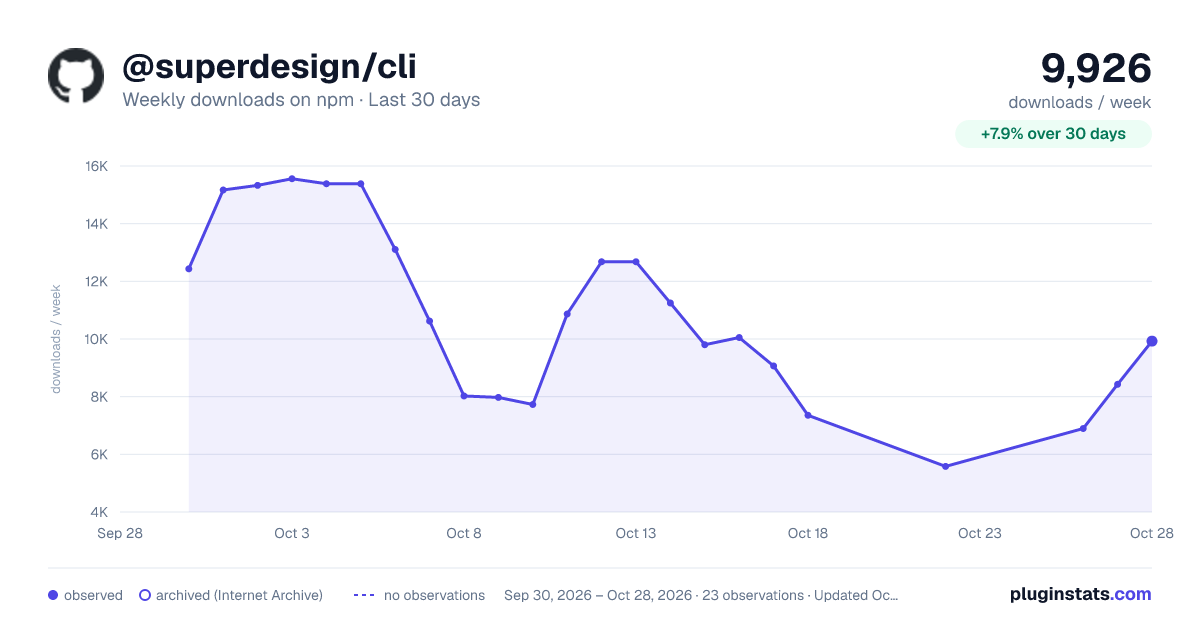
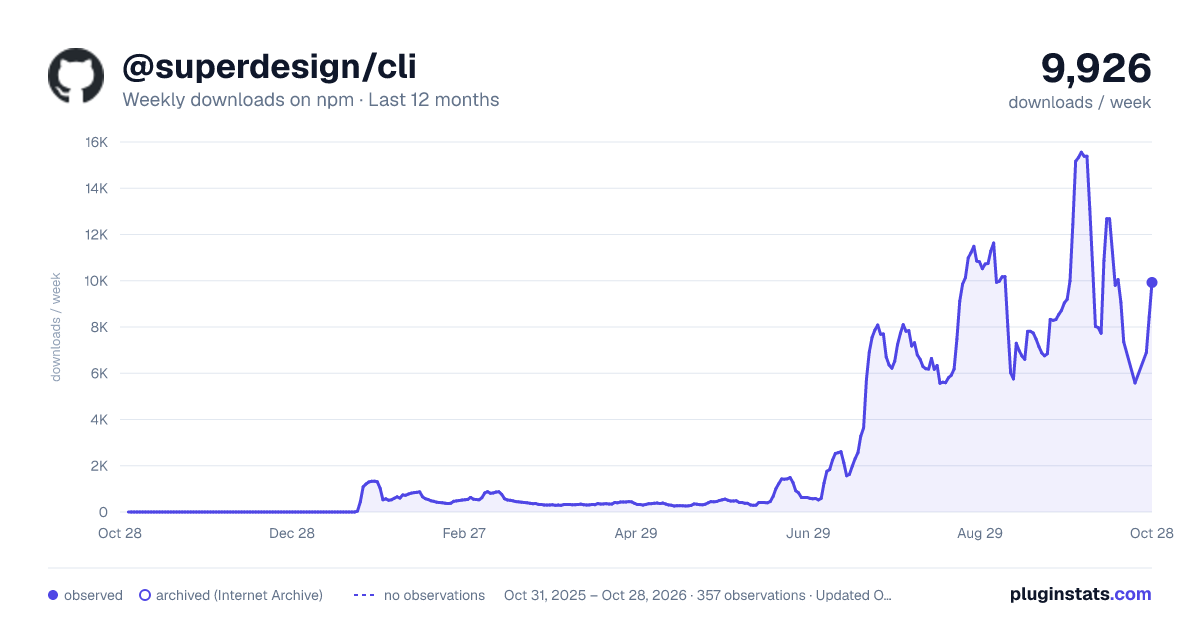
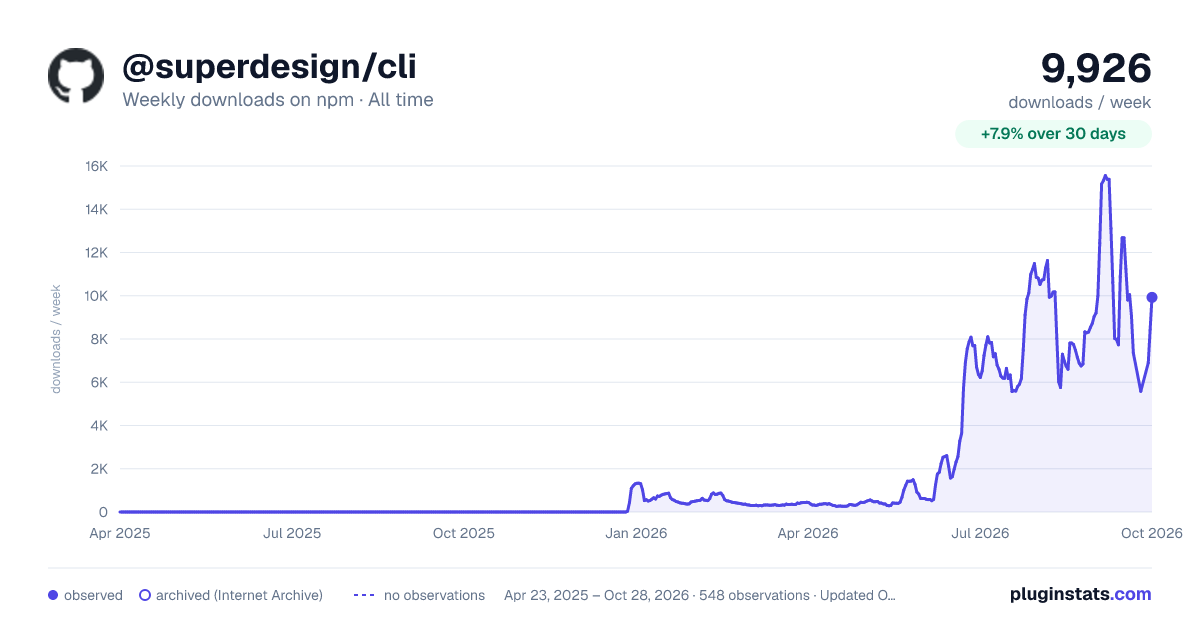

Adoption over time


7/30/90-day growth


Filled points are observed values; hollow points come from Internet Archive snapshots of the listing page. Dashed segments span periods with no observations — values between points are not interpolated.
Recent observations
Full history (543)Similar npm Claude Code plugins
Data source
Weekly downloads (trailing 7 complete days) come from the official npm downloads API. Downloads include CI and mirrors and are not equivalent to installs or users. npm publishes no ratings.
Listing: https://www.npmjs.com/package/@superdesign/cli. First seen Oct 16, 2026; last successful collection Oct 18, 2026. See the methodology.