 PluginStats
vite-plugin-devtools-json weekly downloads statistics
By ChromeDevTools · npm · Vite plugins
Vite plugin for generating `com.chrome.devtools.json` on the fly in the devserver.
vite-plugin-devtools-json has 174,320 recorded weekly downloads on npm, a decrease of 37.4% over the past 30 days.
It ranks #385 of 2,251 tracked npm listings by weekly downloads.
Over 90 days, weekly downloads changed by -43.9%.
PluginStats has 121 daily observations since Jun 19, 2026; the latest is from Oct 17, 2026.
About vite-plugin-devtools-json
Vite Plugin for DevTools Project Settings (devtools.json)
Vite plugin for generating the Chrome DevTools project settings file on-the-fly in the devserver.
This enables seamless integration with the new Chrome DevTools features
1. DevTools Project Settings (devtools.json), and 1. Automatic Workspace folders.
Installation
Usage
Add it to your Vite config
While the plugin can generate a UUID and save it in vite cache, you can also specify it in the options like in the following:
Options
| Name | Type | Default | Description |
| projectRoot | string | config.root | Absolute path that will be reported to DevTools. Useful for monorepos or when the Vite root is not the desired folder. | | normalizeForWindowsContainer | boolean | true | Convert Linux paths to UNC form so Chrome on Windows (WSL / Docker Desktop) can mount them (e.g. via WSL or Docker Desktop). Pass false to disable. _Alias:_ normalizeForChrome (deprecated)_ | | uuid | string | auto-generated | Fixed UUID if you prefer to control it yourself. |
Example with all options:
The /.well-known/appspecific/com.chrome.devtools.json endpoint will serve the project settings as JSON with the following structure
where root is the absolute path to your {projectRoot} folder, and uuid is a random v4 UUID, generated the first time that you start the Vite devserver with the plugin installed (it is henceforth cached in the Vite cache folder).
Checkout [bmeurer/automatic-workspace-folders-vanilla] for a trivial example project illustrating how to use the plugin in practice.
Publishing
The package is published to npm by the publish-on-tag GitHub Actions workflow, which uses npm trusted publishing (no npm tokens involved) and generates provenance attestations.
To publish a new version:
1. Bump the version in package.json and land that change on main. 2. Tag the release commit and push the tag:
Pushing the tag triggers the workflow, which builds and tests the package and then runs npm publish.
License
The code is under MIT License.
Description from the npm listing.
- vite
- vite-plugin
- chrome-devtools
- devtools
- chrome
Where vite-plugin-devtools-json sits in the listing
Each band is one page of 20. Weekly downloads on a log scale. Placement is projected from weekly downloads, so it can differ from the marketplace's own sort order. Hover a dot to see the listing.


Charts
Images: 30d · 1y · all time · 1600×900 dark
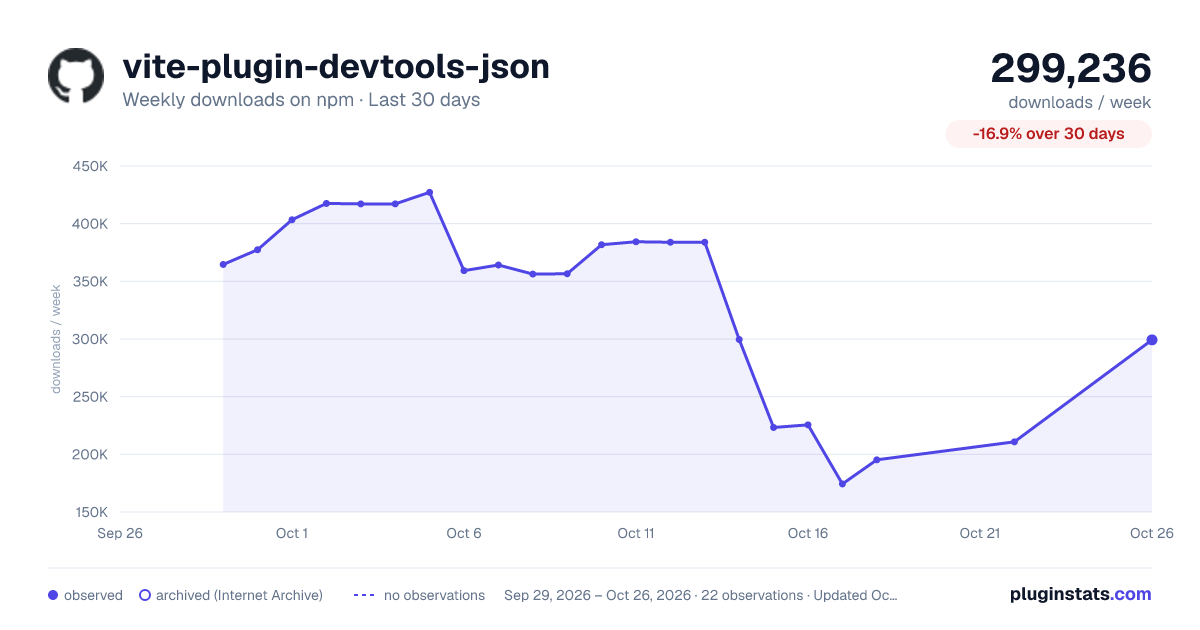
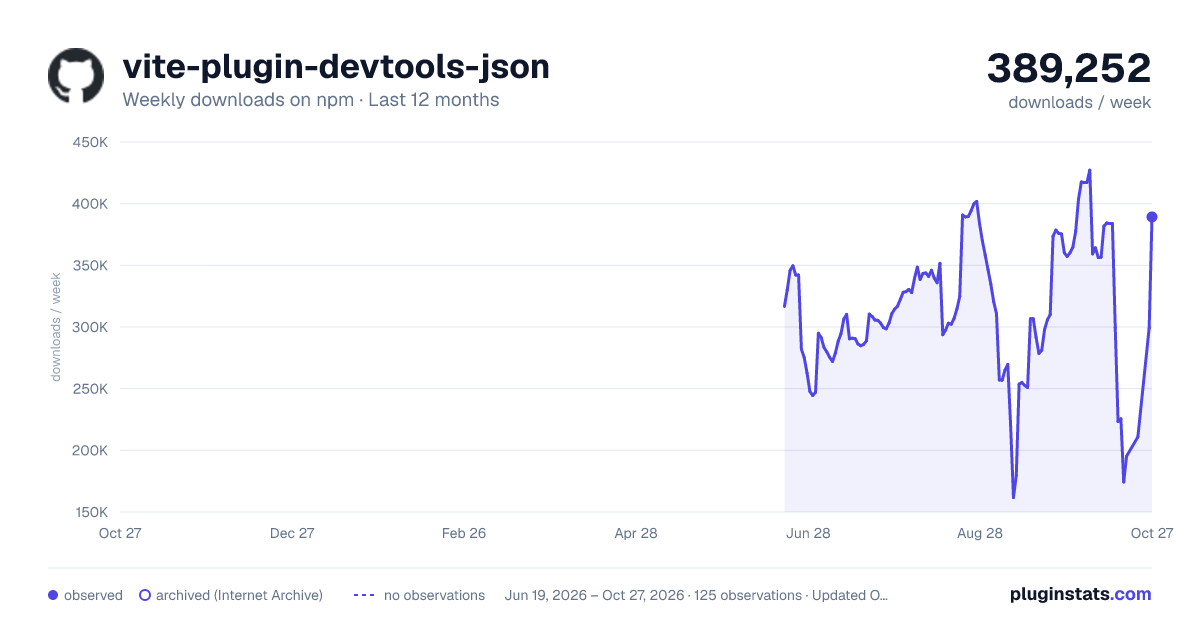
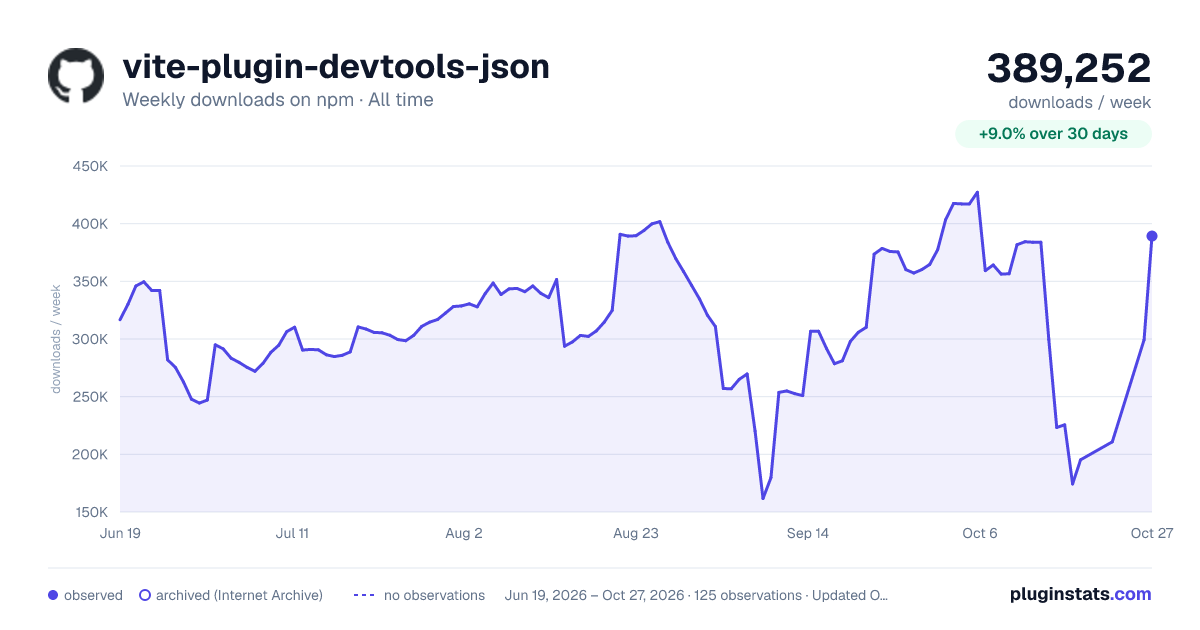

Adoption over time


7/30/90-day growth


Filled points are observed values; hollow points come from Internet Archive snapshots of the listing page. Dashed segments span periods with no observations — values between points are not interpolated.
Recent observations
Full history (121)Similar npm Vite plugins plugins
Data source
Weekly downloads (trailing 7 complete days) come from the official npm downloads API. Downloads include CI and mirrors and are not equivalent to installs or users. npm publishes no ratings.
Listing: https://www.npmjs.com/package/vite-plugin-devtools-json. First seen Oct 16, 2026; last successful collection Oct 18, 2026. See the methodology.