 PluginStats
eslint-plugin-jsonc weekly downloads statistics
By ota-meshi (10 listings) · npm · ESLint plugins
ESLint plugin for JSON, JSONC and JSON5 files.
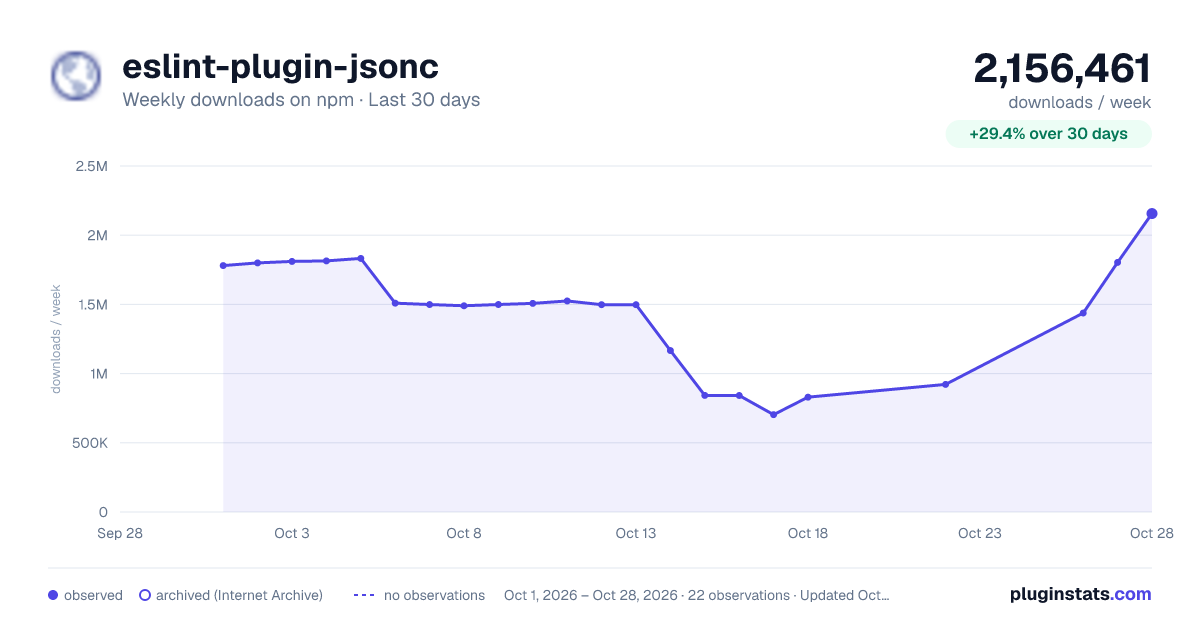
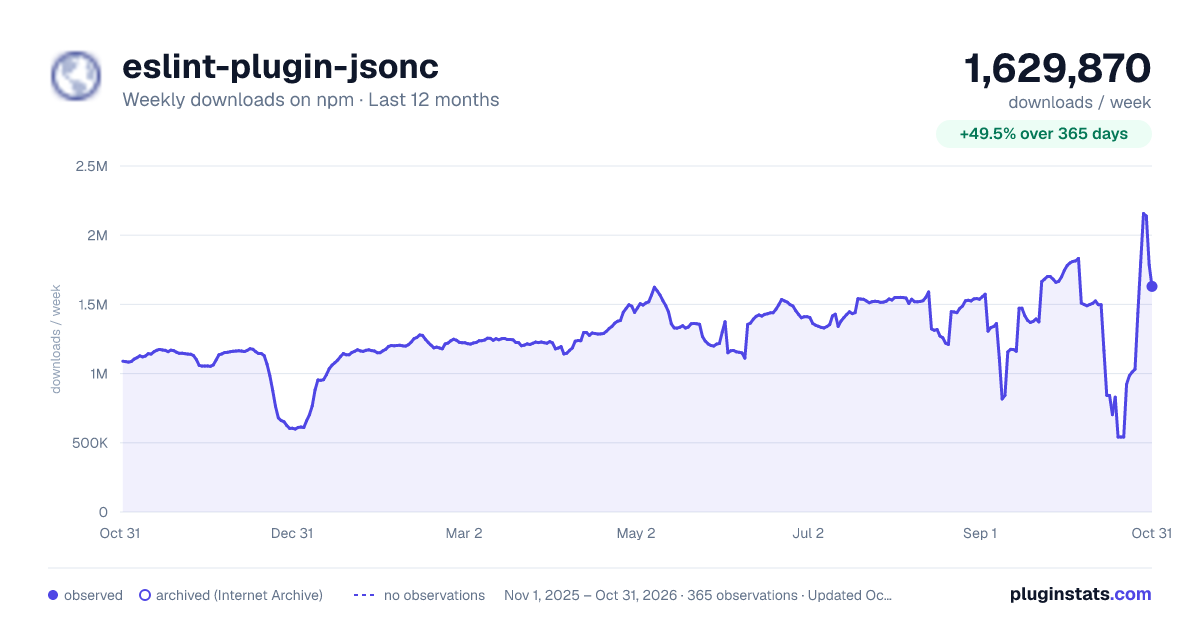
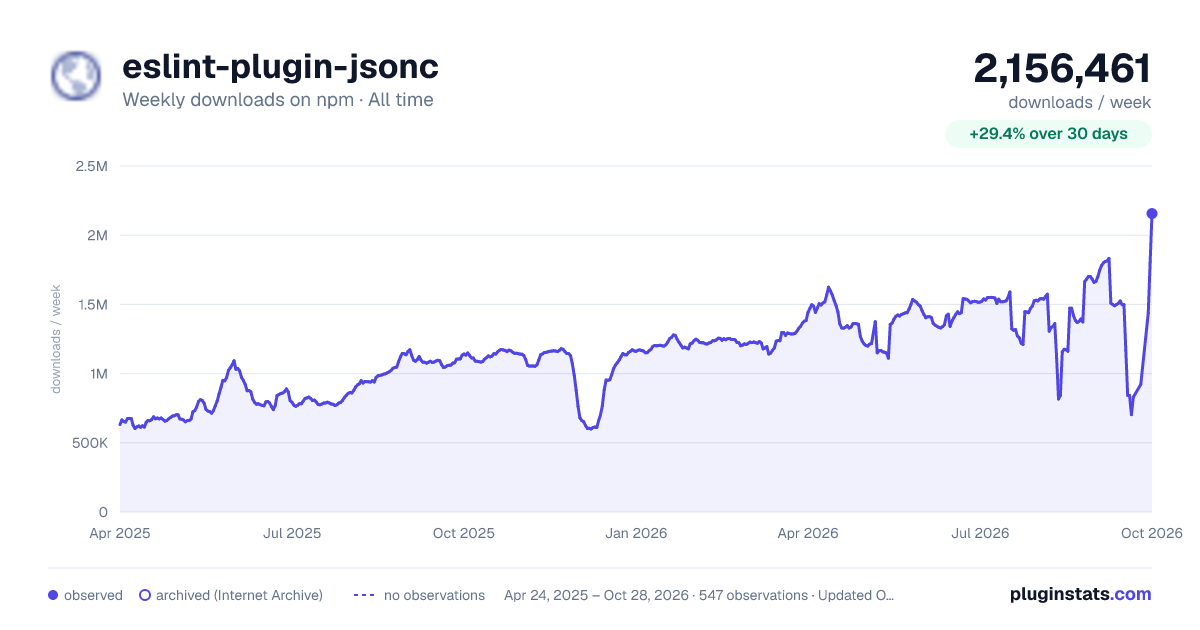
eslint-plugin-jsonc has 703,284 recorded weekly downloads on npm, a decrease of 49.2% over the past 30 days.
It ranks #207 of 2,256 tracked npm listings by weekly downloads.
Over 90 days, weekly downloads changed by -54.4%.
PluginStats has 542 daily observations since Apr 24, 2025; the latest is from Oct 17, 2026.
About eslint-plugin-jsonc
Introduction
eslint-plugin-jsonc is ESLint plugin for [JSON], [JSONC] and [JSON5] files.
:name_badge: Features
This ESLint plugin provides linting rules relate to better ways to help you avoid problems when using [JSON], [JSONC] and [JSON5].
• You can use ESLint to lint [JSON]. • You can apply rules similar to the rules you use for JavaScript to JSON using the "jsonc/auto" rule provided by this plugin. • You can choose the appropriate config provided by this plugin depending on whether you are using [JSON], [JSONC] or [JSON5]. • Supports Vue SFC custom blocks such as . Requirements vue-eslint-parser v7.3.0 and above. • Supports ESLint directives. e.g. // eslint-disable-next-line • You can check your code in real-time using the ESLint editor integrations.
You can check on the Online DEMO.
:question: Why is it ESLint plugin?
ESLint is a great linter for JavaScript. Since [JSON] is a subset of JavaScript, the same parser and rules can be applied to [JSON]. Also, [JSONC] and [JSON5], which are variants of [JSON], are more similar to JavaScript than [JSON]. Applying a JavaScript linter to [JSON] is more rational than creating a JSON-specific linter.
How does eslint-plugin-jsonc work?
This plugin parses .json with its own parser, but this parser just converts AST parsed by acorn (It is used internally by the ESLint standard parser) into AST with another name. However, ASTs that do not exist in [JSON] and the superset of JSON syntaxes are reported as parsing errors. By converting the AST to another name, we prevent false positives from ESLint core rules. Moreover, You can do the same linting using the extended rules of the ESLint core rules provided by this plugin.
The parser package used by this plugin is [jsonc-eslint-parser].
:question: How is it different from other JSON plugins?
[@eslint/json]
They work similarly, but [@eslint/json] is an ESLint JSON language plugin, but eslint-plugin-jsonc is an ESLint plugin.
• eslint-plugin-jsonc was created 4 years before [@eslint/json] and it has more rules than [@eslint/json]. • The parser used by eslint-plugin-jsonc accepts more non-standard JSON syntax than [@eslint/json]. eslint-plugin-jsonc has rules that can auto-fixed these non-standard syntax to standard syntax. • eslint-plugin-jsonc can also be used together with [@eslint/json].
Plugins that do not use AST
e.g. eslint-plugin-json
These plugins use the processor to parse and return the results independently, without providing the ESLint engine with AST and source code text.
Plugins don't provide AST, so you can't use directive comments (e.g. /* eslint-disable */). Plugins don't provide source code text, so you can't use it with plugins and rules that use text (e.g. eslint-plugin-prettier, eol-last). Also, most plugins don't support JSON5.
eslint-plugin-jsonc works by providing AST and source code text to ESLint.
Plugins that use the same AST as JavaScript
e.g. eslint-plugin-json-files, eslint-plugin-json-es
These plugins use the same AST as JavaScript for linting.
Since the plugin uses the same AST as JavaScript, it may not report syntax that is not available in JSON (e.g. 1 + 1, (42)). Also, ESLint core rules and other plugin rules can false positives (e.g. quote-props rule reports quote on keys), which can complicate the your configuration.
The AST used by eslint-plugin-jsonc is similar to JavaScript AST, but with a different node name. This will prevent false positives. This means that it can be easily used in combination with other plugins.
:book: Documentation
See documents.
:cd: Installation
Requirements
- ESLint v9.38.0 and above - Node.js v20.x (>=20.19.0), v22.x (>=22.13.0), v24.x and above
:book: Usage
Configuration
Configuration (eslint.config.js)
Use eslint.config.js file to configure rules. See also: .
Example eslint.config.js:
This plugin provides configs:
• *.configs.base ... Configuration to enable correct JSON parsing. • *.configs['recommended-with-json'] ... Recommended configuration for JSON. • *.configs['recommended-with-jsonc'] ... Recommended configuration for JSONC. • *.configs['recommended-with-json5'] ... Recommended configuration for JSON5. • *.configs.prettier ... Turn off rules that may conflict with Prettier. • *.configs.all ... Enables all rules. It's meant for testing, not for production use because it changes with every minor and major version of the plugin. Use it at your own risk.
For backward compatibility, the flat/* prefix is still supported:
• *.configs['flat/base'], *.configs['flat/recommended-with-json'], etc.
This plugin will parse .json, .jsonc and .json5 by default using the configuration provided by the plugin (unless you already have a parser configured - see below).
See the rule list to get the rules that this plugin provides.
Languages
This plugin provides the following language identifiers for use in ESLint configurations:
• jsonc/json ... JSON files • jsonc/jsonc ... JSONC files • jsonc/json5 ... JSON5 files • jsonc/x ... Extended JSON files that accept any syntax representing static values parseable by jsonc-eslint-parser. Recommended because it allows flexible parsing while strict syntax checks can be enforced and auto-fixed using the plugin's rules.
For example, to apply settings specifically to JSON files, you can use the language field in your ESLint configuration:
The configuration above is included in the shareable configs provided by this plugin, so using configs is generally recommended.
See also
Experimental support for @eslint/json
We've launched experimental support for [@eslint/json].
Configure it as follows:
However, we're not yet sure how best to make this work. Please note that we may change behavior without notice.
:computer: Editor Integrations
Visual Studio Code
Use the dbaeumer.vscode-eslint extension that Microsoft provides officially.…
Description from the npm listing.
- eslint
- eslintplugin
- eslint-plugin
- lint
- jsonc
- json5
- json
Where eslint-plugin-jsonc sits in the listing
Each band is one page of 20. Weekly downloads on a log scale. Placement is projected from weekly downloads, so it can differ from the marketplace's own sort order. Hover a dot to see the listing.


Charts
Images: 30d · 1y · all time · 1600×900 dark

Adoption over time


7/30/90-day growth


Filled points are observed values; hollow points come from Internet Archive snapshots of the listing page. Dashed segments span periods with no observations — values between points are not interpolated.
Recent observations
Full history (542)Similar npm ESLint plugins plugins
Data source
Weekly downloads (trailing 7 complete days) come from the official npm downloads API. Downloads include CI and mirrors and are not equivalent to installs or users. npm publishes no ratings.
Listing: https://www.npmjs.com/package/eslint-plugin-jsonc. First seen Oct 16, 2026; last successful collection Oct 19, 2026. See the methodology.