 PluginStats
@microsoft/powerbi-modeling-mcp weekly downloads statistics
By microsoft (224 listings) · npm · MCP servers
Power BI Authoring MCP Server - Node.js client packaging to author Power BI semantic models in Power BI Desktop, Microsoft Fabric workspaces, and local PBIP and TMDL files.
@microsoft/powerbi-modeling-mcp has 3,578 recorded weekly downloads on npm, a decrease of 26.1% over the past 30 days.
About @microsoft/powerbi-modeling-mcp
✨ Power BI Authoring MCP Server NPM Package
This is a JavaScript wrapper that downloads the Power BI Authoring MCP server, which lets an AI agent create and change Power BI semantic models through a local MCP server. This allows developers and AI applications to interact with Power BI models in entirely new ways, from using natural language to execute modeling changes to autonomous AI agentic development workflows.
💡 What can you do?
-
🔄 Build and Modify Semantic Models with Natural Language - Tell your AI assistant what you need, and it uses this MCP server to create, update, and manage tables, columns, measures, relationships, and more... across Power BI Desktop and Fabric semantic models.
-
⚡ Bulk Operations at Scale - AI applications can execute batch modeling operations on hundreds of objects simultaneously — bulk renaming, bulk refactoring, model translations, or model security rules - with transaction support and error handling, turning hours of repetitive work into seconds.
-
✅ Apply modeling best practices - Easily evaluate and implement modeling best practices against your model.
-
🤖 Agentic Development Workflows - Supports working with TMDL and Power BI Project files, enabling AI agents to autonomously plan, create, and execute complex modeling tasks across your semantic model codebase.
-
🔍 Query and Validate DAX - AI assistants can execute and validate DAX queries against your model, helping you test measures, troubleshoot calculations, and explore your data
📹 Watch the video for an end-to-end demo.
More details on how to use and configure this MCP are available in the GitHub repository: powerbi-modeling-mcp.
📋 Prerequisites
Before getting started, ensure you have Node.js (which includes NPM and NPX) installed:
- Node.js 18+ - Download from nodejs.org
You can verify your installation by running:
node --version
npm --version
📦 Installation
Configure the mcp.json file with the following:
{
    "mcpServers": {
        "powerbi-authoring-local": {
			"type": "local",
			"command": "npx",
			"args": [
				"-y",
				"@microsoft/powerbi-modeling-mcp",
				"--start"
			]
        }
    }
}
Note: When manually configuring Visual Studio and Visual Studio Code, use servers instead of mcpServers as the root object.
License
Before use, you must accept the Power BI Authoring MCP End User License Agreement at https://go.microsoft.com/fwlink/?LinkId=2381247. To accept:
- Command line: pass
--accept-eula(or the alias--accepteula, case-insensitive) when starting the server. This grants acceptance for the current process only and does not persist anything to disk. - Environment variable: set
PBI_MODELING_MCP_ACCEPT_EULA=true. This grants acceptance for the current process only and does not persist anything to disk. - The
accept_eulaMCP tool: an MCP client can callaccept_eulawith the requiredeulaUrlargument set. This also persists acceptance.
🚀 Get started
First, you must connect to a Power BI semantic model, which can reside in Power BI Desktop, Fabric workspace or in Power BI Project (PBIP) files.
-
For Power BI Desktop:
Connect to '[File Name]' in Power BI Desktop -
For Semantic Model in Fabric Workspace:
Connect to semantic model '[Semantic Model Name]' in Fabric Workspace '[Workspace Name]' -
For Power BI Project files:
Open semantic model from PBIP folder '[Path to the definition/ TMDL folder in the PBIP]'
Once the connection is established, you can use natural language to ask the AI agent to make any authoring changes. To get started, try one of the following scenarios.
Local Audit Logs
The local MCP writes audit events to daily newline-delimited JSON
files. On Windows, the default directory is
%LOCALAPPDATA%\Microsoft\powerbi-authoring-mcp\Logs. These files contain audit
metadata and do not include general console or diagnostic logs. Tenant, user,
and network request fields are omitted.
Use PBI_MODELING_MCP_AUDIT_LOG_PATH or
--audit-log-path=<directory> to override the directory. Command-line
configuration takes precedence. Audit logs are retained for seven days. After
seven days, files matching the audit filename format are removed during
startup. Apply appropriate file protection to the directory.
💬 Feedback and Support
- Check the Troubleshooting guide to diagnose and resolve common issues.
- We're building this in the open. Your feedback is much appreciated, and will help us shape the future of the Power BI Authoring MCP server.
- 👉 Open an issue in the public GitHub repository - we’d love to hear from you!
Security
Your credentials are always handled securely through the official Azure Identity SDK - we never store or manage tokens directly.
Custom XMLA endpoints
Organizations that need to connect the local MCP server to custom Analysis Services or Power BI XMLA endpoints can allowlist those endpoint hosts. This configuration is intended for users or administrators who control the MCP server configuration and have verified that the endpoints are trusted by their organization.
By default, outbound Analysis Services connections are limited to localhost and the configured Fabric host. To allow additional endpoint hosts, set a comma-separated list before starting the server:
$env:PBI_MODELING_MCP_ALLOWED_CONNECTION_HOSTS = "server1.contoso.com,server2.contoso.com"
```…
Description from the npm listing.
- powerbi
- modeling
- mcp
- model-context-protocol
- semantic-model
- tabular
- analysis-services
README badge
Show your rank in a README or on your website. The badge updates automatically.
Charts
Images: 30d · 1y · all time · 1600×900 dark
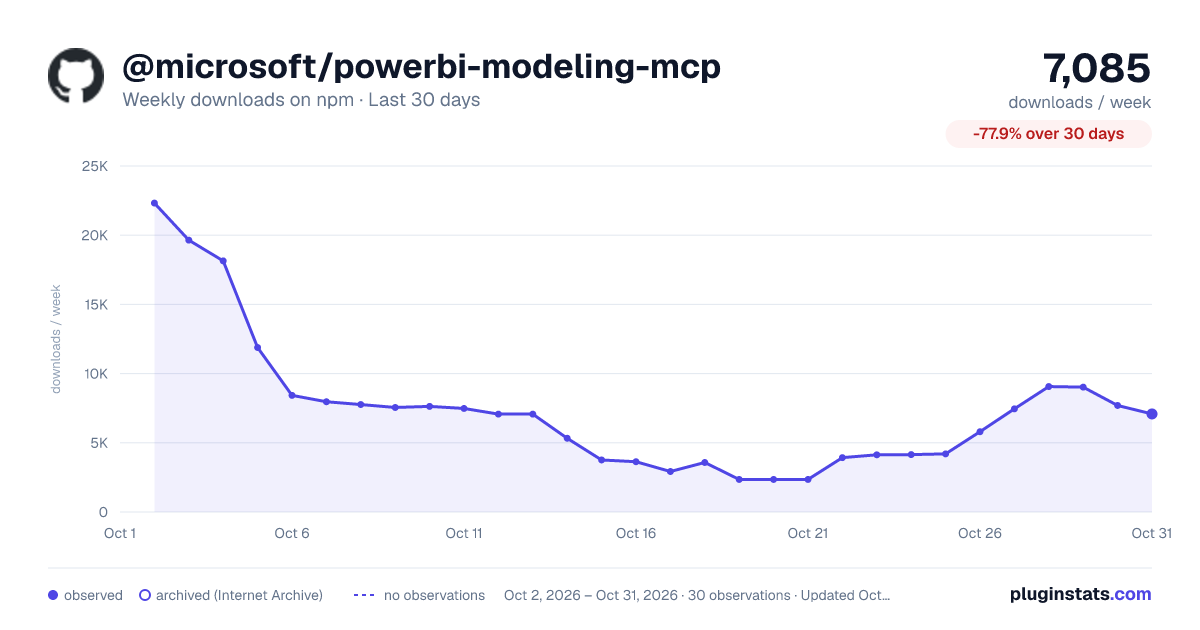
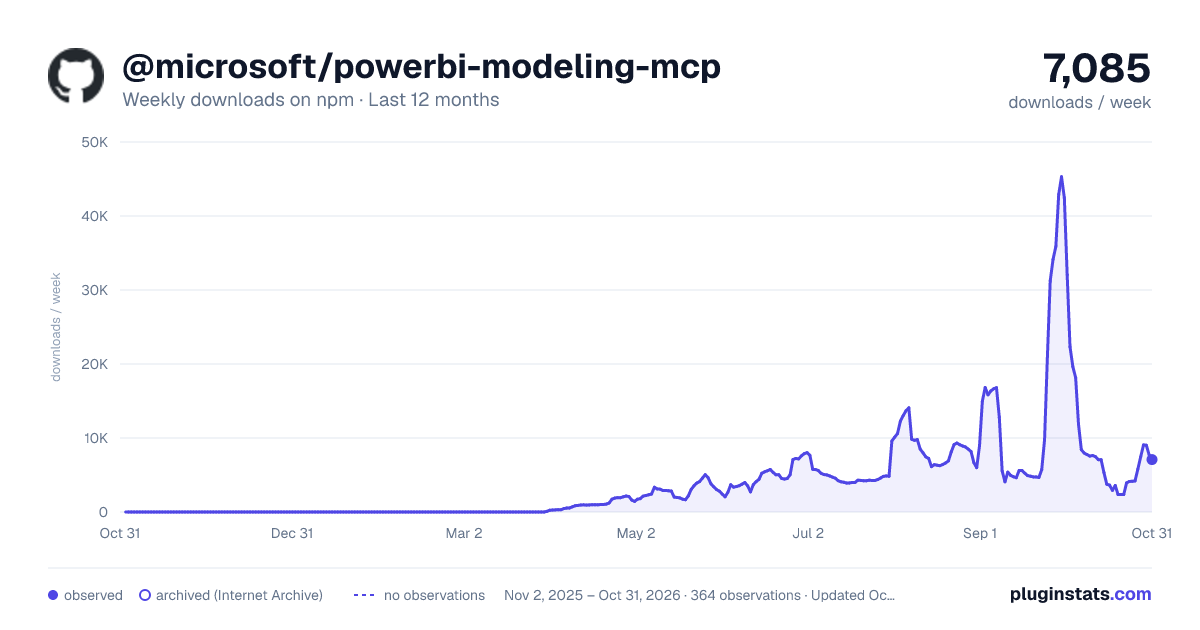
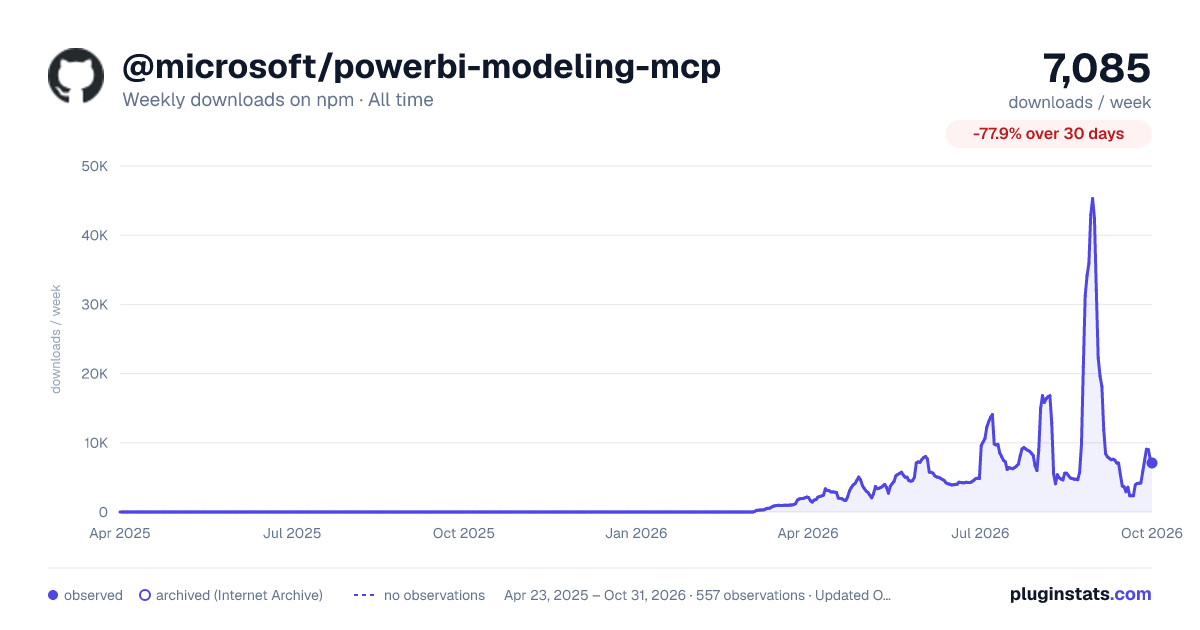

Adoption over time
7/30/90-day growth
Ranking history
Listing placement
Listing placement
Filled points are observed values; hollow points come from Internet Archive snapshots of the listing page. Dashed segments span periods with no observations — values between points are not interpolated.
Each band is one page of 20. Weekly downloads on a linear scale. Placement is projected from weekly downloads, so it can differ from the marketplace's own sort order. Hover a dot to see the listing.
Recent observations
Full history (544)Similar npm MCP servers plugins
All 20 @microsoft/powerbi-modeling-mcp alternatives- 3.5K weekly downloads—
Data source
Weekly downloads (trailing 7 complete days) come from the official npm downloads API. Downloads include CI and mirrors and are not equivalent to installs or users. npm publishes no ratings.
Listing: https://www.npmjs.com/package/@microsoft/powerbi-modeling-mcp. First seen Oct 16, 2026; last successful collection Oct 22, 2026. See the methodology.