 PluginStats
@poppanator/sveltekit-svg weekly downloads statistics
By poppanator · npm · Vite plugins
Import SVG files as Svelte components
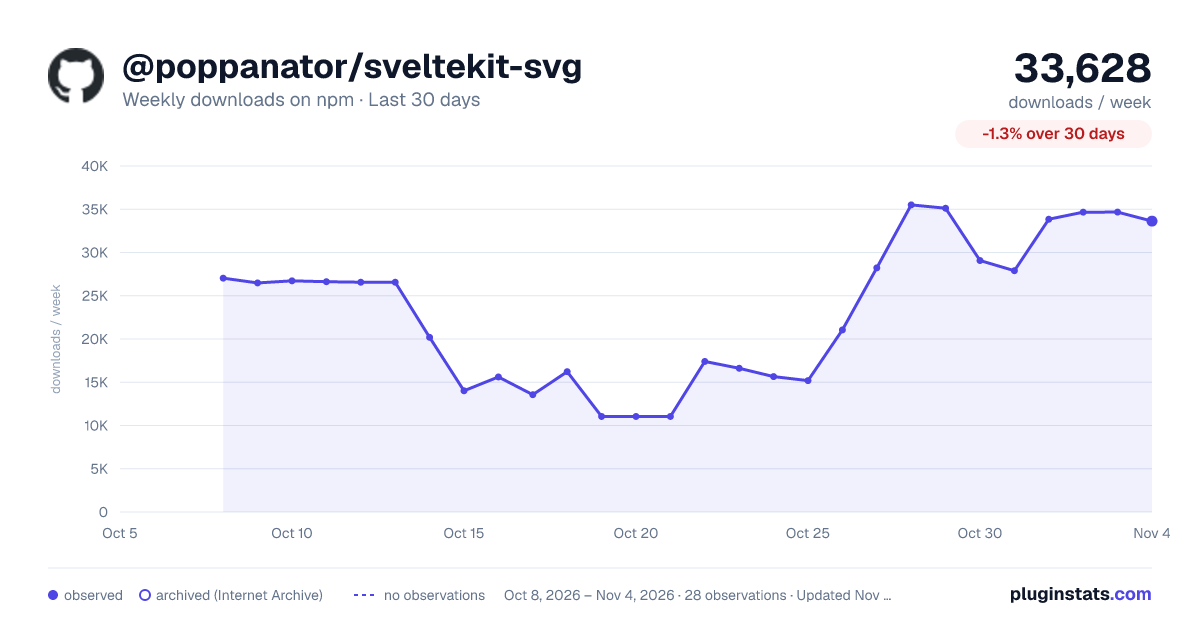
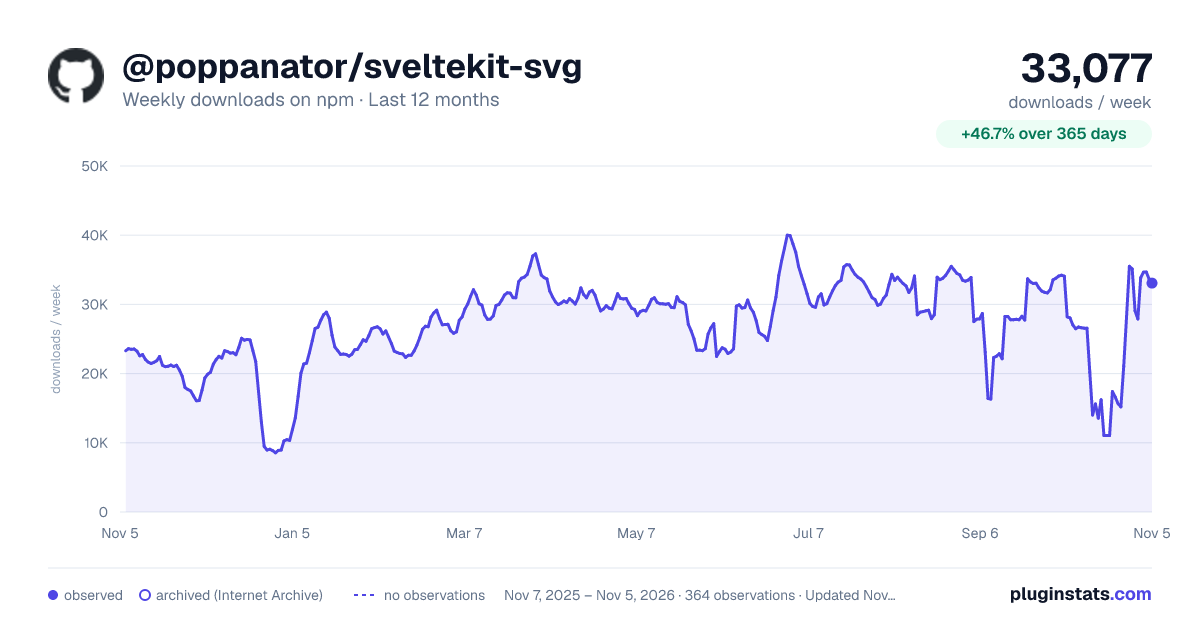
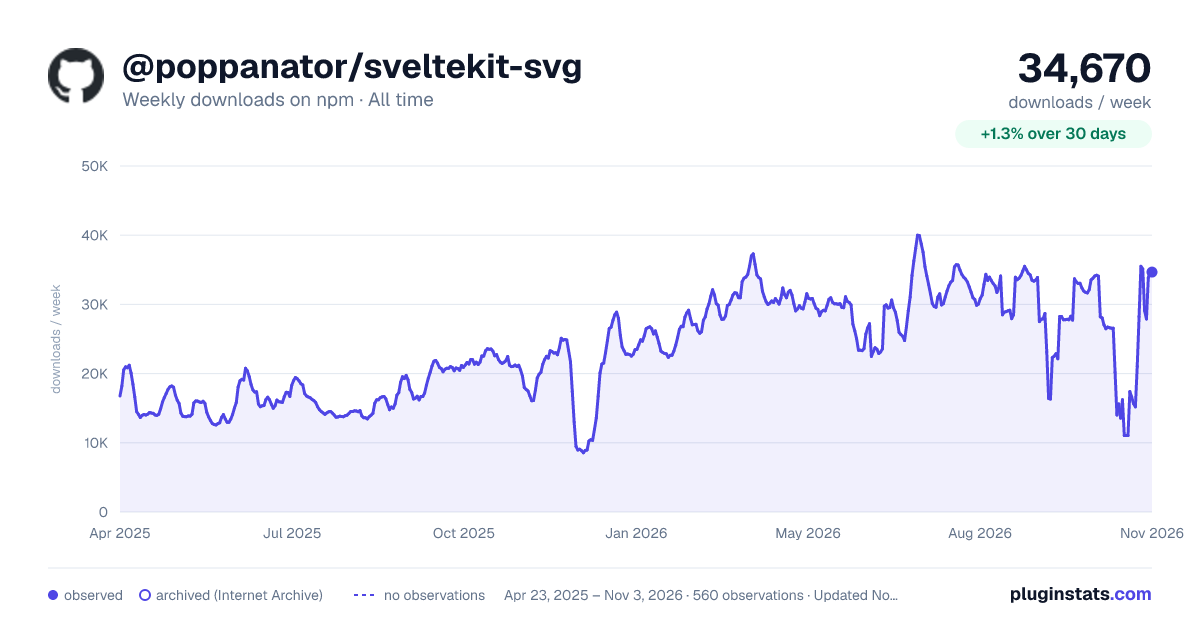
@poppanator/sveltekit-svg has 13,561 recorded weekly downloads on npm, a decrease of 51.2% over the past 30 days.
It ranks #843 of 2,251 tracked npm listings by weekly downloads.
Over 90 days, weekly downloads changed by -61.7%.
PluginStats has 543 daily observations since Apr 23, 2025; the latest is from Oct 17, 2026.
About @poppanator/sveltekit-svg
SvelteKit SVG Plugin
This plugin makes it possible to import SVG files as Svelte components, inline SVG code or urls.
### NOTE! For Svelte 4 projects, use version 4 of this plugin
_NOTE! This plugin isn't just for SvelteKit, but works for any Svelte project using Vite_
Install
• yarn add --dev @poppanator/sveltekit-svg • npm install -D @poppanator/sveltekit-svg
Usage
In your vite.config.js
You can also pass multiple svg transformers based on paths if you want to apply different SVGO options for different SVGs
Svelte usage
Import as a Svelte component:
NOTE! It's recommended that you use the ?component query string if you use the suggested type definition below. The reason is that Vite ships a type definition for *.svg which states that import Comp from './file.svg returns a string.
So providing a default type definition for *.svg is in most cases causing a conflict which will lead to TSC errors when treating such an import as a Svelte component.
So the best way to avoid errors, current and future, is to always use import Comp from './file.svg?component with the suggested type definition at the end of this file.
When used as a component you can also pass attributes to the SVG
Import as file path:
Import as data URL:
In contrast to ?url this will apply SVGO optimization/transform before the the SVG is turned into a data URL
You can also pass the SVGO config option datauri as value to ?dataurl. This will, for instance, generate an URI encoded string
Import as code:
Options
• { • includePaths: ['src/assets/icons/', 'src/images/icons/'] • } • `
Typescript
For Typescript not to complain about file.svg?component et.al, add the following import statement to src/app.d.ts (or any .d.ts file somewhere in the path of your project where tsc can find it).
NOTE! If you have module/moduleResolution set to NodeNext in your Typescript config, you MUST include .d.ts in the import of the SVG type definition.
Notes on using with _Jest_
_I don't know if this still applies, but it's kept here for good measure_
According to a report _Jest_ will have trouble transforming .svg files when such is imported as a Svelte component.
The solution seems to be to add a module name mapper entry in the the jest.config.cjs file, like so:
where src/lib/EmptyIcon.svelte can contain just .
See the reported issue and solution
Description from the npm listing.
- svelte-plugin
- svelte
- sveltekit-plugin
- sveltekit
- svg
- svgo
- vite-plugin
- vite
Where @poppanator/sveltekit-svg sits in the listing
Each band is one page of 20. Weekly downloads on a log scale. Placement is projected from weekly downloads, so it can differ from the marketplace's own sort order. Hover a dot to see the listing.


Charts
Images: 30d · 1y · all time · 1600×900 dark

Adoption over time


7/30/90-day growth


Filled points are observed values; hollow points come from Internet Archive snapshots of the listing page. Dashed segments span periods with no observations — values between points are not interpolated.
Recent observations
Full history (543)Similar npm Vite plugins plugins
Data source
Weekly downloads (trailing 7 complete days) come from the official npm downloads API. Downloads include CI and mirrors and are not equivalent to installs or users. npm publishes no ratings.
Listing: https://www.npmjs.com/package/@poppanator/sveltekit-svg. First seen Oct 16, 2026; last successful collection Oct 18, 2026. See the methodology.