 PluginStats
prettier-plugin-markdown-compact-tables weekly downloads statistics
By cudoment (2 listings) · npm · Prettier plugins
Prettier plugin that prints Markdown and MDX tables in a compact form, without alignment padding.
prettier-plugin-markdown-compact-tables has 36 recorded weekly downloads on npm, an increase of 140% over the past 30 days.
It ranks #1770 of 2,251 tracked npm listings by weekly downloads.
PluginStats has 543 daily observations since Apr 23, 2025; the latest is from Oct 17, 2026.
About prettier-plugin-markdown-compact-tables
prettier-plugin-markdown-compact-tables
English | 한국어
A Prettier plugin that prints Markdown and MDX tables in a compact form, without alignment padding. It hooks into Prettier 3's markdown and mdx parsers.
Pipes are surrounded by exactly one space, and cells are never padded to match column widths.
Contents
• Why • Requirements • Installation • Configuration • Running it • Table compaction • prettier-plugin-markdown-replacements • Compatibility • Development • License
Why
Prettier's built-in Markdown printer pads every cell to its column width whenever the table fits within printWidth. Only a table that overflows the limit is printed in a compact form. In a documentation project that raises printWidth so prose is never wrapped, that means every table gets alignment padding.
When a table packs several lines into one cell with , mixing lists and code, that single cell decides the width of the whole table. In the table below only the send_mode description is long: title and is_public are barely a few words.
What you write
What the default printer produces
The description cells of title and is_public are padded out to the width of the send_mode description.
With word wrap on in an 80-column editor, it looks roughly like this. The padding stretches into what look like blank lines, the last cell of each row is pushed onto a line of its own, and the delimiter row runs on for four lines.
What this plugin produces
Under the same word wrap, only the long send_mode row folds, into three lines; the other four rows stay on one line each.
Line lengths
| Line | Default printer | This plugin |
| Header | 215 chars | 40 chars | | Delimiter | 215 chars | 25 chars | | title row | 215 chars | 45 chars | | send_mode row | 215 chars | 208 chars | | is_public row | 215 chars | 60 chars |
Not a single character of content was added, yet the short lines grew three to nine times longer, and every added position is a space.
It also affects review. Adding one sentence to the send_mode description recomputes the column widths, so with the default printer all five lines of the table show up in the diff. With this plugin, only the line you actually edited does.
Requirements
| Item | Version |
| Node.js | 18 or later | | Prettier | 3.0 or later |
Every Prettier 3 minor release is covered by the test suite. See Compatibility.
Installation
Install it as a dev dependency alongside Prettier.
The plugin is ESM-only and cannot be loaded through require(). Prettier 3's plugin loader handles ESM directly, so naming it in the configuration file is all that is needed.
Configuration
Add the package name to plugins in your Prettier configuration.
To vendor the plugin inside your repository instead of installing it, point at the file.
Recommended setup
The plugin compacts tables regardless of printWidth, so you never have to tune printWidth for the sake of tables. The options below concern the prose around them. Applying them through overrides keeps the rest of the repository on your usual formatting.
| Option | Recommended value | Why |
| parser | "markdown" for .md, "mdx" for .mdx | Prettier already infers it from the extension, but stating it makes the override self-explanatory | | proseWrap | "never" | Keeps each paragraph on a single line, so editing one word produces a one-line diff | | printWidth | 99999 | Stops that single line from being folded again. It has no effect on how tables are printed |
Using Markdown
Using MDX
A project that carries both formats lists both entries in overrides.
Running it
To format on save, follow the Prettier editor integration guide. In VS Code, install the Prettier extension and add:
Table compaction
Table compaction has no option of its own: registering the plugin turns it on.
Rules applied
| Target | Behavior |
| Spaces around pipes | Fixed at one space; no padding is added to match column widths | | Runs of ASCII spaces inside a cell | Collapsed to a single space | | Unicode spaces in a cell | NBSP and ideographic space are content, so they are kept as written, even at the ends of a cell | | Trailing ASCII space in a cell | Removed | | Alignment markers | :--, :-: and --: are preserved as written |
Line-break tags and the wording inside a cell are left as written. Correcting those is what prettier-plugin-markdown-replacements is for.
What is left untouched
Preserving the source beats correcting it automatically and breaking the table structure. The plugin does not touch:
• the contents of inline code, where spacing and tag spelling stay exactly as written • pipe lines that are not read as a table because the delimiter row is missing • tables whose rows do not match the header's column count • tables inside an MDX comment, {/* ... */} • MDX/JSX elements that contain a fenced code block
The one repair the printer makes
A Markdown table written inside an MDX comment can come out of a formatter as */} | on its closing row. The stray pipe is not valid MDX, and the next parse fails on it, so the printer drops it back to */}.
This is the only place the plugin changes anything other than layout, and it is deliberately narrow. The pipe is removed only when it trails a real comment close, matched against the comment ranges found in the source, and only at the end of a row. It repairs damage a formatter caused rather than editing what an author wrote: without it a document can stop parsing after a round trip.
prettier-plugin-markdown-replacements
This plugin only decides how a table is printed and never rewrites the words inside a cell. prettier-plugin-markdown-replacements corrects spellings and unifies notations such as versus , and its markdownReplacements option can be set in the same configuration.
Prettier resolves one parser per language and both plugins contribute one, so prettier-plugin-markdown-replacements has to be listed last. Listed first, its rules are silently skipped.
Compatibility
| Prettier | Status |…
Description from the npm listing.
- prettier
- prettier-plugin
- markdown
- mdx
- table
- formatter
Where prettier-plugin-markdown-compact-tables sits in the listing
Each band is one page of 20. Weekly downloads on a log scale. Placement is projected from weekly downloads, so it can differ from the marketplace's own sort order. Hover a dot to see the listing.


Charts
Images: 30d · 1y · all time · 1600×900 dark
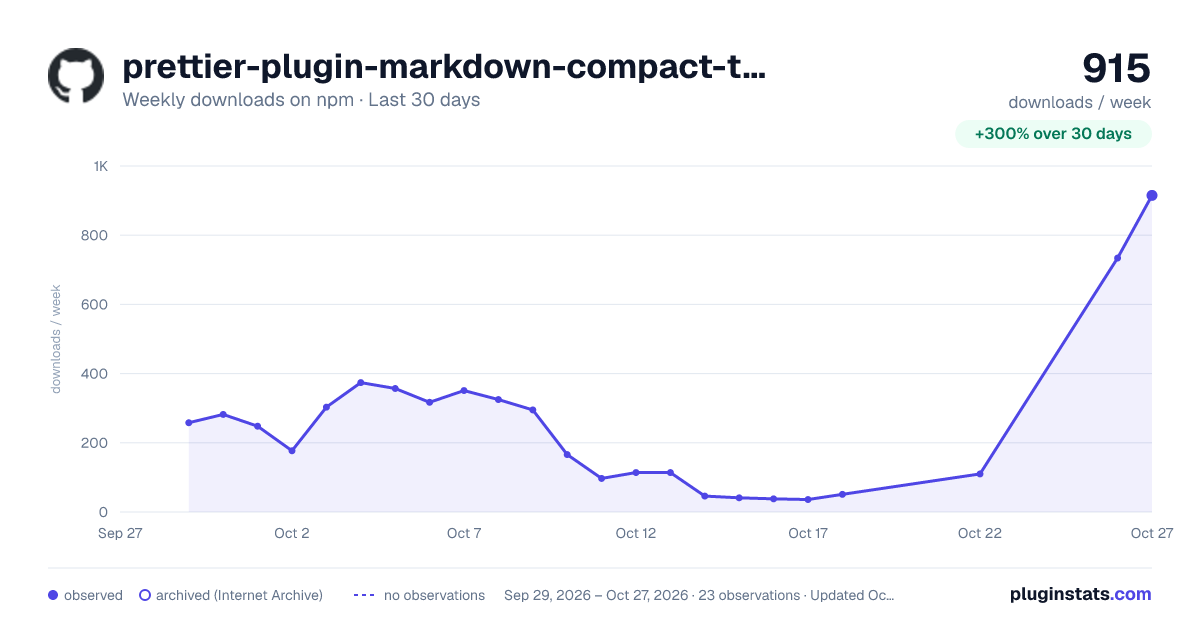
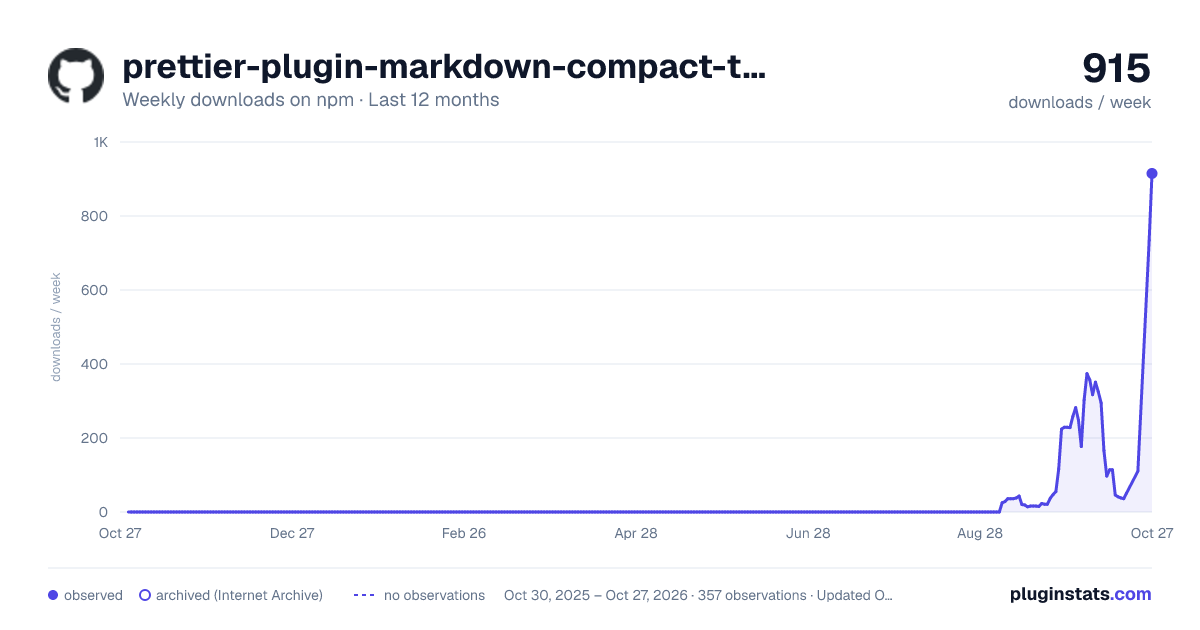
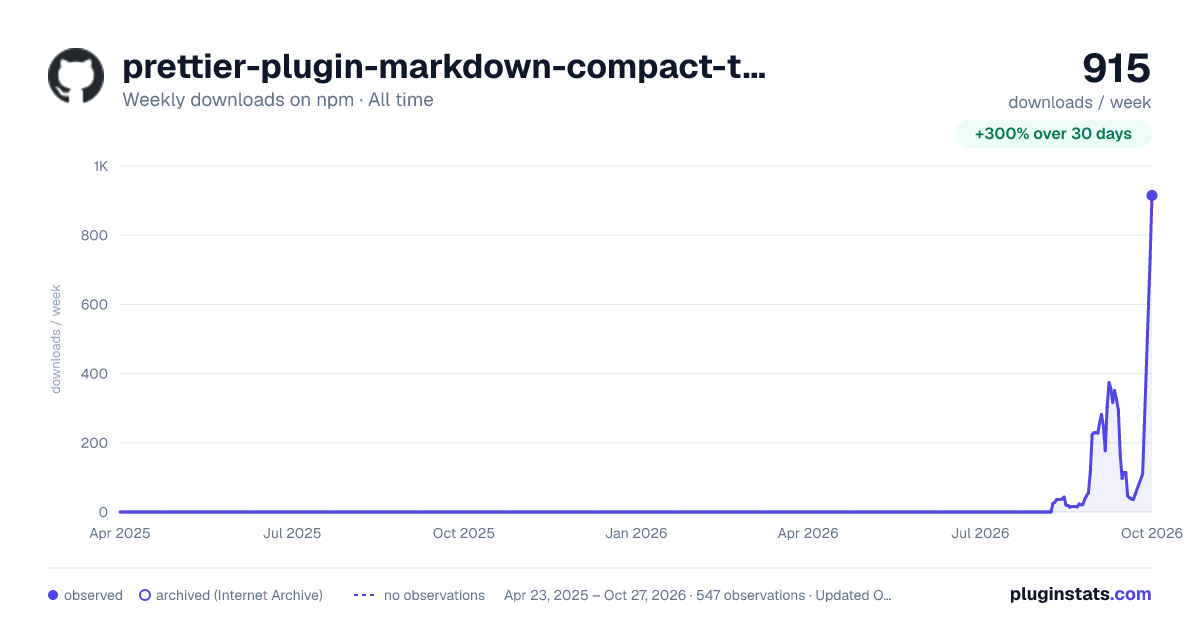

Adoption over time


7/30/90-day growth


Filled points are observed values; hollow points come from Internet Archive snapshots of the listing page. Dashed segments span periods with no observations — values between points are not interpolated.
Recent observations
Full history (543)Similar npm Prettier plugins plugins
Data source
Weekly downloads (trailing 7 complete days) come from the official npm downloads API. Downloads include CI and mirrors and are not equivalent to installs or users. npm publishes no ratings.
Listing: https://www.npmjs.com/package/prettier-plugin-markdown-compact-tables. First seen Oct 16, 2026; last successful collection Oct 18, 2026. See the methodology.