 PluginStats
ssh-mcp weekly downloads statistics
By tufantunc · npm · MCP servers
MCP server exposing policy-gated, audited SSH access for Linux and Windows hosts via the Model Context Protocol.
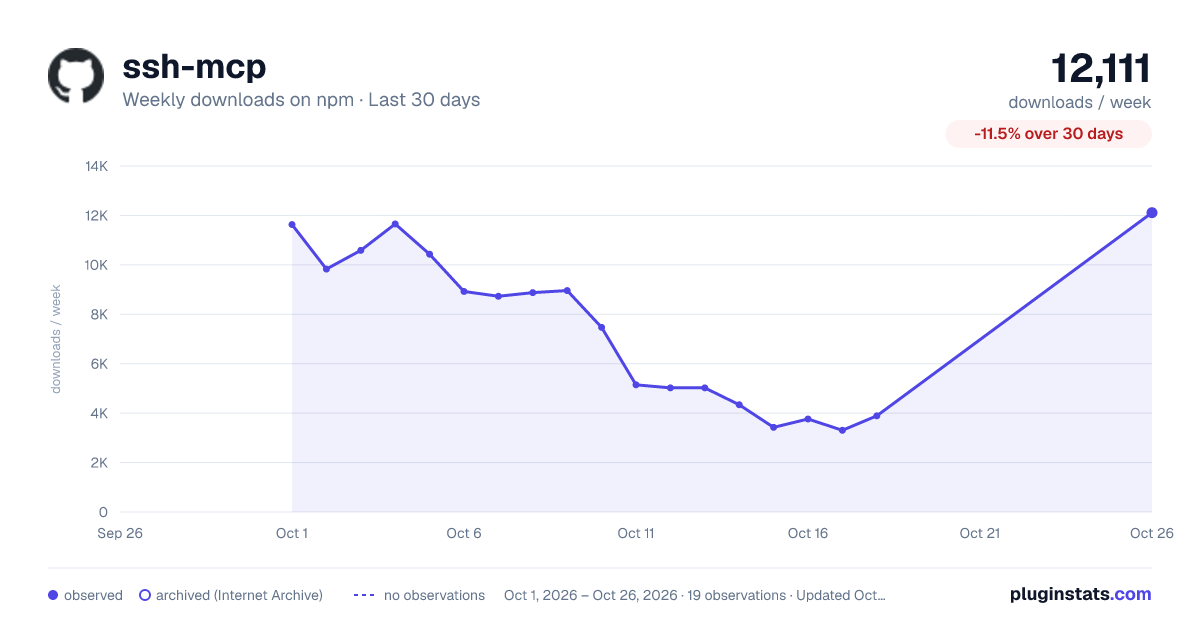
ssh-mcp has 3,306 recorded weekly downloads on npm, a decrease of 64.1% over the past 30 days.
It ranks #1182 of 2,256 tracked npm listings by weekly downloads.
Over 90 days, weekly downloads changed by +185%.
PluginStats has 543 daily observations since Apr 23, 2025; the latest is from Oct 17, 2026.
About ssh-mcp
SSH MCP Server v2
SSH MCP Server is a security-first Model Context Protocol server that gives LLM agents controlled SSH access to remote hosts — with command classification, policy-based authorization, human-in-the-loop approval, and full audit logging.
The risk this server exists to manage. Giving an LLM shell access on a remote host puts private data, untrusted input and network egress in one place — Simon Willison's "lethal trifecta". Prompt injection has no general fix, so ssh-mcp assumes any command may be attacker-influenced: it classifies before executing, authorizes against a role × host-group matrix, gates destructive work behind approval, and records the decision either way. That narrows the blast radius; it does not remove the risk. Two things stay yours: never point it at a root account, and never set auto approval on a production profile. SECURITY.md has the full threat model.
Quick Start
1. Install
2. Configure
Without a config the server still starts, so a client or directory can complete the MCP handshake and read tools/list — but every tool call is refused until you configure it, with a message naming the path below. Nothing runs on a host until this step is done.
Create the config file at the path for your platform:
| Platform | Path |
| Linux | ~/.config/ssh-mcp/config.toml (or $XDG_CONFIG_HOME/ssh-mcp/config.toml) | | macOS | ~/Library/Application Support/ssh-mcp/config.toml | | Windows | %APPDATA%\ssh-mcp\config.toml |
The config decides which hosts, roles and policy rules this server honours, so it checks that nobody but you can read it — and treats the two platforms differently, because the question has a much clearer answer on one of them.
Linux and macOS: enforced. The mode check above, on the file *and* the directory — which is why chmod 700 is in that command, since mkdir -p under the default umask leaves the directory 0755. The server refuses to start otherwise. "Only the owner" is unambiguous here and chmod is a one-line fix.
Windows: split by what the ACL actually allows. There are no mode bits, so the ACL is read instead — and read exposure and write exposure are not treated alike, because Windows is much clearer about one of them than the other.
| The ACL lets another account… | Default |
| only read the config | reported, and the server starts | | change the config | refused | | nothing (no ACL at all) | refused — that is full control for everyone | | …and if the ACL could not be read | refused, except when icacls is absent or the check timed out |
A config under %APPDATA% inherits access for you, SYSTEM and Administrators and needs nothing done to it. One created elsewhere does not: a file under C:\ inherits *read* for every local account and *modify* for every authenticated one. The message names the two icacls commands that fix it either way.
Read exposure is reported rather than refused because that is where Windows is genuinely muddier than POSIX, and refusing over it blocked a config at the documented location (#138). Write exposure is refused because it is not muddy at all: another account being able to rewrite the file that decides which hosts, roles and approval policy this server honours is an authorization bypass, not a disclosure.
Two flags move the whole thing: --strictConfigAcl refuses everything the check objects to, read-only grants included; --allowUncheckedConfigAcl reports everything and refuses nothing. Neither combination leaves you without an exit, which is the lesson of #138.
Exit statuses
| Status | Meaning |
| 0 | Clean shutdown | | 1 | A defect in the server — printed with a stack trace; please report it | | 2 | How it was invoked or configured — printed as a message, no stack |
A supervisor that treats any non-zero status as a failure needs no change. One that matched on 1 to detect a startup problem should match on 2 as well.
Starting with nothing configured is not an exit-2 condition, as of the release that added introspection without a config: the server starts so it can be described, and refuses each tool call instead. A supervisor that used a non-zero exit to catch an unconfigured deployment should watch for starting unconfigured on stderr, or read configured from GET /health when running the HTTP transport.
3. Set credentials via environment variables
4. Connect from your MCP client
Claude Code:
Claude Desktop / Cursor / Windsurf:
Never pass passwords as CLI arguments — they're visible via ps aux. Use env vars, config files, SSH agent, or OS keychain.
Tools (14)
| Tool | Purpose | readOnly | destructive |
| list-connections | Discover available hosts and connection status | ✅ | — | | list-sessions | List active sessions per host | ✅ | — | | open-session | Create a named interactive (stateful) or background session | — | — | | close-session | Close a session. A background session's command is signalled (INT/TERM/KILL) before its channel is dropped | — | ✅ | | read-session-output | Read output from background sessions (e.g., tail -f) | ✅ | — | | read-command | Execute allowlisted read-only commands (ls, cat, grep, ...) | ✅ | — | | run-command | Execute arbitrary commands (destructive/privileged need approval, unless approvalPolicy = "auto") | — | — | | privileged-command | Execute with sudo (needs approval, unless approvalPolicy = "auto") | — | ✅ | | sftp-upload | Upload a file via SFTP (replaces the destination unconditionally) | — | ✅ | | sftp-download | Download a file via SFTP | ✅ | — | | sftp-list | List a remote directory, bounded in entries and bytes | ✅ | — | | sftp-upload-file | Stream a local file to the remote host, never through model context | — | ✅ | | sftp-download-file | Stream a remote file to local disk, never through model context | — | ✅ | | signal-process | Send INT/TERM/KILL to a remote PID | — | ✅ |
Streaming file transfer…
Description from the npm listing.
- ssh
- mcp
- model-context-protocol
- server
- windows
- linux
- automation
- remote
- cli
- typescript
Charts
Images: 30d · 1y · all time · 1600×900 dark
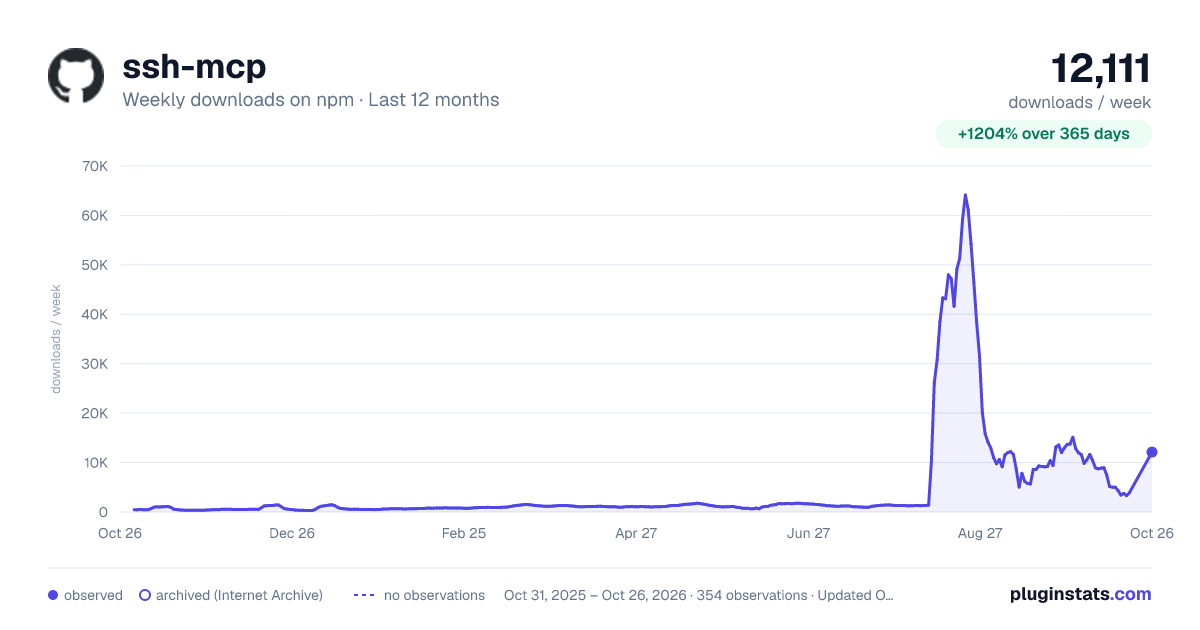
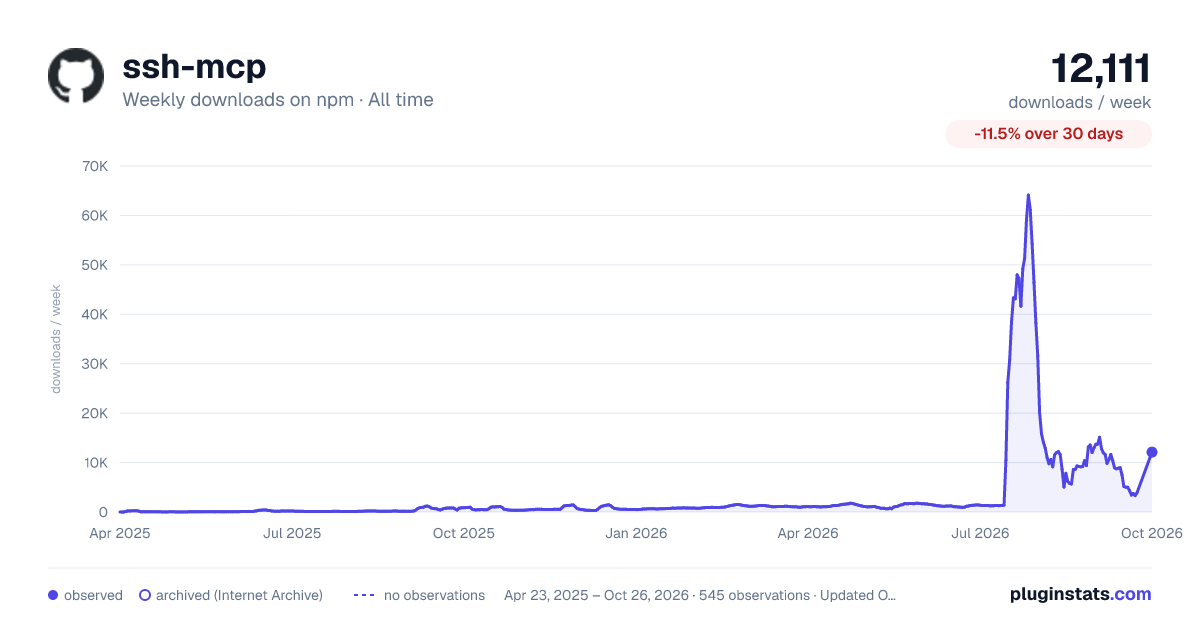

Adoption over time


7/30/90-day growth


Listing placement


Filled points are observed values; hollow points come from Internet Archive snapshots of the listing page. Dashed segments span periods with no observations — values between points are not interpolated.
Each band is one page of 20. Weekly downloads on a log scale. Placement is projected from weekly downloads, so it can differ from the marketplace's own sort order. Hover a dot to see the listing.
Recent observations
Full history (543)Similar npm MCP servers plugins
All 20 ssh-mcp alternativesData source
Weekly downloads (trailing 7 complete days) come from the official npm downloads API. Downloads include CI and mirrors and are not equivalent to installs or users. npm publishes no ratings.
Listing: https://www.npmjs.com/package/ssh-mcp. First seen Oct 16, 2026; last successful collection Oct 19, 2026. See the methodology.