 PluginStats
eslint-plugin-json-format weekly downloads statistics
By bkucera · npm · ESLint plugins
lint and auto-fix json
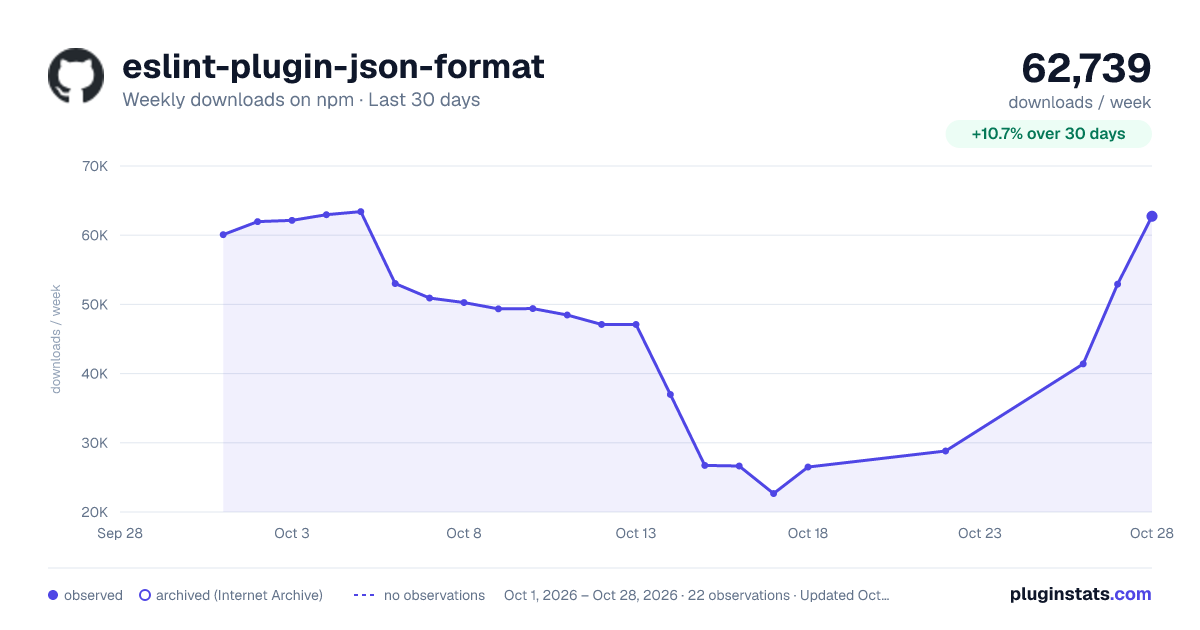
eslint-plugin-json-format has 22,668 recorded weekly downloads on npm, a decrease of 60.5% over the past 30 days.
It ranks #719 of 2,251 tracked npm listings by weekly downloads.
Over 90 days, weekly downloads changed by -54.6%.
PluginStats has 121 daily observations since Jun 19, 2026; the latest is from Oct 17, 2026.
About eslint-plugin-json-format
eslint-plugin-json-format
An ESLint plugin to lint, format, auto-fix, and sort your json files.
Features
• lint, format, and auto-fix json files (files ending with .json or rc) • auto-sort package.json files (default true, can be disabled and sorting configured) • ignores json-with-comments files (default ["/.tsconfig.json", ".vscode/"]) • ignores certain files by default (default ["**/package-lock.json"])
Installation
You'll first need to install ESLint:
Next, install eslint-plugin-json-format:
Usage
Add json-format to the plugins section of your .eslintrc configuration file. You can omit the eslint-plugin- prefix:
cli example:
Note: In order to lint hidden files (e.g. .eslintrc.json), you'll need to modify/create a .eslintignore in your project root with these contents: .eslintignore:
Settings
default settings (.eslintrc):
Note: glob patterns use minimatch against path names relative to the project root (cwd)
sort-package-json order
You can configure the exact sort order of your package.json files (or turn it off entirely with false)
Available sorting options
false: disable package.json sorting.
"standard": default from sort-package-json. This is a sane, standard order.
"pro": places scripts and dependencies at the top, reducing need to scroll down to view them. Pros only.
["your", "custom", "order", "here"]: provide an array to manually set the sort order.
Settings examples
to turn off sorting package.json files for example, in your .eslintrc:
to format tsconfig.json (this will strip comments!), in your .eslintrc:
change the sort order of package.json:
Editor Configuration
VSCode:
In order for editor integration via the vscode-eslint extension, you'll need to enable linting json files.
settings.json:
to auto-format* json-with-comments-files, also add "language": "jsonc" (* will strip comments)
License
MIT
Credits
large amount of code borrowed from eslint-plugin-html
Description from the npm listing.
- eslint
- eslint-plugin
- eslint-plugin-json
- eslintplugin
- json
- json-format
Where eslint-plugin-json-format sits in the listing
Each band is one page of 20. Weekly downloads on a log scale. Placement is projected from weekly downloads, so it can differ from the marketplace's own sort order. Hover a dot to see the listing.


Charts
Images: 30d · 1y · all time · 1600×900 dark
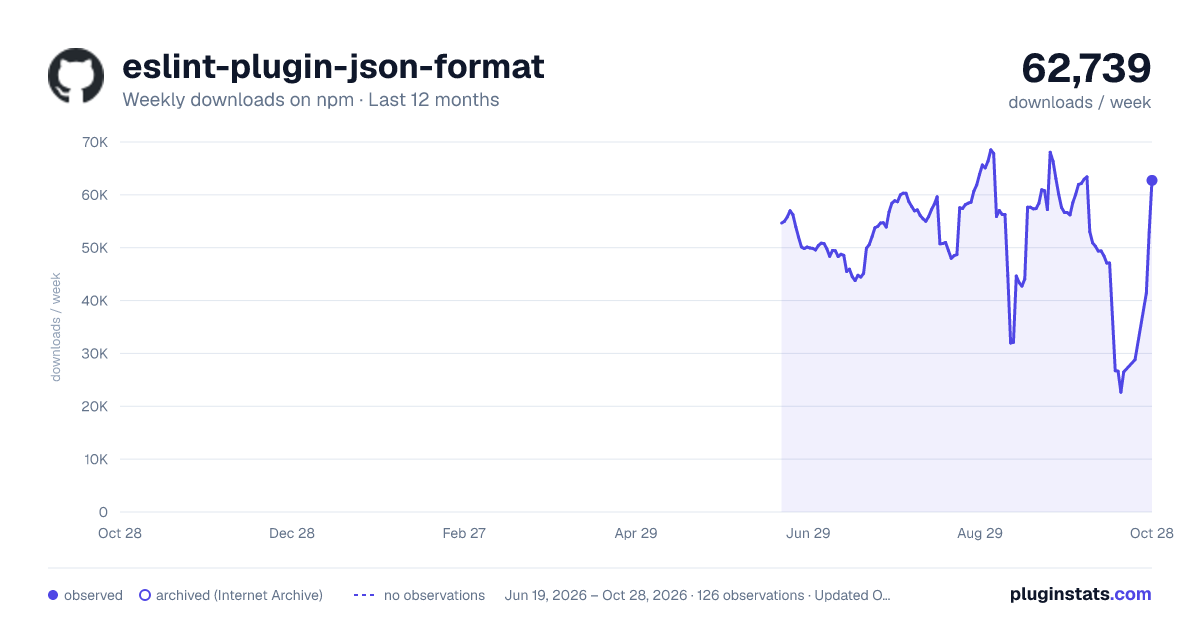
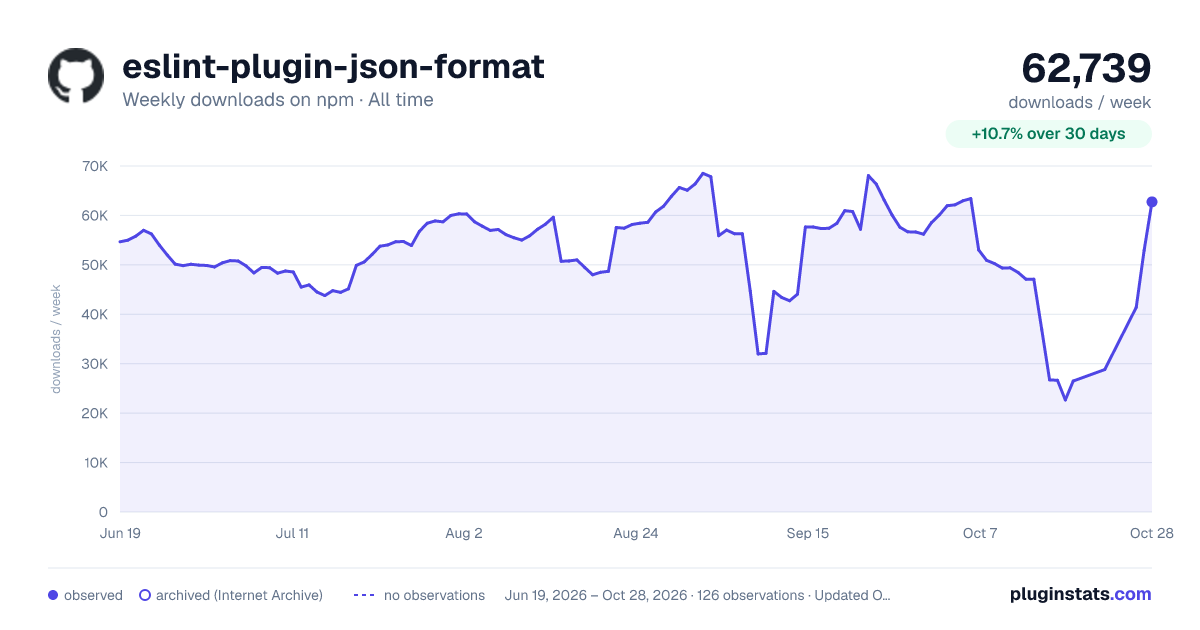

Adoption over time


7/30/90-day growth


Filled points are observed values; hollow points come from Internet Archive snapshots of the listing page. Dashed segments span periods with no observations — values between points are not interpolated.
Recent observations
Full history (121)Similar npm ESLint plugins plugins
Data source
Weekly downloads (trailing 7 complete days) come from the official npm downloads API. Downloads include CI and mirrors and are not equivalent to installs or users. npm publishes no ratings.
Listing: https://www.npmjs.com/package/eslint-plugin-json-format. First seen Oct 16, 2026; last successful collection Oct 18, 2026. See the methodology.