 PluginStats
webpack-ext-reloader-next weekly downloads statistics
By graybearo · npm · Webpack plugins
Webpack extension reloader for Chrome, Firefox, and Edge. Auto-reloads your browser extension on rebuild. MV3-ready successor to webpack-ext-reloader.
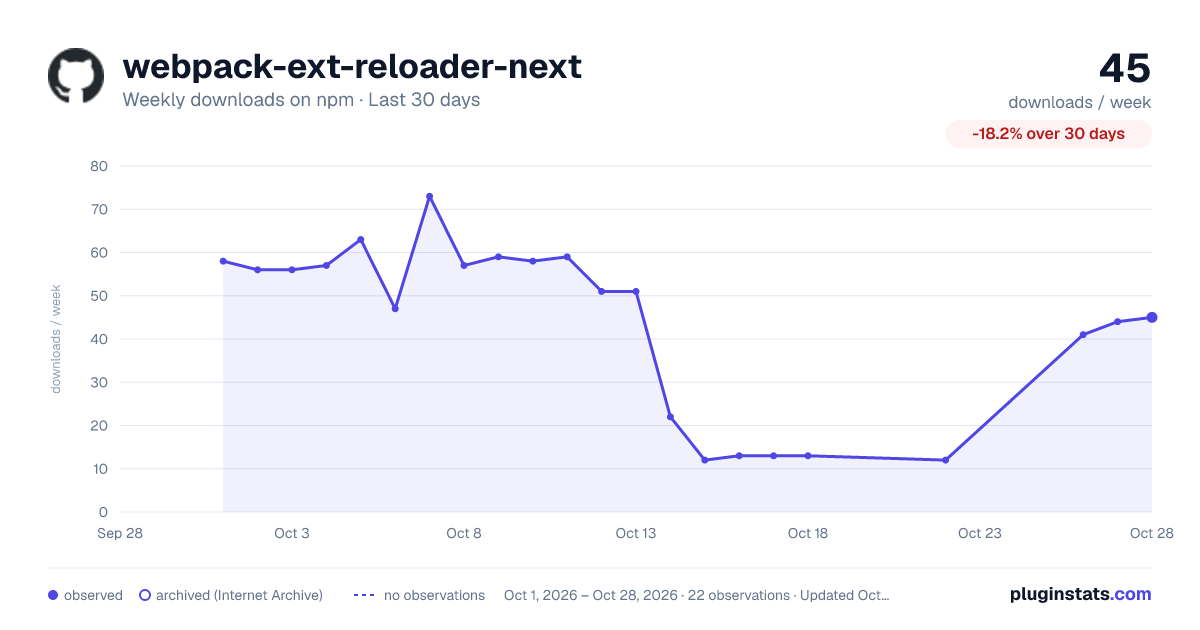
webpack-ext-reloader-next has 13 recorded weekly downloads on npm, a decrease of 79.4% over the past 30 days.
It ranks #1892 of 2,256 tracked npm listings by weekly downloads.
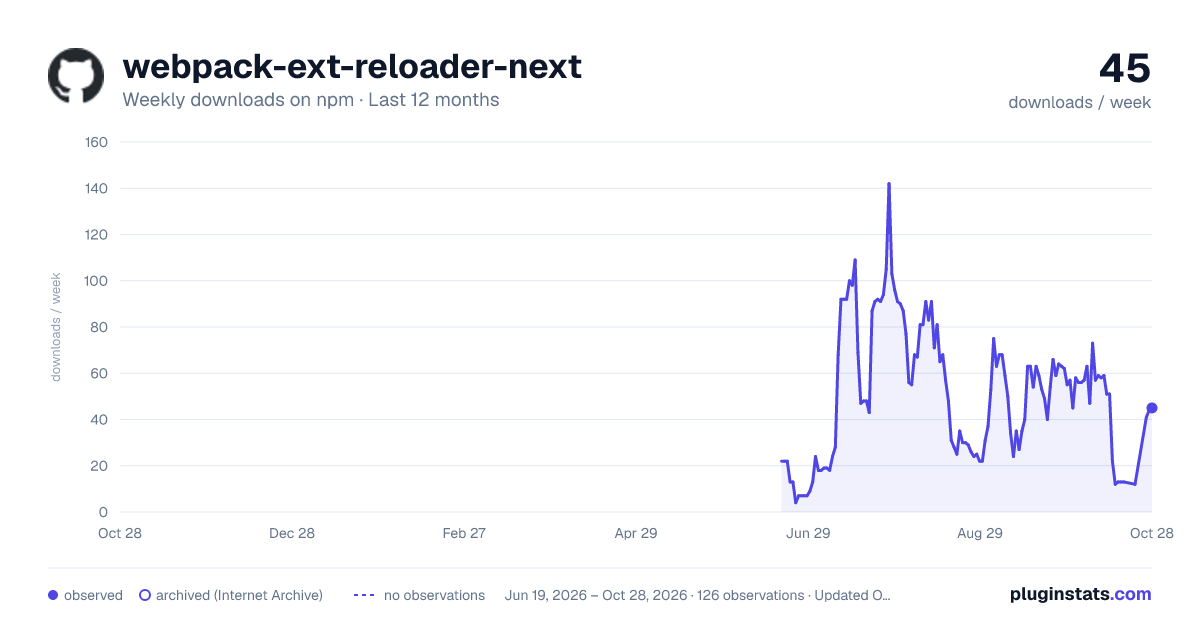
Over 90 days, weekly downloads changed by -72.9%.
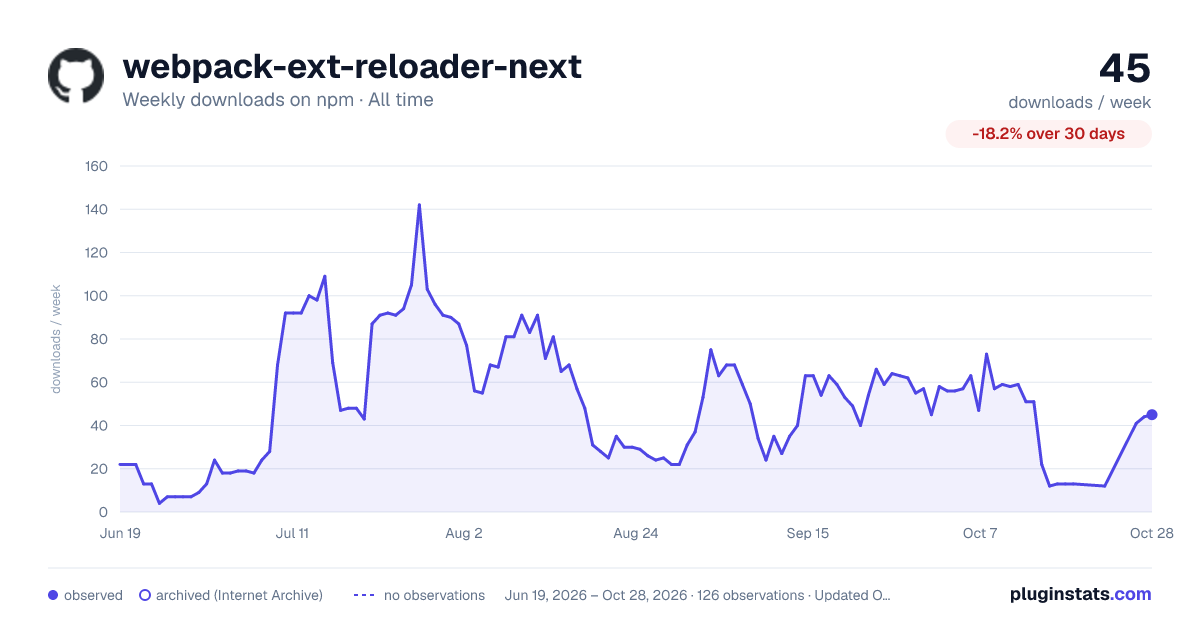
PluginStats has 121 daily observations since Jun 19, 2026; the latest is from Oct 17, 2026.
About webpack-ext-reloader-next
Webpack 5 auto-reloader for browser extensions — Manifest V3, zero-config, with CSS hot-swap. Edit a file → your Chrome / Firefox / Edge extension reloads. CSS edits swap in place without losing scroll or form state.
Install · Quick start · What changes do what · How it works · Migrate · CLI · Options · Troubleshooting · FAQ
Why this exists
The original webpack-ext-reloader is unmaintained and broken on Manifest V3 — its WebSocket dies the moment Chrome puts the service worker to sleep, and it doesn't reconnect. This package is the modern successor.
It picks a port, watches your build, and reloads the extension over a self-healing WebSocket that survives service-worker eviction. No configuration required for the common case.
Install
Quick start
Drop one line into your webpack config. Pick the form that matches your setup:
CommonJS (webpack.config.js or .cjs):
ES Modules (webpack.config.mjs, or with "type": "module"):
TypeScript (webpack.config.ts):
The default export is also available if you prefer import ExtReloader from "webpack-ext-reloader-next".
That's it. The plugin reads your manifest.json, infers your background / content / popup entries, and starts a reload server on a free port starting at 9012. Run webpack --watch, load the unpacked build into Chrome, and edit a file — the extension reloads on its own.
The plugin is automatically a no-op when mode === "production".
Multiple content scripts or pages? Pass entries arrays — the inferred defaults assume one of each:
What it does on each kind of change
| You edited | What happens |
| manifest.json | Full extension reload (chrome.runtime.reload) | | _locales/** | Full extension reload | | Background service worker | Full extension reload | | Popup / options / devtools page | Reload the open extension page only | | Content script JS | Reload tabs matching the script's matches | | Content script or page CSS | Hot-swap in place — no reload | | Static asset (image, etc.) | Nothing (just rebuild) |
The CSS hot-swap is the one feature no other webpack extension reloader ships. Edit a stylesheet — whether it's import-ed from JS (cloned with a cache-buster) or declared in manifest.json under content_scripts[].css (re-injected via chrome.scripting.insertCSS) — and your Gmail (or whatever) tab keeps its scroll position and form state.
How it works
1. Webpack finishes a build. The plugin diffs the emitted assets against the previous build. 2. The diff classifies the change — manifest, background, content JS, content CSS, page, locale, or static asset. 3. A typed message goes out over WebSocket (ws://localhost:9012) to every connected client. Schemas live in shared/messages.ts. 4. Each client takes the minimum action: background reloads the extension, content scripts reload their host tabs, CSS swaps in place — no full reload. 5. The service worker reconnects on every Chrome event, so SW eviction never breaks the connection.
The protocol is bundler-agnostic. Today it ships with a webpack 5 plugin and a standalone CLI; rspack and Vite are on the roadmap.
Migrating from webpack-ext-reloader
If you're already using the original webpack-ext-reloader (or webpack-extension-reloader, or @reorx/webpack-ext-reloader), migration is mostly a rename.
1. Swap the dependency:
2. Update the import — ExtensionReloader → ExtReloader:
The entries mapping is no longer required — the plugin reads your manifest.json and infers them. You can still pass entries to override.
3. Delete any manual chrome.runtime.reload() workaround you added because the old plugin's WebSocket died on MV3. The new client reconnects on every Chrome event, so the SW eviction cycle is handled automatically.
Option name compatibility:
| webpack-ext-reloader option | webpack-ext-reloader-next |
| port | port (default 9012, auto-increments) | | reloadPage | reloadPage (same default) | | entries | entries (now optional) | | manifest | manifest (now optional) | | — | keepAliveInDev (new, default true) | | — | notifications.* (new) | | — | logLevel (new) |
That's the whole migration for the 90% case.
Manifest V3 specifics
• Service worker reconnection — clients reconnect on every Chrome event so the WebSocket survives the SW eviction cycle. • No eval — nothing in the injected client violates the MV3 CSP. • Smart keep-alive — opt-in chrome.alarms ping so the SW never sleeps in dev (keepAliveInDev: true, on by default). • Manifest-declared CSS hot-swap — uses chrome.scripting.insertCSS to re-inject content_scripts[].css in place. Requires host_permissions covering the page URL (or activeTab); falls back to a tab reload if neither is granted. • Cross-browser — Chrome, Firefox, and Edge all supported via the webextension-polyfill types.
Try the demo extensions
Three MV3 demo extensions live under packages/demo/ — one per target browser. They're identical except for the manifest:
• packages/demo/chrome — plain background.service_worker. Load via chrome://extensions → "Load unpacked" → packages/demo/chrome/dist. • packages/demo/edge — same manifest as Chrome. Load via edge://extensions → "Load unpacked" → packages/demo/edge/dist. • packages/demo/firefox — service_worker + scripts fallback + browser_specific_settings.gecko.id. Load via about:debugging#/runtime/this-firefox → "Load Temporary Add-on" → packages/demo/firefox/dist/manifest.json.
Firefox MV3 still gates background.service_worker behind the extensions.backgroundServiceWorker.enabled pref, so any Firefox MV3 manifest also needs a background.scripts fallback — that's what the firefox-demo shows.
Standalone CLI (no webpack)
If you build with something other than webpack — esbuild, rollup, a custom script — you can still use the same reload protocol via the CLI. It watches your extension's output directory, classifies changes, and broadcasts to clients you've added to your extension.
Options:…
Description from the npm listing.
- webpack
- webpack-plugin
- mv3
- manifest-v3
- webpack-ext-reloader
- webpack-extension-reloader
- chrome-extension
- firefox-extension
- edge-extension
- web-extension
- webextension
- hot-reload
- live-reload
- reloader
- browser-extension
Where webpack-ext-reloader-next sits in the listing
Each band is one page of 20. Weekly downloads on a log scale. Placement is projected from weekly downloads, so it can differ from the marketplace's own sort order. Hover a dot to see the listing.


Charts
Images: 30d · 1y · all time · 1600×900 dark

Adoption over time


7/30/90-day growth


Filled points are observed values; hollow points come from Internet Archive snapshots of the listing page. Dashed segments span periods with no observations — values between points are not interpolated.
Recent observations
Full history (121)Similar npm Webpack plugins plugins
Data source
Weekly downloads (trailing 7 complete days) come from the official npm downloads API. Downloads include CI and mirrors and are not equivalent to installs or users. npm publishes no ratings.
Listing: https://www.npmjs.com/package/webpack-ext-reloader-next. First seen Oct 16, 2026; last successful collection Oct 19, 2026. See the methodology.