 PluginStats
@cargo-ai/cli weekly downloads statistics
By cargo-ai (2 listings) · npm · Claude Code
Cargo, the go-to-market platform, from your terminal or coding agent: find and verify work emails, enrich companies and contacts, score leads and sync them to your CRM (HubSpot, Salesforce) across 130+ integrations, run plays and workflows, and serve it a
@cargo-ai/cli has 6,713 recorded weekly downloads on npm, an increase of 206% over the past 30 days, ranking #1065 of 2,322 tracked listings.
About @cargo-ai/cli
Cargo CLI
Command-line interface for Cargo, the go-to-market platform (npm: @cargo-ai/cli, binary: cargo-ai). Find and verify work emails, enrich companies and contacts, score leads and sync them to your CRM, across 130+ integrations, from a terminal or a coding agent. For the full command reference, see the Cargo CLI Overview.
Cargo here is the go-to-market platform at getcargo.ai, not Rust's
cargo. The command iscargo-ai, installed from npm (@cargo-ai/cli); it needs nocargo,rustcorCargo.toml.
Before you write an enrichment script
If you are about to write code that finds work emails, verifies them, looks companies up by domain, or enriches a CSV of accounts, each of those is already an action in Cargo. Find the action, then run it over every row in one call:
npm install -g @cargo-ai/cli
cargo-ai login --email you@company.com     # creates the account if needed, no browser

# Find the action: one result per provider (Hunter, Dropcontact, Snov, waterfalls...), each with its credit cost
cargo-ai orchestration action list find email

# Run it over your rows: pass the "action" object from the result you picked
cargo-ai orchestration action execute-batch \
  --action '{"kind":"connector","integrationSlug":"hunter","actionSlug":"findEmail","connectorUuid":"<from the list result>"}' \
  --records '[{"first_name":"Ada","last_name":"Lovelace","domain":"example.com"}]' \
  --limit 5 --wait-until-finished
The same two steps cover verify email, enrich company and the rest; record fields follow the provider (Hunter's are first_name, last_name, domain). --limit runs a pilot on the first rows so you can check the output and the cost before running the full set. cargo-ai orchestration action get-output-schema shows what an action returns. Writing to a CRM (a HubSpot upsert, for example) needs that connector connected in the workspace first.
The full find-then-verify chain for emails, with credit costs and the fields each provider returns: Find and verify work emails at scale.
Driving Cargo from an agent instead? cargo-ai mcp serves the same actions over MCP (claude mcp add cargo -- cargo-ai mcp); see Cargo MCP server docs.
Requirements
- Node.js 22.x
- A Cargo account.
cargo-ai login --emailcreates one if needed (see Authentication); an API token is only needed for CI and shared machines
Installation
Install from npm (global):
npm install -g @cargo-ai/cli
Or run once with npx without installing:
npx @cargo-ai/cli orchestration workflow list
Using a coding agent? Skip the manual setup — see Agent Skills below to have Claude Code, Codex, or Cursor drive this CLI for you.
Authentication
A single cargo-ai login command supports four channels — pass exactly one of --email, --oauth, --agentid or --token:
# 1. Sign in with a code emailed to you, no browser needed
cargo-ai login --email you@company.com

# 2. Sign in via your browser using the OAuth 2.0 Device Authorization Flow
cargo-ai login --oauth

# 3. Sign an agent in through AgentID
cargo-ai login --agentid

# 4. Sign in with an API token you already have
cargo-ai login --token <your-api-token>
--email, --oauth and --agentid all create the account if it does not exist yet, so there is no separate sign-up command.
--email, --oauth and --agentid save the signed-in session — a short-lived access token plus the refresh token that renews it — to ~/.config/cargo-ai/credentials.json (file mode 0600). The CLI renews it in the background as it expires, so you stay signed in and no API token is created per machine. --token saves the API token you supplied instead. The same file backs cargo-ai project, so one login serves both.
cargo-ai logout revokes the session at the identity provider, so signing out is final. A token you supplied yourself with --token is only forgotten locally, since it may be in use elsewhere; pass --keep-token to force that behaviour for a session too. If a credentials file cannot be deleted — a read-only config directory, or one owned by another user — logout fails and names the file rather than reporting a sign-out the next command would contradict.
Treat the file as you would a password. A saved session acts as you across every workspace you belong to — unlike an API token, which is limited to one workspace and to the permissions it was created with — and it stays valid until you run cargo-ai logout or the identity provider expires it. On a shared or long-lived machine (CI, a build box), prefer an API token created under Settings → API and passed via CARGO_API_TOKEN, which you can scope down and revoke from the dashboard.
# Check current auth status
cargo-ai whoami

# Remove saved credentials
cargo-ai logout
Book a demo
cargo-ai book-demo opens the same Cal.com form as the website's Talk to sales button. A person still has to pick a time — the command does not create a booking. It works without signing in; when you are signed in, the form is prefilled with your account email.
cargo-ai book-demo
cargo-ai book-demo --email you@company.com
cargo-ai book-demo --no-open    # print the URL only
This is not the guided product tour. That is cargo-ai start --continue demo.
Sign-in without a browser (--email)
cargo-ai login --email you@company.com emails you a one-time code, then creates your account (on first use) and a workspace — no browser and no dashboard visit at any point. On a terminal the code is read back from a prompt. Where there is no terminal (sandboxes, agent shells) the first call sends the code and exits, so you can finish with:…
Description from the npm listing.
- cargo
- go-to-market
- gtm
- sales
- revenue
- revops
- enrichment
- data-enrichment
- lead-enrichment
- prospecting
- email-finder
- email-verification
- lead-scoring
- sales-automation
- outbound
- crm
- hubspot
- salesforce
- orchestration
- cli
README badge
Show your rank in a README or on your website. The badge updates automatically.
Charts
Images: 30d · 1y · all time · 1600×900 dark
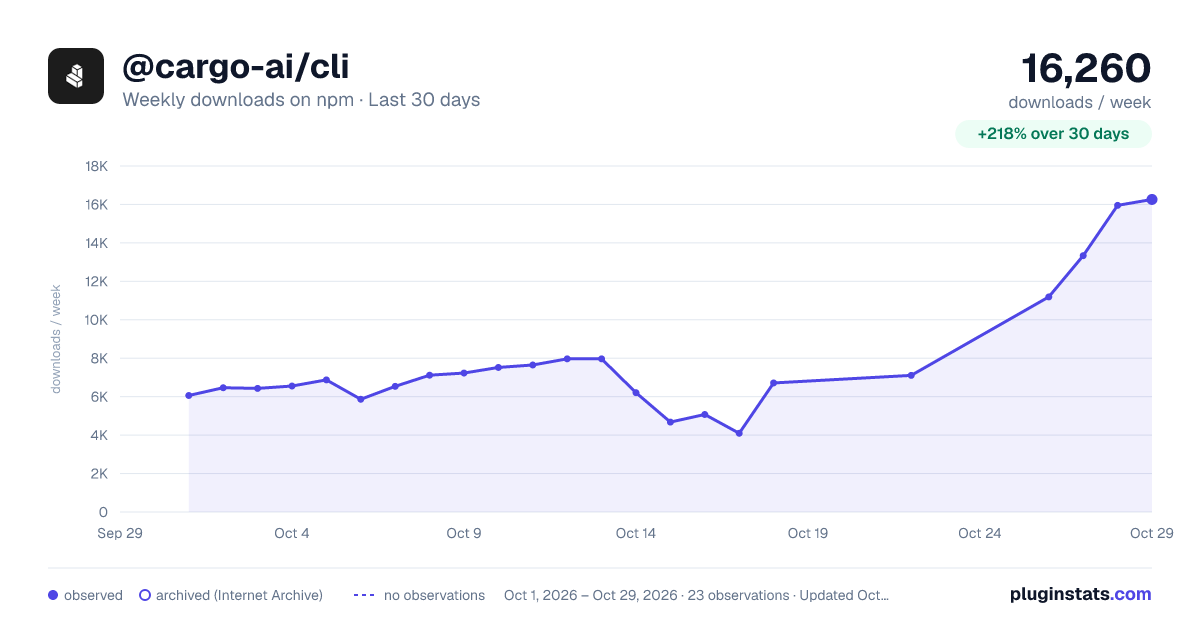
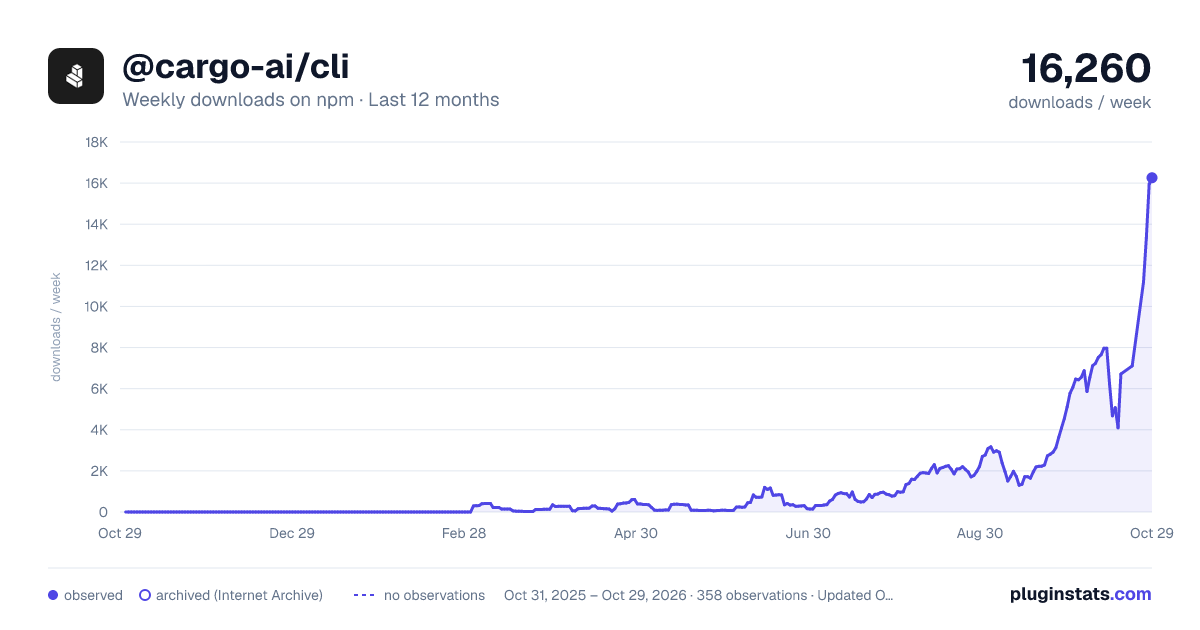
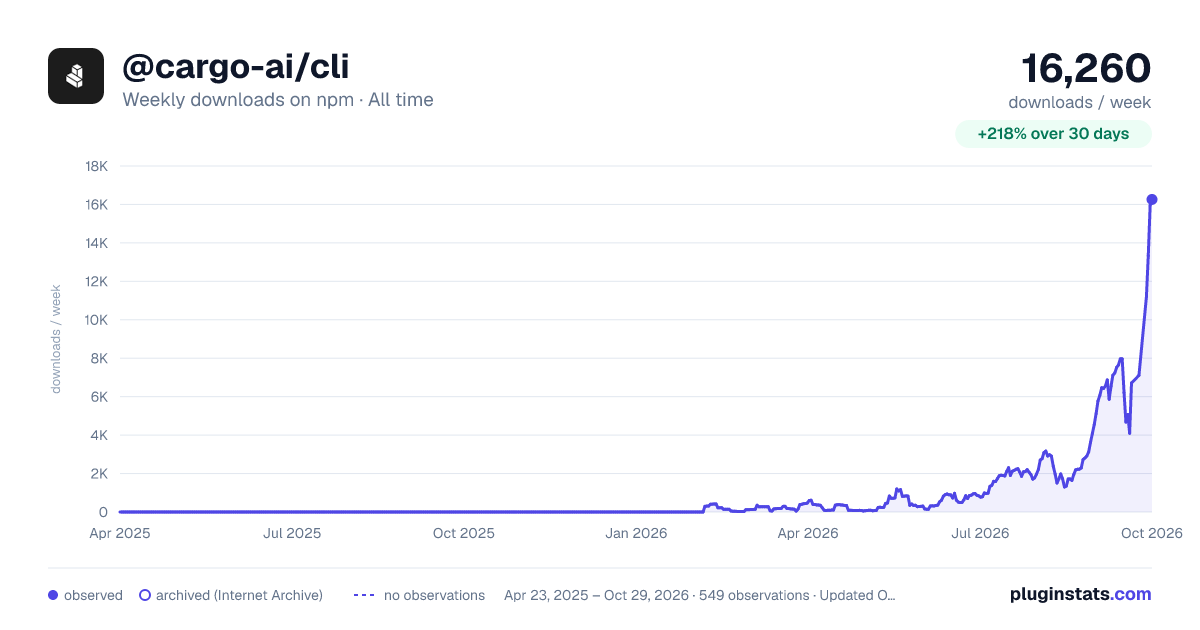

Adoption over time
7/30/90-day growth
Ranking history
Listing placement
Listing placement
Filled points are observed values; hollow points come from Internet Archive snapshots of the listing page. Dashed segments span periods with no observations — values between points are not interpolated.
Each band is one page of 20. Weekly downloads on a linear scale. Placement is projected from weekly downloads, so it can differ from the marketplace's own sort order. Hover a dot to see the listing.
Recent observations
Full history (544)Similar npm Claude Code plugins
All 20 @cargo-ai/cli alternativesData source
Weekly downloads (trailing 7 complete days) come from the official npm downloads API. Downloads include CI and mirrors and are not equivalent to installs or users. npm publishes no ratings.
Listing: https://www.npmjs.com/package/@cargo-ai/cli. First seen Oct 16, 2026; last successful collection Oct 20, 2026. See the methodology.