 PluginStats
@loupekit/mcp weekly downloads statistics
By loupekit · npm · Claude Code
MCP server that exposes Loupe comments to Claude Code as an actionable, fully-contextualized backlog.
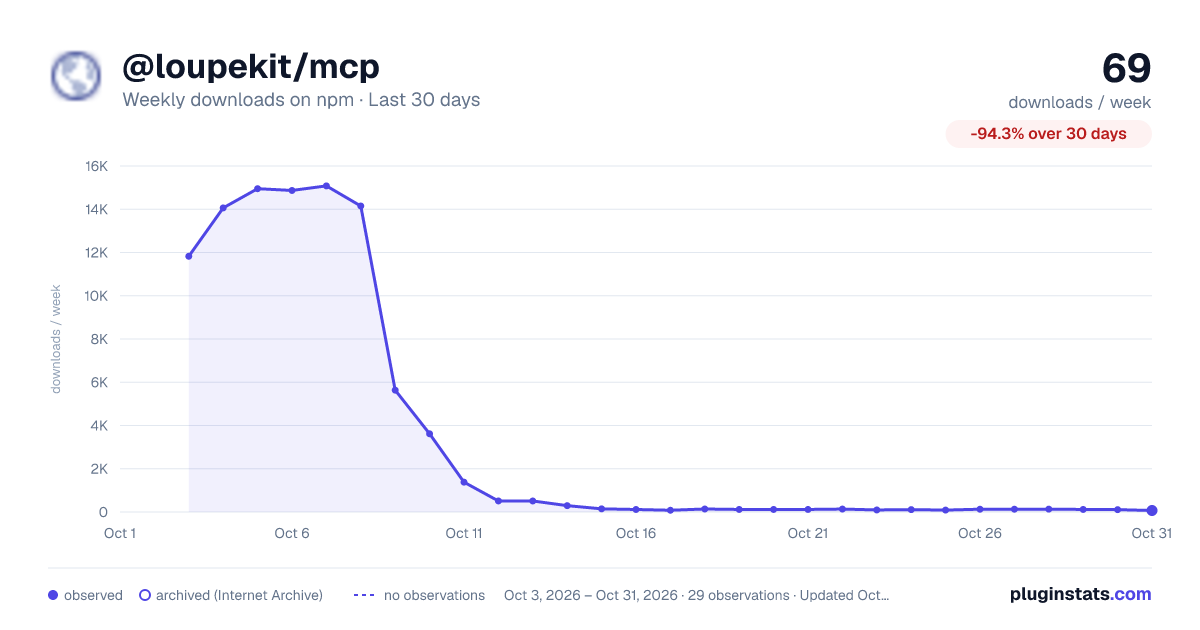
@loupekit/mcp has 81 recorded weekly downloads on npm, a decrease of 31.9% over the past 30 days.
It ranks #1689 of 2,251 tracked npm listings by weekly downloads.
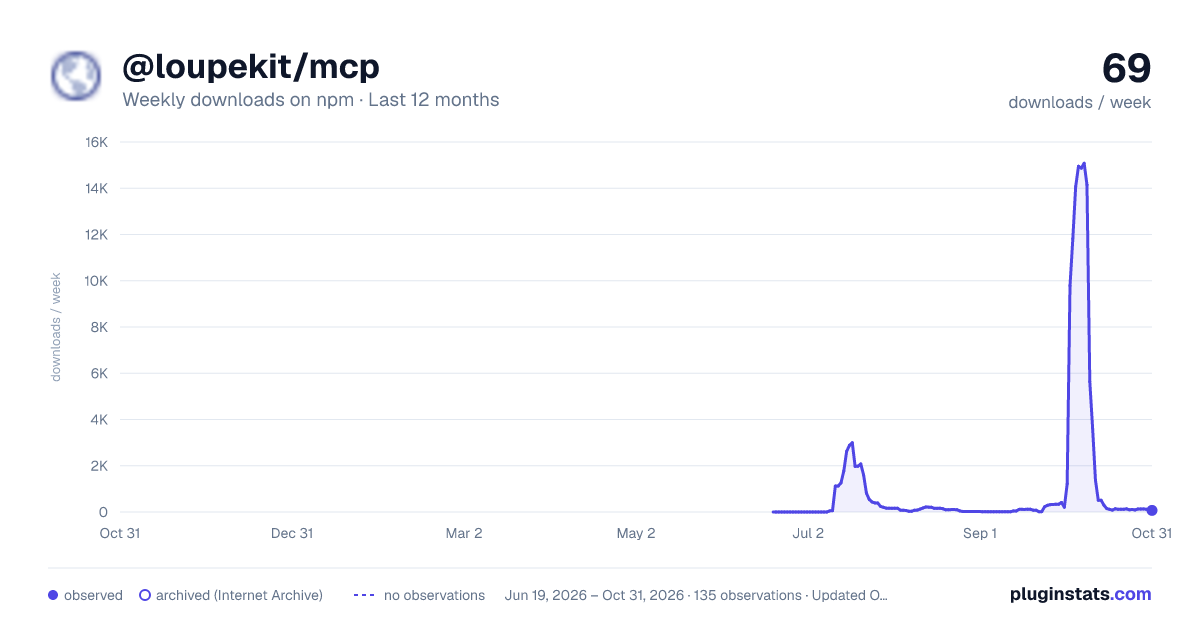
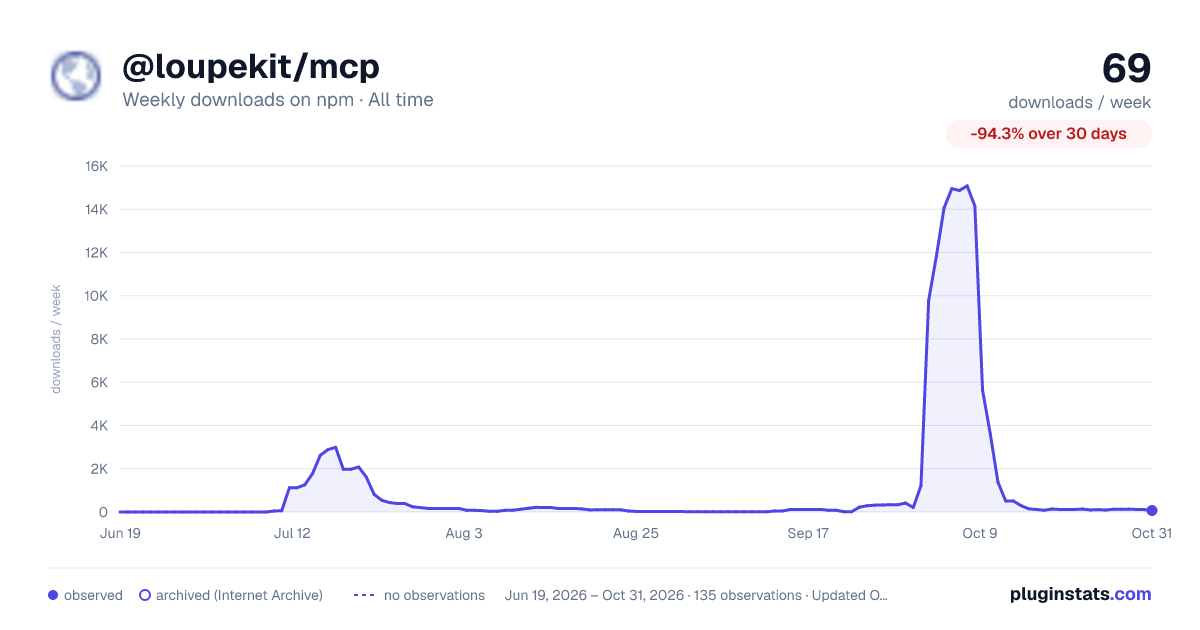
Over 90 days, weekly downloads changed by -95.9%.
PluginStats has 121 daily observations since Jun 19, 2026; the latest is from Oct 17, 2026.
About @loupekit/mcp
@loupekit/mcp
@loupekit/mcp is an MCP (Model Context Protocol) server for Loupe. It gives a coding agent, such as Claude Code, the visual feedback that people pin on your site. For each comment the agent gets the request, the target element's HTML and computed styles, and the screenshot.
The server talks to your MCP client over stdio: the client starts the server as a child process and exchanges messages with it over standard input and output.
Contents
• Prerequisites • Install • Configure your MCP client • Verify • Tools at a glance • Environment • The bridge and the /monitor page • Troubleshooting • Links • License
Prerequisites
• Node.js 24 or later. The package is built for Node.js 24. It does not declare an engines field, so npm does not warn you on an older version. • A running Loupe server. This is the backend that stores comments and serves the API the MCP server calls, for example the Node server @loupekit/server. To run one on your machine, see Run the local server and dashboard. • A project key and its project secret. A *project* is the unit Loupe groups comments under. It has a public *project key*, such as pk_demo_acme, and a private *project secret*. The project secret is the admin key: the server accepts it in the X-Loupe-Admin header. For the demo project that npm run seed creates, the key is pk_demo_acme and the seed prints the secret as admin key. • An MCP client, such as Claude Code. • npm, which includes npx. To run the server from a source checkout instead, you also need git.
Install
Install from npm
Run it without installing:
Or install it globally. This adds the loupe-mcp command:
Note: Fixed in 0.14.1. The published 0.14.0 package fails at start with ERR_MODULE_NOT_FOUND for @loupekit/shared. On 0.14.0, run the server from a source checkout.
Install from a source checkout
Use this method to run the server from the repository, for example while you work on Loupe itself.
1. Clone the repository:
You should see a new loupe folder.
2. Go into the folder:
3. Install the dependencies:
The command finishes without errors and creates node_modules.
4. Build the shared package:
You should see tsc -p tsconfig.json in the output, and the command exits without errors.
5. Print the full path of the folder:
You should see an absolute path that ends in /loupe. You use it as when you configure your client. Node.js 24 runs the TypeScript entry packages/mcp/index.ts directly, so you do not need to build the MCP package.
Configure your MCP client
Add a loupe server to your client's MCP configuration. For Claude Code, this is .mcp.json in your project root.
For a source checkout, set "command": "node" and "args": ["/packages/mcp/index.ts"] instead, where is the path that pwd printed in step 5 of the install.
Replace the placeholders:
• : the base URL of your Loupe server, for example http://localhost:8787. • : the project whose comments the agent works on, for example pk_demo_acme. • : that project's secret. LOUPE_ADMIN_KEY holds the project secret, and the server sends it as the X-Loupe-Admin header. Keep the file out of version control if it holds a real secret.
For other MCP clients, see Connect Claude Code and other MCP clients.
Verify
1. Start the server by hand, with the same values as your client configuration:
For a source checkout, replace npx -y @loupekit/mcp with node /packages/mcp/index.ts.
You should see this line on standard error:
The line ends in bridge=disabled when LOUPE_BRIDGE_PORT is 0 or the port is busy. Press Ctrl+C to stop the server, so the client's own copy can use port 9800.
2. Start your client. In Claude Code, run /mcp.
You should see loupe listed as connected, with 19 tools.
3. Ask your agent:
You should see the agent call list_comments and reply with a line such as 3 comment(s):, then one line per comment. If the project has no matching comments, you see No comments match.
Tools at a glance
The server exposes 19 tools.
| Purpose | Tools |
| Comments (the feedback backlog) | list_comments, get_comment, update_status, propose_change | | Selections and element context | get_latest_selection, get_selection_history, get_element_context, find_source_for_selection | | Companion chat with the person watching | get_companion_messages, reply_to_companion | | Agent activity | get_activity_summary, get_recent_events, get_files_touched, get_dashboard_url, install_agent_hooks | | Threads and pull requests | get_thread_conversation, add_thread_message, mark_thread_addressed, create_pr_for_thread |
Terms used in the table:
• Companion chat: messages that the person watching the page sends to the agent from the widget's Chat tab, and the agent's replies. • Thread: the conversation on a piece of feedback: the original request, then every reply with its author.
create_pr_for_thread needs a GitHub token in GITHUB_TOKEN or GH_TOKEN, or a signed-in gh CLI.
install_agent_hooks edits your user-level Claude Code settings, $HOME/.claude/settings.json, unless you set LOUPE_CLAUDE_SETTINGS or pass a path. Before it writes, it copies the existing file to settings.json.loupe-backup in the same folder. It leaves other hook entries alone. To undo it, restore the backup:
For each tool's arguments and output, see the MCP reference.
Environment
The defaults point at the local demo server. Set these three variables whenever you use another server or project:
| Variable | Type | Default | Purpose | Example |
| LOUPE_API | URL | http://localhost:8787 | Base URL of the Loupe server. | https://tracker.example.com | | LOUPE_PROJECT_KEY | string | pk_demo_acme | The project the agent works on. | pk_demo_acme | | LOUPE_ADMIN_KEY | string | empty | The project secret, sent as X-Loupe-Admin. | sk_demo_acme_0f3b9c |
Other variables control the bridge port, the workspace, the hooks and GitHub. See Environment variables.
The bridge and the /monitor page…
Description from the npm listing.
- loupe
- mcp
- model-context-protocol
- claude
- claude-code
- visual-feedback
- product-management
- ai
Where @loupekit/mcp sits in the listing
Each band is one page of 20. Weekly downloads on a log scale. Placement is projected from weekly downloads, so it can differ from the marketplace's own sort order. Hover a dot to see the listing.


Charts
Images: 30d · 1y · all time · 1600×900 dark

Adoption over time


7/30/90-day growth


Filled points are observed values; hollow points come from Internet Archive snapshots of the listing page. Dashed segments span periods with no observations — values between points are not interpolated.
Recent observations
Full history (121)Similar npm Claude Code plugins
Data source
Weekly downloads (trailing 7 complete days) come from the official npm downloads API. Downloads include CI and mirrors and are not equivalent to installs or users. npm publishes no ratings.
Listing: https://www.npmjs.com/package/@loupekit/mcp. First seen Oct 16, 2026; last successful collection Oct 18, 2026. See the methodology.