 PluginStats
codeam-cli weekly downloads statistics
By edgar-durand (2 listings) · npm · Claude Code
Workflow-continuity bridge for AI coding agents. Wrap Claude Code or Codex in a PTY and supervise, approve, and redirect the session from any device — async. The terminal companion for CodeAgent Mobile.
codeam-cli has 2,012 recorded weekly downloads on npm, a decrease of 51.0% over the past 30 days.
It ranks #1285 of 2,251 tracked npm listings by weekly downloads.
Over 90 days, weekly downloads changed by -81.8%.
PluginStats has 121 daily observations since Jun 19, 2026; the latest is from Oct 17, 2026.
About codeam-cli
codeam-cli
The workflow-continuity bridge for AI coding agents. Wrap Claude Code or Codex once, then supervise, approve, and redirect from any device — async.
codeam-cli is the terminal bridge for CodeAgent Mobile. It wraps AI coding agents inside a pseudo-terminal and streams the entire session — output, diffs, interactive selectors — to your phone or web dashboard so you can stay in the loop while the agent runs for hours instead of seconds.
Currently supports Claude Code (Anthropic) and OpenAI Codex — start either via codeam (Claude Code) or codeam codex (OpenAI Codex).
Why does this exist?
AI agents went async. They write, refactor, test, and ship code on their own — for hours, not seconds. Most CLI workflows still pin you to one screen while that happens.
codeam-cli is the supervision layer on top: run the agent locally exactly like you would today, and a paired phone / browser becomes a remote checkpoint. Approve diffs while you're away from the desk. Redirect a long-running refactor over coffee. Step into a meeting without losing the session.
Same terminal, same project, same files — just no longer chained to the desk.
Quick Start
That's it. Open the CodeAgent Mobile app, enter the code, and you're controlling Claude Code from your phone.
Commands
| Command | What it does |
| codeam | Start the active agent in the current directory, with mobile control | | codeam | Start a specific agent — codeam claude, codeam codex, … | | codeam pair | Pair a new mobile device (6-character code or QR, interactive agent picker) | | codeam pair --agent | Pair non-interactively for a specific agent (claude, codex, …) — useful in scripts | | codeam pair-auto | redeem a one-shot auto-pair token from --token, --token-file, or CODEAM_AUTO_TOKEN | | codeam link | capture local credentials for and store them for cloud workspace reuse | | codeam sessions | List all paired devices | | codeam sessions switch | Choose which paired session the next codeam invocation will use | | codeam sessions delete | Forget a specific paired session (leaves the others intact) | | codeam status | Show connection status | | codeam invite | Print your referral link — share it to earn PRO for you and the devs you bring | | codeam doctor | run environment, install, and pairing diagnostics (--json for machine-readable output) | | codeam logout | Remove all paired sessions | | codeam deploy | Provision a cloud workspace (GitHub Codespaces) and pair it to your phone | | codeam deploy ls (alias list) | List the cloud workspaces you've deployed (and which still have a session running) | | codeam deploy stop (alias remove) | Pick a deployed workspace and stop its codeam session (and optionally the workspace itself) | | codeam host enroll --token | Enroll this machine as a self-hosted execution target (the token is minted by the mobile/web app) | | codeam host-agent | Run the self-hosted supervisor (the enroll step installs this as a systemd service — you rarely call it by hand) | | codeam completion | print shell completions for (bash, zsh, or fish) | | codeam --version, -v | Print the installed CLI version | | codeam --help, -h | Show usage and the full command list |
codeam invite — share your referral link
Once you're paired, run:
The CLI fetches your personal referral link from the backend and prints it. Share it with teammates: every developer who signs up through your link and pairs their first session earns both of you 14 days of PRO — at no extra cost.
Requires an active paired session (codeam pair first).
codeam deploy — drive a cloud workspace from your phone
Don't want to keep your laptop running while you control Claude from the train? codeam deploy spins up a fresh GitHub Codespace for any of your repos, installs Claude Code + codeam-cli inside it, copies your local Claude credentials so you skip the re-auth (or runs claude login interactively if you don't have a local config yet), supervises the agent with PM2 so the session survives even after you close your laptop, and gives you a QR/code to pair your phone — straight from your local terminal.
That's it. You'll be guided through:
1. Pick a provider (GitHub Codespaces today; more coming). 2. Pick a repo from your account. 3. Reuse an existing codespace or create a new one — re-runs of codeam deploy against the same project don't pile up codespaces. 4. Wait ~1 minute while the codespace boots and tools install. 5. Scan the QR / enter the code on the CodeAgent Mobile app. 6. Your local terminal automatically disconnects once Claude is ready — close the laptop, the agent keeps running on the codespace, and your phone stays connected.
Requirements: the GitHub CLI (gh) installed and authenticated (gh auth login). The deploy flow re-uses gh's OAuth — we don't ask for a separate token.
Managing your deployed workspaces
Stopping a workspace via codeam deploy stop is non-destructive: the GitHub Codespace stays around (preserving your branch, files, and dotfiles); only the running compute is paused. Re-running codeam deploy will offer to resume that same codespace.
Adding more managed cloud backends (Gitpod, Coder, …) is a single new file in apps/cli/src/services/providers/ — the CloudProvider interface keeps it pluggable. To run on your own server instead, see the next section.
Self-hosted execution plane — run agents on your own server
Prefer to run the execution plane on your own hardware (a VPS, homelab, or GPU box) instead of a managed Codespace? CodeAgent can provision the same agent runtime on any Linux server you own — with zero inbound ports, no tunnel, and without ever handing us your SSH keys. The box only needs outbound internet.
Setup is a one-time paste, driven from the app:…
Description from the npm listing.
- claude
- claude-code
- ai
- ai-agent
- ai-coding
- ai-workflow
- ai-workflow-continuity
- async-ai-productivity
- remote-ai-supervision
- cli
- developer-tools
- devtools
- codeagent
- codeam
- anthropic
- openai-codex
- cursor
- copilot
- jetbrains
- vscode
Where codeam-cli sits in the listing
Each band is one page of 20. Weekly downloads on a log scale. Placement is projected from weekly downloads, so it can differ from the marketplace's own sort order. Hover a dot to see the listing.


Charts
Images: 30d · 1y · all time · 1600×900 dark
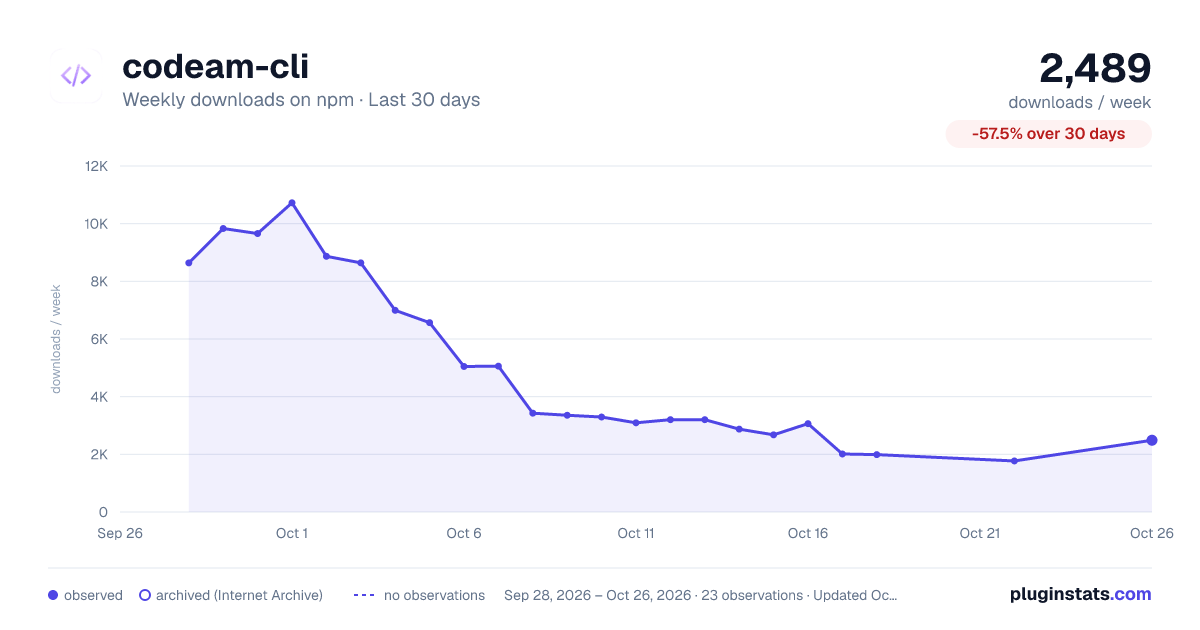
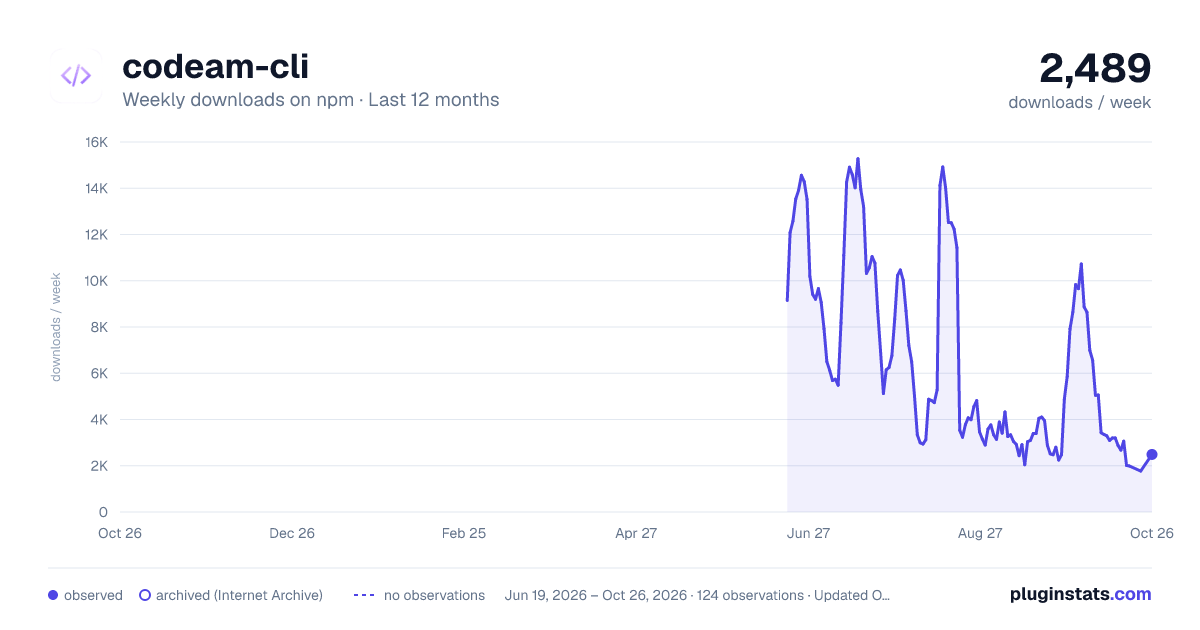
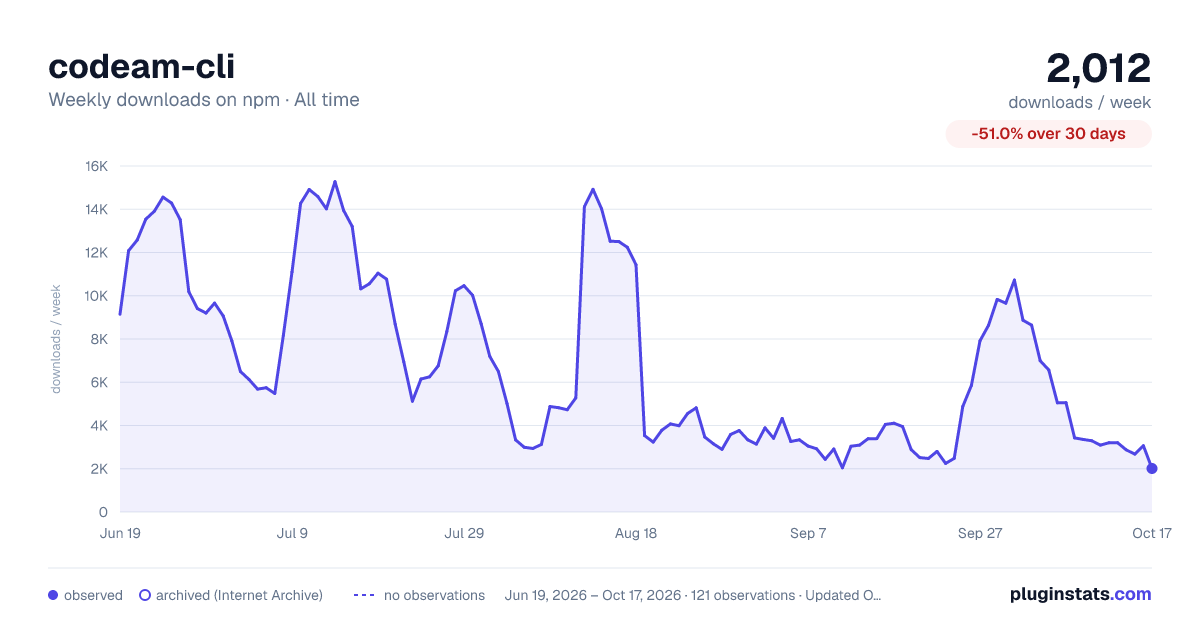

Adoption over time


7/30/90-day growth


Filled points are observed values; hollow points come from Internet Archive snapshots of the listing page. Dashed segments span periods with no observations — values between points are not interpolated.
Recent observations
Full history (121)Similar npm Claude Code plugins
Data source
Weekly downloads (trailing 7 complete days) come from the official npm downloads API. Downloads include CI and mirrors and are not equivalent to installs or users. npm publishes no ratings.
Listing: https://www.npmjs.com/package/codeam-cli. First seen Oct 16, 2026; last successful collection Oct 18, 2026. See the methodology.