 PluginStats
task-master-ai weekly downloads statistics
By eyaltoledano · npm · MCP servers
A task management system for ambitious AI-driven development that doesn't overwhelm and confuse Cursor.
task-master-ai has 6,965 recorded weekly downloads on npm, a decrease of 37.2% over the past 30 days.
It ranks #1005 of 2,251 tracked npm listings by weekly downloads.
Over 90 days, weekly downloads changed by -56.3%.
PluginStats has 121 daily observations since Jun 19, 2026; the latest is from Oct 17, 2026.
About task-master-ai
Taskmaster: A task management system for AI-driven development, designed to work seamlessly with any AI chat.
| Docs
By @eyaltoledano & @RalphEcom
A task management system for AI-driven development with Claude, designed to work seamlessly with Cursor AI.
Documentation
📚 View Full Documentation
For detailed guides, API references, and comprehensive examples, visit our documentation site.
Quick Reference
The following documentation is also available in the docs directory:
• Configuration Guide - Set up environment variables and customize Task Master • Tutorial - Step-by-step guide to getting started with Task Master • Command Reference - Complete list of all available commands • Task Structure - Understanding the task format and features • Example Interactions - Common Cursor AI interaction examples • Migration Guide - Guide to migrating to the new project structure
Quick Install for Cursor 1.0+ (One-Click)
Note: After clicking the link, you'll still need to add your API keys to the configuration. The link installs the MCP server with placeholder keys that you'll need to replace with your actual API keys.
Claude Code Quick Install
For Claude Code users:
Don't forget to add your API keys to the configuration: • in the root .env of your Project • in the "env" section of your mcp config for taskmaster-ai
Requirements
Taskmaster utilizes AI across several commands, and those require a separate API key. You can use a variety of models from different AI providers provided you add your API keys. For example, if you want to use Claude 3.7, you'll need an Anthropic API key.
You can define 3 types of models to be used: the main model, the research model, and the fallback model (in case either the main or research fail). Whatever model you use, its provider API key must be present in either mcp.json or .env.
At least one (1) of the following is required:
• Anthropic API key (Claude API) • OpenAI API key • Google Gemini API key • Perplexity API key (for research model) • xAI API Key (for research or main model) • OpenRouter API Key (for research or main model) • Claude Code (no API key required - requires Claude Code CLI) • Codex CLI (OAuth via ChatGPT subscription - requires Codex CLI)
Using the research model is optional but highly recommended. You will need at least ONE API key (unless using Claude Code or Codex CLI with OAuth). Adding all API keys enables you to seamlessly switch between model providers at will.
Quick Start
Option 1: MCP (Recommended)
MCP (Model Control Protocol) lets you run Task Master directly from your editor.
1. Add your MCP config at the following path depending on your editor
| Editor | Scope | Linux/macOS Path | Windows Path | Key |
| Cursor | Global | ~/.cursor/mcp.json | %USERPROFILE%\.cursor\mcp.json | mcpServers | | | Project | /.cursor/mcp.json | \.cursor\mcp.json | mcpServers | | Windsurf | Global | ~/.codeium/windsurf/mcp_config.json | %USERPROFILE%\.codeium\windsurf\mcp_config.json | mcpServers | | VS Code | Project | /.vscode/mcp.json | \.vscode\mcp.json | servers | | Q CLI | Global | ~/.aws/amazonq/mcp.json | | mcpServers |
Manual Configuration
Cursor & Windsurf & Q Developer CLI (mcpServers)
🔑 Replace YOUR_…_KEY_HERE with your real API keys. You can remove keys you don't use.
Note: If you see 0 tools enabled in the MCP settings, restart your editor and check that your API keys are correctly configured.
VS Code (servers + type)
🔑 Replace YOUR_…_KEY_HERE with your real API keys. You can remove keys you don't use.
2. (Cursor-only) Enable Taskmaster MCP
Open Cursor Settings (Ctrl+Shift+J) ➡ Click on MCP tab on the left ➡ Enable task-master-ai with the toggle
3. (Optional) Configure the models you want to use
In your editor's AI chat pane, say:
For example, to use Claude Code (no API key required):
Table of available models | Claude Code setup
4. Initialize Task Master
In your editor's AI chat pane, say:
5. Make sure you have a PRD (Recommended)
For new projects: Create your PRD at .taskmaster/docs/prd.txt. For existing projects: You can use scripts/prd.txt or migrate with task-master migrate
An example PRD template is available after initialization in .taskmaster/templates/example_prd.txt.
[!NOTE] While a PRD is recommended for complex projects, you can always create individual tasks by asking "Can you help me implement [description of what you want to do]?" in chat.
Always start with a detailed PRD.
The more detailed your PRD, the better the generated tasks will be.
6. Common Commands
Use your AI assistant to:
• Parse requirements: Can you parse my PRD at scripts/prd.txt? • Plan next step: What's the next task I should work on? • Implement a task: Can you help me implement task 3? • View multiple tasks: Can you show me tasks 1, 3, and 5? • Expand a task: Can you help me expand task 4? • Research fresh information: Research the latest best practices for implementing JWT authentication with Node.js • Research with context: Research React Query v5 migration strategies for our current API implementation in src/api.js
More examples on how to use Task Master in chat
Option 2: Using Command Line
Installation
Initialize a new project
This will prompt you for project details and set up a new project with the necessary files and structure.
Common Commands
Tool Loading Configuration
Optimizing MCP Tool Loading
Task Master's MCP server supports selective tool loading to reduce context window usage. By default, all 36 tools are loaded (~21,000 tokens) to maintain backward compatibility with existing installations.
You can optimize performance by configuring the TASK_MASTER_TOOLS environment variable:
Available Modes
| Mode | Tools | Context Usage | Use Case |…
Description from the npm listing.
- claude
- task
- management
- ai
- development
- cursor
- anthropic
- llm
- mcp
- context
Where task-master-ai sits in the listing
Each band is one page of 20. Weekly downloads on a log scale. Placement is projected from weekly downloads, so it can differ from the marketplace's own sort order. Hover a dot to see the listing.


Charts
Images: 30d · 1y · all time · 1600×900 dark
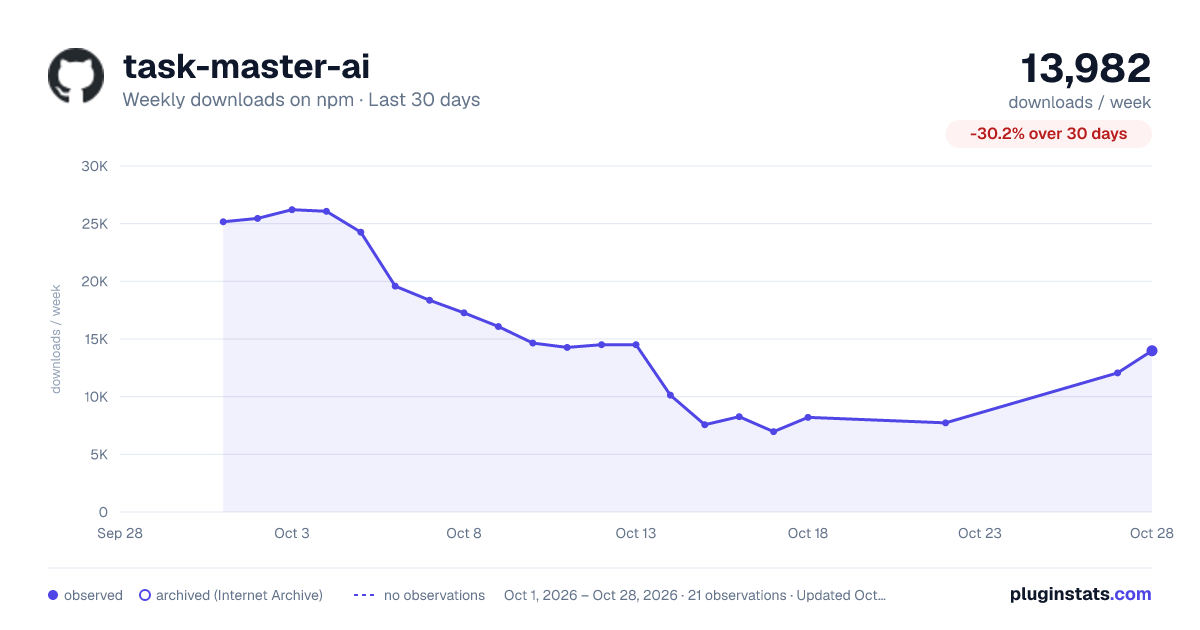
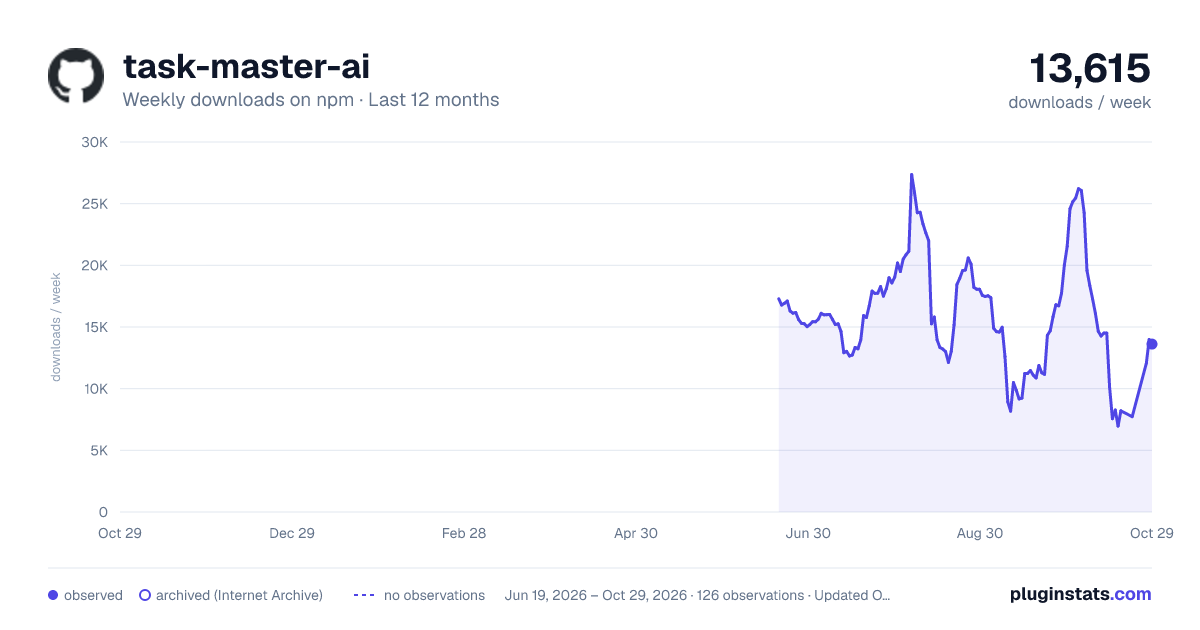
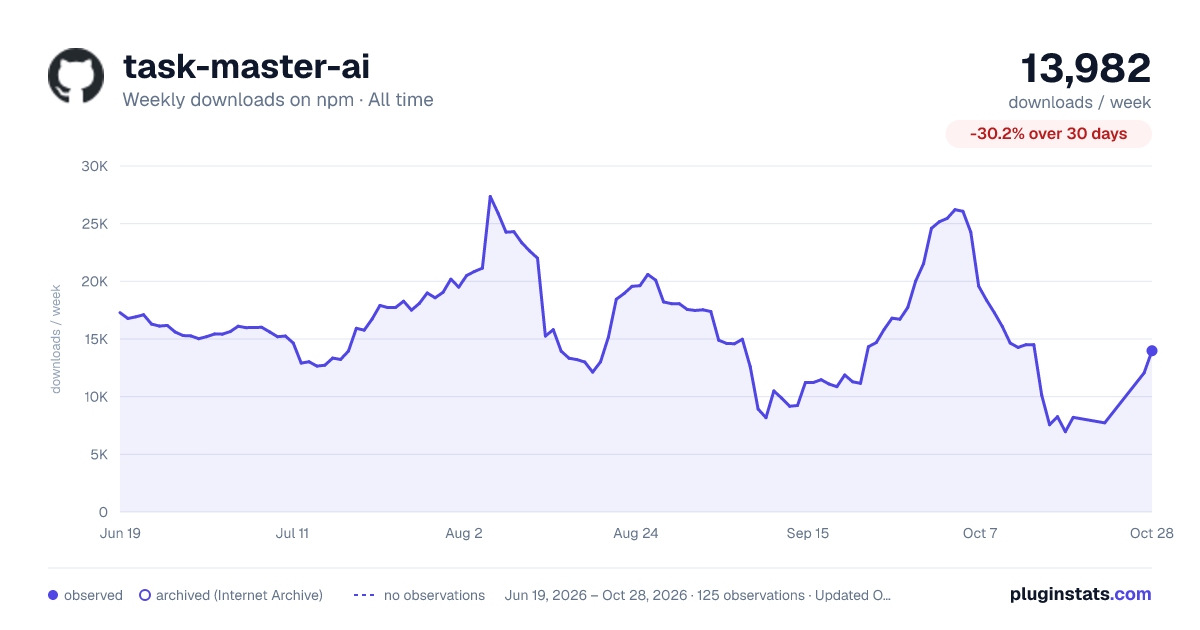

Adoption over time


7/30/90-day growth


Filled points are observed values; hollow points come from Internet Archive snapshots of the listing page. Dashed segments span periods with no observations — values between points are not interpolated.
Recent observations
Full history (121)Similar npm MCP servers plugins
Data source
Weekly downloads (trailing 7 complete days) come from the official npm downloads API. Downloads include CI and mirrors and are not equivalent to installs or users. npm publishes no ratings.
Listing: https://www.npmjs.com/package/task-master-ai. First seen Oct 16, 2026; last successful collection Oct 18, 2026. See the methodology.