 PluginStats
tailwindcss-border-image weekly downloads statistics
By sebagnz · npm · Tailwind plugins
Tailwind CSS plugin to add border-image utilities.
tailwindcss-border-image has 224 recorded weekly downloads on npm, a decrease of 62.8% over the past 30 days.
It ranks #1583 of 2,256 tracked npm listings by weekly downloads.
Over 90 days, weekly downloads changed by -72.3%.
PluginStats has 121 daily observations since Jun 19, 2026; the latest is from Oct 17, 2026.
About tailwindcss-border-image
Tailwind CSS border-image plugin
A tailwind plugin that provides primitives to work and fully customize the CSS border-image property.
View demo · Report bug · Request feature
Table of contents • The plugin • Browser compatibility • Getting started • Utilities • Source • Slice • Slice fill • Width • Outset • Repeat • Resources • Support my work
The plugin
Tailwind CSS doesn't provide support for border-image out of the box, therefore this plugin aims to provide you with a set of utilities to meet that need.
The plugin it's not opinionated, meaning it doesn't provide any UI components nor override any of the tailwind's default configuration or values.
As an example, it makes it possible for this css:
to be written with tailwind:
Browser compatibility
The border-image property is widely supported, even since IE. You can check its support [here][can-i-use-border-image].
Getting started
Utilities
The CSS border-image syntax follows this schema:
Basically it's a short-hand for setting border-image-source, border-image-slice, border-image-width, border-image-outset and border-image-repeat in a one-liner.
This plugin will provide you with utilities to work with each one of them in a tailwind CSS fashion.
Source
_Required_
| Utility | Values |
| border-image- | {theme.backgroundImage} | | border-image- | {arbitrary} |
The border-image-source CSS property sets the source image used to create an element's border image. (Keep in mind that all gradients are also considered images).
To set the border-image source you can use the border-image-{value}.
{value} can be anything defined in your theme.backgroundImage meaning that any gradient or image resource included in your theme can be used as a border image source. For example border-image-gradient-to-t.
It also supports arbitrary values, that way if you don't want to add an specific backgroundImage to your theme you can just inline it. For example: border-image-[conic-gradient(var(--tw-gradient-stops) 0 0)]
Slice
_Default: 0_
The border-image-slice has it's own set of values that can be extended or overwritten through the borderSlice property on the tailwind.config.js.
Since border-image-slice works with unitless values (no pixels, rems, etc) it's the only property that requires custom values.
The default theme.spacing values can't be used because they contain units (rem). The borderSlice values follow the same pattern as the default spacing, width or height that we are used to but without units.
| Utility | Values | |
| border-slice- | {theme.borderSlice} / {arbitrary} | Sets a value for all four slices | | border-slice-x- | {theme.borderSlice} / {arbitrary} | Sets a value for the left and right slices | | border-slice-y- | {theme.borderSlice} / {arbitrary} | Sets a value for the top and bottom slices | | border-slice-t- | {theme.borderSlice} / {arbitrary} | Sets a value for the top slice | | border-slice-r- | {theme.borderSlice} / {arbitrary} | Sets a value for the right slice | | border-slice-b- | {theme.borderSlice} / {arbitrary} | Sets a value for the bottom slice | | border-slice-l- | {theme.borderSlice} / {arbitrary} | Sets a value for the left slice |
The border-image-slice CSS property divides the image specified by border-image-source into regions. These regions form the components of an element's border image.
The slice property accepts up to four values, acting also as a short-hand (like margin and border properties do). This means that if you provide one value it will be used for the four slices.
This plugin also proivdes utilities to set only x, y or individual values if you need to customize each of them individually.
Slice fill
_Default: fill_
| Utility | Values |
| border-slice- | fill, no-fill |
With the slice property you can control the 8 outer slices. To control the inner slice (the 9th slice) you should use the fill property. To do that you should also make use of the border-slice- utilities, this time targeting the fill value.
Width
_Default: 0_
| Utility | Values | |
| border-image-width- | {theme.width} / {arbitrary} | Sets a value for all four widths | | border-image-width-x- | {theme.width} / {arbitrary} | Sets a value for the left and right widths | | border-image-width-y- | {theme.height} / {arbitrary} | Sets a value for the top and bottom widths | | border-image-width-t- | {theme.height} / {arbitrary} | Sets a value for the top width | | border-image-width-r- | {theme.width} / {arbitrary} | Sets a value for the right width | | border-image-width-b- | {theme.height} / {arbitrary} | Sets a value for the bottom width | | border-image-width-l- | {theme.width} / {arbitrary} | Sets a value for the left width |
The border-image-width CSS property sets the width of an element's border image and like slice property, the witdh is also a short-and for the four sides.
Outset
_Default: 0_
| Utility | Values | |
| border-outset- | {theme.width} / {arbitrary} | Sets a value for all four outsets | | border-outset-x- | {theme.width} / {arbitrary} | Sets a value for the left and right outsets | | border-outset-y- | {theme.height} / {arbitrary} | Sets a value for the top and bottom outsets | | border-outset-t- | {theme.height} / {arbitrary} | Sets a value for the top outset | | border-outset-r- | {theme.width} / {arbitrary} | Sets a value for the right outset | | border-outset-b- | {theme.height} / {arbitrary} | Sets a value for the bottom outset | | border-outset-l- | {theme.width} / {arbitrary} | Sets a value for the left outset |
The border-image-outset CSS property sets the distance by which an element's border image is set out from its border box.
The parts of the border image that are rendered outside the element's border box with border-image-outset do not trigger overflow scrollbars and don't capture mouse events.
Like the slice and width property, the witdh is also a short-and for the four sides.
Repeat
_Default: stretch_
| Utility | Values |…
Description from the npm listing.
- tailwindcss
- tailwindcss-plugin
- border-image
- css border-image
Where tailwindcss-border-image sits in the listing
Each band is one page of 20. Weekly downloads on a log scale. Placement is projected from weekly downloads, so it can differ from the marketplace's own sort order. Hover a dot to see the listing.


Charts
Images: 30d · 1y · all time · 1600×900 dark
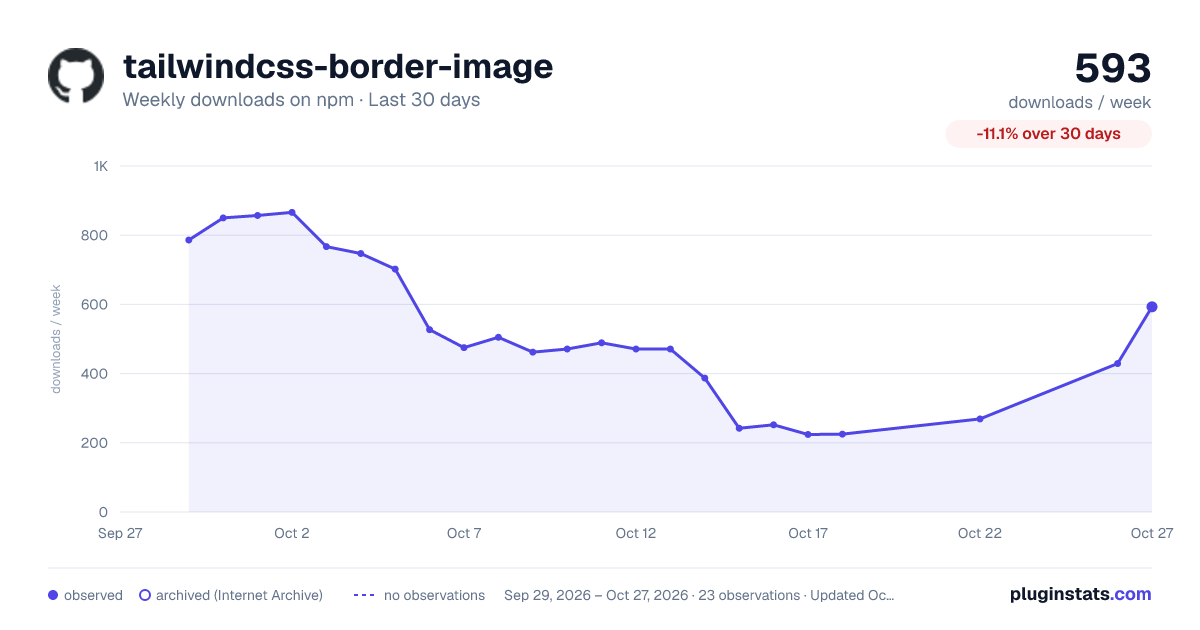
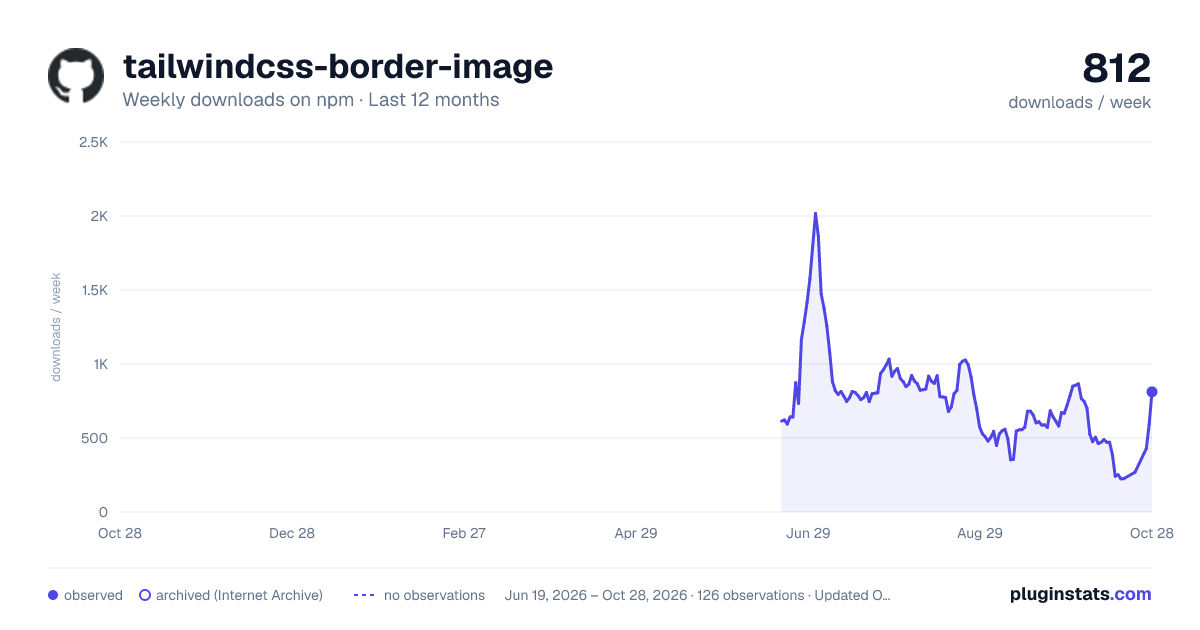
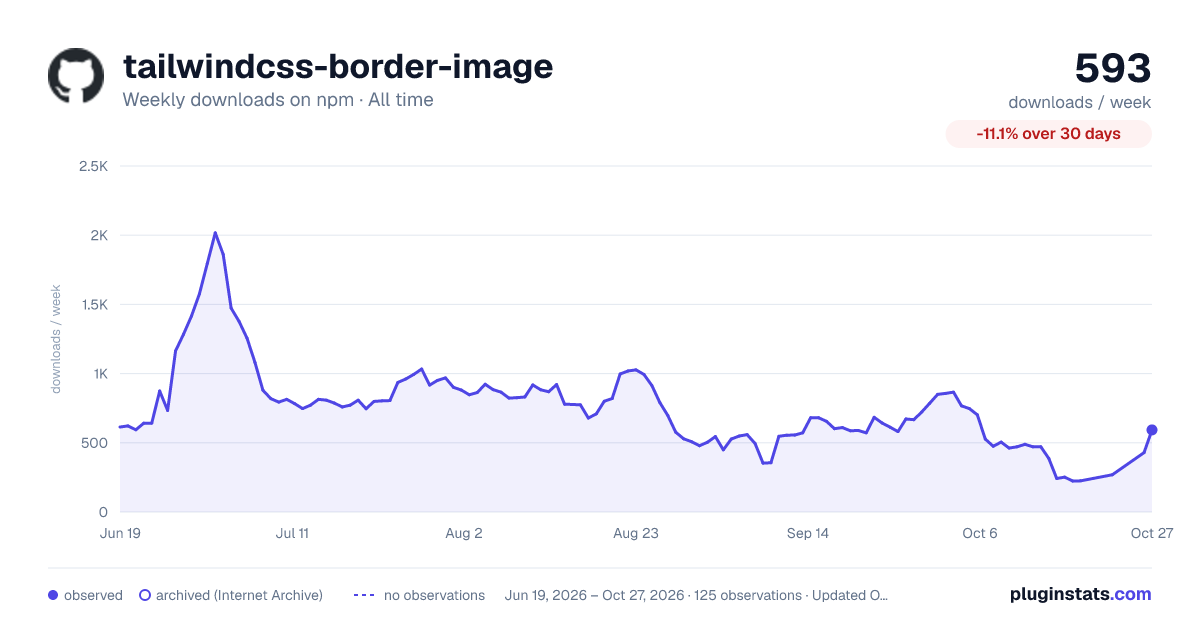

Adoption over time


7/30/90-day growth


Filled points are observed values; hollow points come from Internet Archive snapshots of the listing page. Dashed segments span periods with no observations — values between points are not interpolated.
Recent observations
Full history (121)Similar npm Tailwind plugins plugins
Data source
Weekly downloads (trailing 7 complete days) come from the official npm downloads API. Downloads include CI and mirrors and are not equivalent to installs or users. npm publishes no ratings.
Listing: https://www.npmjs.com/package/tailwindcss-border-image. First seen Oct 16, 2026; last successful collection Oct 19, 2026. See the methodology.