 PluginStats
@gotcos/glasses-server weekly downloads statistics
By gotcos · npm · Claude Code
COS Glasses: self-hosted AI heads-up-display server for Even G2 smart glasses, powered by Claude Code, Codex, Cursor Agent CLI, or local Ollama
@gotcos/glasses-server has 1,550 recorded weekly downloads on npm, a decrease of 33.5% over the past 30 days, ranking #1318 of 2,256 tracked listings.
About @gotcos/glasses-server
COS Glasses Server
Self-hosted AI heads-up display for Even G2 smart glasses. Runs on your Mac, talks to your local Claude Code, Codex, or Cursor Agent CLI, and pushes answers, voice transcription, and notes to the lens. Your data never leaves your machine, and no API key is pasted into the phone for chat.
Quick start
For the optional COS Control macOS menu bar app, run the same non-mutating readiness check it uses before guided installation:
COS Control then installs the same npm package as a launchd-managed runtime. The original foreground command remains supported and unchanged.
Normal server start checks Node, finds your CLI, checks voice and image processing, writes ~/.cos-glasses/.env, and starts the server on 0.0.0.0:3141. Optional Whisper and Kokoro models are provisioned when their local services start; --prepare-only intentionally does not download or install optional models, write COS configuration, or start a listener. It may invoke an installed agent CLI's read-only version/auth probe, and that CLI may maintain its own user cache. On boot the server prints an API token — paste that into the COS Glasses app. Only one COS Glasses server may run on a Mac at a time; a second npx or source runner exits before opening ports or touching shared conversation/media state. Version 6.6.0 also gives that server a durable identity and boot-scoped display replay, allowing build 188+ to reconnect after a Tailscale, Wi-Fi, or process interruption without silently losing completed replies.
Requirements
• Node.js 20.11+ — https://nodejs.org • Claude Code CLI (Opus/Fable/Sonnet). Claude Desktop alone does not install the terminal command. Install it on one line with npm install -g @anthropic-ai/claude-code (never with sudo), then run claude and finish the browser sign-in or Codex CLI (GPT Frontier/Balanced) — https://developers.openai.com/codex/, then codex login • Optional: Cursor Agent CLI for Composer 2.5 Fast and the newest Grok high-fast. Ensure agent is on PATH, run agent login, and verify agent models lists composer-2.5-fast and a cursor-grok-*-high-fast id. COS maps cursor-grok to the newest high-fast it finds; it never silently substitutes Claude or Codex. • Even G2 glasses + the COS Glasses app from the Even Hub • brew install whisper-cpp for free local voice (the launcher can download the model) • Optional: brew install python@3.12 ffmpeg poppler espeak-ng for local Kokoro spoken replies on Apple silicon (Python 3.11-3.12 is supported). ffmpeg also enables photo/video attachments; poppler enables PDF text and page previews. TXT, Markdown, CSV, and JSON attachments need no extra tool. Text chat remains available without these optional dependencies. • Optional: Tailscale so your phone reaches your Mac from anywhere
No provider API key is needed for chat when using signed-in CLIs. Usage is billed to the corresponding Claude, Codex, or Cursor subscription. Pick a provider per query, or set a default with COS_G2_DEFAULT_MODEL (opus|fable|sonnet|codex-frontier|codex-balanced|cursor-grok|cursor-composer|ollama). Claude tier aliases and the two GPT slots resolve dynamically, so new model releases do not require a new glasses package. GPT discovery refreshes every 15 minutes and retains its last-known-good catalog through transient failures. Cursor discovery also refreshes every 15 minutes and retains its last-known-good catalog through transient failures. Cursor Agent mode can edit files and run shell commands in the selected workspace. Choose Ask mode when you want a non-editing answer; clients that omit the execution mode default to Ask. Existing COS_CODEX_MODEL / COS_CODEX_REASONING_EFFORT settings remain supported on the migrated Frontier slot; leave them blank for auto-latest. Codex runs sandboxed read-only by default. Set COS_CODEX_SANDBOX=workspace-write for workdir writes + outbound network (sandbox_workspace_write.network_access=true is passed by the managed server and should also be set in ~/.codex/config.toml for interactive Codex). Local Ollama is a fourth picker, shown only when ollama serve answers GET http://127.0.0.1:11434/api/tags with a pulled model. Direct POST /api/chat — not Codex --oss. Optional pin: COS_OLLAMA_MODEL. COS_CODEX_EXTRA_ARGS is a Codex CLI hatch, not the Ollama UX. See Configuration. Claude is the most permissive provider by default. It runs with --dangerously-skip-permissions, so a glasses query on the Claude/Opus path can run shell commands and read, edit, and write files on this Mac without prompting you. That is what makes the glasses useful for real work, and it has been the behavior for some time — but as of 6.18.3 the model is also correctly told it has those tools, so you will see it use them more readily than before. Set COS_CLAUDE_TRUST_MODE=allowlist to remove Claude's permission bypass and restrict it to COS's explicit per-query tool allowlist; undeclared tools then fail closed without prompting. In allowlist mode the query keeps web search/fetch and read-only workspace access (Read, Glob, Grep) — no shell, no edits, no writes. Only the exact value allowlist restricts anything — any other value logs a warning and stays trusted. Servers before 6.41.0 denied ALL workspace reads in allowlist mode; if a hardened install answers "I don't have access to your workspace files", update the server.
Connect your phone (the one gotcha)
The glasses app runs on your iPhone and must reach this server on your Mac.
- The launcher binds 0.0.0.0 (all interfaces) for you. 2. Same WiFi (simplest): find your Mac's LAN IP (System Settings > Wi-Fi > Details), and in the COS Glasses app enter http://192.168.x.x:3141. 3. From anywhere: install Tailscale on the Mac + iPhone (same account), note the Mac's 100.x address, and enter http://100.x.x.x:3141. 4. Either way, paste the API token the server printed at boot.…
Description from the npm listing.
- even-g2
- smart-glasses
- claude-code
- codex
- ai
- cos
- heads-up-display
- whisper
- cursor
README badge
Show your rank in a README or on your website. The badge updates automatically.
Charts
Images: 30d · 1y · all time · 1600×900 dark
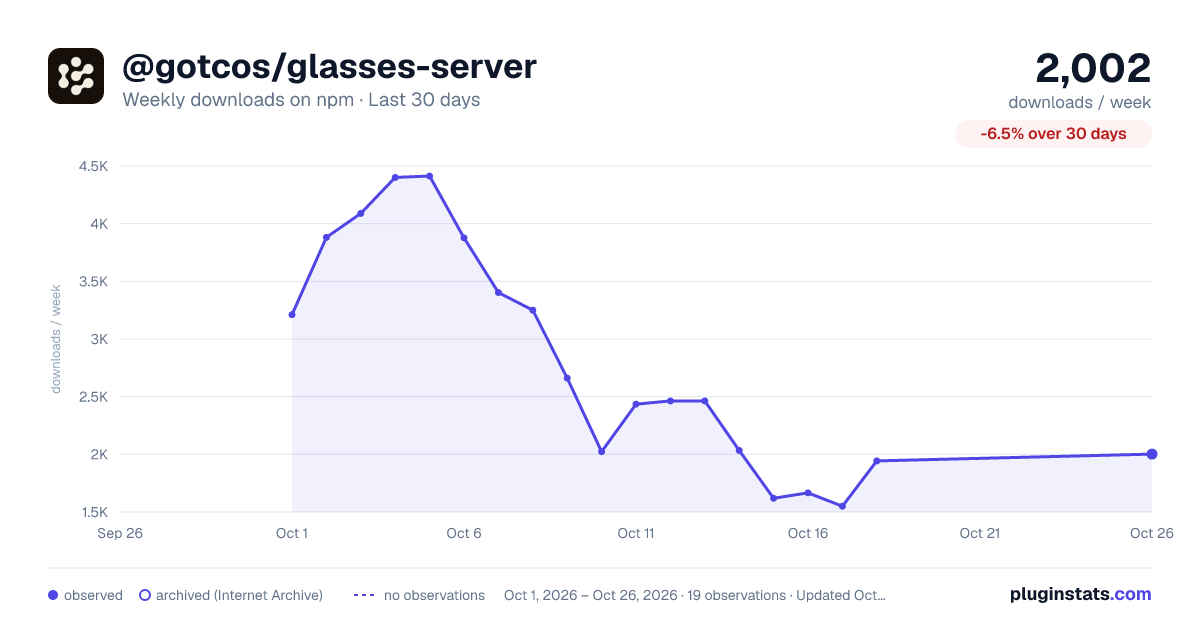
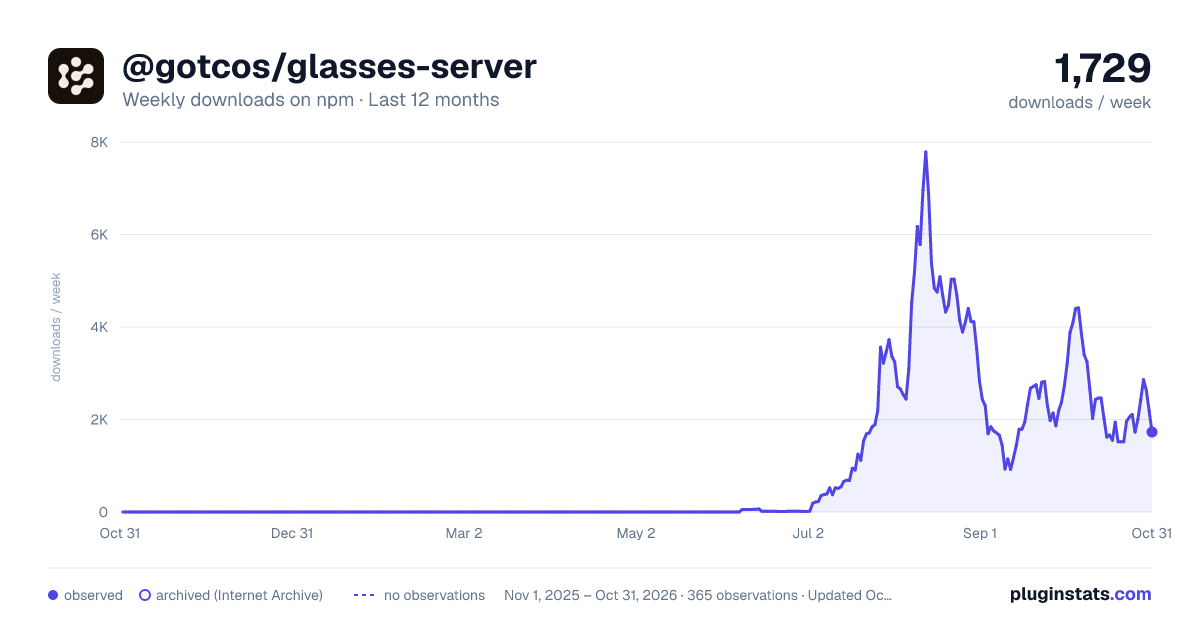
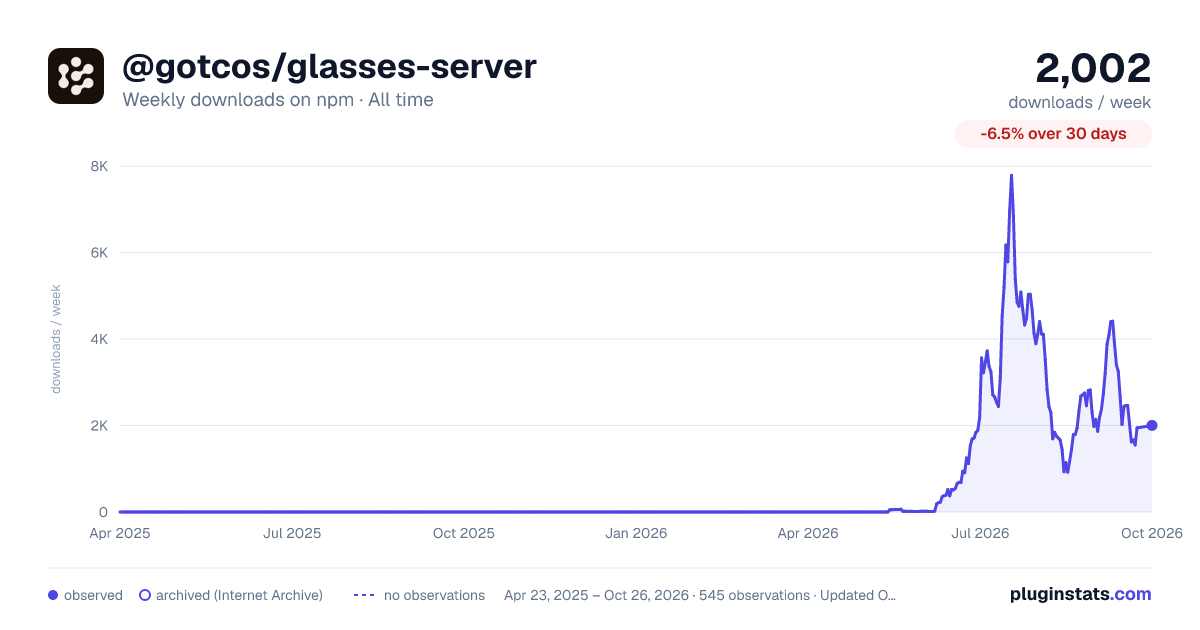

Adoption over time
7/30/90-day growth
Ranking history
Listing placement
Listing placement
Filled points are observed values; hollow points come from Internet Archive snapshots of the listing page. Dashed segments span periods with no observations — values between points are not interpolated.
Each band is one page of 20. Weekly downloads on a linear scale. Placement is projected from weekly downloads, so it can differ from the marketplace's own sort order. Hover a dot to see the listing.
Recent observations
Full history (543)Similar npm Claude Code plugins
All 20 @gotcos/glasses-server alternativesData source
Weekly downloads (trailing 7 complete days) come from the official npm downloads API. Downloads include CI and mirrors and are not equivalent to installs or users. npm publishes no ratings.
Listing: https://www.npmjs.com/package/@gotcos/glasses-server. First seen Oct 16, 2026; last successful collection Oct 19, 2026. See the methodology.