 PluginStats
vite-plugin-sentry weekly downloads statistics
By ikenfin · npm · Vite plugins
The unofficial Sentry plugin for Vite ⚡️
vite-plugin-sentry has 4,942 recorded weekly downloads on npm, a decrease of 70.9% over the past 30 days.
It ranks #1098 of 2,251 tracked npm listings by weekly downloads.
Over 90 days, weekly downloads changed by -81.7%.
PluginStats has 542 daily observations since Apr 24, 2025; the latest is from Oct 17, 2026.
About vite-plugin-sentry
Plugin for Vite ⚡️ to create releases and upload sourcemaps to Sentry
This plugin hooks into the Vite build step, to create a new release and upload source maps. It does not instrument error reporting in your app.
It's a port of official Sentry webpack plugin for Vite.
It's fully written on Typescript and there is some differences in configuration, described below, but we mostly follow @sentry/cli types.
Install
Configuration
If you using Typescript - you can use ViteSentryPluginOptions type for better configuration experience with autocomplete.
Example config:
Possible breaking change!
From version 1.2.0 we have changed default error handling. Now if Sentry report error while uploading sourcemaps - we crash whole build process instead of just print warning. This was done to prevent calling next to && operator on uploading error.
You can enable legacy mode using legacyErrorHandlingMode: true in plugin config.
Wiki
Check project wiki on github to get more information.
Share config with Sentry client library
To correctly work with Sentry, you need to add a release to your project. Same about dist option: your uploaded sourcemaps and client sentry initialization must have same release/dist to make sentry correct recognize and bind sourcemaps to logged errors.
You can expose release and dist options used by vite-plugin-sentry into your application using Vite feature known as virtual module.
To do so, you need to add several lines:
TypeScript
To get type information for the virtual module or import meta env, you can add vite-plugin-sentry/client to your types array in tsconfig.json.
Also you can use reference in your typescript code like below:
Common how to:
Delete generated source maps after upload (#1)
UPD: From version 1.2.1 you can use new configuration option cleanSourcemapsAfterUpload to clean sourcemap files.
While i recommend to use CI, you can also use tools like rimraf in your npm scripts to drop any unnecessary files after build was complete:
Cannot install on Windows
This plugin relies on @sentry/cli tool, which requires VCRedist to be installed. Please check #8 for details.
List of available options
Here are the list of all plugin options:
Legend:
❌ - NOT required
⚠️ - NOT required in plugin config, but MUST be set (for example, using .sentryclirc file)
✅ - Required
| Option | Type | Required | Default value | Description |
| legacyErrorHandlingMode | boolean | ❌ | false | When true - all sentry uploading errors will be printed as warnings, build process will not be failed, vite will return exit code 0 | | cleanSourcemapsAfterUpload | boolean | ❌ | false | Delete generated sourcemap files after complete | | debug | boolean | ❌ | false | Show debug messages during run | | skipEnvironmentCheck | boolean | ❌ | false | By default plugin will be enabled only for production builds. Set this option to true to skip environment checks | | dryRun | boolean | ❌ | false | Run sentry in dry mode - will only prints all steps | | url | string | ❌ | 'https://sentry.io/' | The base URL of your Sentry instance. | | authToken | string | ⚠️ | '' | The authentication token to use for all communication with Sentry. Can be obtained from https://sentry.io/settings/account/api/auth-tokens/. Required scopes:project:releases (and org:read if setCommits option is used). | | org | string | ⚠️ | '' | The slug of the Sentry organization associated with the app. | | project | string | ⚠️ | '' | The slug of the Sentry project associated with the app. | | vcsRemote | string | ❌ | 'origin' | The name of the remote in the version control system. | | configFile | string | ❌ | '' | Path to sentry cli config file, as described in https://docs.sentry.io/product/cli/configuration/#configuration-file. By default, the config file is looked for upwards from the current path, and defaults from ~/.sentryclirc are always loaded | | release | string | ❌ | | Unique name for release. Defaults to sentry-cli releases propose version (requires access to GIT and root directory to be repo) | | finalize | boolean | ❌ | false | Determines whether processed release should be automatically finalized after artifacts upload | | silent | boolean | ❌ | false | If true, all sentry-cli logs are suppressed | | deploy | SentryCliNewDeployOptions | ❌ | | Sentry release deployment settings, see details below | | sourceMaps | SentryCliUploadSourceMapsOptions | ✅ | | Sourcemaps settings, see details below | | setCommits | SentryCliCommitsOptions | ❌ | | Adds commits to sentry, see details below |
deploy settings
With deploy you can configure sentry cli to send deployment info. Here is a table of settings:
| Option | Type | Required | Description |
| env | string | ✅ | Environment value for release. For example production | | started | number | ❌ | UNIX timestamp for deployment start | | finished | number | ❌ | UNIX timestamp for deployment finish | | time | number | ❌ | Deployment duration in seconds. Can be used instead of started and finished. | | name | string | ❌ | Human-readable name for this deployment | | url | string | ❌ | URL that points to the deployment |
sourceMaps settings
With sourceMaps you can configure how sourcemaps will be processed
| Option | Type | Required | Description |…
Description from the npm listing.
- vite-plugin
- sentry
- sentry-cli
- sourcemap
Where vite-plugin-sentry sits in the listing
Each band is one page of 20. Weekly downloads on a log scale. Placement is projected from weekly downloads, so it can differ from the marketplace's own sort order. Hover a dot to see the listing.


Charts
Images: 30d · 1y · all time · 1600×900 dark
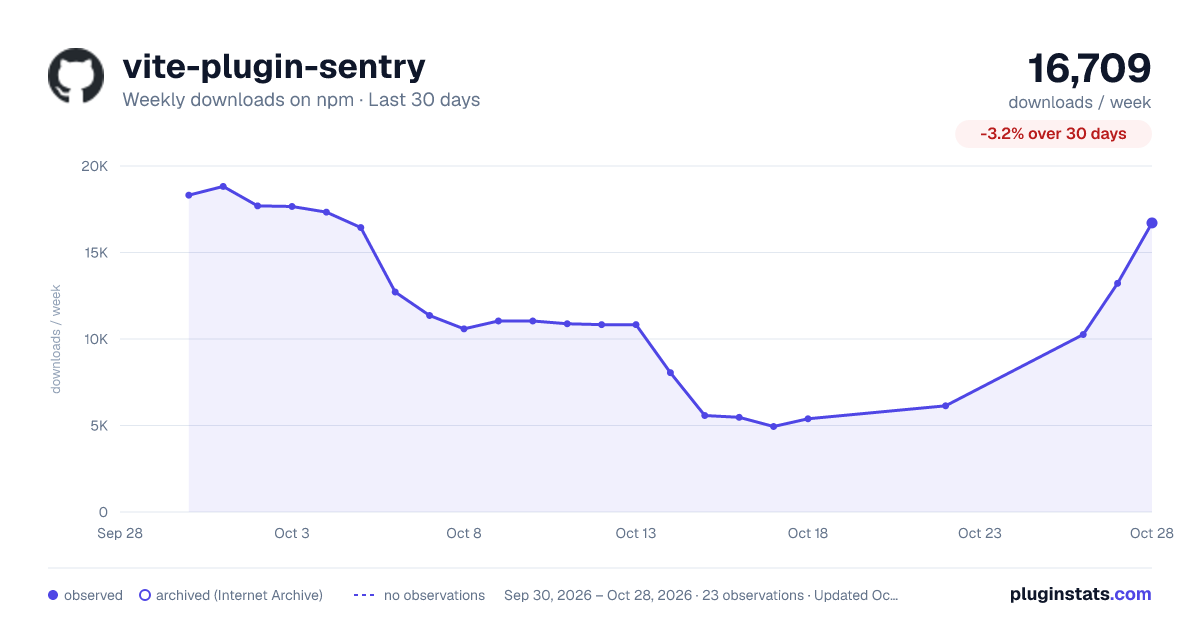
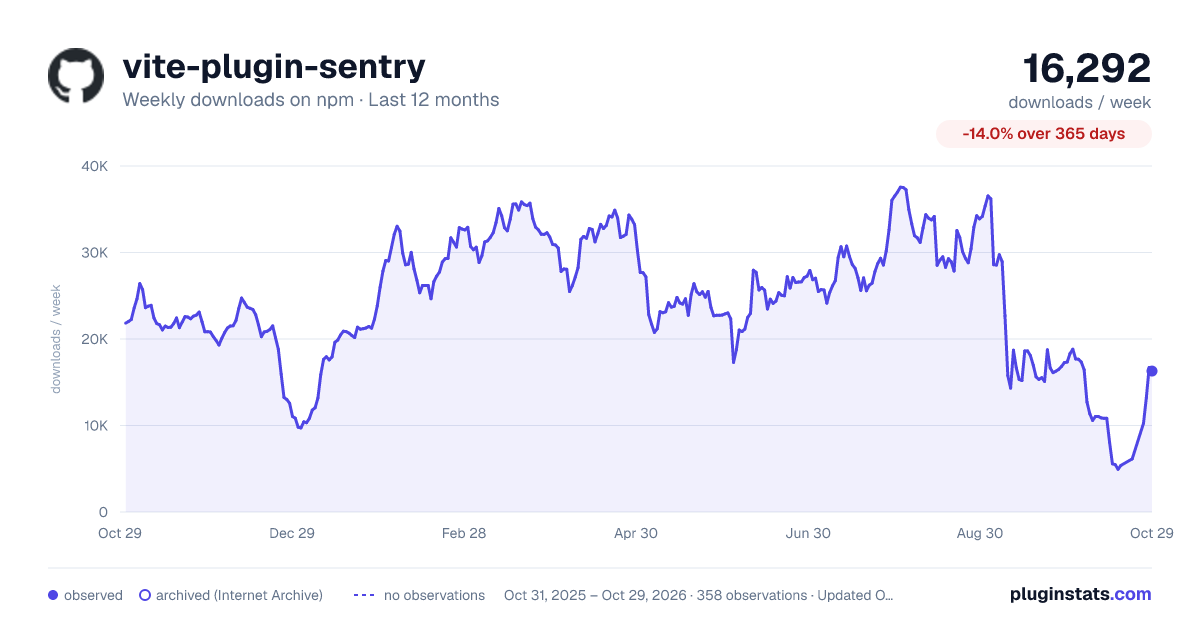
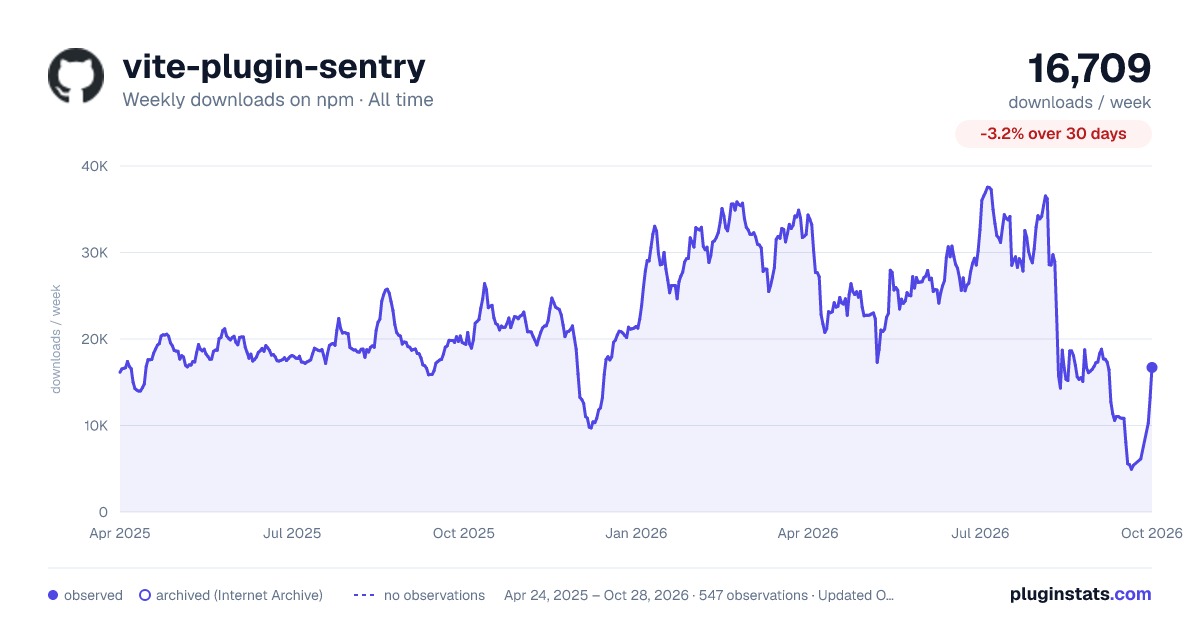

Adoption over time


7/30/90-day growth


Filled points are observed values; hollow points come from Internet Archive snapshots of the listing page. Dashed segments span periods with no observations — values between points are not interpolated.
Recent observations
Full history (542)Similar npm Vite plugins plugins
Data source
Weekly downloads (trailing 7 complete days) come from the official npm downloads API. Downloads include CI and mirrors and are not equivalent to installs or users. npm publishes no ratings.
Listing: https://www.npmjs.com/package/vite-plugin-sentry. First seen Oct 16, 2026; last successful collection Oct 18, 2026. See the methodology.