 PluginStats
@phucbm/tailwindcss-style-props weekly downloads statistics
By phucbm (2 listings) · npm · Tailwind plugins
Tailwind CSS plugin for easily adding multiple inline style properties using the style utility
@phucbm/tailwindcss-style-props has 5 recorded weekly downloads on npm, a decrease of 37.5% over the past 30 days, ranking #2195 of 2,322 tracked listings.
About @phucbm/tailwindcss-style-props
@phucbm/tailwindcss-style-props
A Tailwind CSS plugin that enables easy addition of multiple inline style properties using a custom style utility.
Installation
# Using npm
npm install @phucbm/tailwindcss-style-props

# Using yarn
yarn add @phucbm/tailwindcss-style-props

# Using pnpm
pnpm add @phucbm/tailwindcss-style-props
Setup
Add the plugin to your tailwind.config.js file:
// tailwind.config.js
module.exports = {
  // ...rest of your config
  plugins: [
    require('@phucbm/tailwindcss-style-props'),
    // ...other plugins
  ],
}
Usage
Use the style utility to add multiple inline style properties:
<!-- Basic usage -->
<div class="style-[color=red;font-size=16px]">
  This text will be red with a font-size of 16px
</div>

<!-- With CSS variables -->
<div class="style-[color=var(--my-color);background=var(--my-bg)]">
  Using CSS variables
</div>

<!-- Complex values -->
<div class="style-[transform=rotate(45deg);transition=all_0.3s_ease]">
  Complex property values
</div>
How it works
The plugin parses the string value provided to the style utility by:
- Splitting the string by semicolons (
;) to get individual CSS declarations - For each declaration, splitting by equals sign (
=) to get property-value pairs - Converting these pairs into a CSS object that Tailwind can apply
Examples
<!-- Multiple properties -->
<div class="style-[color=blue;padding=10px;margin=5px]">
  Multiple styles applied
</div>

<!-- With responsive prefixes -->
<div class="md:style-[display=flex;gap=10px]">
  Only applies on medium screens and up
</div>

<!-- With hover state -->
<div class="hover:style-[background=yellow;color=black]">
  Changes on hover
</div>

<!-- Combined with other utilities -->
<div class="rounded shadow p-4 style-[max-width=500px;margin=0_auto]">
  Combined with standard Tailwind utilities
</div>
Notes
- Use equals sign (
=) instead of colons (:) to separate property and value - Use semicolons (
;) to separate multiple style declarations - For complex values with spaces, use underscores (
_), which will be interpreted as spaces
License
MIT
Description from the npm listing.
- tailwind
- tailwindcss
- tailwindcss-plugin
- css
- style
- inline-styles
- props
README badge
Show your rank in a README or on your website. The badge updates automatically.
Charts
Images: 30d · 1y · all time · 1600×900 dark

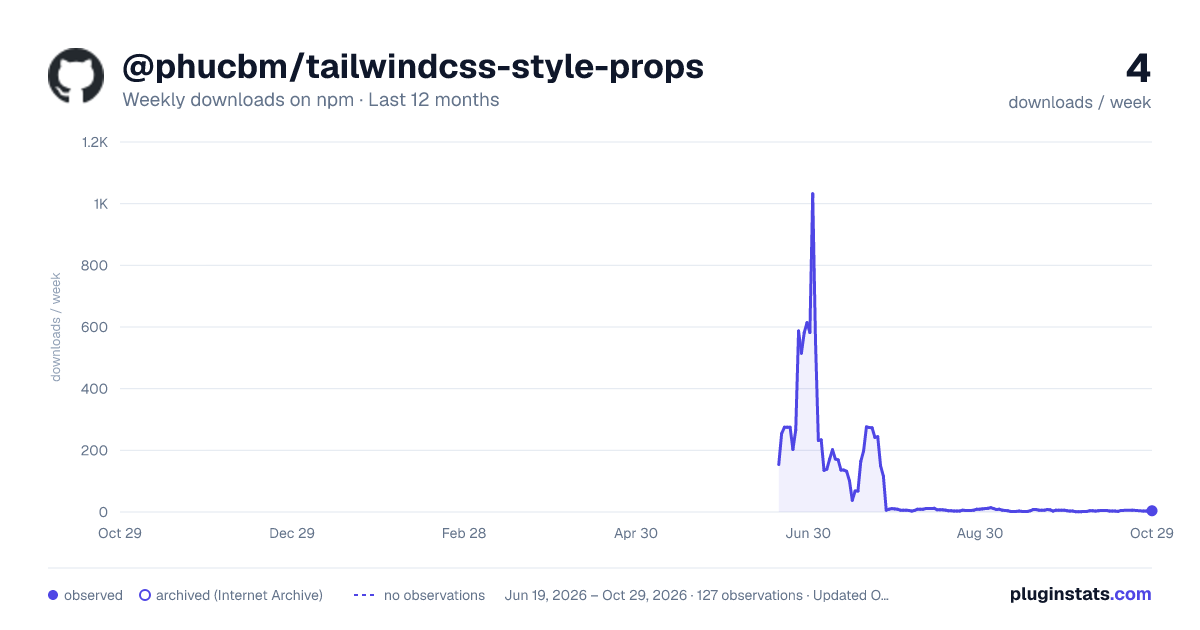
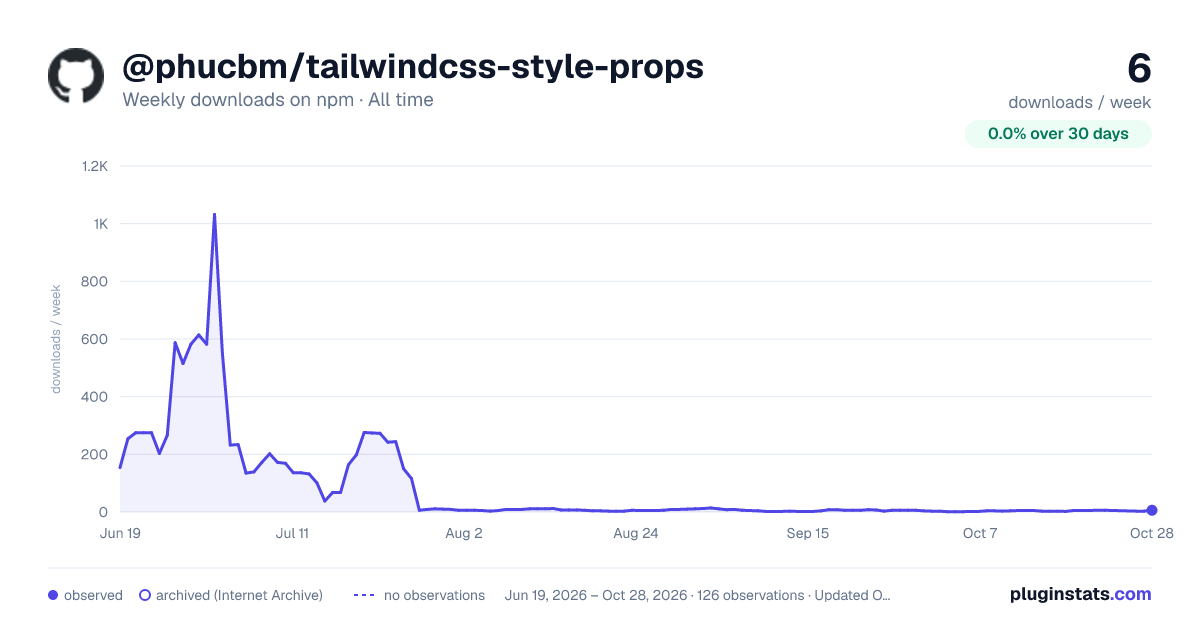

Adoption over time
7/30/90-day growth
Ranking history
Listing placement
Listing placement
Filled points are observed values; hollow points come from Internet Archive snapshots of the listing page. Dashed segments span periods with no observations — values between points are not interpolated.
Each band is one page of 20. Weekly downloads on a linear scale. Placement is projected from weekly downloads, so it can differ from the marketplace's own sort order. Hover a dot to see the listing.
Recent observations
Full history (122)Similar npm Tailwind plugins plugins
All 20 @phucbm/tailwindcss-style-props alternatives- 5 weekly downloads-54.5%
- 5 weekly downloads-70.6%
- 5 weekly downloads-16.7%
Data source
Weekly downloads (trailing 7 complete days) come from the official npm downloads API. Downloads include CI and mirrors and are not equivalent to installs or users. npm publishes no ratings.
Listing: https://www.npmjs.com/package/@phucbm/tailwindcss-style-props. First seen Oct 16, 2026; last successful collection Oct 20, 2026. See the methodology.