 PluginStats
@jabworks/prettier-config weekly downloads statistics
By jabworks · npm · Prettier plugins
Opinionated Prettier config for JS, TS, React, Next.js, JSON, and more
@jabworks/prettier-config has 7 recorded weekly downloads on npm, a decrease of 56.3% over the past 30 days.
About @jabworks/prettier-config
@jabworks/prettier-config

Opinionated Prettier configuration with essential plugins for modern JavaScript, TypeScript, and JSON formatting.
Features
- Modern formatting rules optimized for readability and consistency
- Plugin integration for enhanced formatting capabilities:
- 🎨 Tailwind CSS - Automatic class sorting and optimization
- 📦 Package.json - Consistent package.json formatting
- 🔤 JSON sorting - Alphabetical key sorting for better diffs
- TypeScript support with proper import/export handling
- Configurable overrides for different file types
Installation
# npm
npm install -D @jabworks/prettier-config

# pnpm
pnpm add -D @jabworks/prettier-config

# yarn
yarn add -D @jabworks/prettier-config
Peer Dependencies
This package requires the following peer dependencies to be installed:
npm install -D prettier prettier-plugin-packagejson prettier-plugin-sort-json prettier-plugin-tailwindcss
Usage
Method 1: Prettier Configuration File (Recommended)
Create a prettier.config.mjs file in your project root:
import { config } from '@jabworks/prettier-config';

export default config;
Or using CommonJS:
const { config } = require('@jabworks/prettier-config');

module.exports = config;
Method 2: Package.json
Add to your package.json:
{
	"prettier": "@jabworks/prettier-config"
}
Note: This method doesn't support extending or customizing the configuration.
Method 3: Custom Configuration
Extend the base configuration with your own rules:
import { config } from '@jabworks/prettier-config';

export default {
	...config,
	// Your custom overrides
	printWidth: 100,
	semi: false,
};
Configuration Details
This configuration includes the following settings:
Formatting Rules
{
  arrowParens: 'avoid',           // (a) => a instead of (a) => a
  bracketSameLine: false,         // Closing > on new line
  bracketSpacing: true,           // { foo } instead of {foo}
  endOfLine: 'lf',               // Unix line endings
  jsxSingleQuote: true,          // Single quotes in JSX
  printWidth: 120,               // Line length limit
  quoteProps: 'as-needed',       // Quote object properties only when needed
  semi: true,                    // Always add semicolons
  singleAttributePerLine: true,  // Each JSX attribute on its own line
  singleQuote: true,             // Single quotes for strings
  tabWidth: 2,                   // 2 spaces for indentation
  trailingComma: 'all',          // Trailing commas everywhere
  useTabs: false,                // Use spaces instead of tabs
}
Plugins
- prettier-plugin-tailwindcss: Automatically sorts Tailwind CSS classes
- prettier-plugin-sort-json: Sorts JSON object keys alphabetically (except package.json)
- prettier-plugin-packagejson: Formats package.json with standard key order
File-Specific Overrides
- JSON files (excluding package.json): Uses
prettier-plugin-sort-jsonfor key sorting - Package.json files: Uses
prettier-plugin-packagejsonfor standard formatting
Examples
Before/After Formatting
JavaScript/TypeScript:
// Before
const example = { c: 1, a: 2, b: 3, longKey: 4 };
function test( a,  b, c ) {
	return a + b + c;
}

// After
const example = { c: 1, a: 2, b: 3, longKey: 4 };
function test(a, b, c) {
	return a + b + c;
}
JSON:
// Before
{
  "version": "1.0.0",
  "name": "my-package",
  "dependencies": {
    "z-lib": "1.0.0",
    "a-lib": "2.0.0"
  }
}

// After
{
  "name": "my-package",
  "version": "1.0.0",
  "dependencies": {
    "a-lib": "2.0.0",
    "z-lib": "1.0.0"
  }
}
Tailwind CSS:
// Before
<div className="text-red-500 p-4 bg-blue-100 hover:bg-blue-200 flex items-center">

// After
<div className="flex items-center bg-blue-100 p-4 text-red-500 hover:bg-blue-200">
IDE Integration
VS Code
- Install the Prettier extension
- Add to your VS Code settings:
{
	"[javascript]": {
		"editor.defaultFormatter": "esbenp.prettier-vscode"
	},
	"[json]": {
		"editor.defaultFormatter": "esbenp.prettier-vscode"
	},
	"[typescript]": {
		"editor.defaultFormatter": "esbenp.prettier-vscode"
	},
	"editor.defaultFormatter": "esbenp.prettier-vscode",
	"editor.formatOnSave": true
}
Scripts
Add these scripts to your package.json:
{
	"scripts": {
		"format": "prettier --write .",
		"format:check": "prettier --check ."
	}
}
Compatibility
- Prettier: >=3.8.1
License
MIT
Contributing
This package is part of the @jabworks style guide monorepo. Please refer to the main repository for contribution guidelines.
Description from the npm listing.
- prettier
- prettier-config
- prettier-plugin
README badge
Show your rank in a README or on your website. The badge updates automatically.
Charts
Images: 30d · 1y · all time · 1600×900 dark
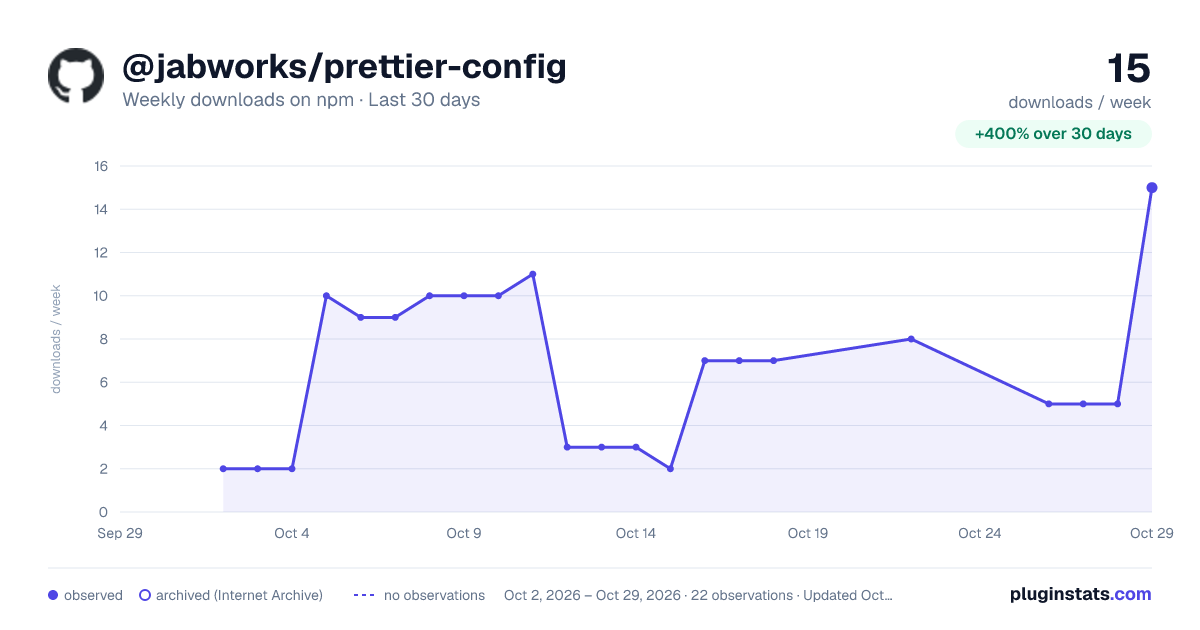
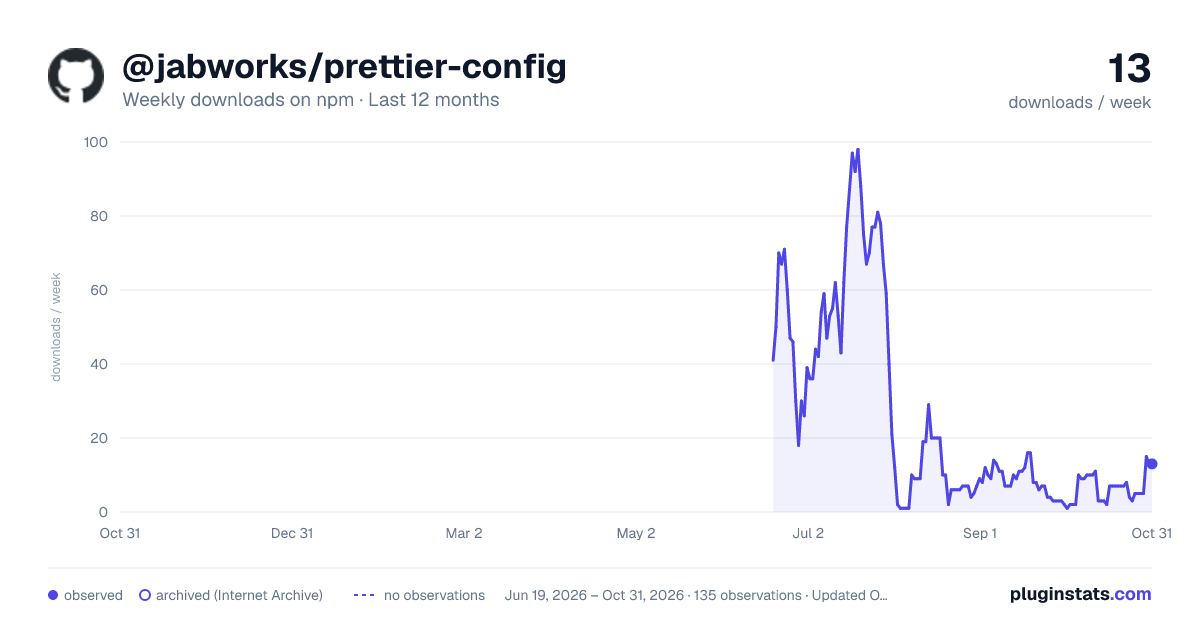
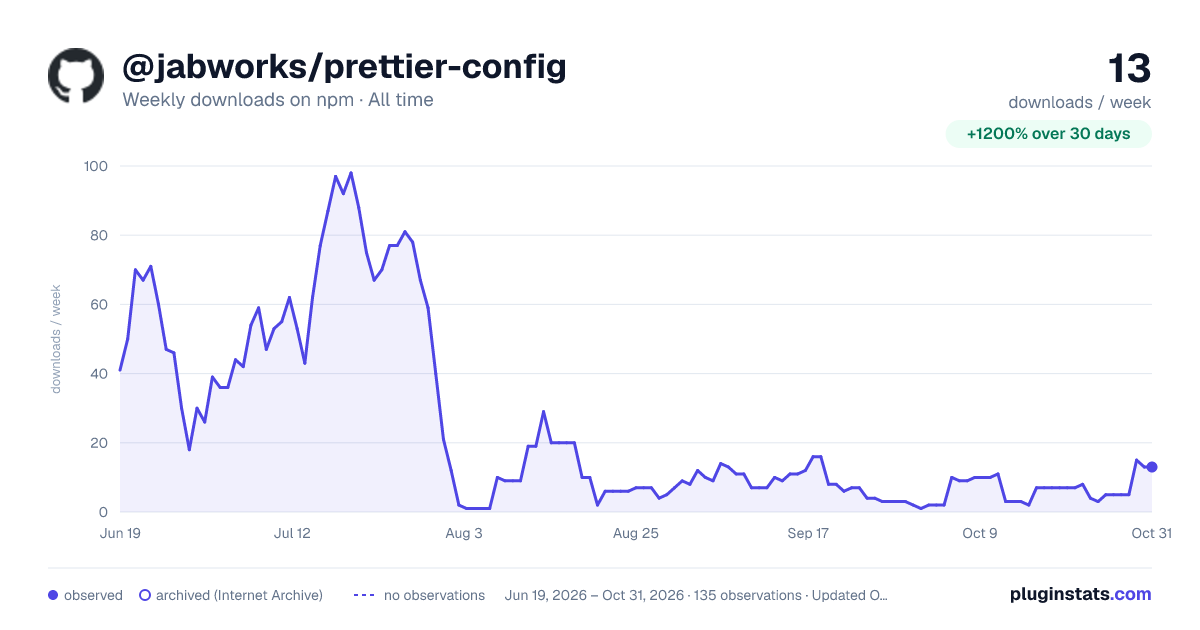

Adoption over time
7/30/90-day growth
Ranking history
Listing placement
Listing placement
Filled points are observed values; hollow points come from Internet Archive snapshots of the listing page. Dashed segments span periods with no observations — values between points are not interpolated.
Each band is one page of 20. Weekly downloads on a linear scale. Placement is projected from weekly downloads, so it can differ from the marketplace's own sort order. Hover a dot to see the listing.
Recent observations
Full history (122)Similar npm Prettier plugins plugins
All 20 @jabworks/prettier-config alternativesData source
Weekly downloads (trailing 7 complete days) come from the official npm downloads API. Downloads include CI and mirrors and are not equivalent to installs or users. npm publishes no ratings.
Listing: https://www.npmjs.com/package/@jabworks/prettier-config. First seen Oct 16, 2026; last successful collection Oct 22, 2026. See the methodology.