 PluginStats
@kolbo/mcp weekly downloads statistics
By kolbo · npm · Claude Code
Kolbo AI MCP Server - Generate images, videos, music, speech, and sound effects from Claude Code
@kolbo/mcp has 1,102 recorded weekly downloads on npm, a decrease of 67.9% over the past 30 days.
It ranks #1373 of 2,251 tracked npm listings by weekly downloads.
Over 90 days, weekly downloads changed by -49.0%.
PluginStats has 543 daily observations since Apr 23, 2025; the latest is from Oct 17, 2026.
About @kolbo/mcp
@kolbo/mcp
Personal fonts
Browse My fonts with list_fonts({source:"custom"}) (the default), or the read-only Font collection with source:"global". Use source:"all" to search both. Mix up to three family IDs across both sources in the same generation; inspect actual styles/scripts with get_font. Collection fonts do not need uploading and cannot be renamed or deleted by users.
Use list_fonts / get_font to discover My Fonts. Local stdio clients upload one OTF/TTF/WOFF2 (up to 5 MiB) with upload_font; remote shell clients use create_font_upload_ticket, and browser clients use font_upload_widget. Poll get_font_upload_status until ready, then pass the returned family ID in font_ids to image creation/editing or image-mode Creative Director. rename_font and delete_font manage the library.
Only models reporting supports_custom_fonts: true accept these selections. Fonts and backend-generated specimens never go through media upload. See Personal Fonts. Availability requires a published client and deployed backend containing these tools; source changes alone do not update installed clients.
No-background images
generate_image and generate_image_edit accept background: "transparent" for models whose list_models record reports supports_transparent_background: true. Kolbo also appends the exact phrase no background once to the effective prompt, while the structured setting requests the native alpha channel through the configured provider route. Use output_format: "png" or "webp" (PNG is selected automatically when omitted). Prompt wording alone is not sufficient, and unsupported models reject the request instead of silently returning an opaque image.
Use Kolbo AI as native tools in Claude Code and Claude Desktop via MCP (Model Context Protocol).
Generate images, videos, music, speech, sound effects, multi-scene campaigns, and conversational chat — all from natural language in your coding environment. 100+ AI models behind Smart Select routing, with reusable Visual DNA profiles for character/style consistency.
✨ Interactive widgets (v1.30+): in claude.ai, Claude Desktop, and Codex Desktop, generations render as live Kolbo cards — real-time progress with model + settings chips, an inline result gallery / video or audio player, and one-click Animate · Edit · Recreate · Download actions. Multi-audio generations render every track with its own player and Download button. Library and model searches render as browsable grids with audio preview. Text-only clients (Claude Code, Codex CLI, Cursor) keep the classic text responses.
Set up — paste one prompt, or one config block (keyless, no API key)
Flow sessions and nodes
Flow tools create, inspect, precisely edit, organize, validate and run saved node workflows in an explicit project. Use get_flow_schema, get_flow_session and revision-checked update_flow_session for prompts, Assistant system prompts, settings, groups and connections. Runs use explicit aggregate credit limits and persisted run IDs. Compatible Flow API routes are required. See Flow MCP workflow and contract.
Easiest: paste this prompt to your AI
Copy this and paste it to Claude, ChatGPT, Cursor, or any AI assistant — it installs Kolbo itself (picks local config or remote connector based on what it can do):
Or set it up yourself — one command
Run this once — it sets up the full Kolbo experience (the MCP tools and the routing skill) for every installed agent (Claude Desktop, Claude Code, Cursor), keyless:
Or add the config by hand — this block is identical for every MCP client and carries no API key (on first use it logs you in via the browser):
| Client | Where the config goes |
| Claude Code | ~/.claude.json (or claude mcp add kolbo -- npx -y @kolbo/mcp@latest) | | Claude Desktop | claude_desktop_config.json | | Cursor | .cursor/mcp.json | | Kolbo Code | configured automatically on kolbo auth login |
Restart your app, then ask it to generate something. The first time, a Kolbo login opens in your browser — click Allow (no API key to create). _Prefer an API key? Create one at app.kolbo.ai/developer and add "env": { "KOLBO_API_KEY": "kolbo_live_..." } to the block above._
Browser-only (claude.ai / ChatGPT / Codex): connector + skill
1. Add the custom connector https://api.kolbo.ai/mcp under Settings → Connectors, then Connect → log in → Allow. 2. Download the Skill and upload it (Claude.ai: Settings → Features → Skills; ChatGPT/Codex: Settings → Skills). Codex CLI: unzip into ~/.codex/skills/.
The Skill is the canonical routing layer. Without it the tools still work, but the model will not load Seedance / Visual DNA / filmmaking rules.
Optional upgrade: add the Kolbo skill for slash-commands + smart routing
The config above is all you need. If you want one-word slash-commands (/kolbo:marketing-studio, /kolbo:product-photoshoot, …) and automatic routing to the best tool with the right defaults, install the Kolbo skill on top — it's an enhancement layer, not a requirement:
The skill-only command installs the canonical single kolbo skill and does not change MCP configuration. The Claude Code plugin and npx -y @kolbo/mcp install routes configure MCP as well. Official installer-created skill folders are marked as Kolbo-managed and refresh automatically when the MCP server starts on a newer package; unmarked or hand-authored folders are never overwritten. The canonical skill ships inside Kolbo Code, so however you connect, the behavior matches. See the full setup guide at docs.kolbo.ai/developer-api/claude-code-skill.
Use it
Just ask your agent naturally:
Generation • *"Generate an image of a sunset over mountains"* • *"Create a 5-second video of waves crashing"* • *"Build a 4-scene storyboard for a coffee shop ad"* • *"Remove the background from this image"* • *"Make a lo-fi hip hop beat"* • *"Read this out loud with a British female voice"*…
Description from the npm listing.
- kolbo
- mcp
- ai
- image-generation
- video-generation
- music-generation
- text-to-speech
- claude-code
- claude-desktop
- model-context-protocol
Where @kolbo/mcp sits in the listing
Each band is one page of 20. Weekly downloads on a log scale. Placement is projected from weekly downloads, so it can differ from the marketplace's own sort order. Hover a dot to see the listing.


Charts
Images: 30d · 1y · all time · 1600×900 dark
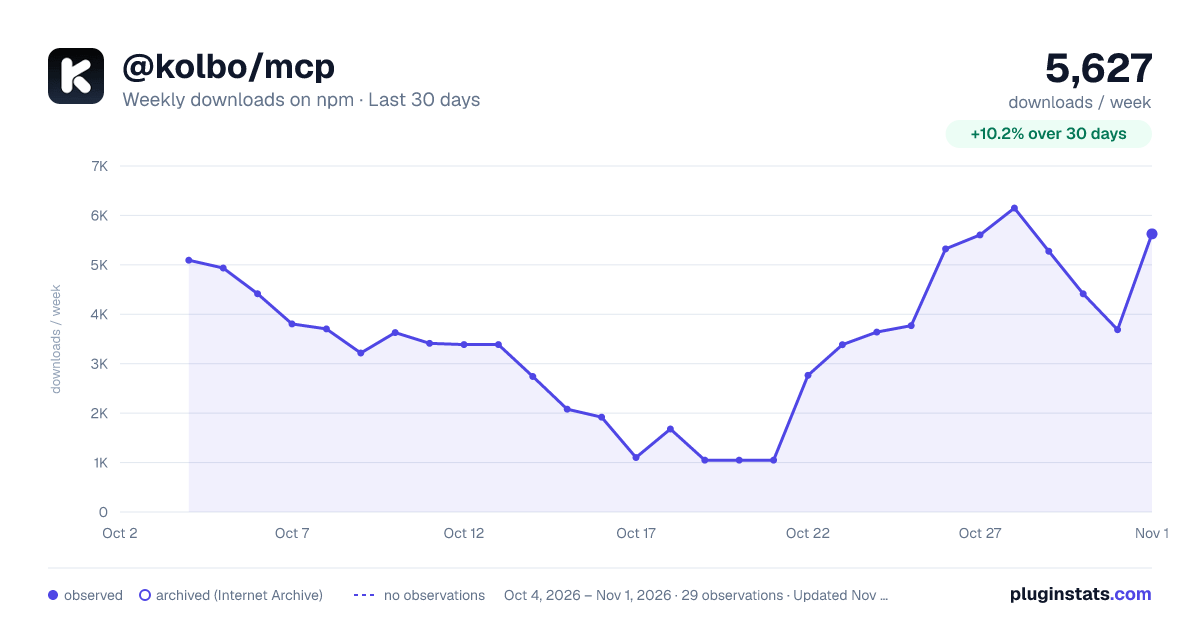
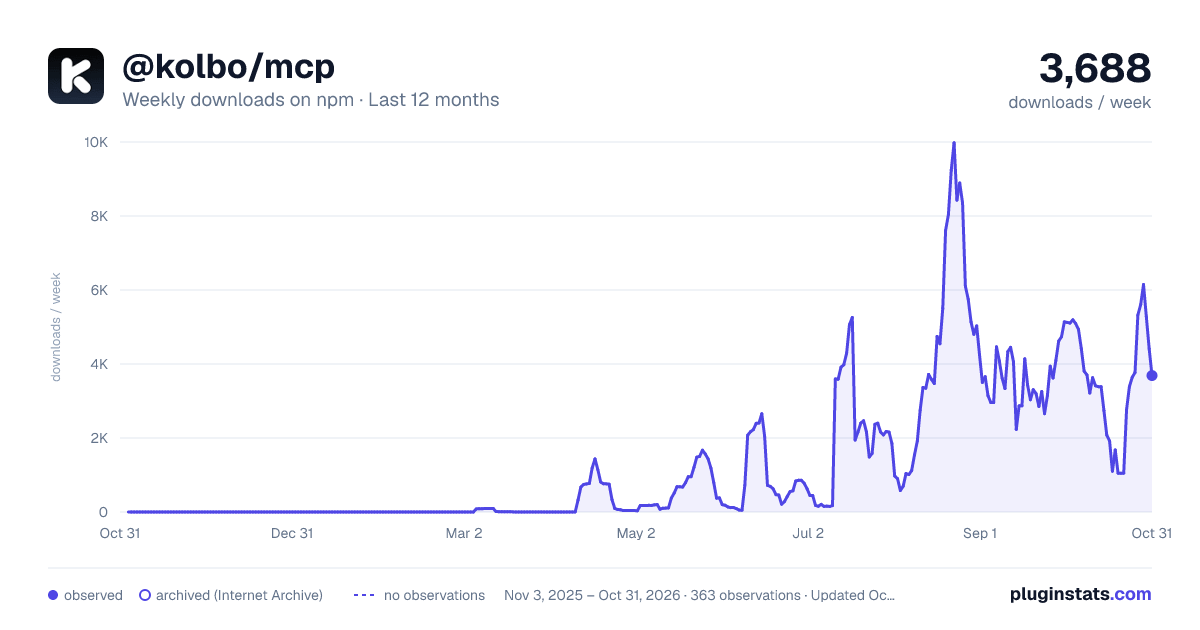
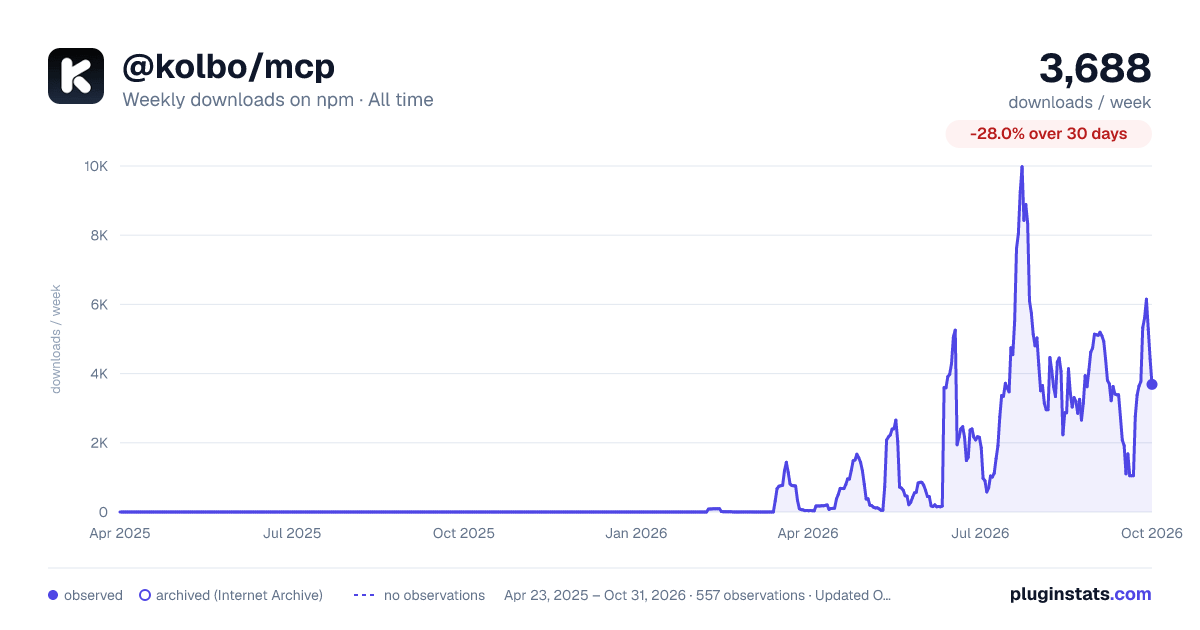

Adoption over time


7/30/90-day growth


Filled points are observed values; hollow points come from Internet Archive snapshots of the listing page. Dashed segments span periods with no observations — values between points are not interpolated.
Recent observations
Full history (543)Similar npm Claude Code plugins
Data source
Weekly downloads (trailing 7 complete days) come from the official npm downloads API. Downloads include CI and mirrors and are not equivalent to installs or users. npm publishes no ratings.
Listing: https://www.npmjs.com/package/@kolbo/mcp. First seen Oct 16, 2026; last successful collection Oct 18, 2026. See the methodology.